Nomad Sculpt
- 659.00
- 3.6
- Installs
- 1.00M
- Price
- Free

Screenshots
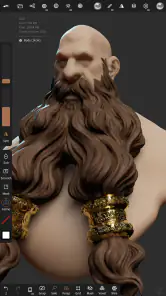
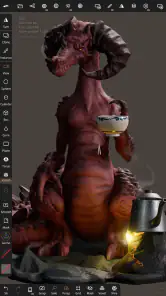
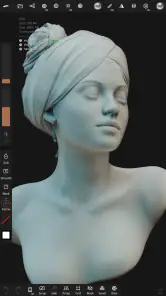
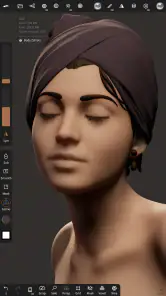
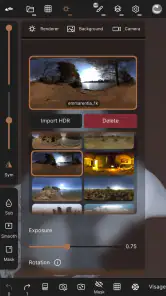
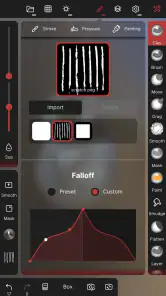
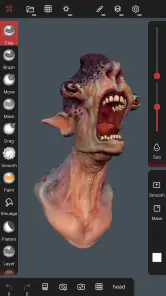
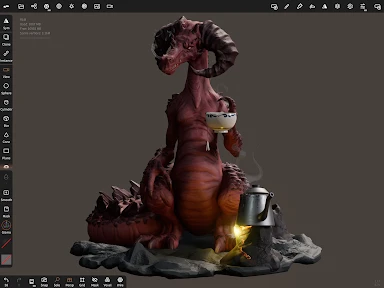
Analysis by Reviewed
I like mobile art tools best when they help me act on an idea before it fades, and 3D sculpting is a particularly satisfying fit for that. Nomad Sculpt gives me a way to shape a form directly on a phone or tablet, without first setting up a desktop workspace. It is not a substitute for every stage of a larger 3D project, but it can make the first, exploratory steps feel much more immediate.
Speed expectations before a project grows
My speed expectations are modest in a useful way: simple forms and early experimentation are a sensible starting point, while increasingly detailed models ask more of both the device and the person using it. I would begin with a rough shape, rotate it, and see how comfortably the controls respond before investing time in fine detail. That quick check helps me decide whether to keep working on this device or move the project to a larger screen.
The free price lowers the barrier to trying this kind of workflow. In-app purchases are listed at $19.99 per item, so I would look at the purchase choices in the app and decide whether they match my needs rather than assuming I need to pay before I can explore. For someone unsure whether sculpting on a touchscreen will feel natural, a short trial with a small model is more informative than planning a large project in advance.
Where mobile sculpting earns its place
A practical use is making a quick concept model while waiting between appointments: block out a character or prop, turn it around to check its silhouette, and jot down what needs changing before the next session. That is different from using a phone as a complete production studio. I find the mobile format most valuable when it removes setup friction and lets me test an idea in three dimensions at the moment I think of it.
There is also a useful learning angle. Beginners can practice seeing how a form changes when viewed from different directions, rather than relying only on a flat drawing. More experienced artists may use a quick sculpt as a visual reference or a way to explore proportions. If the goal is primarily line drawing, lettering, or painting on a flat canvas, a dedicated two-dimensional art app is likely a more direct fit.
Unleashing Your Inner Sculptor
Imagine having a chunk of clay right in your pocket, ready for you to mold and shape at any moment. That's what Nomad Sculpt brings to the table. This app transforms your smartphone or tablet into a virtual sculpting studio, offering a plethora of tools and features that cater to both beginners and seasoned artists.
Features That Inspire Creativity
As soon as you open the app, you're greeted by an intuitive and user-friendly interface that makes navigation a breeze. The app boasts a wide array of brushes and tools that mimic real-life sculpting instruments, allowing for precise detailing and finishing. Whether you're looking to carve out intricate patterns or smooth surfaces, Nomad Sculpt has got you covered.
More From Our News Desk

Weather by Xiaomi Review: Clear at a Glance, Less Clear Up Close

X Under Pressure: Can It Recover When Posting Goes Wrong?

Clash of Clans Is Won Between the Battles

Android Auto Makes the Case for Quieter Car Software

MobiOffice: Transforming Mobile Productivity with Seamless Integration

EA SPORTS FC™ Mobile Soccer: Redefining Mobile Sports Gaming
One of the standout features is the app's ability to handle high-resolution models without breaking a sweat. This means you can go wild with your creativity without worrying about lag or crashes. Plus, the multi-touch support lets you zoom, pan, and rotate your model effortlessly, making the sculpting process feel as natural as working with physical materials.
Keeping a Mobile Project Manageable
For more control over a model, I would work from broad forms toward smaller details rather than adding fine marks everywhere at once. It is an especially useful habit on a touchscreen: zooming out regularly helps me judge whether a shape reads clearly, while rotating the model prevents a promising front view from hiding awkward proportions elsewhere. I would also save deliberate checkpoints before major changes, so an experiment does not become a reason to abandon a version I liked.
Speed depends on the device and on how demanding the model becomes, so I would not assume every phone will feel equally responsive with heavy work. A simple blockout is a sensible place to begin; if interaction starts to feel less immediate as detail grows, I would pause, simplify the project, or continue on a device with more room to work. That is a more useful expectation than treating the app as limitless just because it runs on a mobile screen.
Heavy work and thoughtful checkpoints
For a longer session, I would separate the job into clear passes: establish the main silhouette, check the model from several sides, and only then spend time on smaller surface decisions. This keeps me from polishing a detail that later has to move because the underlying proportions were off. It also gives me natural points to pause and assess how the device is handling the project.
A checkpoint is especially useful before a risky change, not just at the end of a session. If I am testing a new direction, preserving a version I already like gives me room to experiment without treating every edit as irreversible. I would also zoom out often; on a close view, small marks can look convincing even when they do not improve the overall read of the object.
Perfect for All Skill Levels
Whether you're an aspiring artist or a professional sculptor, Nomad Sculpt caters to all skill levels. For beginners, there are plenty of tutorials and guides to help you get started, while advanced users can dive straight into the app's more sophisticated features. The ability to export your creations in various formats is a bonus, allowing you to showcase your work or continue refining it in other software.
That export option is also a reason I would think about the end use early. If the goal is a concept image or a personal study, the mobile workflow may be enough on its own; if the model needs further work elsewhere, I would test the handoff with a small project before building a large one around it. People who mainly want quick two-dimensional sketches may be happier with a drawing app, while those who need a broad desktop production setup should compare it with full computer-based 3D software instead.
Device Fit and Reliability
Nomad Sculpt is an Art & Design app from Hexanomad, with an Everyone age rating and support for devices running Android 8.0 or later. Its current version is 2.5, and it has been available since August 3, 2020. It has reached over one million installs and holds an average rating of 3.6 from around 7,900 ratings, with about 659 written reviews. I read those figures as a sign that many people have tried it, but ratings alone cannot tell me whether it will feel right on a particular device.
For reliability, I would judge it through the kind of work I actually plan to do: start with a modest model, spend time rotating and editing it, and see whether the app remains comfortable on my device before relying on it for a long session. I would avoid doing intricate work when I am rushed, and keep a habit of saving progress rather than assuming any creative app can never close unexpectedly. Those are sensible precautions for mobile 3D work, especially as a project grows more complex.
Touchscreen comfort and device limits
Screen size changes the feel of sculpting. A tablet gives my hands more room to work around the model, while a phone is convenient for a quick edit but can make precise gestures feel crowded. Neither is automatically the right choice: I would try a short session on the device I already own and notice whether I can comfortably rotate, zoom, and make controlled adjustments before choosing it for sustained work.
Support for Android 8.0 or later gives a clear starting point for checking compatibility, but it does not guarantee identical performance across devices. If a phone feels cramped or becomes less comfortable as a project develops, that is a practical reason to switch to a tablet or desktop tool, not a sign that every sculpting task must be forced onto mobile. I would choose the tool around the project rather than the other way around.
The Joy of Creating on the Go
What I personally love about this app is the freedom it offers. You no longer need to be confined to a studio or workspace; you can create wherever inspiration strikes. Whether you're commuting, lounging at a café, or simply relaxing at home, Nomad Sculpt lets you bring your artistic visions to life with ease.
The app's developers have clearly put a lot of thought into making the sculpting experience as seamless and enjoyable as possible. The regular updates and community engagement show their commitment to continuous improvement, which is always a plus in my book.
Choosing it over familiar alternatives
Compared with drawing apps, the central difference is that I am shaping volume rather than building an image from strokes on a flat surface. That makes this a better match for exploring an object’s proportions or seeing a character from multiple angles. A drawing app remains the simpler choice for a quick illustration, while desktop 3D software is a stronger fit when a project depends on a broad computer-based workflow.
I would also be cautious about treating portability as a promise of effortless precision. Touch interaction can be convenient, but it asks me to manage zoom and viewpoint deliberately. My most useful habit is to alternate close inspection with a distant view and a full rotation; it catches lopsided forms before I spend time refining them. That small discipline makes mobile sculpting feel more intentional.
Who I Would Recommend It To
I would recommend it to curious beginners who want to understand form by manipulating a model directly, and to experienced artists who value having a portable place to explore ideas. It is also a useful option for anyone who wants to practice shaping objects without setting up physical materials. I would skip it if I were looking for a simple sketch pad, if touchscreen sculpting sounds uncomfortable, or if my work depended on a particular desktop-only workflow.
Compared with typical drawing apps, this is for thinking in volume rather than laying down marks on a flat canvas. Compared with desktop 3D tools, its strength is being available on a mobile device, not replacing every specialist workflow. The trade-off is clear: a phone or tablet makes it easy to start, but screen space and device capability can shape how long and how intricately I want to work.
My final take on a portable sculpting studio
In conclusion, Nomad Sculpt is more than just an app; it's a gateway to endless possibilities. Whether you're sculpting for fun or honing your craft, this app provides the tools you need to create stunning digital sculptures. So go ahead, download it, and let your imagination run wild!
My more practical recommendation is to begin with one small, low-pressure project: a simple prop, an abstract form, or a rough character blockout. That lets me learn whether the controls suit my hands, whether my device feels comfortable over a longer session, and whether the mobile workflow matches the work I want to do. At a 3.6 average from around 7,900 ratings, it has drawn a substantial audience, but I would still treat my own trial as the deciding test. It is free to start, rated for Everyone, and offers a focused way to explore 3D form; just keep the limits of a touchscreen and your device in mind when deciding how far to take a project.
Nomad Sculpt Frequently Asked Questions
Can I try Nomad Sculpt before paying for it?
Nomad Sculpt is free to download, so you can install it and explore the app before deciding whether to make an in-app purchase. The app is in the Art & Design category, and its central promise is to let you sculpt, paint, and create in 3D. Check the purchase details shown in your app store before buying, as paid items are offered within the app.
Is Nomad Sculpt suitable for beginners, or is it mainly for experienced 3D artists?
Nomad Sculpt can work for both beginners and experienced artists, though its many sculpting tools may take some exploration if you are new to 3D creation. The mobile interface is built around hands-on modeling, painting, and rendering, giving new users room to experiment while offering more experienced creators a broader set of options for developing their models.
What is Nomad Sculpt and what can it be used for?
Nomad Sculpt is a digital sculpting and 3D modeling application designed for mobile devices. It's ideal for artists and designers who want to create complex 3D models on the go. With a user-friendly interface, it offers a wide range of tools for sculpting, painting, and rendering, making it suitable for both beginners and professionals in 3D art creation.
Is Nomad Sculpt available on both Android and iOS platforms?
Yes, Nomad Sculpt is available for download on both Android and iOS platforms. This allows users with different mobile devices to access and use the app seamlessly. You can find it on the Google Play Store for Android devices and the Apple App Store for iOS devices, ensuring broad accessibility for all users.
What are the main features of Nomad Sculpt that make it stand out?
Nomad Sculpt boasts several impressive features that set it apart from other mobile 3D modeling apps. It includes dynamic topology, voxel remeshing, and support for various brush types. Users can also enjoy real-time rendering with PBR (Physically Based Rendering) materials, multiple layers for complex models, and a customizable interface, providing a comprehensive sculpting experience.
Pros
- Intuitive user interface design.
- Supports multi-resolution sculpting.
- Exports in various file formats.
- Responsive customer support.
- Regular updates and bug fixes.
Cons
- Limited free version features.
- Requires a powerful device.
- Occasional lag with large files.
- No direct 3D printing option.
- Learning curve for beginners.
- Category
- Art & Design
- Version
- 2.5











