NOAA Weather & Tides
- 4.68K
- 4.4
- Installs
- 1.00M
- Price
- Free

Screenshots
Analysis by Reviewed
I tend to check the weather at the moments when a small change can alter the whole plan: before a walk, on the way to the coast, or while deciding whether to leave early. NOAA Weather & Tides is built around detailed forecasts and marine information, so it suits people who want more than a quick sun-or-cloud icon. I find it most useful when I have a specific place and time in mind, rather than when I just want a broad glance at the day.
When a forecast depends on a live connection
Weather maps and forecasts are only useful when their information is current, and this app’s radar, alerts, and forecast views make connectivity part of the experience. If I’m checking conditions before heading out, I try to load the relevant view while I still have a dependable connection. That gives me a chance to inspect the map and make a decision before I’m on the move, rather than assuming every screen will refresh smoothly later.
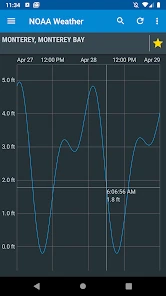
This matters especially for coastal plans. A tide chart can help me choose when to arrive, but it does not replace checking local conditions close to departure. I treat the chart as one planning input and the latest forecast as another; for boating or other safety-sensitive activities, I would also consult appropriate official guidance. The app is a helpful tool, not a reason to ignore changing conditions.
A practical routine for trips and daily plans
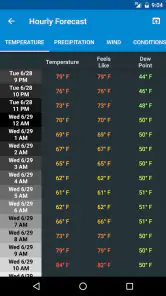
For an ordinary day, I’d use the forecast to decide when to walk, commute, or take a break outdoors. For a beach visit, I’d check the forecast and tide information together before settling on a time. A useful habit is to look at the hourly view rather than relying only on the day’s headline conditions: a pleasant afternoon does not tell me whether rain or a shift in wind could affect the hours I actually plan to be outside.
The same approach helps when plans involve more than one location. I would check the destination as well as home, then compare the timing of the conditions before leaving. That extra step is more useful than repeatedly refreshing a single general forecast, especially when a coastal stop or outdoor activity is the main reason for the trip.
Choosing it over a quick-glance alternative
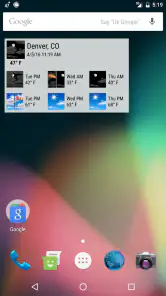
NOAA Weather & Tides is a weather app from Pandamonium Software, and its focus is more practical than decorative. A typical phone weather widget is quicker for a glance at the current temperature, while this app is a better fit when I want radar, alerts, or tide details in the same place. If I rarely visit the coast and only need a simple daily summary, the extra information may feel like more than I need.
It is free, rated for Everyone, and has an average rating of 4.4 from around 13,000 ratings. There are over a million installs, and optional in-app purchases are listed at $3.99 per item. I’d start with the free experience and decide whether any paid option is worthwhile only after I know which parts I actually use. Its long-standing presence in the weather category may appeal to people who want an established tool, though a focused interface still takes a little time to learn.
More From Our News Desk

Clash of Clans Is Won Between the Battles

Android Auto Makes the Case for Quieter Car Software

MobiOffice: Transforming Mobile Productivity with Seamless Integration

EA SPORTS FC™ Mobile Soccer: Redefining Mobile Sports Gaming

How Microsoft OneDrive Became a Mobile Productivity Giant

How Google Translate Breaks Language Barriers Effortlessly
First Impressions and Interface
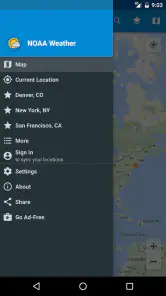
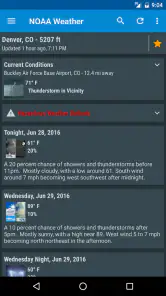
Upon installing the app, the first thing that struck me was its straightforward interface. NOAA Weather & Tides doesn’t bombard you with unnecessary frills; it’s all about functionality. The home screen provides a comprehensive overview of current weather conditions, including temperature, wind speed, and humidity. What I found particularly useful was the easy navigation between different sections like forecasts and tide data.
Features that Stand Out
The app’s real-time weather updates are remarkably accurate, which is a huge plus in my book. It pulls data directly from the National Oceanic and Atmospheric Administration (NOAA), ensuring that the information you get is both reliable and up-to-date. I also appreciated the detailed hourly forecasts, which help in planning day-to-day activities without any hitches.
For those living near the coast or planning a beach getaway, the tide information is a game-changer. It provides not only the timing of high and low tides but also details on tide height, which is incredibly useful for fishing enthusiasts like myself. It’s like having a personal marine biologist in your pocket!
User Experience and Customization
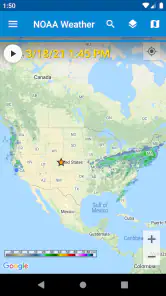
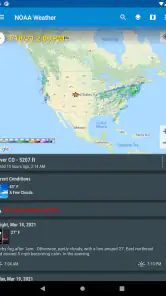
Another feature that I found handy is the customization options. You can set alerts for severe weather conditions, ensuring you’re never caught off guard. The app also allows you to choose between different map layers, including satellite and radar views, giving you a visual representation of weather patterns. It’s these little touches that make using the app a breeze.
While the app is generally user-friendly, I did notice that some of the more detailed settings might require a bit of a learning curve for first-time users. However, once you get the hang of it, the wealth of information at your fingertips is well worth the effort.
Using maps without losing focus
Radar is most valuable when I use it to answer a narrow question: is precipitation approaching my route, or is it likely to pass before I leave? I wouldn’t keep the map open simply because it looks informative. Check the area that matters, compare it with the forecast, and then put the phone away. That makes the app easier to use on a busy day and avoids mistaking a colorful map for a complete picture of local conditions.
There is a useful distinction between looking at radar and making a plan from it. A map can show a band of precipitation, but I still need to consider where I am going and when I expect to be there. For a walk, I might check once before leaving and again if the sky changes; for a drive, I would check before setting off rather than trying to interpret moving map details while travelling. The app is most helpful when it supports a decision I can act on safely.
Alerts and a realistic day outdoors
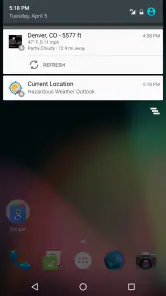
Alerts also work best as a backup rather than a substitute for checking ahead. I’d review the settings once, choose the warnings relevant to my plans, and avoid enabling every possible notification just because the option exists. Too many interruptions can make important alerts easier to miss. On a day when timing matters, I would still open the app before setting out instead of relying on a notification to arrive at exactly the right moment.
Imagine I have a free afternoon and want to take a coastal walk, but I also need to pick someone up later. I would check the destination’s hourly forecast and tide timing before leaving, then use radar to see whether rain is moving toward the route. If the connection is dependable, that combination gives me a more useful basis for choosing when to go than a single daily icon. I would still leave room to change the plan: a forecast is guidance, not a promise about what the weather will do at one particular stretch of coast.
Connectivity, recovery, and data-conscious habits
If a map or forecast seems slow to load, I’d first check whether the connection is the problem before changing several settings at once. Moving to a better-signal spot or trying again later is a more sensible first step than repeatedly refreshing every screen. For a planned outing, checking the destination while connected at home or work is a simple safeguard; I would not assume that the app will provide the same experience without a network connection.
If a screen still does not respond as expected, I would narrow down what I need instead of tapping through every section. A basic forecast check may be enough for a short errand, while a coastal plan is a good reason to wait for the tide and map views to load properly before committing. This is not a perfect fix for a weak signal, but it helps avoid making a decision from a partial or stale-looking view. When conditions are important to safety, I would seek another reliable source rather than treating a failed refresh as reassurance.
To keep mobile use purposeful, I’d avoid leaving radar running while travelling and open it only when I need to make a decision. That is a practical way to limit unnecessary screen time and data use without sacrificing the app’s main strengths. If you need continuous access to current conditions in places where your connection is unreliable, consider arranging another trusted source of updates before you go.
For a data-conscious routine, I would use the app in deliberate checks: choose the location, inspect the forecast or radar, then close the view when I have answered the question. That is more sensible than repeatedly reopening maps out of habit. It also makes the difference between a quick glance and a trip-planning session clear. A person who depends on frequent live updates should think about signal and data availability before setting out, especially if the route passes through areas where a phone connection may be inconsistent.
Who will find it useful—and who may not
I’d recommend this app to people who regularly plan around changing weather, especially anyone who uses tide timing alongside forecasts. It can also suit hikers and outdoor workers who want radar and alerts available for checking before a route or shift. On the other hand, if you mainly want a tiny widget, a quick temperature check, or a polished minimalist display, your phone’s built-in weather option may be faster and less involved.
It also makes sense for someone who fishes or visits the shore often enough to care about tide timing, even if they do not need a marine-focused tool every day. The trade-off is that the extra views take attention: a person who wants one number and a simple rain icon may find the more detailed layout unnecessarily busy. A general-purpose weather app can be the better everyday choice if its glanceable forecast is all you use, while this one earns its place when the radar, alerts, and tide information answer real questions.
Final Thoughts
In wrapping up my review, I have to say that the app has quickly become a staple on my phone. Its accuracy, ease of use, and comprehensive features make it a standout among weather apps. Whether you're a sailor, a hiker, or just someone who likes to stay informed about the weather, this app is definitely worth checking out. Just remember, while the app provides excellent information, it’s always good to cross-check weather updates from multiple sources for the most accurate picture.
NOAA Weather & Tides was released on March 21, 2012, and its established focus is clear: useful weather information with coastal details rather than a purely visual daily summary. My verdict is positive when I have a real planning question to answer, but more reserved for casual glances. I’d use it with a connection-aware routine, check important conditions again before travelling, and treat its detailed tools as decision support—not as a guarantee that the weather will behave as expected.
NOAA Weather & Tides Frequently Asked Questions
What is NOAA Weather & Tides, and what is its main purpose?
NOAA Weather & Tides is a weather app from Pandamonium Software for people who want forecasts, radar, alerts, and tide charts in one place. Its emphasis is practical information for checking conditions and planning around the weather or tides. If those are the tools you are looking for, its focused approach may suit your everyday routine.
Does NOAA Weather & Tides include tide information for coastal planning?
Yes, tide charts are part of the app’s central offering alongside forecasts, radar, and alerts. That makes it relevant to people who want to check tide information as part of planning an outing or keeping track of changing conditions near the coast. As with any forecast tool, use the information thoughtfully when making plans that depend on local conditions.
What devices and permissions should I consider before downloading NOAA Weather & Tides?
NOAA Weather & Tides is a weather app from Pandamonium Software, and its features are intended for checking forecasts, radar, alerts, and tide information. Before installing, consider whether you want weather notifications and location-based information, since those functions may involve device permissions. You can review the permission prompts on your device and decide which access you are comfortable allowing.
Who is NOAA Weather & Tides designed for, and is it suitable for younger users?
The app is categorized as a weather app and is rated for Everyone, making it suitable for a broad audience interested in forecasts and tide information. It may be useful to people planning everyday activities as well as those who need to keep an eye on changing conditions. Its focus is practical weather information rather than entertainment or social features.
What features does NOAA Weather & Tides offer?
NOAA Weather & Tides provides users with real-time weather data including temperature, wind speed, and precipitation forecasts. It also offers tide predictions, sun and moon phases, and detailed radar maps. The app is designed for both casual users and professionals needing precise weather information. Additionally, it includes customizable alerts and notifications for severe weather conditions.
Pros
- Accurate weather forecasts
- Tide predictions included
- User-friendly interface
- Customizable alerts
- Works offline
Cons
- Ads can be intrusive
- Limited free features
- Requires internet for updates
- No radar maps
- Basic design

- Category
- Weather
- Version
- Varies with device