

Nice G.O.
- 284.00
- 4.6
- Installs
- 10.00K
- Price
- Free

Screenshots
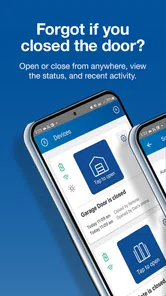
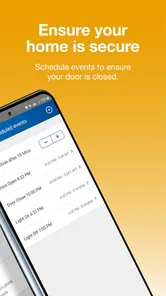
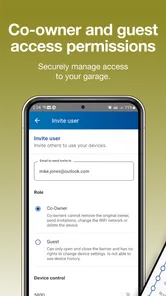
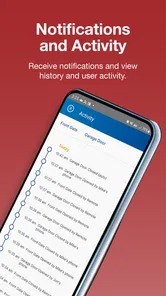
Analysis by Reviewed
If you want to open and manage a compatible garage door from your phone, Nice G.O. is the kind of app worth judging by your daily routine rather than by a long feature checklist. I used it with that practical question in mind: does it make arriving home, leaving for work, and handling access easier enough to justify adding another app to my phone? My answer is generally yes, especially for people who already use compatible Nice equipment and want a straightforward mobile control point.
This is a free House & Home app from Nice North America LLC, focused on mobile access and control of garage doors. It is available for everyone, and the current release is version 1.1.11 for devices running operating system 10 or later. The app has reached over ten thousand installs, with an average rating of 4.6 from around 1.8 thousand ratings, so there is a useful amount of public feedback behind it without making the product feel like an established smart-home platform with endless integrations.
What I would consider before choosing Nice G.O.
The first decision is compatibility. Nice G.O. is not a universal replacement for every garage-door remote, and installing it does not automatically turn an ordinary opener into a connected one. The important question is whether your existing Nice setup can work with the app. I would check the opener and any connected hardware before spending time configuring an account. If your equipment is from another manufacturer, or if you only want a basic physical remote, this app may not be the most sensible route.
The second question is how often phone control would genuinely help. I found the strongest argument for it in small moments that are easy to overlook: opening the garage while carrying groceries, checking the door before going to bed, or letting a family member in without walking to the wall control. Those situations are more convincing than the idea of controlling a garage door from a phone simply because it sounds modern.
There is also a trust decision. A garage door is different from a lamp. A tap can change access to part of your home, so I would not treat the app as a novelty. Before relying on it, I would make sure the right household members have access, keep the phone protected, and continue using the ordinary wall control or remote as a fallback. The convenience is real, but it works best when it complements sensible home-access habits.
My third criterion is whether the app reduces friction instead of adding it. A mobile controller is useful when I can reach it quickly and understand what is happening. It is less useful if I have to remember a complicated sequence every time I drive into the garage. That is why I would test the complete routine while parked safely: open the app, identify the correct door, send the command, and confirm the result before depending on it during a rushed morning.
The everyday moments where it feels most useful
One realistic example is coming home with a car full of shopping and realizing the remote is buried in a bag. With Nice G.O. already set up, the phone becomes the control surface I am most likely to have in my hand. I can deal with the door before getting out of the car, rather than balancing bags while searching for a small remote. That is a modest improvement, but repeated several times a week, it is exactly the kind of convenience a home app should provide.
More From Our News Desk

 Gmail
GmailGmail in a Busy Inbox: Who Benefits Most?
From first account to crowded workday, Gmail earns its place through dependable search and flexible sorting—but its best fit depends on how much inbox maintenance you can tolerate.

 Prime Video
Switching to Prime Video: What Changes in Your Viewing Routine
Prime Video can make a compelling second home for streaming, but switching means learning a different catalog, rental layer, and route from browsing to playback.

 Universal TV Remote Control
Universal TV Remote Control Works Best as a Reliable Backup
A phone remote earns its place through quick setup and reliable habits. Here is how to get more from Universal TV Remote Control—and where its limits show.

 Weather - By Xiaomi
Weather by Xiaomi Review: Clear at a Glance, Less Clear Up Close
Xiaomi’s weather app makes everyday forecasts quick to scan, but its calm surface can leave useful details and recovery paths harder to find than they should be.

 X
XX Under Pressure: Can It Recover When Posting Goes Wrong?
A resilience-focused review of X, examining setup, mistaken posts, interruptions, weak connections, and the gaps that matter when recovery needs to be dependable.

 Clash of Clans
Clash of Clans Is Won Between the Battles
Its raids are quick; its community is a long-term project of coordination, teaching, rivalry, and shared responsibility—with all the friction that entails.
Latest News



Another good use is handling a planned arrival. If a family member needs access while I am upstairs, I can use the phone instead of interrupting what I am doing to walk to the garage. The same principle applies when a delivery or service visit requires access, although I would only do this when I am comfortable with the timing and the person involved. The app can make the action easier; it does not remove the need to think about who is being given access.
Night-time checking is a different kind of benefit. Many people have experienced the moment of wondering whether the garage door was left open after getting into bed. A phone-based control app can be more convenient than going downstairs to find out. I would still verify the door physically when the situation matters, but for ordinary household uncertainty, remote control is more comfortable than a second trip through the house.
A less obvious advantage is that the app can help make a phone the shared tool people already carry, rather than requiring everyone to remember where a dedicated remote is. That can be useful in households where remotes move between cars or disappear into drawers. The trade-off is that every person who needs access must be comfortable using the app and have a suitable device, so it does not automatically simplify life for less tech-oriented family members.
Where Nice G.O. has the strongest case
The clearest strength is focus. Nice G.O. is built around garage-door access rather than trying to become a dashboard for every connected object in the house. I appreciate that narrower purpose because it keeps the decision simple: if your main goal is mobile garage control and your hardware belongs in the Nice ecosystem, the app has a clear reason to exist.
Its free price also lowers the barrier to trying it. You are not making a subscription decision just to find out whether phone control fits your routine. That matters for a feature that may be used only a few times a day but can still be valuable at exactly the right moment. I would still separate the app’s free availability from any hardware or installation costs associated with making a garage system compatible; the app itself does not make every setup connected.
The rating of 4.6 suggests that many users find the basic experience satisfactory, and the review count of around 283 gives prospective users more than a handful of opinions to scan. I would read those comments for recurring setup or connection complaints rather than treating the average as a guarantee. Garage environments can vary, and a smooth experience depends on the equipment and phone involved as much as on the app interface.
For me, the biggest practical win is reducing dependence on a particular remote. A remote is excellent when it is in the car and working, but it is easy to forget, misplace, or leave in another vehicle. A phone is usually closer at hand. That does not make it a better replacement in every situation, though. A physical remote can be faster for someone who dislikes apps, and it remains valuable if the phone battery is low or the user is not comfortable managing mobile access.
When another approach may fit better
I would not recommend choosing Nice G.O. solely because you want a broad smart-home system. If your priority is a single app that brings together lighting, cameras, thermostats, locks, and garage access, a wider platform may be a better organizational fit. That does not make this app poor at its job; it simply means a focused garage controller may feel like one more destination in a home already divided among several apps.
I would also hesitate if you rarely use a smartphone around the garage. Someone who always enters through the same door, keeps a remote in the car, and has no need to grant temporary access may gain very little. In that case, the traditional remote and wall button are simpler because they require no app navigation and do not change an established habit.
Households with unreliable phone access should think carefully too. If a phone is often shared, left uncharged, or locked away, mobile control can become less dependable than a dedicated remote. I would not remove the physical alternatives after installing Nice G.O. The best setup is one where the app adds convenience without becoming the only way to operate an essential part of the home.
There is a similar trade-off for people who want extensive automation. Nice G.O. makes sense as a direct control tool, but I would not assume that it will replace a specialized automation system or provide every advanced routine a smart-home enthusiast might want. If your goal is elaborate scenes, broad device coordination, or a single automation hub, compare those requirements separately before committing to a garage-focused app.
What switching actually involves
The cost of switching is not mainly financial because the app is free. The real cost is setup time, household adjustment, and the need to establish a reliable fallback. I would begin with one primary phone, confirm that the garage responds consistently, and only then introduce the app to other household members. That staged approach makes it easier to identify whether a problem comes from the account, the phone, the connection, or the garage hardware.
I would also choose a clear routine for using it. For example, after sending an open command, I would wait until the door has visibly completed its movement before driving through. When closing remotely, I would first make sure nobody, no pet, and no object is in the doorway. The app can make the command available from farther away, but distance also makes it easier to lose visual awareness of what is happening.
Another useful habit is keeping the app easy to find without making access careless. A home-screen shortcut can reduce the number of taps during a busy arrival, while a protected phone prevents the convenience from becoming an open invitation to anyone holding it. I would avoid handing over my personal login simply to make access easier; it is better to decide deliberately who should be able to control the door.
Before replacing a remote, I would test the app during the exact conditions in which I expect to use it. Try it from the driveway, from inside the house, and during a normal morning rush. If the experience feels slow or confusing in those moments, the app may still be useful as a backup, but it should not be treated as the primary control method. This is one of the most important trade-offs: convenience is valuable only when it is predictable.
The operating-system requirement is another practical point. Nice G.O. needs system version 10 or later, so owners of older phones should check that before planning a household rollout. For most current devices, this will not be a major obstacle, but it can matter if an older spare phone is intended to stay in the kitchen or be shared by the family.
How it compares with the usual garage-door choices
The traditional remote wins on immediacy. Pressing a button is familiar, and it does not require opening an app or navigating a phone. It is also easy to hand to another driver. Nice G.O. wins when the phone is already in use, when the remote is unavailable, or when remote access is more useful than a short-range button. I see the app as a strong companion to a remote rather than an automatic reason to discard one.
A wall-mounted control wins for people who are already inside the home and near the garage. It is simple and visible, especially for family members who do not want to manage mobile software. Nice G.O. becomes more attractive when the person controlling the door is elsewhere in the house, arriving from outside, or dealing with an access request without walking to the garage.
A broader smart-home platform may win for users who already organize their devices in one ecosystem. The benefit there is consistency across several kinds of equipment. The downside can be extra complexity and a less focused experience. Nice G.O. is easier to justify when garage control is the specific problem, while a broader platform deserves attention when the garage is only one part of a larger automation plan.
Finally, a manufacturer-focused app can be preferable to a generic solution when it matches the garage equipment directly. The trade-off is flexibility: a focused app may not be the best answer for mixed-brand homes. I would choose based on the equipment already installed, the number of people who need access, and whether direct control or whole-home coordination matters more.
My recommendation after weighing the trade-offs
I recommend Nice G.O. to owners of compatible Nice garage equipment who want free mobile access and can keep a physical control method available. It is particularly appealing for busy households, people who regularly misplace remotes, and anyone who wants to handle ordinary access moments without walking to the garage. The app’s focused purpose is a benefit when you want garage control, not a complete smart-home command center.
I would skip it if your equipment is not compatible, if you never use phone-based controls, or if adding another app would create more confusion than convenience. I would also choose a wider platform instead when your main goal is managing many types of connected devices together. Those are not failures of Nice G.O.; they are clear signs that the product’s narrower role does not match the job you want done.
For a cautious first test, install it on the phone used most often around the garage, confirm the setup works reliably, and keep the existing remote in service for a while. Pay attention to the moments that matter in your own routine rather than trying to force daily use. If the app saves you from repeated trips, misplaced remotes, or awkward access handoffs, it earns its place quickly. If it does not, the conventional controls may remain the better choice.
My final view is that Nice G.O. is a sensible, focused option rather than a universal smart-home solution. Its value comes from making garage access available where people already spend much of their time: on their phones. I like it most as an added layer of convenience with careful access habits and a backup control nearby. For the right Nice setup, that is enough to make this free House & Home app genuinely useful.
Nice G.O. Frequently Asked Questions
Can Nice G.O. control a garage door remotely?
Nice G.O. is designed for mobile access and control of garage doors, so it can bring those functions to your phone. Before relying on it as your main way to operate a door, make sure the app is set up for your needs and that your phone has a working connection. The practical experience also depends on the compatible garage-door setup and the app’s available controls.
Which phones can I install Nice G.O. on?
Nice G.O. is available for Android and iOS devices, making it an option for people using either major mobile platform. On Android, the device needs to meet the app’s minimum operating-system requirement; the current version is 1.1.11. Check the app’s listing in your platform’s official store before installing, and keep your phone’s software updated for the best chance of a smooth experience.
Who develops Nice G.O., and how popular is it?
Nice G.O. is developed by Nice North America LLC and is listed in the House & Home category. It has an average rating of 4.6 from around 1.8 thousand ratings, with 283 written reviews and over 10 thousand installs. Those figures offer a quick sense of its reception, but reading recent user feedback can help you decide whether its garage-door features suit your expectations.
What is Nice G.O. and what can I do with it?
Nice G.O. is a mobile application designed to bring its services and features to your smartphone in a convenient format. It focuses on mobile access to and control of garage doors, letting users use their phone for those functions. The exact experience may vary depending on your location, account status, and the version installed.
Is Nice G.O. free to download and use?
Nice G.O. is free to download, so there is no upfront installation fee. However, that does not necessarily mean every feature or service connected with using the app is completely free. Before confirming any transaction related to the app or its services, review the displayed prices, terms, and possible recurring costs carefully.
Pros
- Simple interface makes navigation quick for new players.
- Short sessions work well for casual play during spare moments.
- Bright visuals give the game a friendly
- approachable style.
- Progression provides a clear reason to keep playing regularly.
- Runs well on many modern Android and iOS devices.
Cons
- Limited variety may make the gameplay feel repetitive over time.
- Some features may require patience or in-app purchases to unlock.
- The small player base can affect matchmaking and online activity.
- Occasional ads may interrupt the flow between gameplay sessions.
- Advanced players may find the overall challenge too easy.







