

Nesiya Tova - נסיעה טובה
- 46.00
- 4.9
- Installs
- 10.00K
- Price
- Free

Screenshots
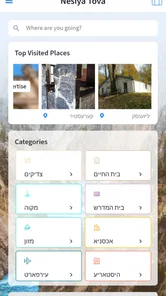
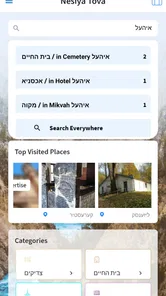
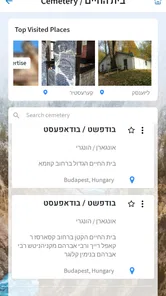
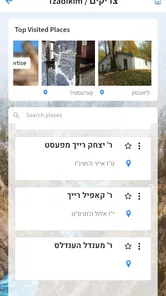
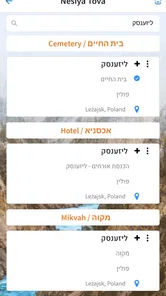
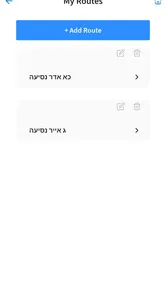
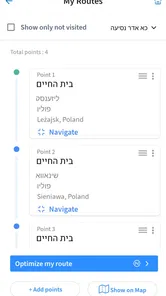
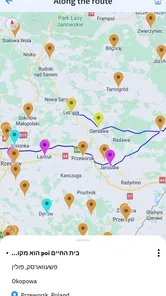
Analysis by Reviewed
Planning a visit to holy places can be surprisingly complicated. The route itself is only one part of the problem: timing, unfamiliar surroundings, changing plans, and the need to keep useful travel information close at hand can all make a simple trip feel disorganized. Nesiya Tova is a free Travel & Local app from Nesiya Tova LLC that is aimed at people preparing for this kind of journey, especially travel connected with מקומות הקדושים, or holy places.
I see its main value less as a replacement for a full navigation service and more as a focused travel companion. That distinction matters. If I only needed turn-by-turn directions, I would normally reach for a dedicated maps app. If I wanted a broad travel marketplace, I would choose a booking service. Nesiya Tova occupies a narrower space: it is designed around the practical needs of a religious journey, where the destination and the purpose of the visit are closely connected.
The app is available at no upfront cost and is rated for Everyone, which makes it approachable for families and mixed-age groups. It has passed the ten-thousand-install mark and holds a 4.9 average from 218 ratings, alongside 46 written reviews. Those figures suggest a small but highly positive user base rather than a mass-market travel platform. I would treat that as encouraging, while still remembering that a specialized app can feel useful mainly to the audience it was built to serve.
One focused capability: organizing travel around holy places
The most important capability here is the app’s focus on helping users travel to holy places and handle related needs in one dedicated environment. That focus changes the experience from a general search for attractions into a more purposeful form of preparation. Instead of beginning with a broad tourism question such as “what can I do nearby?”, the user begins with a destination that has spiritual importance and needs practical support around it.
In my view, this is the app’s clearest advantage. General travel tools are excellent at distance, traffic, landmarks, and commercial listings, but they do not necessarily understand why a particular place matters to the traveler. A specialized app can reduce the mental work involved in gathering relevant information from unrelated sources. Even when I still need another tool for maps or bookings, having a dedicated starting point makes the planning process feel more coherent.
That focus is also a limitation. Nesiya Tova is not the obvious choice for a weekend built around restaurants, museums, nightlife, or broad sightseeing. A standard travel planner will usually offer a wider range of destination categories, and a navigation app will normally be stronger for live routing. I would download this app because of its religious-travel orientation, not because I expect it to replace every other app on my phone.
The store presents it as an app for travel and the needs involved in reaching holy places, while the short description is simply “Nesiya Tova.” That concise positioning tells me to approach it as a practical companion rather than a large encyclopedic guide. The benefit is a clearer purpose; the trade-off is that users looking for extensive general tourism content may find the scope too specialized.
More From Our News Desk

 Weather - By Xiaomi
Weather by Xiaomi Review: Clear at a Glance, Less Clear Up Close
Xiaomi’s weather app makes everyday forecasts quick to scan, but its calm surface can leave useful details and recovery paths harder to find than they should be.

 X
XX Under Pressure: Can It Recover When Posting Goes Wrong?
A resilience-focused review of X, examining setup, mistaken posts, interruptions, weak connections, and the gaps that matter when recovery needs to be dependable.

 Clash of Clans
Clash of Clans Is Won Between the Battles
Its raids are quick; its community is a long-term project of coordination, teaching, rivalry, and shared responsibility—with all the friction that entails.

 Android Auto
Android Auto Makes the Case for Quieter Car Software
The car interface is no longer judged by how much it can do, but by how quietly it helps. Android Auto shows what drivers now expect—and what still gets in the way.

 MobiOffice: Word, Sheets, PDF
MobiOffice: Transforming Mobile Productivity with Seamless Integration
MobiOffice: Word, Sheets, PDF is redefining mobile productivity with a surprising blend of functionality and innovation.

 EA SPORTS FC Soccer Mobile 26
EA SPORTS FC™ Mobile Soccer: Redefining Mobile Sports Gaming
Dive into EA SPORTS FC™ Mobile Soccer, where immersive gameplay and strategic depth transform mobile sports gaming.
Latest News



Why a focused destination tool can be more useful than a general map
A map answers “where is this?” very well. It may not answer the questions that arise before and during a meaningful religious visit: what should I prepare first, which information should I keep together, and how can I avoid switching between unrelated services while coordinating with relatives? A focused app can help establish a single planning habit, even when the actual route is completed elsewhere.
That is particularly helpful when one person is organizing travel for several people. A family member may be comfortable with maps but less comfortable deciding what information is relevant to the visit. Another traveler may prefer not to search the web repeatedly in an unfamiliar language or location. A specialized interface can give the group a common reference point, which is often more valuable than having every person use a different general-purpose tool.
I would not assume that specialization automatically means completeness. The best way to use this app is to let it handle the holy-place travel context while keeping a normal map, communication method, and any booking confirmations available when needed. In other words, its strength is reducing scattered preparation, not eliminating the rest of the travel toolkit.
How the experience works in practice
When I use a focused travel app, I want the first few minutes to answer three practical questions: where should I begin, what information is connected to my destination, and what should I do when plans change? Nesiya Tova’s value depends on how quickly it helps me move from general intention to a usable plan. The app’s specialized purpose gives that process a sensible direction, but I would still approach the trip with a little preparation rather than relying on one screen at the last minute.
My preferred workflow would be to open the app before leaving, identify the holy place or travel need that matters most, and review the available information without rushing. I would then write down or save the details I expect to need when connectivity, battery life, or attention becomes limited. This is a simple habit, but it is one of the most useful ways to turn a travel app into something dependable: prepare while calm, then use it as a reference while moving.
For a group trip, I would also nominate one person to coordinate the app and another to keep the broader route plan. That avoids a common problem in family travel, where several people search for the same destination independently and end up with slightly different assumptions. A dedicated travel app works best when it becomes part of a shared routine rather than another source of disconnected information.
One practical tip is to separate spiritual planning from transport planning. I would use Nesiya Tova to organize the destination-specific side of the visit, then verify roads, walking directions, public transport, or driving conditions with a map service. This two-tool approach may sound less convenient than an all-in-one promise, but it is more realistic. Each app can do the job it is designed for instead of forcing one service to cover every travel question.
Another useful habit is to check the app before the day becomes busy. If I am already standing outside a station or trying to guide children through an unfamiliar area, I have less patience for exploring menus. Reviewing the destination earlier lets me notice what information is genuinely useful and what I still need from another source. It also gives me time to make a backup plan, which is especially important when the visit has fixed timing or involves older relatives.
A realistic day with the app
Imagine I am helping arrange a visit for relatives who are traveling together. One person knows the spiritual importance of the destination, another is responsible for transport, and I am trying to keep everyone informed. I would begin with Nesiya Tova to establish the destination-focused plan, then use a map service to check the actual journey. Before leaving, I would make sure the group knows the meeting point and who is carrying the essential information.
During the day, I would return to the app when I needed the context of the visit rather than simply the fastest route. If the group split up, I would communicate the plan directly instead of assuming the app could coordinate people for me. If a route changed, I would use live navigation to recalculate it and keep Nesiya Tova as the reference for the purpose and destination of the trip. This is where the app’s role becomes clear: it supports the journey without pretending to be the entire journey.
That workflow is also useful for a solo traveler. I can prepare the destination information in advance, keep transport details separate, and avoid repeatedly searching for the same religious site through broad travel results. The app is most helpful when it reduces uncertainty before I leave, not when I expect it to solve every unexpected event on the road.
What to expect from the current app
The current version is 5.6.2, and the app supports devices running Android 7.0 or later. That makes it accessible to people who are not using the newest phone, which is worth noting for families who keep an older device as a travel handset. I would still test it on the actual phone I plan to carry, because an app that works on paper can feel different depending on screen size, storage, battery condition, and the rest of the device setup.
The app is free to install, but it includes in-app purchases ranging from $1.99 to $99.99 per item. That is the detail I would pay closest attention to before committing to a paid part of the experience. A free download lowers the barrier to trying it, but it does not mean every possible function or piece of content is included without charge. I would review any purchase screen carefully and decide whether the added value matches the way I intend to travel.
Because the content rating is Everyone, I would feel comfortable considering it for a family device. That does not remove the need for adult planning, of course. Children may use a travel app, but an adult should still handle route decisions, payments, meeting points, and changes to the itinerary.
The best scenario for using it
Nesiya Tova makes the most sense when the holy place is the reason for the trip, not merely one stop among many. In that situation, the app’s focused identity can save time because I am not starting from a blank, general travel search. I can build the visit around the destination first and then add transport and practical arrangements around it.
I think it is particularly suitable for travelers who are visiting a place they have not previously organized themselves. A first-time planner may not know which details deserve attention or how to structure the day. A specialized app gives that person a more relevant starting point than a generic list of nearby attractions. It can also help a traveler explain the plan to relatives who care more about the purpose of the visit than about tourism features.
It can be useful for a small group, too, especially when one person is acting as the organizer. The organizer can use the app for the destination-centered part of preparation, while the rest of the group receives a simple summary of the plan. This reduces the temptation to send everyone a collection of unrelated search results, screenshots, and map pins.
Another strong scenario is a short trip with a clear objective. When I only have limited time, broad travel apps can encourage me to compare too many possibilities. A focused tool helps keep the visit centered. I can decide what matters, confirm the surrounding logistics elsewhere, and avoid turning a meaningful stop into an overloaded sightseeing schedule.
There is also a benefit for travelers who prefer a calmer planning process. Some people do not want to research a destination through advertisements, reviews, and endless recommendations. They want a practical path to the place that matters to them. Nesiya Tova’s narrow purpose may feel reassuring in that context, because it is closer to a dedicated companion than to a noisy travel marketplace.
When another app is the better choice
I would skip Nesiya Tova if my main need were live navigation. A dedicated maps app is normally better for traffic, route changes, walking directions, and comparing transport options. I would also choose a broader travel service if I needed hotel reservations, restaurant discovery, attraction tickets, or a complete sightseeing itinerary in one place.
I would be cautious about relying on it alone for a journey involving several cities or complicated connections. The more transport stages a trip has, the more important it becomes to use tools built for schedules, routing, and real-time changes. The app can still have a role in organizing the holy-place portion, but it should not be treated as the sole authority for every logistical detail.
Travelers who dislike in-app purchases should also decide in advance how much they are willing to spend. The free entry point is convenient, but the range of optional item prices means I would not tap through payment screens casually. If I only need basic orientation, I would first test the free experience and see whether it fits my needs before considering anything extra.
Finally, someone who wants a highly detailed historical or cultural guide may prefer a dedicated guidebook or specialist reference. A travel companion centered on reaching holy places is not automatically the same thing as a deep educational resource. I would choose based on the purpose of the trip: practical destination support here, extensive background research elsewhere.
Trade-offs that matter before installing
The biggest trade-off is focus versus breadth. The narrower the app’s purpose, the more relevant it can feel to the right traveler, but the less useful it becomes for unrelated travel tasks. I consider that a fair exchange, provided I understand its role from the beginning. Problems arise only when a user expects a specialized companion to behave like a complete travel operating system.
The second trade-off is convenience versus verification. A single destination-focused app can make preparation feel simpler, but I would still verify critical transport and timing information through an appropriate service. This is not a criticism unique to Nesiya Tova; it is a sensible rule for travel. When a missed connection or wrong turn would seriously affect the day, I prefer two independent checks over one convenient assumption.
The third trade-off concerns purchases. Free installation is useful for trying the app, particularly when I am unsure whether its focus matches my needs. At the same time, the in-app purchase range is wide enough that I would treat paid content as a deliberate decision. I would ask myself whether I am paying for something that genuinely improves this particular trip or simply collecting features I may never use.
There is also a human trade-off. An app can organize information, but it cannot replace communication among travelers. For a family or group, I would still agree on meeting points, responsibilities, and a backup contact method. The more people involved, the less wise it is to assume that everyone will see the same screen at the same time.
One subtle strength is that the app encourages destination-first thinking. One subtle weakness is that this same focus may feel restrictive to a traveler who wants spontaneous exploration. I like having a clear purpose when the visit is religious, but I would not use this as my only travel companion for an open-ended holiday.
Who gains the most from this focused companion
The strongest audience is people planning a journey specifically to holy places, especially those who want one dedicated starting point instead of assembling every detail from general search tools. Families, small groups, and first-time organizers are likely to appreciate the focused approach because it gives the trip a clear center.
It may also suit travelers using an older Android phone. Support for Android 7.0 or later means the app is not limited to the newest devices, although I would still check the actual handset before departure. A simple travel setup can be valuable when the phone is reserved for maps, calls, and essential planning rather than being a powerful new model.
The high average rating and positive review count make me comfortable recommending a trial, but I would not treat those figures as a guarantee that every traveler will have the same experience. Ratings reflect the people who chose to review the app, and a specialized product naturally attracts users who already need its particular purpose. The right question is not whether it is universally useful; it is whether its religious-travel focus matches my trip.
I would recommend trying it when the destination itself is central, the group needs a focused planning reference, and the user is comfortable supplementing it with maps or transport tools. I would not recommend making it the only app for a complex itinerary, a general vacation, or a trip where live route information is the main concern.
After using it as a destination-centered companion, my opinion is positive but specific. Nesiya Tova is not valuable because it tries to cover every part of travel. It is valuable because it gives a particular kind of journey its own practical starting point. Its best use is alongside, not instead of, ordinary navigation and communication tools.
For me, that makes the free download worth considering when a visit to a holy place is the main reason for traveling. I would install it early, explore it before the day begins, check any paid options carefully, and keep a second route-planning method ready. Used with those expectations, it can make preparation feel more focused and less scattered, which is exactly the kind of modest but meaningful help a specialized travel app should provide.
Nesiya Tova - נסיעה טובה Frequently Asked Questions
Who is Nesiya Tova - נסיעה טובה intended for?
Nesiya Tova - נסיעה טובה is aimed at people who need help with travel and arrangements for reaching holy places. Its focus may be especially relevant to travelers looking for support with the practical needs of such a visit. The app is listed for everyone, so its audience is not limited to a particular age group.
What is Nesiya Tova - נסיעה טובה, and what is it used for?
Nesiya Tova - נסיעה טובה is a travel-oriented application designed to help users organize and manage transportation-related information. Depending on the available service in your region, it may provide route details, trip planning tools, travel updates, or useful information for reaching a destination. Before downloading, check the app’s description and supported locations to confirm that its features match your needs.
Is Nesiya Tova - נסיעה טובה available for both Android and iPhone?
Availability can vary according to the developer, country, and operating system version. Users should look for the official Nesiya Tova - נסיעה טובה listing in Google Play or the Apple App Store rather than downloading an unofficial file from a third-party website. Checking the store page also confirms compatibility, the latest update date, required permissions, supported languages, and whether the app is currently offered in your region.
Does Nesiya Tova - נסיעה טובה require an internet connection or location access?
Travel and transportation apps commonly need an internet connection to load current routes, schedules, maps, notices, or other changing information. Nesiya Tova - נסיעה טובה may also request location access if it offers nearby services, live positioning, or directions. Review each permission carefully during installation and enable location only when it is necessary for the feature you want to use.
Is Nesiya Tova - נסיעה טובה free to download and use?
The application may be available as a free download, but users should still review the official store listing for possible advertisements, optional purchases, subscriptions, or service charges connected with specific travel features. Downloading an app does not always mean every function is free. Read the pricing information and terms before confirming a booking, purchasing a ticket, or activating any premium option.
Pros
- Clear Hebrew interface designed for Israeli travelers
- Useful trip-planning details in one convenient place
- Helps users prepare before leaving for a journey
- Practical information can reduce travel-related uncertainty
- Suitable for users seeking a focused Israeli travel tool
Cons
- Hebrew knowledge may be necessary to use the app comfortably
- Information quality may depend on regular content updates
- Some features could be less useful outside Israel
- May require location or internet access for full functionality
- The app may feel limited for users wanting broader travel services











