

Neighborbrite Landscape Design
- 22.00
- 4.6
- Installs
- 10.00K
- Price
- Free

Screenshots
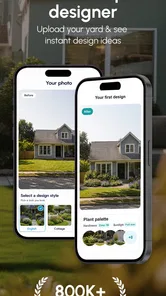
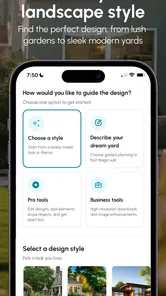
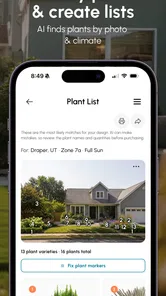
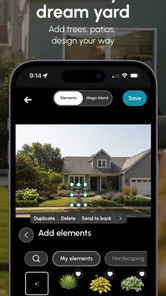
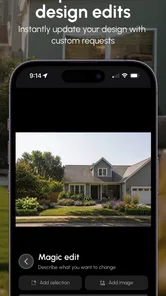
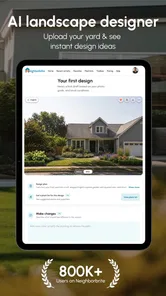
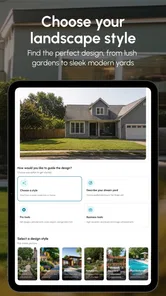
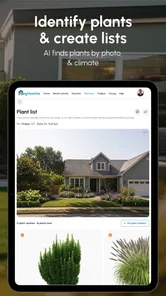
Analysis by Reviewed
I tried Neighborbrite Landscape Design as a planning companion for outdoor spaces, and my first impression was that it is most useful when I am still deciding what a garden, yard, or patio could become. Rather than beginning with a shopping list or a technical drawing, I can use the app to explore visual possibilities and narrow down a direction. That makes it especially approachable for someone who has ideas but cannot yet picture them clearly.
It is an Android app in the House & Home category, developed by Neighborbrite Inc. The central idea is AI-assisted landscape design: I provide an outdoor-space context, then use generated concepts as a starting point for thinking about layout, planting style, and atmosphere. I would not treat the result as a construction plan, but I do see value in using it before spending money on plants, furniture, paving, or professional design time.
How the AI planning experience feels in everyday use
The most natural way to use this app is during the uncertain stage of a project. Imagine standing in a small, tired-looking backyard with a narrow strip of lawn, an unused wall, and a few containers that never quite came together. A traditional approach might involve browsing hundreds of garden photos, saving disconnected ideas, and trying to imagine whether any of them suit the actual space. Neighborbrite Landscape Design gives that process a more direct visual focus.
I can begin with the space I want to improve, then compare different design directions instead of committing immediately to one expensive solution. That matters because outdoor decisions are difficult to reverse. A sofa can be moved, but a planted border, path, or mature shrub takes more effort to change. The app is therefore strongest as a low-risk sketchbook for decisions that have not yet become physical.
The AI element also changes the way I think about inspiration. A general image search is good at showing attractive gardens, but it often leaves me with the wrong question: “How do I copy this?” A landscape-design app is more useful when it helps me ask, “Which parts of this idea could work in my space?” That distinction makes the experience more practical, even when the visual output needs careful interpretation.
My advice is to treat each concept as a conversation starter rather than a promise. A generated view may help me notice that I prefer a softer planting style, a more structured modern look, or a seating area that feels connected to the house. It should not replace checking sunlight, drainage, local climate, mature plant size, access routes, or building restrictions.
Why connectivity matters from the first design attempt
The most important practical point is that this is an AI-driven experience, so the quality of the session depends on communication between the app and its online service. When the connection is responsive, the process feels exploratory: I can submit an idea, wait for the design response, and continue refining my thoughts. When the connection is weak, that creative rhythm becomes less comfortable because the app cannot feel as immediate as a simple sketchbook or a locally stored photo editor.
More From Our News Desk

 Gmail
GmailGmail in a Busy Inbox: Who Benefits Most?
From first account to crowded workday, Gmail earns its place through dependable search and flexible sorting—but its best fit depends on how much inbox maintenance you can tolerate.

 Prime Video
Switching to Prime Video: What Changes in Your Viewing Routine
Prime Video can make a compelling second home for streaming, but switching means learning a different catalog, rental layer, and route from browsing to playback.

 Universal TV Remote Control
Universal TV Remote Control Works Best as a Reliable Backup
A phone remote earns its place through quick setup and reliable habits. Here is how to get more from Universal TV Remote Control—and where its limits show.

 Weather - By Xiaomi
Weather by Xiaomi Review: Clear at a Glance, Less Clear Up Close
Xiaomi’s weather app makes everyday forecasts quick to scan, but its calm surface can leave useful details and recovery paths harder to find than they should be.

 X
XX Under Pressure: Can It Recover When Posting Goes Wrong?
A resilience-focused review of X, examining setup, mistaken posts, interruptions, weak connections, and the gaps that matter when recovery needs to be dependable.

 Clash of Clans
Clash of Clans Is Won Between the Battles
Its raids are quick; its community is a long-term project of coordination, teaching, rivalry, and shared responsibility—with all the friction that entails.
Latest News



I would use it at home on a reliable connection when I want to spend time comparing possibilities. That setting gives me enough patience to inspect a result instead of making a rushed decision in a garden center. It also makes it easier to keep reference photos, measurements, and notes nearby while I evaluate what the visual concept is actually suggesting.
There is a useful trade-off here. Online AI processing can provide a more ambitious design experience than a basic drawing tool, but it also introduces waiting and dependence on the service. If I am only trying to mark where a bench might go, paper or a standard image editor may be faster. If I want help imagining a complete change in mood and arrangement, the extra online step can be worthwhile.
Using it on a phone without losing the real-world context
A phone is a convenient place to test ideas because I can stand near the garden while thinking about it. That mobile context is also where I need to be disciplined. A small screen encourages quick reactions, and a visually attractive concept can make me overlook practical details such as how much room is needed to walk around furniture or whether a planting bed would block a gate.
I get more from the app when I separate observation from decision-making. First, I look at the existing space in person. I note the direction of light, the surfaces that must remain, the areas that become muddy, and the views I want to keep open. Then I use the app to explore design language and arrangement. Finally, I return outside and test the concept against those observations.
That three-step routine is one of the most useful ways to avoid overtrusting an AI image. The app can help me visualize a destination, but the garden itself supplies the constraints. A narrow side passage, for example, may look perfect with dense planting in a concept image, yet feel awkward if it needs to carry bins or provide maintenance access.
For a balcony or compact courtyard, I would pay particular attention to scale. Visual tools can make a space appear more generous than it feels in person. Before acting on an idea, I would use a tape measure and mark the proposed footprint with temporary objects. This is especially helpful for seating, raised planters, storage, and any design that depends on comfortable movement.
The app is also a good fit for sharing a direction with another person. Instead of explaining an abstract preference such as “something warmer and less formal,” I can show a visual concept and discuss what works or does not. That can make household decisions easier. At the same time, I would avoid presenting the image as a final quotation or technical specification to a contractor, because it is better understood as an early visual reference.
What to do when the connection or result fails
Any service-centered visual workflow needs a recovery plan. If a design request takes longer than expected, my first response would be patience rather than repeated tapping. Sending the same idea again and again can create confusion about which result I am evaluating, and it does not improve the underlying request.
I would keep the original project thought in a short note outside the app: the space, the style I am testing, the elements I want to preserve, and the one change I am trying to understand. That small habit protects the creative work if a session is interrupted. It also makes it easier to restart with a clearer request instead of trying to remember what I had in mind.
When a result feels unsuitable, I would diagnose the problem before abandoning the concept. Sometimes the issue is not the overall direction but one unrealistic element. A design may have the right atmosphere but too much furniture, overly dense planting, or an arrangement that ignores the entrance. In that situation, I would keep the useful part of the idea and simplify the rest.
There is another important recovery step: compare the generated concept with the original space immediately. If I only look at the result on its own, I may judge it like a beautiful garden photograph. Looking back and forth helps me identify whether it actually responds to the available shape, existing structures, and practical routine.
I would also save or record the ideas I genuinely want to revisit, where the app’s available workflow allows that, rather than assuming every visual will remain easy to find. The reason is simple: landscape decisions often happen over several weekends. A concept that seems unhelpful today may become useful after I remove an old planter or rethink the seating area.
Making thoughtful use of the app and its paid path
The app is free to install, which makes it easy to test before deciding whether it belongs in my planning routine. Its age rating is Everyone, so the presentation is suitable for a broad audience. The current version is 2.4.1, and the minimum operating-system requirement is Android 7.0, which keeps the technical entry point relatively accessible for compatible phones.
There are in-app purchases ranging from $24.99 to $149.99 per item. That is a wide enough range that I would be careful before paying. I would first decide what problem I am trying to solve: choosing a visual style, preparing for a conversation with a partner, or developing a serious plan that may justify a larger expense. If I only want occasional inspiration, a paid option may be harder to justify than it would be for someone actively redesigning a property.
My data-conscious approach would be equally simple. I would use the app when I have a stable connection, avoid treating repeated generations as harmless experimentation, and prepare a focused request before starting. A clear brief is better than sending many vague attempts. For example, I would describe the type of space, the features that must stay, the atmosphere I want, and the practical limitation that matters most.
I would also think carefully about the images and details I choose to use. A garden photo can reveal the layout of a home, neighboring boundaries, entrances, or personal belongings. Before sharing an image, I would crop out anything irrelevant and avoid including people, house numbers, or private details. This is good digital hygiene for any image-based home app, and it keeps the design task focused on the outdoor space.
That preparation has a creative benefit as well as a data benefit. When I remove distractions from a photo and define the actual goal, I become more aware of what I am asking the tool to solve. The output is then easier to judge because I am not mixing a style experiment with a request for a buildable plan.
Where it beats familiar alternatives, and where it does not
Compared with browsing social media or general image searches, Neighborbrite Landscape Design is more directly tied to the problem of shaping an outdoor area. Inspiration feeds are excellent for discovering plant combinations and garden moods, but they can become overwhelming and detached from the space I own. This app offers a more focused bridge between “I like this look” and “Could something in this direction work here?”
Compared with drawing a plan by hand, it is faster for communicating atmosphere. A pencil sketch can show dimensions and circulation more honestly, but it usually does not help me imagine how a planting style or overall mood might feel. I would use both approaches together: the app for visual direction, and a measured sketch for checking feasibility.
Compared with hiring a landscape professional, the app is much more accessible for early exploration, but it cannot carry the same responsibility. A professional can inspect the site, discuss maintenance, account for local conditions, and turn preferences into a plan with practical detail. I would use this app before that conversation if I needed help explaining my taste, not instead of professional advice for a complex project.
It is also not the best choice for someone who already knows exactly what they need and simply wants a precise planting schedule, material estimate, or construction drawing. In that case, a specialist tool or direct expert consultation would be more appropriate. The app’s strength is the uncertain middle ground where I need help seeing options before selecting one.
Who will get the most from this garden planner
I think it is particularly well suited to first-time homeowners, renters with permission to improve a patio or balcony, and people who have inherited an untidy outdoor area without a clear plan. It can reduce the intimidation of a blank page by giving a visual starting point. It is also useful for couples or families who struggle to describe the same design preference in words.
It can help someone prepare for a professional consultation, too. I would bring a small set of preferred concepts and explain which elements attracted me: a calmer seating zone, a stronger boundary, more greenery, or a less cluttered arrangement. That makes the consultation more productive without pretending the AI output is a finished design.
I would be more cautious if the project involves major grading, retaining walls, drainage problems, protected trees, or a highly specific local planting requirement. Those situations need site knowledge that a visual concept cannot supply. Likewise, a person who dislikes experimenting with several possibilities may find the process less valuable than simply working from a measured plan.
My final view after weighing the connected experience
Neighborbrite Landscape Design works best when I use it as a visual thinking tool, not as an authority on what can be built. Its online, AI-assisted nature makes it more engaging than a static collection of garden photographs, but that same strength means the experience is tied to a dependable connection and to my willingness to assess each result carefully.
The app has a 4.6 average from around 192 ratings and has passed 10 thousand installs, which suggests that it has found an audience among people exploring home and garden ideas. I would still judge it by my own project rather than by popularity. The free entry point makes testing sensible, while the in-app purchase range means I would only spend more after confirming that the workflow genuinely improves my decisions.
My practical recommendation is to use it in a quiet planning session, with a clear photo or description, a short list of non-negotiable features, and a notebook or measuring tape nearby. Save the ideas that clarify your taste, challenge the ones that ignore real constraints, and do not let a polished image rush you into buying materials.
My connectivity verdict is positive but conditional: when I have a reliable connection and an early-stage design question, the app can turn vague outdoor ambitions into useful visual conversations. When I need exact dimensions, offline certainty, horticultural precision, or construction-ready guidance, I would choose a measured plan or a professional instead. For the right stage of a garden project, though, it is a friendly and practical way to see possibilities before making them permanent.
Neighborbrite Landscape Design Frequently Asked Questions
Who is Neighborbrite Landscape Design intended for?
Neighborbrite Landscape Design is aimed at people who want to explore ideas for gardens, yards, and other outdoor spaces. It may suit homeowners planning a refresh, as well as anyone looking for visual inspiration before discussing a project. The app is rated for Everyone, so its content rating is suitable for a broad audience. Its designs are concepts to consider, rather than a substitute for specialist advice.
What is Neighborbrite Landscape Design, and what can I use it for?
Neighborbrite Landscape Design is a landscaping visualization app that helps you explore ideas for improving outdoor spaces. You can use it to experiment with garden layouts, plants, decorative elements, patios, pathways, and other landscape concepts. It is especially useful for homeowners who want inspiration before starting a renovation, although the generated designs should be treated as visual suggestions rather than exact construction plans.
How does Neighborbrite create landscape design ideas from my property?
The app generally works by using a photo of your yard or outdoor area as the starting point. After uploading or capturing an image, you can explore different landscaping styles and possible improvements. The app analyzes the visible space and produces concept images based on the selected preferences. Results can vary depending on image quality, lighting, camera angle, and how clearly the existing garden or yard is shown.
Is Neighborbrite Landscape Design free to download and use?
Neighborbrite is free to download, but in-app purchases are available, with listed items ranging from $24.99 to $149.99. Some features, design generations, or advanced options may depend on the current pricing model. Before confirming a purchase, check the in-app payment details carefully so you understand what is included and whether a paid option suits your needs.
Can I rely on the app’s designs for real landscaping or construction work?
Neighborbrite is best used as a creative planning and inspiration tool, not as a replacement for a professional landscape architect, contractor, or horticultural expert. A generated image may not account for drainage, soil conditions, sunlight, local climate, property boundaries, permits, irrigation, mature plant sizes, or structural safety. Use the concepts to discuss possibilities with qualified professionals before beginning major work.
Pros
- AI-generated landscape ideas help visualize different outdoor styles quickly.
- Offers inspiration for gardens
- patios
- yards
- and other exterior spaces.
- Simple interface makes experimenting with design concepts accessible to beginners.
- Useful for collecting ideas before discussing plans with a landscaper.
- Can spark creative solutions for underused or difficult outdoor areas.
Cons
- Generated designs may not reflect your yard’s exact size
- slope
- or lighting.
- Plant suggestions may not suit your local climate or soil conditions.
- Some features or design options may require in-app purchases.
- Results can look attractive but may be impractical or costly to build.
- Requires photos or detailed input for more useful
- personalized suggestions.







