

Navan
- 482.00
- 4.7
- Installs
- 500.00K
- Price
- Free

Screenshots


Analysis by Reviewed
I judge a travel app less by how many screens it has than by whether I can find the next useful detail when I’m rushing. That is where Navan aims to help: it brings business travel and expense tasks into one mobile experience. I’d consider it for work trips where bookings and spending need to stay organized, rather than as a replacement for every tool I use on a personal holiday.
What to expect from the pace
For a traveler, “fast” usually means getting to an itinerary or booking choice without digging through email, not flashy animation. Navan’s appeal is that it is designed around work travel and expenses, so keeping related tasks together can reduce the back-and-forth that slows down trip planning. I would still treat any travel app as one part of a travel routine: keep essential confirmations accessible and allow time to check details before heading out.
Busy travel days and practical trade-offs
The app is most relevant when a trip involves several moving pieces: a flight, a hotel, ground transport, and work-related spending. On a day when plans shift, having a single place to check travel information can be more convenient than switching between booking services, inbox searches, and a separate expense tool. The trade-off is that an all-in-one approach is most useful when your employer or travel arrangements fit the service; a solo leisure traveler who already prefers a particular airline or booking site may find their existing setup simpler.
For example, imagine arriving at the airport between meetings and needing to confirm what comes next. I would use a consolidated itinerary as a quick reference, then verify any important change with the relevant booking provider or travel contact before acting. That small double-check is sensible for any trip, especially when a missed update could affect a connection. For expenses, capturing purchases close to when they happen is also easier than trying to reconstruct a week of receipts later.
Getting Started with Ease
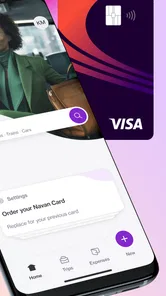
Now, downloading and setting up Navan is as breezy as a summer vacation. Available on both Android and iOS, this app makes the installation process straightforward. Once you’re in, you’re greeted with a neat and intuitive interface that doesn’t require a tech manual to navigate. I was impressed by how quickly I could sync my email to pull in all my travel-related info. It was almost magical watching all my upcoming trips pop up in one place.
Your Travel Itinerary, Organized
One of the standout features of Navan is its ability to automatically organize your travel itinerary. No more flipping through endless emails to find that elusive flight confirmation. Everything is categorized neatly, with flights, hotel bookings, and car rentals all just a tap away. It even updates you in real-time with any changes to your schedule, so you’re always in the loop. I found this feature particularly handy when my flight time changed unexpectedly; the app had my back with a timely notification.
A useful habit is to check the itinerary after making a booking and again before leaving for the airport, rather than assuming a notification has covered every detail. That gives me a chance to spot a mismatch between the trip I expect and the information I need on the day. If you travel with colleagues, this consolidated view can also make it easier to keep your own plans straight without treating a personal inbox search as the source of truth for every booking.
More From Our News Desk

 Weather - By Xiaomi
Weather by Xiaomi Review: Clear at a Glance, Less Clear Up Close
Xiaomi’s weather app makes everyday forecasts quick to scan, but its calm surface can leave useful details and recovery paths harder to find than they should be.

 X
XX Under Pressure: Can It Recover When Posting Goes Wrong?
A resilience-focused review of X, examining setup, mistaken posts, interruptions, weak connections, and the gaps that matter when recovery needs to be dependable.

 Clash of Clans
Clash of Clans Is Won Between the Battles
Its raids are quick; its community is a long-term project of coordination, teaching, rivalry, and shared responsibility—with all the friction that entails.

 Android Auto
Android Auto Makes the Case for Quieter Car Software
The car interface is no longer judged by how much it can do, but by how quietly it helps. Android Auto shows what drivers now expect—and what still gets in the way.

 MobiOffice: Word, Sheets, PDF
MobiOffice: Transforming Mobile Productivity with Seamless Integration
MobiOffice: Word, Sheets, PDF is redefining mobile productivity with a surprising blend of functionality and innovation.

 EA SPORTS FC Soccer Mobile 26
EA SPORTS FC™ Mobile Soccer: Redefining Mobile Sports Gaming
Dive into EA SPORTS FC™ Mobile Soccer, where immersive gameplay and strategic depth transform mobile sports gaming.
Latest News



Seamless Booking Experience
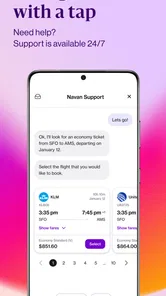
Planning a last-minute getaway or a business trip? The booking feature on Navan is a lifesaver. It aggregates options from various booking sites and presents them in a user-friendly format. I loved how I could compare prices and amenities without having to hop between different websites. Plus, booking directly through the app was a smooth experience, making travel arrangements feel less like a chore and more like a breeze.
Choice is helpful, but the lowest price is not automatically the best work-travel option. I’d compare the practical details that affect the whole journey, such as timing and location, before settling on a booking. If your employer has a preferred process, follow that rather than assuming a convenient in-app option is the right one for reimbursement or approval. For purely personal trips, specialist travel sites may still suit you better if you value their particular search tools or loyalty arrangements.
Budgeting Made Simple
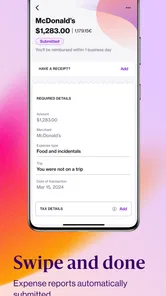
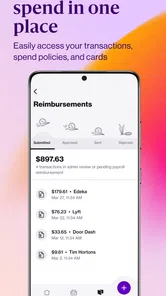
Traveling on a budget? Let Navan keep your expenses in check. The app provides an expense tracker that automatically logs your spending, categorizing everything from flights to meals. I must say, seeing a breakdown of my expenses helped me manage my budget better and avoid those pesky travel surprises. This feature is a game-changer for frequent travelers looking to keep their finances in order.
Expense tracking is most useful when it becomes a small routine, not a task saved for the last night of a trip. I’d review entries while details are fresh and check that a purchase has landed in the category I expect. That makes the app more useful as a record of work spending, while leaving room to correct an item that needs attention. If you rarely travel for work, a basic personal budgeting method may be less effort than adopting a dedicated business-travel workflow.
Reliability, device fit, and who should choose it
Navan is a free Travel & Local app from Navan, Inc, with an Everyone age rating. It has a 4.7 average from around 7.9 thousand ratings, and more than 500 thousand installs. Those figures suggest it has found an audience, but they cannot promise that every individual trip will be trouble-free. Travel details can change outside an app’s control, so I’d keep booking confirmations available and use the provider or work travel contact for urgent questions.
The app’s release date is June 6, 2015, and its current version is 8.84.0; it requires Android 9 or later. On a compatible phone, I’d expect the basic decision to be less about raw performance and more about whether the business-travel workflow suits you. I can’t infer battery use or speed on every device from those details, so I’d judge it during ordinary use before depending on it for a complicated trip. If you use an older Android device, check compatibility first; if you travel only occasionally for leisure, your existing airline, hotel, and email apps may be enough.
Compared with the usual mix of separate booking apps, email searches, and a spreadsheet or expense tracker, Navan’s main advantage is having work-trip information gathered in one place. That convenience matters most to frequent business travelers who want fewer manual handoffs. It matters less to someone who enjoys assembling a trip from separate services or needs a tool centered on personal vacation planning. A practical way to decide is to use it for one straightforward work itinerary, then see whether it actually reduces the time you spend checking bookings and keeping expenses organized.
In conclusion, if you’re someone who travels often or just wants to make your travel planning more efficient, Navan is worth checking out. It’s like having a personal assistant who’s there to ensure your trips go off without a hitch. So next time you’re planning a trip, give Navan a try and travel smarter, not harder!
Navan Frequently Asked Questions
Is Navan free to download, and what devices can run it?
Navan is free to download and is available for Android and iOS, so travelers can use it on either mobile platform. Before installing, check that your device meets the app’s operating-system requirement: it supports Android 9 or later. The app is developed by Navan, Inc and is rated for Everyone, making it broadly accessible to users looking for a travel and expense tool.
What is Navan and what does it offer to users?
Navan is a comprehensive travel management app designed to simplify the process of booking and managing travel itineraries. It offers features like flight and hotel bookings, real-time travel alerts, itinerary management, and expense tracking. Navan aims to streamline business and personal travel by integrating various travel-related services into a single, user-friendly platform. Its focus is reflected in the short description, “Business travel and expense. Solved.”
Is Navan available for both Android and iOS devices?
Yes, Navan is available for both Android and iOS platforms. Users can easily download the app from the Google Play Store for Android devices or the Apple App Store for iOS devices. This cross-platform availability ensures that users can access their travel information and manage bookings on the go, regardless of their preferred mobile operating system.
Does Navan provide real-time travel updates and alerts?
Navan offers real-time travel updates and alerts to help users stay informed about their travel plans. These notifications include flight status changes, gate information, and any delays or cancellations. By providing timely alerts, Navan helps users adjust their plans accordingly and ensures a smoother travel experience.
Can I manage travel expenses using Navan?
Yes, Navan includes features for managing travel expenses. Users can track their expenses by uploading receipts and categorizing their spending directly within the app. This functionality not only simplifies expense reporting for business travelers but also helps individuals maintain a clear record of their travel-related expenditures.
Pros
- User-friendly interface enhances navigation
- Real-time traffic updates for accurate routes
- Offline maps available for no data use
- Voice-guided navigation aids in driving
- Customizable route options for preferences
Cons
- Consumes significant battery power quickly
- Occasional GPS signal loss issues
- Limited public transportation options
- Ads can be intrusive during navigation
- Requires large storage for offline maps











