MyTSA
- 1.46K
- 4.1
- Installs
- 1.00M
- Price
- Free
Screenshots
Analysis by Reviewed
I’d think of MyTSA as a practical checkpoint companion rather than an all-purpose trip planner. When I’m packing or heading to the airport, the most useful travel app is often the one that answers a small, urgent question quickly. MyTSA focuses on those questions, especially airport security procedures and what travelers can bring. That narrow purpose is its strength, though it also means it won’t replace an airline app or a broader travel planner.
Where the free access fits
MyTSA is a free travel app from the TSA Mobile Team, so there is no purchase decision to weigh before trying it. Its audience is broad: the content rating is Everyone, and the app has reached over a million installs. It has an average rating of 4.1 from around 4,400 ratings, which suggests plenty of travelers find it useful, while leaving room for mixed experiences.
The current version is 4.5.0, and the app first appeared in 2012. Those details make it a long-running utility, but I wouldn’t judge a travel tool by age alone. What matters is whether it gives me a clear answer at the moment I need one. I’d keep it as a free reference, not expect it to organize flights, hotels, or an entire itinerary.
Useful answers, with a few important limits
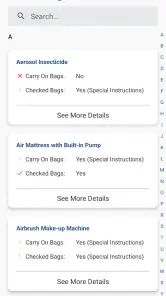
The “Can I Bring?” search is the feature I’d use before packing. Instead of guessing about an item, I can look it up and think through whether it belongs in my carry-on or checked bag. A useful habit is to search for an item while packing, not at the checkpoint: that gives me time to move it, leave it at home, or make another plan rather than deciding under pressure.
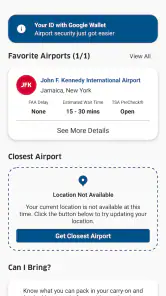
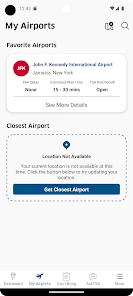
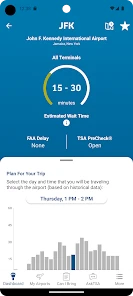
MyTSA also presents airport information, including security wait estimates and status notices. I’d treat a crowd-sourced wait time as a clue, not a promise. A report can become less representative as conditions change, so I wouldn’t use one estimate to cut a close connection or decide that arriving late is safe. For a high-stakes timing decision, I’d allow a buffer and check with airport staff when appropriate.
The app is most helpful when its information answers a TSA-specific question. For airline delays, gate changes, boarding passes, or a full route plan, the airline’s own app or a general travel planner is the better tool. Keeping those roles separate avoids expecting MyTSA to solve problems it isn’t designed to handle.
Who I’d recommend it to
I’d suggest it to occasional flyers who want a quick reference before leaving home, parents checking what to pack, and frequent travelers who prefer to review security guidance directly. Picture a traveler packing the night before an early flight: they find an unfamiliar toiletry, search for it, and can deal with the question calmly instead of holding up the line the next morning. That small change in timing is where the app can earn its place.
More From Our News Desk

Clash of Clans Is Won Between the Battles

Android Auto Makes the Case for Quieter Car Software

MobiOffice: Transforming Mobile Productivity with Seamless Integration

EA SPORTS FC™ Mobile Soccer: Redefining Mobile Sports Gaming

How Microsoft OneDrive Became a Mobile Productivity Giant

How Google Translate Breaks Language Barriers Effortlessly
It may be less useful if you already know the rules, rarely fly, or mainly need live airline and itinerary management. I’d also avoid treating any airport estimate as a guarantee. My practical approach would be to use MyTSA for preparation and a second, more direct source for decisions where a delay or item restriction could seriously disrupt the trip.
Putting the information to work
I’d use the app in two passes rather than trying to solve everything at once. First, while packing, I’d search for the objects that make me hesitate and sort them into a carry-on or checked-bag decision. Then, closer to departure, I’d look at the airport information as one planning signal. Separating those tasks keeps a useful search from getting mixed up with a time-sensitive estimate, which has a different level of certainty.
For an item with several parts, I’d search the exact object or the part that creates the concern, rather than relying on a broad category. A small tool attached to a larger item, for example, may raise a different question from the main object. If a result does not settle the issue, I would not treat a vague match as permission; I’d consult the appropriate official guidance or ask airport staff. This is a sensible way to use a lookup tool without turning it into a substitute for judgment.
There is also a useful distinction between preparing for a trip and managing it. MyTSA makes more sense during the first stage, when I can still change what I pack, than in the middle of a disruption when I need a carrier to rebook me or tell me where to go. I’d install it before travel rather than wait until I’m already in a queue, so I can learn where its relevant information is and avoid fumbling through an unfamiliar app at the airport.
How it compares with other travel tools
Compared with a general travel app, MyTSA has a narrower job. A planner may gather reservations, itinerary details, or transportation information in one place, while this app is useful for security-focused questions. That specialization is an advantage when the question is about screening, but it is also a reason not to make it the center of a trip-management setup. I’d pair it with the airline’s app for flight-specific changes and use a broader planner only if I need help organizing the rest of the journey.
Search engines can be faster for broad questions, but results may mix official advice with summaries written for different situations. I like having a TSA-oriented reference for a TSA question; I still read the answer carefully and check current official guidance when the consequence of getting it wrong is significant. The app is not valuable because it removes every judgment call. Its value is giving me a more focused starting point than an unfocused web search.
Airport websites and staff have a different role again. They can be better sources for local conditions or a question that depends on the airport I’m using, while a crowd-sourced wait estimate offers only a snapshot from travelers. I would compare the estimate with my own needs, not assume that one number describes every checkpoint or every moment. If I’m traveling with a tight schedule, a safer plan matters more than squeezing the most out of an estimate.
Questions I’d settle before relying on it
Can I use MyTSA to decide whether an item will definitely pass screening? I would use “Can I Bring?” to guide packing, not as a guarantee that every situation will be handled the same way. The practical choice is to check early, read the result in context, and seek a more direct answer if the item is important or unusual. That approach leaves room for the checkpoint decision and avoids a last-minute surprise.
Should I trust the wait estimate when choosing when to leave? Not on its own. It can help me understand what other travelers are reporting, but it is not a promise about the line I will encounter when I arrive. I’d use it as a prompt to be attentive, while keeping enough time for the ordinary uncertainties of airport travel. It is especially unwise to let a short estimate justify a risky arrival time.
Will it handle a canceled flight or a gate change? That is where I’d switch to the airline’s own app or speak with the carrier. MyTSA is a security reference, not a booking or customer-service channel. Keeping that distinction in mind saves time: open the tool that can actually act on the problem instead of searching a security app for itinerary controls.
Does the free price make it worth keeping? For a traveler who flies occasionally, the answer can still be yes if a single useful packing check saves uncertainty. Since it costs nothing to try, I’d judge it by whether its focused answers help with my own travel habits, not by expecting a complete suite of trip features. Someone who rarely flies and already knows what they need may have little reason to keep it front and center.
When I’d choose it—and when I wouldn’t
The strongest case for MyTSA is a traveler who has one or two concrete security questions and wants to check them before leaving home. It is also a reasonable companion for someone helping a family member pack, since they can look up uncertain items without needing to become an expert in every screening detail. The payoff is less about managing a whole holiday and more about reducing avoidable confusion at one particular stage of travel.
I’d skip it as a primary travel app if my main concern were coordinating reservations, following a flight, or responding to a disruption. I’d also avoid leaning on its airport reports when I need certainty the reports cannot provide. A different source is better for those jobs, and using the right tool is more helpful than expecting one free utility to cover every travel need.
Ever found yourself standing in line at the airport, wondering just how long you’ll be stuck there? Or maybe you're the type who likes to have every detail planned out before you even leave the house. If so, the MyTSA app might just become your new best travel buddy. This handy app, developed by the Transportation Security Administration, is here to make your airport experience as smooth as possible.
What’s the Buzz About?
So, what exactly does the MyTSA app offer? Well, for starters, it provides real-time updates on airport security wait times. Imagine being able to check how long you’ll be waiting in line before you even get to the airport. It’s like having a crystal ball for your travel plans! This feature is crowd-sourced, meaning it relies on input from other travelers to give you the most accurate information.
Features That Stand Out
One of the standout features of this app is its “Can I Bring?” tool. We've all been there, staring at a bottle of shampoo or a snack, wondering if it’ll make it past security. The app lets you search for specific items to see if they’re allowed in your carry-on or checked luggage. This feature can really save you from that awkward moment of having to toss your favorite lotion at the checkpoint.
Another nifty feature is the app’s ability to provide airport status updates. You can check for delays, closures, and other important announcements. This means fewer surprises and a more relaxed travel experience. Plus, with the app’s TSA PreCheck information, frequent flyers can stay informed about their status and benefits.
Ease of Use
The app’s interface is user-friendly and straightforward. Navigating through the features is a breeze, even for those who aren’t particularly tech-savvy. The design is clean and intuitive, ensuring you can find the information you need without any hassle.
One small gripe, though, is that since the wait time information is crowd-sourced, its accuracy can vary. If you’re traveling during peak hours, it might be worth double-checking with airport staff just to be safe.
Final Thoughts
In a world where travel can often feel chaotic, the MyTSA app is like a calming presence in the palm of your hand. While it might not have all the bells and whistles of some other travel apps, its focus on providing practical, real-time information makes it an invaluable tool for any traveler.
So next time you’re planning a trip, consider downloading the MyTSA app. It’s free, it’s helpful, and it might just save you some stress on your next journey. Safe travels!
MyTSA Frequently Asked Questions
Is MyTSA free to download, and who is it for?
MyTSA is a free Travel & Local app from the TSA Mobile Team, intended for travelers who want convenient access to information about airport security. It is rated for Everyone, so its content is suitable for a broad audience. If you are preparing for a flight and want TSA-related guidance in one place, the app may be useful to explore before heading to the airport.
What is MyTSA and how does it help travelers?
MyTSA is a mobile application designed to assist travelers in navigating airport security and planning their journeys more efficiently. The app provides real-time information on security wait times, TSA PreCheck lane availability, and allows users to check what items they can bring through security. It's a great tool for reducing travel stress and ensuring a smoother airport experience.
How accurate are the wait times provided by MyTSA?
The wait times in MyTSA are crowdsourced from other app users and historical data, which means they are generally accurate but can fluctuate with airport conditions. TSA also supplements this with its own data. It's advisable to use these times as estimates and check frequently for updates, especially during peak travel times.
Can I use MyTSA for international travel?
MyTSA primarily focuses on U.S. airports and domestic travel, providing information relevant to TSA security procedures. While it does not provide specific information for international airports, travelers can still benefit from its general travel tips and security guidelines. For international travel, it's best to check the specific security procedures of the destination airport.
Is MyTSA available for both Android and iOS devices?
Yes, MyTSA is available for both Android and iOS devices. Users can download it from the Google Play Store or the Apple App Store. The app is designed to be user-friendly and offers a seamless experience across both platforms, ensuring that travelers can access vital security information no matter their preferred device.
Pros
- Real-time airport security wait times
- Flight delay information
- Airport amenities guide
- TSA PreCheck availability
- User-friendly interface
Cons
- Limited airport coverage
- Occasional data inaccuracies
- Requires internet connection
- No offline mode
- Ads can be intrusive
- Category
- Travel & Local
- Version
- 4.5.0