

MyRXNT
- 216.00
- 4.6
- Installs
- 50.00K
- Price
- Free
Screenshots


Analysis by Reviewed
Managing healthcare is rarely difficult because of one huge task. It is difficult because small tasks pile up: remembering which office to contact, keeping track of a message, checking whether a prescription request moved forward, or finding the right place to handle a routine question. MyRXNT is designed to bring that kind of patient communication into one mobile app. After spending time with it, I see the appeal clearly: it is a focused medical companion for people whose healthcare provider uses the RXNT system, rather than a general health tracker or an emergency-care tool.
The app is free, available for Everyone, and developed by RXNT. It has reached over 50 thousand installs and holds a 4.6 average from more than 700 ratings, which suggests that many users find its basic purpose worthwhile. That said, the most important question is not the rating. It is whether your clinic or medical practice is connected to RXNT. If it is, MyRXNT can make ordinary administrative healthcare tasks less scattered. If it is not, the app has little practical value for you.
How MyRXNT fits into everyday healthcare
I find it helpful to think of MyRXNT as a personal route to a participating provider, not as a shared household inbox. In a home where one person helps another with routine care, that distinction makes it worth agreeing in advance who will handle sign-in and messages, while keeping each patient’s account and sensitive details separate. That practical boundary leads to the first setup decision: whose care is the app being used to manage?
A patient-facing tool rather than a full health dashboard
MyRXNT belongs to the medical category, but I would not compare it with fitness trackers, symptom diaries, medication reminder apps, or telehealth marketplaces. Its role is narrower and more practical. It is meant to help patients stay connected to participating healthcare providers, using a phone as the access point for patient-facing services.
That distinction matters before you install it. Someone looking for blood-pressure charts, exercise goals, nutrition guidance, or a large library of medical information should look elsewhere. MyRXNT makes more sense when your goal is to interact with a practice and keep healthcare communication in one place.
In my experience, this kind of focused design can be a strength. A general health app often tries to do too much and leaves the user searching through unrelated sections. A provider-connected app has a clearer job: help you handle the relationship with your care team. The trade-off is that its usefulness depends heavily on the organization behind your account.
A realistic use case for busy patients
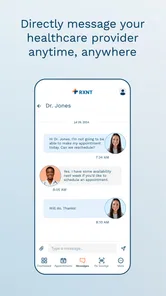
Imagine that you have finished a routine appointment and later remember a question about the next step. You do not need emergency advice, but you also do not want to call the main office, wait through a phone menu, and explain the situation to someone who may need to transfer you. A provider-connected app such as MyRXNT can be a more natural place to begin, assuming your practice supports the relevant patient workflow.
More From Our News Desk

 Gmail
GmailGmail in a Busy Inbox: Who Benefits Most?
From first account to crowded workday, Gmail earns its place through dependable search and flexible sorting—but its best fit depends on how much inbox maintenance you can tolerate.

 Prime Video
Switching to Prime Video: What Changes in Your Viewing Routine
Prime Video can make a compelling second home for streaming, but switching means learning a different catalog, rental layer, and route from browsing to playback.

 Universal TV Remote Control
Universal TV Remote Control Works Best as a Reliable Backup
A phone remote earns its place through quick setup and reliable habits. Here is how to get more from Universal TV Remote Control—and where its limits show.

 Weather - By Xiaomi
Weather by Xiaomi Review: Clear at a Glance, Less Clear Up Close
Xiaomi’s weather app makes everyday forecasts quick to scan, but its calm surface can leave useful details and recovery paths harder to find than they should be.

 X
XX Under Pressure: Can It Recover When Posting Goes Wrong?
A resilience-focused review of X, examining setup, mistaken posts, interruptions, weak connections, and the gaps that matter when recovery needs to be dependable.

 Clash of Clans
Clash of Clans Is Won Between the Battles
Its raids are quick; its community is a long-term project of coordination, teaching, rivalry, and shared responsibility—with all the friction that entails.
Latest News



The same applies to a parent managing care for a child, an adult helping an older relative, or anyone who has several appointments with the same practice. The value is not dramatic technology. It is reducing the number of small communication steps that are easy to forget. I found that the app is best judged by this quieter benefit: does it make routine contact with your provider easier than relying on phone calls, paper reminders, and scattered messages?
What the current version tells me about its maturity
The current version is 2.6.1, and the app was released on January 11, 2022. Those details place MyRXNT beyond the earliest launch stage, while still leaving room for ongoing refinement. I would describe it as an established provider-connection app rather than a broad digital health platform that has expanded into every possible service.
That is useful context for existing users. A version number in the 2.x range often signals a product that has moved past its first release and is being maintained through incremental improvements. It does not automatically mean that every workflow is polished, nor does it prove that every practice offers the same experience. The app should be understood as one part of the RXNT healthcare environment, with the provider’s setup influencing what you can actually do.
What has changed and what that means in practice
MyRXNT’s verified release history gives users a current reference point: version 2.6.1 is the version to look for when checking whether the app is up to date. I appreciate that this makes it easier to discuss the product as it exists now instead of treating an early launch build as representative of today’s experience.
At the same time, I would avoid reading too much into the version number alone. A later version does not tell me that every desired feature has arrived, and it does not guarantee identical behavior across every medical office. For a patient, the practical test is simple: install the current build, sign in through the route provided by your participating practice, and see whether the tasks you actually need are available.
For existing users, staying current is especially sensible with a healthcare app. Updates can affect compatibility, sign-in behavior, reliability, and the way information is presented. I would not postpone an important care-related conversation while waiting for an app to work perfectly, though. If a message is urgent or concerns a serious symptom, use the appropriate direct medical channel instead of treating MyRXNT as an emergency service.
The provider connection is the central trade-off
The biggest limitation is also the defining condition of the app: MyRXNT is useful only when it connects to the healthcare practice you use. This is different from a standalone medication organizer or a general appointment calendar, where you can begin using the product independently. Here, the medical office is part of the experience.
That creates a dependency many people may overlook. Two patients can install the same app and have very different results because their practices may configure patient access differently. Before spending time troubleshooting, I would first confirm with the office that it supports MyRXNT and ask which sign-in or enrollment steps it expects patients to follow.
This is also why I would not recommend the app as a universal replacement for your provider’s phone line. If the office has not enabled the service for you, reinstalling the app repeatedly will not solve the underlying problem. The better workflow is to verify participation, use the exact account details associated with the practice, and contact the office directly when enrollment or identity verification becomes the obstacle.
Where it compares well with familiar alternatives
Compared with calling a practice for every routine question, a connected app can feel less disruptive. You can begin from your phone instead of matching the office’s telephone hours to your own schedule. It may also reduce the need to keep several pieces of paper or remember which department handles a request.
Compared with a general patient portal accessed through a mobile browser, a dedicated app can be more convenient for repeated use. The icon is easy to find, and the experience is built around mobile access rather than a desktop page squeezed onto a small screen. That advantage is most noticeable for people who contact the same practice regularly.
However, a browser portal may still be better for someone who rarely needs access, uses a shared or older device, or prefers not to add another app. A phone call remains the stronger option when the matter is time-sensitive, complex, or likely to require a long back-and-forth conversation. MyRXNT is best as a convenient channel for appropriate routine interactions, not as a universal replacement for every healthcare communication method.
Small workflow habits that make it more useful
One useful habit is to set up access before you urgently need it. Trying to create or connect an account while dealing with a prescription question or a scheduling problem adds unnecessary pressure. I would install the app after confirming that your practice supports it, complete the sign-in process during a calm moment, and check that you can reach the correct provider connection.
A second habit is to treat the app as a record of communication rather than a place to send vague notes. When writing to a practice, include the reason for contacting them, the relevant appointment or medication context, and the action you are asking about. Clear messages are easier for staff to route than a short sentence that assumes the reader already knows the whole story.
A third is to keep expectations realistic when more than one practice is involved. If you see different providers who do not share the same RXNT setup, MyRXNT may not give you one complete view of all your healthcare. You may still need another portal, a phone call, or your own personal record for information held elsewhere. That is not necessarily a flaw in the app; it is a consequence of healthcare systems being divided between organizations.
Who will get the most from it?
I would recommend MyRXNT first to patients whose regular provider has specifically directed them to use it. It is also a good fit for people who dislike making routine phone calls, want a mobile route to practice communication, or help coordinate care for a family member. The free price removes the financial barrier to trying it, which is helpful when you are testing whether your provider’s workflow fits your habits.
It may be particularly useful for people who are comfortable handling everyday administrative tasks from a smartphone. The app is not asking you to become a health-data expert. Its appeal is practical: open the app, use the provider connection, and avoid treating every minor question as a telephone task.
I would be more cautious if you want one app to combine records from every doctor, track wellness metrics, manage complex medication schedules, and provide immediate clinical guidance. MyRXNT is not the right choice for that broader expectation. I would also steer away from relying on it for urgent symptoms, emergencies, or situations where a delayed response could be dangerous.
Accessibility, age rating, and the human side of support
The Everyone content rating makes the app broadly suitable from an age-classification perspective, but that does not mean every healthcare task is equally simple for every person. Older adults, people with limited digital confidence, or caregivers managing another person’s account may need help with the initial setup and sign-in process.
For those users, I would prepare the provider’s name, the patient’s identifying information, and any enrollment instructions before opening the app. Avoid guessing when an account does not connect. A short call to the medical office can clarify whether the issue is an incorrect detail, an invitation that has not been issued, or a practice-side setup problem.
This is one area where a traditional alternative can be better. If a family member is uncomfortable with smartphone healthcare tools, a phone conversation may be faster and less stressful. The best choice is the channel that lets the patient communicate accurately and safely, not necessarily the newest one.
Privacy-minded habits worth keeping
Because MyRXNT is used for healthcare communication, I would handle the phone as carefully as I would handle paper medical documents. Use a device lock, avoid leaving the app open on a shared screen, and be careful when discussing personal information in public. These are sensible habits for any patient-facing medical service, regardless of the convenience it offers.
I would also avoid sending highly sensitive details through the wrong channel simply because it is available. If the app presents a routine communication route, use it for matters appropriate to that route. If you are unsure whether a question belongs there, ask the practice which method it prefers. The app can improve access, but it cannot replace judgment about the seriousness or sensitivity of a situation.
Remaining gaps I would keep in mind
The main gap is not a missing cosmetic feature. It is the possibility that the app’s usefulness will feel uneven from one practice to another. Patients naturally expect a consistent experience after installing a named app, but provider-connected services depend on how each organization handles enrollment, communication, and follow-up.
Another gap is scope. MyRXNT should not be mistaken for a complete personal health record that automatically brings together every clinician, test, pharmacy, and insurance interaction. If your healthcare is spread across several organizations, you may still need a separate system for keeping your own overview. I would use MyRXNT for the relationship it actually supports and maintain another trusted method for information outside that connection.
There is also a human-response gap to consider. A mobile message can be easier to send than a phone call, but the app cannot control how quickly a practice responds. If you need an answer by a particular time, confirm the appropriate contact method with the office rather than assuming that sending a message guarantees immediate attention.
What I would watch as the app evolves
With version 2.6.1 as the current reference, I would watch future updates for improvements that make provider connection clearer, reduce sign-in friction, and explain the status of routine requests more plainly. Those changes would matter more to me than adding unrelated wellness features. The core value of MyRXNT is dependable communication with a participating practice.
I would also look for a smoother experience for caregivers and households where one person helps another manage appointments or messages. Healthcare apps become genuinely useful when they handle real-life situations, not just the simplest individual account. Clear account boundaries and straightforward guidance would make a meaningful difference without turning the app into an overloaded dashboard.
My final take on MyRXNT
MyRXNT is a focused medical app with a sensible purpose: helping patients stay connected to an RXNT-supported healthcare practice from a phone. I like its practical direction and its free access, and the strong user rating indicates that the basic idea works well for many people. Its greatest strength is convenience during routine provider communication, especially for patients who would rather use a mobile channel than make repeated calls.
My recommendation comes with one firm condition: confirm that your practice supports it. Once that connection exists, prepare your account before you need it, write clear messages, and keep a phone or other direct route available for urgent matters. If you want a broad health-management platform, this will feel too narrow. If you want a straightforward bridge to a participating provider, MyRXNT can be a useful everyday healthcare tool rather than another app that simply adds clutter to your phone.
For me, the app succeeds when expectations match its role. It is not trying to replace a clinician, an emergency service, or every other health app. It is a patient-access point, maintained by RXNT, and its value comes from making the ordinary parts of care a little easier to manage.
MyRXNT Frequently Asked Questions
Is MyRXNT free, and what devices can run it?
MyRXNT is a free medical app from RXNT, so you can download it without paying for the app itself. It supports devices running Android 8.0 or later. Before installing, check your device’s operating system version and make sure you have enough space for the app. Access to its patient tools still depends on having an account connected to a provider that uses RXNT.
Who develops MyRXNT, and what is its overall reputation?
MyRXNT is developed by RXNT and is intended to help patients stay connected to their care. It has an average rating of 4.6 from 773 ratings, with 216 written reviews, and has been installed over 50,000 times. Those figures offer a broad sense of user reception, but your experience may depend on whether your healthcare provider uses the platform and which features the practice makes available.
What is MyRXNT and who is it designed for?
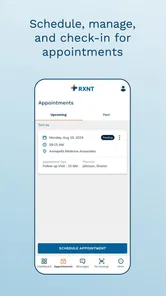
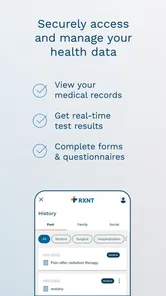
MyRXNT is a healthcare management app connected to the RXNT platform, intended for patients whose medical provider uses RXNT services. Depending on the provider’s setup, the app may allow you to review health information, communicate with the office, manage appointments, request prescription refills, and access billing or other patient-related features. Availability can vary by practice and account permissions.
Can I use MyRXNT without an invitation or an RXNT provider?
You generally need an account created or enabled by a healthcare provider that uses RXNT. Downloading the app alone may not provide access to its features. During registration, you may be asked to verify personal information or use an invitation from your medical office. If you cannot sign in, contact the provider’s office rather than creating multiple accounts or entering inaccurate information.
What can I do through the MyRXNT app?
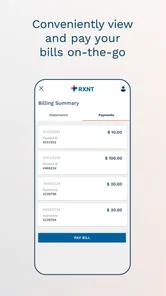
The exact tools available depend on the healthcare organization connected to your account, but MyRXNT may support appointment-related tasks, secure communication, prescription refill requests, access to selected medical records, statements, and electronic forms. Some functions can be limited by provider policy, your role, or local regulations. The app should not be treated as a replacement for emergency care or direct clinical evaluation.
Pros
- Quick access to prescriptions
- refills
- and medication details
- Helps keep pharmacy and prescription information organized
- Secure login helps protect sensitive health information
- Useful for managing prescriptions while away from the office
- Available on mobile devices for convenient access on the go
Cons
- Features may depend on whether your provider supports RXNT
- Some users may find account setup and verification time-consuming
- Prescription updates may not appear immediately
- Requires an internet connection for most functions
- The interface may feel less intuitive for first-time users











