

myPatientVisit Portal
- 39.00
- 4.8
- Installs
- 10.00K
- Price
- Free

Screenshots
Analysis by Reviewed
When a medical app handles appointments, messages, or visit-related information, trust matters more than a polished interface. I approached myPatientVisit Portal with that in mind: not as a general health tracker, but as a mobile option for people whose healthcare provider already uses the myPatientVisit service. That distinction is important, because the app’s usefulness depends heavily on the clinic or practice behind the account.
Developed by Nextech Systems, LLC, this free medical app gives patients using myPatientVisit a mobile-ready way to interact with their patient portal. It is available for everyone from an age-rating perspective, and the current release is version 6.136.0 for devices running iOS or Android 10 and later. I found the experience most relevant for people who want a more convenient route into an existing healthcare relationship rather than another standalone wellness application.
The app has built a solid public reception, with a 4.8 average from around 380 ratings and more than 10,000 installs. Those figures suggest that many users find it useful, but they should not be mistaken for a guarantee that every clinic offers the same experience. A patient portal is partly an app and partly an organization’s workflow, so the quality of responses, available records, and account support can vary outside the application itself.
What trust looks like in a patient portal
My first test with a medical portal is simple: does it help me reach the right healthcare information without encouraging me to treat the app like an emergency service? myPatientVisit Portal makes sense for routine communication and access to patient-facing services connected to a participating provider. It is not the kind of tool I would rely on for urgent symptoms, immediate medical advice, or a situation where waiting for a portal response could create risk.
That boundary is easy to overlook because a phone makes every service feel instant. A portal can sit beside a familiar chat app, but it does not work like one. A message may depend on office hours, staff availability, and the provider’s own procedures. I would use it for an ordinary administrative or follow-up task, then use the clinic’s stated urgent-care route for anything time-sensitive.
The strongest trust signal here is the service’s focused purpose. Instead of presenting itself as a social health community or a broad collection of questionable health tools, it is tied to the myPatientVisit portal experience. That narrower role makes it easier to understand what the app is for: access to a healthcare provider’s digital patient environment from a mobile device.
There is also a practical limitation hidden in that model. Installing the app alone does not create a healthcare relationship or guarantee access to every portal function. If a clinic has not enabled the service for you, the app cannot replace registration through that provider. I would confirm the clinic’s participation and account instructions before spending time troubleshooting a login that may not be an app problem at all.
More From Our News Desk

 Gmail
GmailGmail in a Busy Inbox: Who Benefits Most?
From first account to crowded workday, Gmail earns its place through dependable search and flexible sorting—but its best fit depends on how much inbox maintenance you can tolerate.

 Prime Video
Switching to Prime Video: What Changes in Your Viewing Routine
Prime Video can make a compelling second home for streaming, but switching means learning a different catalog, rental layer, and route from browsing to playback.

 Universal TV Remote Control
Universal TV Remote Control Works Best as a Reliable Backup
A phone remote earns its place through quick setup and reliable habits. Here is how to get more from Universal TV Remote Control—and where its limits show.

 Weather - By Xiaomi
Weather by Xiaomi Review: Clear at a Glance, Less Clear Up Close
Xiaomi’s weather app makes everyday forecasts quick to scan, but its calm surface can leave useful details and recovery paths harder to find than they should be.

 X
XX Under Pressure: Can It Recover When Posting Goes Wrong?
A resilience-focused review of X, examining setup, mistaken posts, interruptions, weak connections, and the gaps that matter when recovery needs to be dependable.

 Clash of Clans
Clash of Clans Is Won Between the Battles
Its raids are quick; its community is a long-term project of coordination, teaching, rivalry, and shared responsibility—with all the friction that entails.
Latest News



Account access deserves a careful first setup
My advice is to complete the initial setup when you are not distracted. Use the contact details and identity information your provider already has, and keep any account recovery information current. A portal is less forgiving of casual account sharing than a shopping app because the information connected to it can be personal and medically sensitive.
I would also avoid signing in on a borrowed device unless there is a clear reason to do so. If you must use one, take the extra moment to sign out afterward and avoid saving credentials in the browser or device. These are ordinary precautions, but they matter more when the app connects to a healthcare account.
A useful habit is to check the account after installation before you actually need it. If access fails on the day of a scheduled task, you may have little time to work out whether the issue is an incorrect password, an incomplete provider registration, or a service problem. Testing early turns an unexpected medical-administration problem into a manageable setup task.
Visible choices are more valuable than assumptions
With a medical app, I do not judge privacy by the presence of reassuring language alone. I look for the choices presented during setup and use: what the app asks me to provide, which notifications I can control, whether I can sign out, and whether the account gives me a clear way to manage access. Those are the points where user agency becomes visible.
myPatientVisit Portal should be treated as an account-based service rather than a passive information reader. That means I would pay attention to every sign-in prompt, permission request, and notification option instead of accepting everything automatically. If a notification can reveal that a healthcare message has arrived, I would consider whether its preview might be visible on a locked screen and adjust the device’s notification settings if necessary.
This is not a criticism unique to this app. It is a realistic trade-off with mobile portals: notifications can save time, but they can also expose more context than you intended. A discreet alert may be preferable in a shared household, workplace, or public setting. I would choose convenience only after considering who can see the phone.
On a shared tablet or family phone, I would be especially cautious. Even if the operating system supports multiple users or profiles, I would not assume that switching profiles automatically handles every portal session. My preferred workflow is to use a personal device, protect it with a screen lock, and sign out when the device is not exclusively mine.
Data-sensitive moments happen outside the main screen
People often focus on the login page and forget the surrounding moments where sensitive information can appear. Screenshots, notification banners, copied text, email forwarding, and automatic backups can all change who might see a piece of health-related information. The app may be only one part of that chain.
For example, if I needed to refer to a portal message while speaking with a family member, I would avoid taking a screenshot unless it was genuinely necessary. I would also check where screenshots and downloaded files are stored before using them as a personal record. A phone gallery is convenient, but it is not the same thing as a controlled medical filing system.
Another overlooked moment is copying information into a general notes app. That may be useful for remembering a question before an appointment, yet it can place sensitive content in a less protected location. I would write down only what I need, avoid including unnecessary identifiers, and remove the note when it has served its purpose.
The same caution applies to support conversations. If I needed help with access, I would describe the technical problem without sending more medical detail than necessary. A login issue usually does not require a complete explanation of a diagnosis, treatment, or personal history. Keeping the support request narrow reduces accidental disclosure.
How I would use it in an ordinary week
Imagine I have a follow-up task with a participating clinic and prefer not to manage it through a desktop computer. I would install the app, confirm that I am using the provider’s official account route, and sign in before the task becomes urgent. I would then review the available portal area, complete the intended action, and sign out if the phone is shared.
Afterward, I would avoid treating the absence of an immediate response as proof that something went wrong. A portal submission and a provider reply are different events. If the issue is routine, I would allow the clinic’s normal response period; if it is urgent, I would use the provider’s direct telephone or emergency instructions instead of repeatedly refreshing the app.
This workflow shows where the app can be genuinely helpful. It puts a familiar patient-service channel on a mobile device, reducing the friction of finding a computer or remembering a separate web address. The benefit is not excitement; it is removing a small barrier from an already important task.
It also shows why I would keep an alternate route available. If the app is unavailable, the device is lost, or the account needs verification, the clinic’s phone number and other official contact options remain important. A patient portal should make routine communication easier, not become the only way to reach care.
Where it compares well with ordinary alternatives
Compared with calling a clinic for every routine administrative question, a mobile portal can be more convenient because it lets the patient handle the task away from a phone queue. It is also better suited to people who prefer written communication and want a record of what they sent or received within the provider’s digital environment.
Compared with using a general email account, a dedicated portal feels more appropriate for healthcare-related communication because it is connected to the provider’s patient workflow rather than mixed with newsletters, shopping receipts, and personal correspondence. I would still read each screen carefully, but the focused setting is a meaningful advantage.
Compared with a desktop website, the mobile app is attractive when the phone is the device I already carry. The trade-off is screen size. Long forms, detailed instructions, or complex account recovery can be easier to understand on a larger display. If I were reviewing a lengthy document or trying to resolve an unusual account problem, I would prefer whichever official access method gives me the clearest view, even if that means using a computer.
It is also different from a health-tracking app. I would not choose myPatientVisit Portal to log exercise, monitor general wellness, or collect independent symptom trends. Its value comes from the provider connection. Someone looking for personal health journaling or medication reminders may be better served by a tool designed specifically for those purposes.
Who should use it, and who should be cautious?
I think it is a good fit for patients whose provider already uses myPatientVisit and who want a mobile route into that relationship. It should also suit people who are comfortable managing an account on a phone, understand that portal communication is not emergency care, and appreciate written access to routine healthcare tasks.
I would be more cautious if a person frequently shares devices, struggles with account security, or expects every medical need to be handled instantly through an app. The service may still be usable, but it requires stronger habits around sign-out, screen privacy, notifications, and keeping a direct clinic contact available.
I would skip it as a primary solution if my provider does not support the myPatientVisit service. In that case, installing it is unlikely to solve the underlying access problem. I would also avoid depending on it for urgent symptoms, immediate clinical decisions, or situations where a delayed response could be dangerous.
Practical trust checks before regular use
Before making the app part of my routine, I would run through a short personal checklist:
- Confirm that the healthcare provider actually uses the myPatientVisit portal and that the account belongs to me.
- Review notification previews so private details are not unnecessarily displayed on a locked screen.
- Use a device lock and avoid saving the account on devices used by other people.
- Keep the clinic’s direct contact method available for urgent or time-sensitive concerns.
- Check that I can recognize the difference between a submitted request, a pending response, and a completed task.
These checks do not make the app more complicated; they make its role clearer. The best patient-portal experience is usually the one that quietly handles routine needs while leaving the user in control of when, where, and how information appears.
My cautious verdict
After looking at myPatientVisit Portal as a healthcare access tool rather than a generic mobile app, I see a practical service with a clear audience. Its free availability and mobile-ready approach make sense for patients already connected to a participating provider. The strong 4.8 average and community of roughly 380 ratings are encouraging signs that the experience works well for many people.
Still, I would not recommend installing it blindly. The first question is whether your provider uses the portal and can activate your account. The second is whether you are prepared to protect access on your phone. The third is whether you understand that a portal supports routine communication rather than replacing urgent care channels.
My recommendation is cautious but positive: if your clinic directs you to this service, it is worth trying as a convenient mobile companion to that relationship. Use it with deliberate notification and device settings, keep sensitive information out of unnecessary screenshots or general notes, and maintain a non-app route to the provider. For those conditions, myPatientVisit Portal can reduce everyday friction without asking you to surrender control of how your healthcare information is handled.
myPatientVisit Portal Frequently Asked Questions
Is myPatientVisit Portal free, and which devices can run it?
myPatientVisit Portal is a free medical app from Nextech Systems, LLC. Its current version is 6.136.0 and it requires Android or iOS 10 or later, so check your device’s operating system before downloading. The app is rated for Everyone, making it suitable for a general audience; access to patient information still depends on having an account with a participating healthcare provider.
Who can use myPatientVisit Portal, and do I need an account with a participating provider?
myPatientVisit Portal is intended for patients whose healthcare organization uses the service. Having the app alone does not provide access to a patient portal; your clinic or other provider typically needs to invite you, provide a registration link, or give you account instructions. The app has a 4.8 average from around 380 ratings, but the features you can use depend on your provider’s setup.
What is myPatientVisit Portal used for?
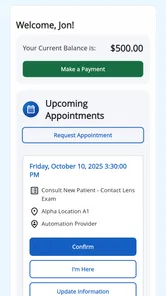
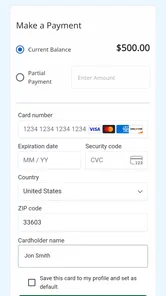
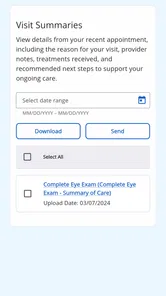
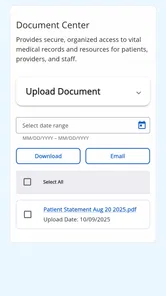
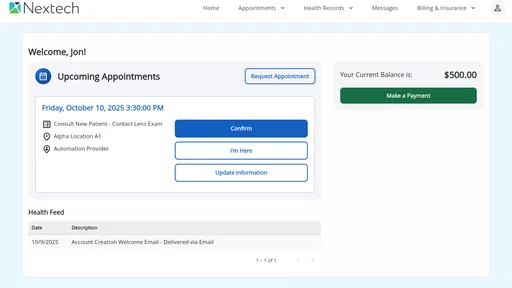
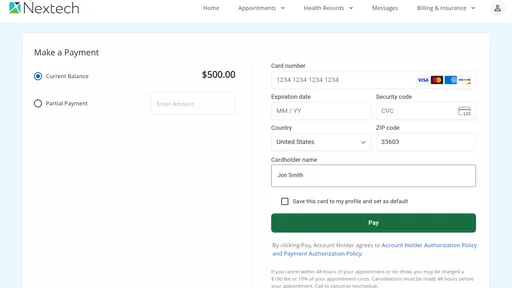
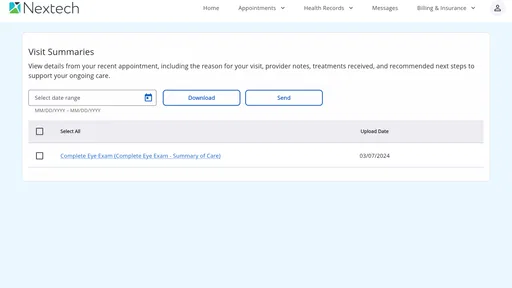
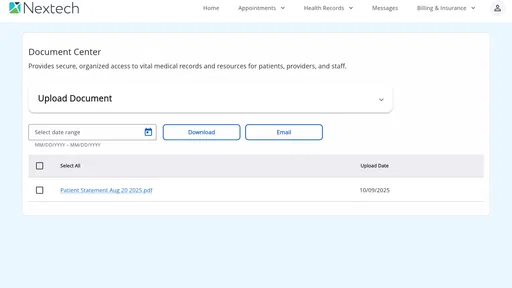
myPatientVisit Portal is designed to help patients interact with participating healthcare providers online. Depending on the organization’s configuration, it may let you view appointment information, complete forms, review messages, access selected health records, and receive instructions before a visit. Available features can differ between hospitals, clinics, and medical practices, so the portal may not offer the same tools for every patient.
How do I sign in to myPatientVisit Portal?
Access usually requires an invitation, registration link, or account details provided by your healthcare organization. You may need to verify your identity using information connected to your appointment or patient record. Follow the instructions supplied by the clinic rather than creating multiple accounts. If your login fails, contact the provider’s support team, since the healthcare organization generally manages account activation, access permissions, and patient identity verification.
Can I use myPatientVisit Portal to schedule or change an appointment?
Appointment management depends on the healthcare provider using the portal. Some organizations allow patients to request, confirm, reschedule, or cancel appointments, while others only display existing visit details and require phone contact for changes. Before relying on the app, check whether your clinic has enabled scheduling features. For urgent changes, missed appointments, or time-sensitive instructions, contacting the office directly is usually the safest option.
Pros
- Secure access to appointments
- test results
- and medical records in one place.
- Easy messaging helps you contact your care team without calling the office.
- Appointment reminders can reduce missed visits and scheduling confusion.
- Prescription refill requests are convenient for eligible medications.
- Supports faster check-in and less paperwork before appointments.
Cons
- Some features may depend on your healthcare provider’s participation.
- Login or verification issues can make first-time setup frustrating.
- Not all test results may appear immediately after they are released.
- Messaging responses depend on office hours and staff availability.
- The interface may feel less intuitive for users unfamiliar with portals.











