

myORCA
- 210.00
- 3.0
- Installs
- 100.00K
- Price
- Free

Screenshots
Analysis by Reviewed
I approached myORCA as the kind of travel app you open when you are already thinking about a bus, train, or ferry connection and want to deal with your transit card without finding a machine first. Developed by myORCA, it belongs to the Travel & Local category and is free to use. Its purpose is focused rather than ambitious: it puts ORCA card management on a phone instead of treating the card as something you can only handle at a station or retail location.
That narrow purpose is also the key to judging it fairly. This is not a route-planning replacement for every transit tool, and it is not a general travel wallet. I found it most useful when I wanted a quicker way to check or manage my ORCA card during an ordinary day out. I also found that the experience depends heavily on getting the initial setup right and understanding whether a problem comes from the app, the card, the account, or the transit system itself.
Where the experience usually gets stuck
The first point of friction is expectation. A person may install myORCA thinking it will behave like a complete transit companion, then feel disappointed if they mainly wanted live directions, service alerts, or a broad trip-planning experience. Its role is more specific: it is centered on the ORCA card. I would install it for card management, not as the only travel app on my phone.
Another common stumbling block is trying to rush through the first account or card connection. When an app deals with a physical transit card and an online account, a small mismatch can create confusion. The card details, account credentials, and information entered during setup need to refer to the same card. If something looks wrong, I would first slow down and recheck the exact information rather than repeatedly tapping the same action.
There is also a practical difference between seeing information in an app and seeing that change reflected everywhere immediately. Transit-card systems can involve online processing, card readers, and the transit network itself. If I make a change and do not see the expected result at once, I would avoid assuming that the action failed. I would check the screen again after a short pause, confirm that I am viewing the intended card, and then test the card through the normal transit process when appropriate.
The most useful mindset is to treat myORCA as a card-management tool, not as a magic fix for every ORCA-related problem. That distinction prevents a lot of unnecessary troubleshooting. It also makes the app easier to appreciate because its value is clearest when the task is directly connected to the card.
What I check before blaming the app
Before opening the app, I make sure I know which physical card I am trying to manage. This sounds obvious, but households and frequent travelers can easily have more than one card nearby. A card number copied from an old note, a family member’s card, or a previous account can send the setup in the wrong direction. I keep the physical card beside me and compare the details carefully.
More From Our News Desk

 Weather - By Xiaomi
Weather by Xiaomi Review: Clear at a Glance, Less Clear Up Close
Xiaomi’s weather app makes everyday forecasts quick to scan, but its calm surface can leave useful details and recovery paths harder to find than they should be.

 X
XX Under Pressure: Can It Recover When Posting Goes Wrong?
A resilience-focused review of X, examining setup, mistaken posts, interruptions, weak connections, and the gaps that matter when recovery needs to be dependable.

 Clash of Clans
Clash of Clans Is Won Between the Battles
Its raids are quick; its community is a long-term project of coordination, teaching, rivalry, and shared responsibility—with all the friction that entails.

 Android Auto
Android Auto Makes the Case for Quieter Car Software
The car interface is no longer judged by how much it can do, but by how quietly it helps. Android Auto shows what drivers now expect—and what still gets in the way.

 MobiOffice: Word, Sheets, PDF
MobiOffice: Transforming Mobile Productivity with Seamless Integration
MobiOffice: Word, Sheets, PDF is redefining mobile productivity with a surprising blend of functionality and innovation.

 EA SPORTS FC Soccer Mobile 26
EA SPORTS FC™ Mobile Soccer: Redefining Mobile Sports Gaming
Dive into EA SPORTS FC™ Mobile Soccer, where immersive gameplay and strategic depth transform mobile sports gaming.
Latest News



I also check that I am using the current account information rather than an old password or an email address that was used for another service. If login fails, I do not immediately create a second account. Duplicate accounts can make it harder to tell where the card is connected, and starting over may not solve the original issue.
My next check is simple but important: I close and reopen the app, confirm the phone has a working internet connection, and make sure I am not relying on a stale screen. This is basic advice, but it is especially relevant when an app is displaying account information that may have been loaded earlier. A fresh session helps distinguish a temporary display problem from an actual account problem.
The app is free, which removes one barrier to trying it, and its Everyone content rating makes it suitable for a broad audience. That does not mean every setup will feel effortless. A free app can still require accurate card information, patience during account linking, and a clear understanding of what action you are attempting.
Setup checks that save time later
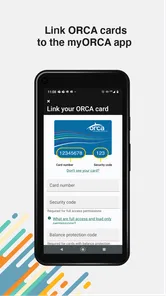
During setup, I would use one deliberate sequence instead of jumping between screens. First, identify the correct ORCA card. Next, sign in with the account intended to manage it. Then, review the card information shown before making additional changes. If the app presents more than one card or account-related choice, I would read each label rather than selecting the first visible option.
I would also avoid setting up the app for the first time while standing in a crowded boarding area. That is exactly when a small error feels like a major failure. A calmer setup gives me time to read prompts, correct a typo, and confirm that the card I see in the app is the card in my wallet.
One useful habit is to take note of the state of the card before making a change. I do not mean creating a complicated record; I simply want to know what I expected to see and what I actually saw. If the result differs, I can describe the problem clearly instead of relying on memory. This is particularly helpful when several actions are performed close together.
I would keep the app updated as well. The current version is 1.7.4, and the app supports Android devices running at least version 5.0. Those details matter when someone is using an older phone: if the device falls outside the supported software range, reinstalling the app or repeating setup is unlikely to solve compatibility issues. On a supported device, updating is a sensible first step when the interface behaves unexpectedly.
For iPhone users, the same principle applies even though the platform checks differ. I would use the current version available for the device, restart the app after an update, and then repeat only the step that failed. Reinstalling immediately can erase useful context and turn a small session problem into a full setup task.
A better daily workflow
Once the card is connected properly, I see myORCA as most useful in small moments rather than as an app I leave open all day. Before heading out, I can use it to handle a card-related task while I still have time to correct an issue. That is better than discovering a problem at the point of boarding, when there may be a line behind me and no convenient place to stop.
For example, imagine I am leaving work for an evening trip. I open the app before walking to the stop, check the card information, and deal with any available account action while I have a stable connection. If something does not look right, I have time to pause and use another payment or travel plan rather than making the platform entrance the testing ground.
A second useful workflow is separating account work from travel movement. I would not make several changes while moving between vehicles or stations. I would perform one action, wait for the app to reflect it, and then verify the result. This reduces the chance of confusing an old screen with a new status.
There is a trade-off here. The app can make card management more convenient, but convenience depends on remembering to prepare ahead. It is less helpful if I only open it after a card has already failed during a busy trip. In that situation, the physical card, a station reader, or staff assistance may provide more immediate information than the phone screen.
How I recover when a workflow breaks
When something goes wrong, I use a short recovery path rather than trying every option at once. I first identify the exact failed step: opening the app, signing in, locating the card, viewing information, or completing a card-related action. Then I close the app, reopen it, and repeat only that step.
If the same step fails, I check the connection and confirm the account details. I also make sure I have not accidentally switched to another card or account. This sounds repetitive, but it is more informative than changing several variables simultaneously. If I update the app, reinstall it, change the password, and try a different card all at once, I will not know which action helped or created a new problem.
If the app opens but the information seems delayed, I give the session time to refresh and compare what I see with the physical card and the context in which I used it. I would not assume that a delayed display means the card itself is unusable. Conversely, I would not assume that a reassuring app screen proves a card reader will accept the card in every situation. The two parts of the system do not always provide feedback in exactly the same moment.
For a login issue, I would use the account-recovery route available on the sign-in screen rather than repeatedly guessing credentials. If the problem concerns the card itself, I would gather the card details, the time of the failed action, and the exact message shown. Clear information makes any later support conversation more productive.
One non-obvious tip is to avoid troubleshooting during a live boarding moment whenever possible. If the card is not working, step aside safely, use the available transit guidance or staff channel, and return to the app when there is no pressure to move. A phone app is a poor place to experiment when other passengers are waiting.
When the app is not the cause
Not every ORCA problem is an app problem. A physical card can be damaged, unreadable, expired, or otherwise unable to work independently of what the phone displays. A reader, gate, vehicle, or network issue can also produce a result that looks like an account failure. If the same card behaves differently across locations, I would pay attention to that pattern instead of focusing only on the app.
Likewise, a transit-system delay can make a card action appear incomplete. The app may show the account side of an event while a reader reflects another stage of processing. In that situation, repeating the action several times could create more confusion. I prefer to wait, refresh once, and check the physical card through the normal process before taking further steps.
There is also a difference between a card balance concern and a journey-planning concern. If I need to know which route to take, when a vehicle is due, or whether service has changed, I may need a separate local transit or mapping tool. myORCA is not the right choice simply because the trip involves public transportation. It is the right choice when the ORCA card itself is part of the task.
This is where the app compares interestingly with the usual alternatives. A physical card is faster for tapping and does not depend on a phone battery, but it gives me less convenient access to card management while I am away from a machine. A browser-based account can be useful on a computer, especially for a longer administrative session, but it is less natural when I am already out traveling. A general transit app can be better for directions and departures, but it is not a substitute for a focused ORCA card tool.
I would therefore use these options together rather than force one of them to do everything. myORCA handles the card side, a route app handles navigation, and the physical card remains important for the actual journey. That combination is more realistic than expecting one small app to replace the entire transit system.
Who will appreciate it most
I think myORCA is a good fit for regular ORCA users who want card management available from a phone. It is also useful for people who prefer to prepare before leaving home, keep their transit tasks organized digitally, and avoid unnecessary stops at a machine when a phone-based option is enough.
It can be especially practical for someone who travels at changing times. Instead of waiting until the last minute, that person can check the card-related situation before heading out and decide whether the trip is ready to go. The benefit is not dramatic every day, but it becomes noticeable when the alternative is discovering a problem at the busiest possible moment.
Families and shared households should be more careful during setup. The app may be convenient, but managing several physical cards requires attention to which card is connected and which account is being used. I would not assume that adding one person’s card automatically organizes every other card. I would handle each card deliberately and verify the result before relying on it.
Visitors may find it useful if they already have an ORCA card and need to manage that card from a phone. However, someone looking only for sightseeing ideas, broad regional directions, or a complete itinerary planner should choose a different primary app. Installing myORCA alone will not turn it into a general-purpose travel guide.
Who should choose another tool
I would skip it if my main need is live route discovery rather than card management. A mapping or transit-planning app will usually be a better starting point for comparing routes, locating stops, and organizing a day across several destinations. I would also hesitate to depend on it as my only backup if my phone is old, unreliable, or frequently out of battery.
People who dislike account setup may find the initial process more effort than expected for occasional travel. If I only use public transportation once in a while and already have a simple way to manage my card, the app’s convenience may not outweigh the time spent connecting and checking everything.
The average rating is 3.0 from around 400 ratings, with over 200 written reviews, so the public response is mixed rather than universally enthusiastic. I read that as a reason to keep expectations practical. The app solves a specific problem for some users, but the setup and system-dependent nature of transit-card management can strongly affect how smooth the experience feels.
My practical verdict
After using myORCA with a troubleshooting-first mindset, I see it as a useful companion for ORCA card tasks, not a complete replacement for every transit tool. Its strongest quality is focus: when I need to manage the card from a phone, the app is more direct than opening a general travel service and hoping it supports the same function.
The best way to use it is to set it up before a busy journey, confirm the correct card, perform one action at a time, and keep the physical card available. If a result looks delayed, refresh calmly instead of repeating the action. If the card fails at a reader, consider the reader, the physical card, and the transit system as possible causes rather than blaming the app automatically.
myORCA is free, rated for Everyone, and has been available since May 10, 2022. With version 1.7.4 and support for Android 5.0 or later, it remains accessible to people using older compatible Android phones, while iPhone users should likewise keep the installed version current. Those details make it easy to try, but they do not remove the need for sensible preparation.
My recommendation is straightforward: install it if you regularly use an ORCA card and want card management close at hand. Keep a separate route-planning option for directions, and do not treat the app as proof that every physical card or reader issue has been resolved. Used within those boundaries, myORCA is a practical, focused tool that earns its place on a transit user’s phone, even though its value depends more on careful setup than on constant daily use.
myORCA Frequently Asked Questions
Is myORCA available for my phone, and what age group is it intended for?
myORCA is a travel and local app for managing an ORCA card on the go. It is available for Android devices running version 5.0 or later, and its content rating is Everyone. Before downloading, check that your device meets the operating-system requirement and that you are installing the app published by myORCA.
What is myORCA and what can I use it for?
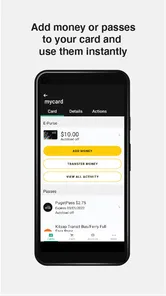
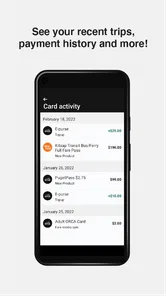
myORCA is the official mobile app for managing ORCA transit payments in the Puget Sound region of Washington. After installing it, you can add and manage eligible ORCA cards, check balances and transaction history, load value or passes, and review recent activity. It is designed for riders using participating buses, trains, ferries, and other regional public transportation services.
Can I add an existing ORCA card to the myORCA app?
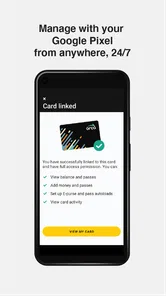
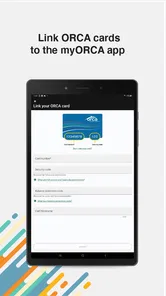
Yes, myORCA generally allows you to connect an existing ORCA card to your account, provided the card is eligible and the required card details can be verified. Once linked, you can view its balance, manage products, and make online purchases or reloads. You should keep your physical card, because the app does not necessarily replace it for every trip.
Can myORCA be used as a mobile ticket or virtual ORCA card?
myORCA may support mobile payment or digital card functionality depending on your device, account setup, and the current services offered by the regional transit system. However, riders should not assume that simply installing the app replaces a physical ORCA card. Before traveling, check that the mobile option is activated and accepted on the specific transit services you plan to use.
How do I add money or purchase a transit pass in myORCA?
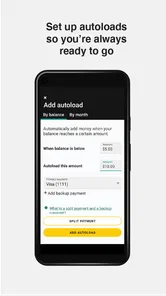
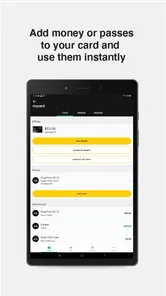
After signing in and selecting a linked ORCA card, you can typically choose an amount to add or select an available pass or fare product. Payment is usually completed with a supported debit or credit card through the app. Processing times can vary, so it is wise to reload before your balance becomes too low, especially when traveling outside normal customer-service hours.
Pros
- Quickly check ORCA card balances and recent transaction history.
- Supports adding funds without visiting a ticket machine or retail location.
- Useful for planning trips with current transit fares and account details.
- Digital access makes managing multiple ORCA cards more convenient.
- Official account tools can reduce the need to carry out routine web tasks.
Cons
- Some features may require signing in or linking an existing ORCA account.
- Balance and transaction updates may not appear instantly after a purchase.
- The app is mainly useful within the Puget Sound transit network.
- Users may still need a physical ORCA card for certain travel situations.
- Occasional app or payment issues can make urgent top-ups inconvenient.











