MyGrowth: Daily Micro Learning
- 176.00
- 4.2
- Installs
- 100.00K
- Price
- Free

Screenshots

Analysis by Reviewed
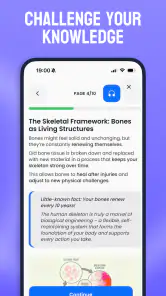
MyGrowth: Daily Micro Learning is the kind of education app I can imagine opening between two ordinary tasks rather than setting aside a whole evening for study. It focuses on small pieces of knowledge for adults, and that narrow idea gives it a clear place among the many apps competing for attention on a phone. I found the experience most appealing when I treated it as a short mental reset: a few minutes to learn something new, reflect on it, and then return to the day.
That convenience also comes with an important condition. The quality of the experience depends on how comfortably the app fits into your mobile routine, including the moments when your connection is weak or your attention is divided. MyGrowth is not a replacement for a full course, a textbook, or serious professional training. Instead, I see it as a lightweight learning companion for people who want regular exposure to useful ideas without committing to long lessons.
How MyGrowth fits learning into a connected day
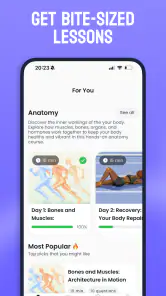
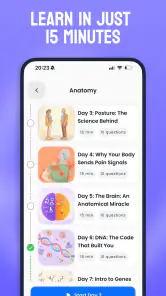
Extramile Limited presents MyGrowth as an education app for adults, and the concept is easy to understand from the first use. Rather than asking me to follow a demanding academic program, it is built around bite-sized learning. That makes the app approachable for someone who enjoys personal development but struggles to maintain a fixed study schedule.
I would place it somewhere between a daily reading habit and a structured learning platform. It has more purpose than casually scrolling through articles, but it does not create the same depth as a long-form course. That distinction matters. If I wanted to master a technical subject, prepare for an exam, or build a portfolio skill, I would choose a specialist course with exercises and a clearer progression. If I wanted a small, repeatable learning moment during a busy day, MyGrowth would make more sense.
The app is free to start, with optional in-app purchases ranging from $0.99 to $69.99 per item. That makes it accessible to try without an immediate financial commitment, while the range of optional purchases means I would still check what is included before paying. A free entry point is useful for testing whether the short-lesson format actually suits my habits. I would not buy anything simply because I enjoyed the first few sessions; I would first decide whether the app is becoming a consistent part of my routine.
Its age classification is Everyone, which fits the broad, approachable nature of the product. The current version is 1.13.1, and it requires at least operating system version 10. On a compatible phone, the basic barrier to entry is therefore relatively low. The app has also reached over 100K installs, with a 4.2 average from around 2K ratings and 176 written reviews. Those figures suggest that it has found a real audience, although they do not tell me whether every learner will enjoy the same subjects or rhythm.
What happens when the connection is part of the experience
Connectivity is easy to overlook in a learning app because each lesson may be short. In practice, a short lesson is only convenient if it opens when I need it. MyGrowth works best in connected situations where I can launch it deliberately, such as at home, in an office with reliable internet, or while waiting somewhere with a stable mobile signal. Those are the moments when the app feels like a dependable pocket activity rather than another source of friction.
More From Our News Desk

Clash of Clans Is Won Between the Battles

Android Auto Makes the Case for Quieter Car Software

MobiOffice: Transforming Mobile Productivity with Seamless Integration

EA SPORTS FC™ Mobile Soccer: Redefining Mobile Sports Gaming

How Microsoft OneDrive Became a Mobile Productivity Giant

How Google Translate Breaks Language Barriers Effortlessly
I would be more cautious about making it part of a commute or travel routine without first checking how it behaves in the exact conditions I expect to use. A train journey with intermittent reception, an underground platform, or a crowded event can turn a two-minute learning plan into repeated loading and interruptions. Since the app’s appeal is built around immediacy, even a small delay feels more noticeable than it would in a long reading session.
My practical advice is to open the app before the learning moment becomes urgent. If I know I will have a few minutes before an appointment, I would not wait until the last second to launch it. Starting earlier gives the content time to appear and avoids wasting the entire break watching a loading screen. This is a small habit, but it is one of the most useful adjustments for any short-form app whose value depends on being ready at the right moment.
I also would not assume that a lesson will remain available simply because I have seen it before. The safest approach is to treat MyGrowth as a connected service unless the app itself clearly confirms otherwise. That keeps expectations realistic and avoids planning a study session around material that may not load when the network disappears.
Mobile situations where the short format works best
The strongest use case I found is the “in-between” moment: after finishing a task, before a meeting, during a quiet coffee, or while waiting for an appointment. These spaces are too short for a serious course but long enough for a focused mental change of pace. MyGrowth gives that time a purpose without demanding the preparation associated with conventional study.
A realistic routine would be this: I finish lunch, connect to a reliable network, open the app, and complete one small learning session before returning to work. I would then write one sentence in my notes about the idea I want to remember. That final step is important because bite-sized content can feel satisfying without becoming memorable. The app supplies the prompt; I have to create the connection to my own life.
The format is also useful for adults whose schedules change every day. A parent, freelancer, shift worker, or frequent traveler may not be able to promise an hour at the same time each evening. A short learning app can fit around those irregular gaps more naturally than a platform that expects a fixed weekly timetable.
There is a trade-off, though. A phone is full of distractions, and the same device that delivers a lesson also offers messages, social feeds, and notifications. I would use MyGrowth with notifications minimized and the phone placed in a mode that makes a brief learning session feel intentional. Otherwise, the app can become the first step toward unrelated browsing rather than a focused educational break.
I would also avoid using it while walking, driving, or handling anything that requires attention. Bite-sized does not mean risk-free. The best mobile context is stationary, safe, and short enough that I can give the lesson genuine attention instead of absorbing it in fragments.
Where the app may fall short for serious learners
The biggest limitation of microlearning is depth. A small lesson can introduce an idea, but introduction is not mastery. If I need detailed explanations, worked examples, long-term projects, or formal assessment, I would look beyond MyGrowth. A specialist learning platform, a well-edited book, or an instructor-led class will usually be better for building durable expertise.
There is also a risk of confusing consistency with progress. Opening an educational app every day feels productive, but the habit only becomes valuable when I can recall and use what I learned. I would judge MyGrowth by the quality of ideas I remember a week later, not by how often I open it. Keeping a small note, discussing a concept with someone, or applying it to a work problem can turn passive consumption into active learning.
The free model deserves the same careful attention. Optional purchases may be worthwhile for a committed user, but the price range is broad enough that I would inspect each purchase screen and understand what I am receiving before confirming anything. Someone looking for a completely unrestricted, no-cost educational resource may prefer public libraries, open course material, or free reference tools instead.
MyGrowth is also not the right choice for every learning personality. I would skip it if I needed a syllabus, visible academic credentials, intensive practice, or a guaranteed offline study workflow. I would also be cautious if I already have too many daily notifications and habit apps. In that case, adding another small obligation could create guilt rather than curiosity.
Handling interruptions, weak reception, and recovery
A good mobile learning habit needs a recovery plan because interruptions are normal. A phone call, a lost signal, a low battery, or an accidental swipe can break a short session. With MyGrowth, I would not treat an interrupted lesson as a failure. I would simply reopen the app when the connection is stable and continue only if I still have enough attention to benefit from it.
The most useful recovery strategy is to keep the session small even when I have more time available. If the app is working slowly, repeatedly refreshing is rarely a good use of a short break. I would close unnecessary apps, check the connection, and try again once rather than turning the learning moment into technical troubleshooting. If the problem continues, I would switch to a saved personal note or another trusted reading source and return later.
This approach also protects the habit from becoming too fragile. A daily learning routine should survive one missed session. I would rather resume naturally the next day than force myself to compensate with an unnecessarily long session. The app’s microlearning concept works best when it reduces pressure, not when it creates another streak that I feel obliged to defend.
Before relying on MyGrowth during travel, I would test it at home by briefly changing network conditions and observing what remains usable. I would not infer offline access from the fact that lessons are short. If offline use is essential to me, I would choose a service that explicitly supports downloaded lessons or keep a separate reading option ready. That is a practical distinction between an app that is convenient online and one that is designed for disconnected study.
Using less mobile data without weakening the habit
Because MyGrowth is intended for frequent mobile use, I would be thoughtful about when I access it over cellular data. The exact amount consumed can vary with the content and connection, so I would not make a fixed assumption. Instead, I would use the phone’s own data controls to watch the app’s activity during the first few sessions.
For a data-conscious routine, I would begin lessons on Wi-Fi whenever possible, especially before a long trip. I would also avoid repeatedly reopening the same screen during a weak connection, since failed attempts can be more wasteful than one clean launch. If the phone offers a warning or limit for mobile data, setting one gives me a useful safeguard without needing to monitor every session manually.
Battery use matters in the same way. A short lesson is unlikely to feel demanding by itself, but frequent launches, poor reception, and background phone activity can make a device work harder. I would keep the screen brightness sensible, close the app after finishing, and avoid using it when the battery is already critical. These are ordinary phone habits, but they make a noticeable difference when learning is spread across many small sessions.
I would also separate “available now” from “important now.” If a lesson fails to load during a limited-data period, there is no need to keep trying. The educational value is not tied to that exact minute. Waiting for Wi-Fi protects both my data allowance and my willingness to keep using the app.
Who will get the most from MyGrowth
I think MyGrowth is best for curious adults who want a regular prompt to learn but do not want a demanding curriculum. It suits people who enjoy variety, have unpredictable schedules, and can turn a short lesson into a starting point for further thought. It may also help someone rebuild a learning habit after leaving formal education, because the commitment feels manageable.
It is less suitable for a learner who needs a measurable qualification or a carefully sequenced path through one subject. In that situation, I would choose a course with explicit objectives, assignments, feedback, and a way to demonstrate competence. The app can supplement that kind of study by offering lighter moments, but I would not make it the main tool for a high-stakes goal.
Families should also remember that an Everyone rating describes broad age suitability, not a guarantee that every topic will match every child’s interests or learning needs. The product is positioned for adults, so I would evaluate it as an adult learning companion rather than a children’s teaching platform.
For a friend deciding whether to try it, I would suggest a simple test: use the free experience during several different parts of the day, including one reliable Wi-Fi session and one ordinary mobile session. Notice whether the lessons fit naturally, whether the connection interrupts the flow, and whether you remember anything afterward. That tells me more than an enthusiastic first impression.
My final view on its connected-learning trade-off
MyGrowth: Daily Micro Learning succeeds when I treat it as a small, intentional learning break rather than a complete education system. The short format is genuinely convenient, particularly for adults whose free time arrives in unpredictable pieces. Its free starting point lowers the risk of trying it, and its broad audience makes it easy to understand without a complicated setup.
At the same time, the connected nature of a mobile experience should shape how I use it. I would not depend on it in places with unreliable reception until I had tested the behavior myself, and I would not assume that a compact lesson replaces deeper study. Planning around Wi-Fi, avoiding repeated failed loads, and having a simple backup reading option make the experience more dependable.
My honest recommendation is therefore conditional but positive: choose MyGrowth if you want a gentle daily nudge toward learning and can give those short sessions a stable connection and real attention. Skip it, or pair it with a more substantial alternative, if your goal is certification, advanced skill development, or guaranteed offline access. Used within its limits, it is a practical way to make otherwise empty mobile moments feel worthwhile.
MyGrowth: Daily Micro Learning Frequently Asked Questions
Who is MyGrowth: Daily Micro Learning designed for?
MyGrowth is an education app aimed at adults who want to explore personal development in short, manageable sessions. Its bite-sized approach can suit people with busy routines as well as anyone who prefers focused learning over long courses. The content can be approached by newcomers and by users who already engage with self-improvement material.
What is MyGrowth: Daily Micro Learning, and how does it work?
MyGrowth: Daily Micro Learning is a personal development app built around short, focused learning sessions. Instead of presenting long courses, it delivers small lessons and practical ideas that can be completed in a few minutes. The content is designed to fit into daily routines, helping users explore topics such as productivity, mindset, habits, communication, and self-improvement without feeling overwhelmed.
Is MyGrowth: Daily Micro Learning suitable for beginners?
Yes, the app is generally suitable for beginners because its lessons are presented in a simple, accessible format and do not require specialist knowledge. Each activity focuses on one idea at a time, making it easier to understand and apply. Users who already read personal development material may find the lessons useful as quick refreshers, while newcomers can use them as an introduction to lifelong learning.
How much time do I need to use MyGrowth every day?
MyGrowth is intended for short daily sessions rather than lengthy study periods. Most users can work through a lesson or activity in just a few minutes, although the exact time depends on the topic and whether you complete any reflection or action exercises. This makes the app convenient for use during a commute, a morning routine, a lunch break, or before going to bed.
Does MyGrowth: Daily Micro Learning require a subscription or offer in-app purchases?
MyGrowth is free to download and offers in-app purchases, with individual items priced from $0.99 to $69.99. Before purchasing, review the options shown in the app and consider whether they suit your learning needs and budget. This can help you decide whether the free experience is enough for you or whether you want to pay for additional offerings.
Pros
- Short daily lessons make learning easy to fit into busy routines.
- Covers a variety of personal and professional development topics.
- Simple interface keeps navigation focused and distraction-free.
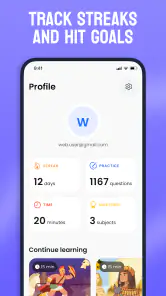
- Progress tracking can encourage consistent learning habits.
- Useful for quick refreshers during commutes or short breaks.
Cons
- Some lessons may feel too brief for complex subjects.
- Content depth can vary noticeably between different topics.
- Regular reminders may become repetitive for some users.
- Advanced learners may find the material too introductory.
- A subscription may be needed to unlock the full experience.
- Category
- Education
- Version
- 1.13.1











