

MyDevoted
- 123.00
- 4.6
- Installs
- 50.00K
- Price
- Free

Screenshots
Analysis by Reviewed
Managing health coverage often becomes frustrating at exactly the wrong moment: when you are trying to check a benefit, find useful information, or understand what to do next. MyDevoted is designed as a mobile companion for Devoted Health members, bringing benefit management into a more convenient place than a folder of papers or a desktop browser. I found its strongest appeal in that simple idea: it gives you a focused way to deal with your Devoted benefits from a phone.
As a medical app from Devoted Health, Inc., it is not trying to replace a doctor, diagnose symptoms, or act like a general wellness tracker. Its purpose is narrower and more practical. That focus is helpful if you already use Devoted Health, but it also means the app makes much less sense for someone outside that health plan. I would treat it as a member tool rather than a complete healthcare app.
What to expect before you begin
The first thing I would tell a new user is to keep expectations realistic. MyDevoted is best approached as a place for handling plan-related tasks, not as an emergency medical service or a substitute for speaking with a healthcare professional. If you have an urgent health concern, the app should not be your first or only step. Its value appears in the quieter moments: checking what your plan offers, reviewing information when you are away from home, or preparing for a conversation with a provider or Devoted Health representative.
The app is free, carries an Everyone age rating, and has passed the early adoption stage with more than fifty thousand installs. Its average rating sits at 4.6 from roughly three hundred ratings, with just over a hundred written reviews. Those figures suggest a generally positive reception, although they should not be mistaken for a guarantee that every member will find every screen effortless. Health-plan apps are personal by nature; the usefulness of a feature depends heavily on your coverage and what you need to do.
MyDevoted is currently listed as version 1.0.8 and supports Android 7.0 or later. That broad compatibility is useful if you keep an older phone, though I would still make sure your device has enough free space and a stable connection before starting. A smooth setup is especially important here because the app is tied to personal coverage information, so rushing through the first screen can create confusion later.
One practical advantage of a dedicated app is that it puts plan information closer to the situations in which you need it. You may be at a pharmacy, speaking with a family member about an appointment, or trying to understand a benefit while traveling. Opening a phone app is often less awkward than searching through old emails or trying to remember which page of a member website contains the answer. That convenience is the main reason I would recommend giving it a chance.
Who will get the most from it
MyDevoted is most suitable for Devoted Health members who prefer using a phone for routine account and benefit tasks. It can also be useful for someone who helps a parent or relative stay organized, provided that person handles access appropriately and the member is comfortable with the arrangement. The app gives those users a central starting point instead of scattering information across documents, phone calls, and browser tabs.
More From Our News Desk

 Gmail
GmailGmail in a Busy Inbox: Who Benefits Most?
From first account to crowded workday, Gmail earns its place through dependable search and flexible sorting—but its best fit depends on how much inbox maintenance you can tolerate.

 Prime Video
Switching to Prime Video: What Changes in Your Viewing Routine
Prime Video can make a compelling second home for streaming, but switching means learning a different catalog, rental layer, and route from browsing to playback.

 Universal TV Remote Control
Universal TV Remote Control Works Best as a Reliable Backup
A phone remote earns its place through quick setup and reliable habits. Here is how to get more from Universal TV Remote Control—and where its limits show.

 Weather - By Xiaomi
Weather by Xiaomi Review: Clear at a Glance, Less Clear Up Close
Xiaomi’s weather app makes everyday forecasts quick to scan, but its calm surface can leave useful details and recovery paths harder to find than they should be.

 X
XX Under Pressure: Can It Recover When Posting Goes Wrong?
A resilience-focused review of X, examining setup, mistaken posts, interruptions, weak connections, and the gaps that matter when recovery needs to be dependable.

 Clash of Clans
Clash of Clans Is Won Between the Battles
Its raids are quick; its community is a long-term project of coordination, teaching, rivalry, and shared responsibility—with all the friction that entails.
Latest News



I would skip it if you are looking for a broad health diary, medication reminder, fitness tracker, telemedicine platform, or symptom-checking service. Those are different jobs. Installing it will not turn your phone into a personal medical record or a replacement for professional advice. I would also avoid relying on it as the only way to access important coverage information until you have opened it, signed in successfully, and confirmed that the details you need are easy to reach.
Setting it up without unnecessary stress
For a first-time user, the best approach is to install MyDevoted when you are not already under pressure. Have your Devoted Health member details available, use the email address or contact information associated with your plan when appropriate, and take a moment to read each screen rather than tapping through automatically. The goal is not merely to finish setup; it is to reach the point where you can confidently find the information you installed the app for.
Because this is a benefits-management tool, account access matters more than visual polish. If you are helping another person, decide in advance whether they should complete the setup themselves or whether you will sit beside them. That small decision can prevent a common problem: one person knowing the login details while the other person is the actual member who needs to understand the account.
I also recommend completing the first sign-in at home or somewhere with dependable connectivity. A weak connection can make a normal account screen look broken, especially when information loads gradually. If something appears incomplete, wait and try again before assuming that your benefit is missing. This is a useful habit with any plan app, but it matters more here because a delayed page can be mistaken for an eligibility problem.
Once you are inside, spend a few minutes learning the shape of the app instead of immediately closing it after finding one answer. Notice how the main areas are arranged and where the app places information about your Devoted benefits. You do not need to memorize every option. What matters is identifying the route you will probably use again, then knowing where to return when you need it.
The first meaningful success
Your first successful action should be something concrete and low-pressure: open the part of MyDevoted that explains or displays a benefit you expect to use soon. For example, if you are preparing for an appointment or reviewing your coverage with a family member, use that moment to locate the relevant information rather than simply browsing. A successful first session ends with an answer you can act on, not just with a completed login.
After finding that information, pause and ask yourself whether you could reach it again without help. If the answer is no, repeat the path once. This may sound overly cautious, but it saves time later when you are standing somewhere unfamiliar and need the same detail quickly. I find that a short practice run is more valuable than reading every menu at once.
A helpful routine is to use the app before a planned healthcare task. Review the information you may need, write down any question that remains unclear, and then take that question to the appropriate Devoted Health contact or healthcare professional. This keeps the app in its proper role: a preparation and reference tool that helps you have a better conversation, rather than an authority that interprets every medical or coverage decision for you.
Another useful habit is to check information before leaving for an appointment or pharmacy visit, not after a problem appears. If you discover that you do not understand a benefit while already at the counter, you have fewer options and more pressure. Looking beforehand gives you time to compare what the app shows with the paperwork or instructions you already have and to resolve confusion while you are still comfortable.
Where new users may hesitate
The most likely source of confusion is the difference between managing benefits and managing care. A benefits app may help you understand plan information, but it does not automatically settle whether a particular medical service is right for you. If a screen gives you useful coverage context, that still does not replace a clinician’s advice about treatment or a provider’s confirmation of an appointment.
Another possible stumbling block is assuming that every question belongs inside the app. If you cannot find an answer, do not keep searching indefinitely or interpret an empty-looking area as a denial. Make a note of the exact question, the service involved, and the date you need the answer. Then use the appropriate official support route or ask your provider. The app is most effective when it reduces simple uncertainty; it is less effective when a situation requires personal explanation.
It is also worth remembering that plan information can be highly specific to the member. A friend’s experience with Devoted Health may not match yours, even if both of you use the same app. I would avoid comparing screenshots or assuming that a benefit visible to another person should appear in your account. Treat your own account as the relevant reference and ask for clarification when something does not make sense.
For older users, the phone itself may be the bigger obstacle than MyDevoted. Small text, unfamiliar navigation, or difficulty entering account information can turn a straightforward task into a tiring one. In that situation, I would use the app together with a trusted family member rather than handing over complete control. Have the member remain involved, confirm what is being viewed, and keep the purpose of each session clear.
How it compares with the usual alternatives
The usual alternative is a member website opened in a browser. A website may be preferable when you want to read several pages at once, print information, or work from a larger screen. MyDevoted has the advantage when the task is short and mobile: checking something while away from a computer, returning to a familiar account area, or preparing for a conversation from your phone.
Paper documents still have a place, especially for people who like to keep a physical record or who do not always have reliable phone access. I would not throw away important plan materials simply because the app is convenient. Digital access is quicker, but paper can be easier to annotate and consult when a device is unavailable. The sensible approach is to use MyDevoted for everyday reference and keep essential documents organized as a backup.
Calling Devoted Health remains the better option when your situation is complicated, urgent, or personal enough that a written explanation would help. A phone conversation can clarify a confusing case in a way that a menu cannot. MyDevoted is strongest for reducing routine friction before that call, helping you gather the right information so you do not have to explain your question from memory.
Compared with a general medical app, MyDevoted is more focused but less universal. A general app may offer symptom tools, health tracking, or appointment-related functions across different providers. This app’s narrower connection to Devoted benefits is precisely what makes it useful to the right audience and irrelevant to everyone else. I would choose it for plan access, not for broad health management.
Small habits that make it more useful
First, use a real task as your learning guide. Instead of exploring randomly, open MyDevoted when you have a specific benefit question. This reveals the app’s practical value faster and helps you remember the route you actually need. It also exposes any unclear wording while you still have time to seek an explanation.
Second, create a short personal checklist after your first successful session. Note where you found the benefit information, where you would look for account-related details, and which questions require a person rather than the app. Do not record sensitive login information in an exposed note. The checklist should describe navigation, not become a security risk.
Third, treat the app as a preparation tool before healthcare conversations. Open it before calling, collect the relevant details, and phrase your question in plain language. This can make a support interaction more efficient because you are discussing a specific screen or benefit instead of starting with a vague concern.
Finally, keep your expectations aligned with the app’s role. A high rating and a growing user base are encouraging, but they do not remove the need to verify important decisions. MyDevoted can make benefits easier to reach; it cannot make every coverage question simple or every healthcare choice automatic.
My recommendation for a first-time member
I recommend MyDevoted to Devoted Health members who want a convenient mobile way to stay connected with their benefits. The free price removes the main barrier to trying it, and the app’s medical focus is clear rather than scattered across unrelated tools. In my experience, the best result comes from installing it before you need it, signing in calmly, and completing one real benefit-related task during the first session.
I would be more cautious about recommending it to someone who expects a complete healthcare hub or who prefers handling all sensitive matters by phone or on paper. For those users, the app may feel unnecessary. The same is true for anyone who is not a Devoted Health member; its usefulness depends on that relationship, so there is little reason to install it just to browse.
Overall, MyDevoted is a practical companion rather than an ambitious all-purpose health platform. Its strength is the everyday convenience of bringing Devoted benefits onto a phone, while its limitation is that convenience cannot replace human clarification when a situation becomes complicated. If you approach it as a focused member tool, learn one useful path during setup, and keep a phone or provider conversation available for questions it cannot settle, it can become a genuinely helpful part of your routine.
MyDevoted Frequently Asked Questions
Is MyDevoted compatible with my phone?
MyDevoted is available for Android and iOS, and the Android version requires Android 7.0 or later. Before downloading, check your device’s operating system and make sure it meets that requirement. The app is free to install, but downloading and using it requires an internet connection, so your mobile carrier’s data charges may apply.
Who develops MyDevoted, and is it intended for general medical advice?
MyDevoted is developed by Devoted Health, Inc. and is a medical app focused on helping members manage their Devoted benefits. It is not a general-purpose medical reference or a substitute for care from a qualified health professional. Its usefulness depends on your relationship with Devoted Health and the features available to your account, so it may not be suitable for someone seeking broad health information.
What is MyDevoted and what can I use it for?
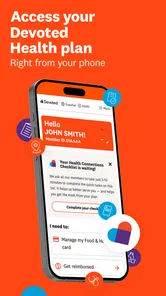
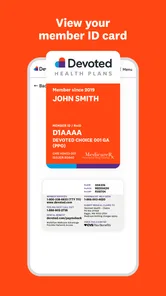
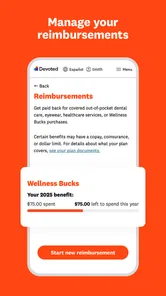
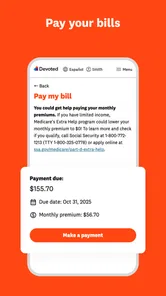
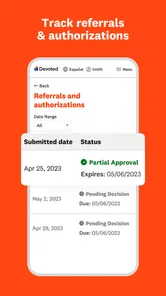
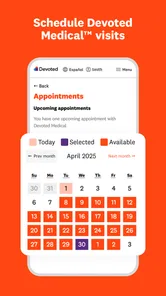
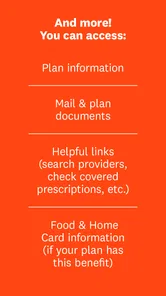
MyDevoted is a mobile app designed for members of Devoted Health to manage important healthcare information from one place. After signing in, users can typically review plan details, access digital member information, search for care and benefits, check coverage-related resources, and find support options. The exact features available may depend on your Devoted Health plan, location, eligibility, and the version of the app installed.
Who can use the MyDevoted app?
MyDevoted is primarily intended for eligible Devoted Health members and, in some cases, authorized caregivers or representatives who have appropriate access. You will generally need valid member information and an account or sign-in credentials to use the main features. If you are not enrolled in a participating Devoted Health plan, many functions may be unavailable. Contact Devoted Health support if your membership cannot be verified.
Is MyDevoted free to download and use?
The MyDevoted app is free to download from the official Android or iOS app store, and there is normally no separate charge simply for installing it. However, using certain healthcare services, prescriptions, appointments, or benefits shown in the app may involve costs determined by your insurance plan. Mobile data charges may also apply, so check with your carrier and review your plan documents before using paid services.
Pros
- Simple way to access devotionals
- prayers
- and faith-based content in one app.
- Personalized content can make daily spiritual routines easier to maintain.
- Useful for users who want encouragement and reflection on the go.
- Clean
- focused experience keeps attention on religious content.
- Convenient mobile access reduces the need for printed devotional materials.
Cons
- Content may feel limited for users seeking broader theological perspectives.
- Some features may require an account or personal information to use fully.
- Religious content may not appeal to users outside its intended faith community.
- Notifications could become distracting if enabled too frequently.
- Availability of certain content or features may vary by region or subscription.











