myColorado
- 5.56K
- 4.2
- Installs
- 500.00K
- Price
- Free

Screenshots
Analysis by Reviewed
If you live in Colorado, the state’s official mobile app is most useful when you treat it as a convenient companion to your usual documents and services, not as a reason to leave every backup at home. I like the idea of having several state-related tasks gathered in one place, especially when an errand comes up unexpectedly. Its range is appealing, but the practical value depends on whether you regularly need Colorado services and are comfortable relying on your phone for quick access.
Who benefits from having it ready
I’d recommend it most to Colorado residents who deal with more than one state-related task over the course of a year. The convenience is less about replacing every official channel and more about having a familiar starting point when an identity, vehicle, voter, or insurance need comes up. If you only visit Colorado briefly, or rarely need state services, a browser and your existing documents may be simpler than maintaining another app.
It can also help households where one person tends to organize errands for others. Before a family appointment or a vehicle-related stop, you can check which details need to be available and prepare them ahead of time. I would not assume that one person’s account or phone automatically covers everyone in the household; each person should confirm what they can access and what identification a particular service accepts.
What to expect when opening it
myColorado is a free business app from the State of Colorado - Governor's Office of IT. It has a 4.3 average from around 11,000 ratings and more than 500,000 installs. Those figures suggest that plenty of people have found a reason to keep it, though they don't tell me how it will feel on every device or connection. The app launched in 2019, and version 12.0 requires Android 12 or later. Its Everyone age rating makes it suitable for a broad audience, but the main reason to install it is straightforward: you live in Colorado or often handle Colorado-related tasks.
I would expect simple actions, such as checking a saved item, to be more useful on the move than browsing state information at length. That distinction matters: this is a practical utility rather than an app I would open for entertainment. If your phone is older or short on space, check that it meets the operating-system requirement before planning around it. I also wouldn't assume that every task can be completed instantly; a state service may involve steps beyond opening the app.
Speed expectations and preparation
I wouldn’t judge a state-services app by whether every screen appears instantly. A quick lookup and a task that connects to an official service are different kinds of work, and the latter may require extra interaction. My practical advice is to open the app before you are in a hurry, sign in if needed, and inspect the particular item you plan to use. That small rehearsal can reveal a setup step while you still have time to handle it calmly.
For a faster errand, decide in advance what you need from the app rather than exploring every section at the counter. If you are checking voter information, preparing for a vehicle matter, or getting an insurance card ready, go straight to that task and keep any related documents nearby. This is not a claim that the app runs slowly; it is simply a sensible way to avoid making a state-related errand depend on last-minute navigation or an uncertain connection.
More From Our News Desk

Weather by Xiaomi Review: Clear at a Glance, Less Clear Up Close

X Under Pressure: Can It Recover When Posting Goes Wrong?

Clash of Clans Is Won Between the Battles

Android Auto Makes the Case for Quieter Car Software

MobiOffice: Transforming Mobile Productivity with Seamless Integration

EA SPORTS FC™ Mobile Soccer: Redefining Mobile Sports Gaming
Using it during a busy day
A realistic use is preparing for an appointment or a quick stop where you may need to show identification or check a state-related detail. Having relevant information organized on your phone can save a search through a wallet or email, but I would still carry physical identification when a situation is important or when I am unsure whether a digital version will be accepted. The useful habit is to set up and check what you need before leaving, rather than discovering a login or setup step while standing in line.
The app's mix of identity, vehicle, voter, insurance, contact, and state-information tools also makes it different from a general-purpose wallet or a browser search. A wallet app is usually better for keeping everyday payment cards together, while a browser can be more direct when you already know the exact state webpage you need. Here, the trade-off is convenience across Colorado-related tasks in one app, rather than the broadest selection of services or a replacement for every official process.
A Digital Wallet for Your Colorado ID
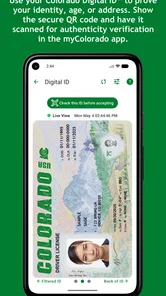
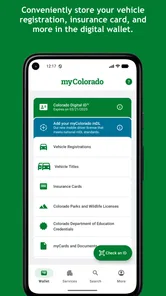
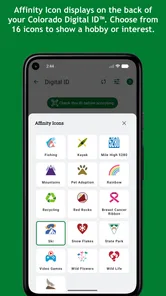
First things first, let's talk about the feature that truly sets the myColorado app apart - the digital ID. Gone are the days of panicking when you can't find your wallet right before heading out. With this app, you can store your Colorado driver’s license or state ID digitally, and it's accepted throughout the state. I mean, how cool is that? It's like having a backup plan, just in case your actual ID decides to play hide and seek.
Choosing the right ID backup
There is an important distinction between having a digital copy available and having a universal substitute for a physical card. I would check the requirements of the exact place or transaction before deciding to leave a wallet behind. That matters most when travel, an appointment, or a time-sensitive errand is involved: a phone can be useful, but a dead battery, a damaged screen, or a request for physical identification can turn convenience into a delay.
A good routine is to make the digital ID part of your backup plan, not your only plan. Keep your physical card available for situations where acceptance is uncertain, and avoid waiting until you are already at a counter to find out what the process requires. The app is more valuable when it reduces rummaging and helps you prepare than when you expect it to remove every need for a physical document.
More Than Just an ID Holder
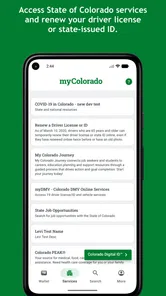
But wait, there's more! This app isn’t just a digital ID holder. It’s packed with features that make living in Colorado a breeze. Need to renew your vehicle registration? No problem, the app's got your back. Want to check your voter registration status? Yep, it does that too. It even lets you access a bunch of state services, all in one place. It’s like having a personal assistant who knows everything about Colorado.
One of my favorite features? The ability to store your insurance card. Seriously, how many times have you fumbled around looking for that one piece of paper? With myColorado, it's right there when you need it. Plus, the app is super user-friendly. Even if technology isn't your best friend, you'll find navigating this app a walk in the park.
Making its range work for you
The practical benefit of combining these tools is that it can reduce the number of places you need to check when preparing for a state-related errand. I’d use it as a personal checklist: identify the task, open the relevant section ahead of time, and confirm that the information I need is present. That is especially useful when a day includes several small stops, because it gives me one place to begin instead of relying on a half-remembered email or a browser tab I opened weeks ago.
The trade-off is that an all-in-one app is not necessarily the best route for every individual task. If you know the exact official webpage you need, using that page directly may be quicker; if your goal is simply to keep payment cards together, a standard wallet app is more appropriate. I see this as a Colorado-specific organizer, not a replacement for either those tools or every state process.
Staying Connected and Informed
Now, let's talk about staying connected. The app provides access to State of Colorado news and COVID-19 updates, which is pretty handy. Whether you're a news junkie or just want to keep tabs on what's happening around you, this feature keeps you in the loop. And if you're into exploring, the app has a neat feature that highlights all the fun things you can do in Colorado. It's like your pocket-sized guide to adventure.
Another cool thing? You can update your address and contact details directly through the app. This might sound minor, but it's a real timesaver. No more standing in line or filling out endless forms. Just a few taps and you're done.
Busy periods, recovery, and reliability
When several things need attention at once, I would use the app to prepare rather than assume that every service can be finished in a single uninterrupted session. For example, before leaving for a vehicle errand, I’d check the relevant details at home and keep any supporting paperwork accessible. If a screen does not load as expected or I lose connectivity, I’d pause and use the appropriate official service channel instead of repeatedly trying the same action while under pressure.
I can’t promise how quickly it will respond on every phone or network, and I wouldn’t treat a utility connected to public services as immune to occasional friction. For important tasks, allow time to recover from a sign-in issue or a service step that needs attention. Keeping your physical documents and the relevant state contact route available gives you a sensible fallback without undermining the convenience of having the app installed.
Reliability and everyday limits
For something tied to identification and public services, reliability matters more than a flashy interface. I would set up the account and review the information I plan to use before depending on it for an appointment, trip, or vehicle-related errand. If the phone is unavailable, the battery is low, or a service requires another step, a paper document or direct visit to the relevant state service remains the safer fallback. Think of the app as a helpful shortcut, not a guarantee that every interaction will work without friction.
It is a stronger fit for Colorado residents who handle several state tasks over time than for visitors who only need a map or a one-off answer. People who prefer to keep identification off a phone, or who use an older Android version, may be better served by physical documents and the state’s individual service channels. For Colorado residents, though, collecting these tools under one roof can make routine errands easier to organize.
Device fit and sensible expectations
The Android requirement is worth checking before you build a routine around the app: it needs Android 12 or later. If your phone does not meet that threshold, relying on the app is not an option on that device, so use physical records or access the relevant service another way. If you are choosing between an older phone and a newer one, I would not upgrade solely for this app unless its Colorado-specific functions solve a recurring need for you.
On a compatible phone, I’d still keep the app focused on the tasks it is meant to help with. I would not expect it to replace a full government website for every complex question, nor would I install it just to browse general Colorado information. Its value is strongest when convenience, identity access, and several state-related tools overlap in your own routine.
Final Thoughts
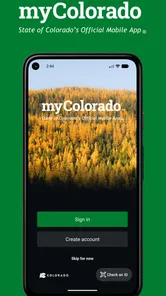
All in all, the myColorado app is a fantastic tool for anyone living in the state. It's like having a Swiss army knife for all things Colorado-related. Whether you need it for the digital ID, state services, or just to stay informed, it's got something for everyone. Plus, it's free to download, so why not give it a whirl? Trust me, once you've got it, you'll wonder how you ever lived without it.
My more measured verdict is that it is worth trying if you routinely handle Colorado services and want a convenient mobile starting point. I would install it, prepare the items I use most, and keep a physical backup for important situations. If I were only visiting, rarely dealt with state matters, or preferred not to keep identification on a phone, I’d stick with the specific service channel or documents I already trust. For residents who value having these tools together, it can be a useful addition rather than a complete replacement for the rest of their paperwork.
myColorado Frequently Asked Questions
Is myColorado free to download, and who publishes it?
myColorado is free to download and is published by the State of Colorado - Governor's Office of IT. It is the state’s official mobile app, intended to bring Colorado services and digital tools together on a phone. If you are looking for an app maintained by the state rather than a third-party service, the publisher and official purpose are important details to check before installing.
What should I check before installing myColorado on my phone?
Before downloading, check that your device meets the app’s operating system requirement and that you can connect to the internet when using its online services. myColorado is available for Android and iOS, and its current version is 12.0. The app is rated for Everyone, so it is suitable for a broad audience, though the state services and identity features are most relevant to Colorado residents.
What is myColorado and what can I do with it?
myColorado is an official state application for Colorado residents, offering a digital version of your Colorado ID and access to state services. With the app, you can renew your driver's license, update your vehicle registration, and access various state resources, all from the convenience of your mobile device. It's designed to streamline interactions with state services and ensure you have essential information at your fingertips.
Is my personal information secure on myColorado?
Yes, myColorado is designed with robust security measures to protect your personal information. The app uses encryption and secure login protocols to ensure your data is safe. The developers regularly update the app to address any security vulnerabilities, making it a reliable choice for managing your state-related documents and services securely.
Can I use myColorado as a valid form of ID?
Yes, myColorado can be used as a valid form of ID within the state of Colorado. The app provides a digital version of your Colorado ID, which can be used for age verification and identity confirmation at establishments that accept digital IDs. However, it's advisable to check with specific places to ensure they accept digital IDs before relying solely on the app.
Pros
- User-friendly interface.
- Secure digital ID storage.
- Access to state services easily.
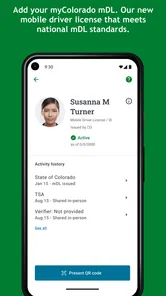
- Mobile driver license feature.
- Frequent updates enhance functionality.
Cons
- Limited to Colorado residents.
- Requires stable internet connection.
- Occasional login issues.
- Some features need improvement.
- Not all services available yet.











