

MyCHRISTUS
- 41.00
- 4.0
- Installs
- 50.00K
- Price
- Free

Screenshots
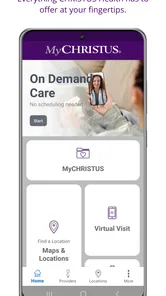
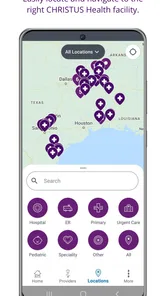
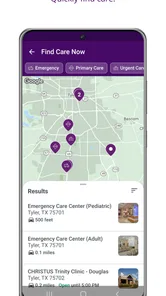
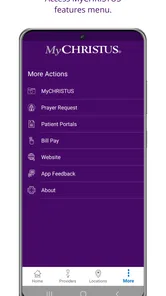
Analysis by Reviewed
I find MyCHRISTUS most useful as a practical doorway into CHRISTUS Health rather than as a general-purpose medical app. It is free, aimed at everyone, and developed by CHRISTUS Health for people who already use or plan to use that healthcare system. In daily life, that distinction matters: the app’s value depends less on entertainment or broad health education and more on how smoothly it helps you manage healthcare tasks connected with CHRISTUS.
After spending time with it, my overall impression is straightforward. MyCHRISTUS can reduce the need to switch between phone calls, paper notes, and separate web pages when you are handling routine care. At the same time, I would not treat it as a replacement for urgent medical help, a full symptom-checking service, or an all-purpose health record that works equally well with every provider. It is strongest when your healthcare relationship is already centered on CHRISTUS Health.
How MyCHRISTUS fits into everyday healthcare
The app sits in the medical category, and that sounds obvious, but it helps set the right expectations. This is not primarily a wellness tracker, exercise coach, medication reminder, or medical reference library. Its role is more administrative and access-oriented: bringing convenient CHRISTUS Health services into a mobile setting.
That focus is useful because healthcare often becomes inconvenient at exactly the wrong time. A person may need to check an appointment detail while away from home, review information before contacting a clinic, or keep track of a healthcare task during a busy workday. An app built around one health system can make those moments less dependent on office hours and less likely to get lost in an email inbox.
MyCHRISTUS is also easier to understand if you think of it as a companion to care rather than care itself. The app can help organize the interaction around your provider, but it does not replace a clinician’s judgment. If you have severe symptoms or an emergency, I would use the appropriate emergency service instead of spending time trying to solve the situation through an app.
One realistic example is a parent preparing for a child’s appointment. Rather than searching through messages or calling the office simply to confirm what is already available through the healthcare system, the parent can use the app as the first place to look. That small change is not dramatic, but it can remove several points of friction from an already stressful day.
Who will get the most value
I would recommend MyCHRISTUS first to patients who regularly receive care through CHRISTUS Health and want a mobile access point for that relationship. It is particularly sensible for people who dislike making routine calls, frequently need to check healthcare information while traveling between home and work, or help coordinate care for a family member.
More From Our News Desk

 Gmail
GmailGmail in a Busy Inbox: Who Benefits Most?
From first account to crowded workday, Gmail earns its place through dependable search and flexible sorting—but its best fit depends on how much inbox maintenance you can tolerate.

 Prime Video
Switching to Prime Video: What Changes in Your Viewing Routine
Prime Video can make a compelling second home for streaming, but switching means learning a different catalog, rental layer, and route from browsing to playback.

 Universal TV Remote Control
Universal TV Remote Control Works Best as a Reliable Backup
A phone remote earns its place through quick setup and reliable habits. Here is how to get more from Universal TV Remote Control—and where its limits show.

 Weather - By Xiaomi
Weather by Xiaomi Review: Clear at a Glance, Less Clear Up Close
Xiaomi’s weather app makes everyday forecasts quick to scan, but its calm surface can leave useful details and recovery paths harder to find than they should be.

 X
XX Under Pressure: Can It Recover When Posting Goes Wrong?
A resilience-focused review of X, examining setup, mistaken posts, interruptions, weak connections, and the gaps that matter when recovery needs to be dependable.

 Clash of Clans
Clash of Clans Is Won Between the Battles
Its raids are quick; its community is a long-term project of coordination, teaching, rivalry, and shared responsibility—with all the friction that entails.
Latest News



It can also be useful for someone who prefers a phone-based workflow over a desktop browser. A mobile app is close at hand, and that makes it easier to check a task at the moment you remember it. The benefit is not that every healthcare problem becomes simple; it is that small administrative steps have a more obvious home.
I would be more cautious if your care is spread across unrelated hospitals and independent practices. In that situation, MyCHRISTUS may still be worthwhile for your CHRISTUS-related needs, but it will not necessarily become the single place where your entire medical life is organized. A broader health-record solution or the separate apps used by your other providers may still be necessary.
The current experience and its practical trade-offs
The current version is 3.9.0, which suggests an app that has continued beyond its initial launch rather than remaining untouched. MyCHRISTUS first appeared on November 9, 2020, so existing users have had time to build expectations around it. I see that ongoing version history as encouraging, but I would not confuse a newer version number with proof that every workflow is polished.
Healthcare apps have an unusual trade-off: convenience depends on access to personal information, while privacy and account security naturally add steps. A sign-in process may feel slower than opening a simple informational app, yet that extra care is appropriate for medical details. My advice is to treat your login as part of your healthcare routine, keep your account information secure, and avoid assuming that a phone screen is automatically private just because you are using the official app.
Another practical consideration is that mobile access does not eliminate the need for preparation. Before an appointment, I would still write down symptoms, questions, medication changes, and relevant dates separately. MyCHRISTUS can help with the connection to the healthcare system, but relying on memory inside any app is a poor substitute for arriving prepared.
What the version history tells existing users
For someone already using an older release, the move to version 3.9.0 is best viewed as part of the app’s continuing maintenance and evolution. I would update because healthcare apps can depend on compatibility improvements and changes in the surrounding phone environment. Keeping the app current also avoids judging today’s experience through problems that may belong to an earlier release.
Still, I would approach an update with realistic expectations. A version change does not automatically mean a completely redesigned experience, a new set of clinical services, or a faster answer from a medical office. The meaningful question is whether the current release makes your particular tasks easier: signing in, finding the right area, checking information, and returning to the app without confusion.
For existing users, the best way to evaluate an update is to test it during a calm moment rather than during a time-sensitive appointment. Open the app, confirm that you can access your account, look for the information you normally need, and make sure you understand where routine actions now live. That simple check can prevent an avoidable scramble later.
I also recommend keeping a backup habit for important appointment details. Even when an app is working properly, phones can lose connectivity, batteries can run low, and a user may be in a place where opening a healthcare account is inconvenient. A note containing the time, location, and questions for your visit is still sensible. The app should reduce friction, not encourage you to abandon every other form of preparation.
Where it compares well with usual alternatives
The usual alternative is often a browser portal, a telephone call, or a mixture of both. Compared with calling, a mobile app can be more convenient for routine access because you do not have to wait for someone to answer simply to retrieve information that is already associated with your account. Compared with a browser, an installed app may feel more direct when you return to the same healthcare system repeatedly.
That does not make the app universally better. A browser can be preferable on a larger screen, especially when you are reviewing a complex amount of information or helping an older relative who finds a phone interface cramped. A phone call remains the better route when the issue is urgent, confusing, or requires a conversation with staff. MyCHRISTUS is most effective when the task is clear and belongs to the CHRISTUS Health relationship.
It also differs from independent health apps that collect information from multiple services. Those broader tools may be better for someone who wants one cross-provider overview, while MyCHRISTUS is more focused. The trade-off is specialization: a focused app can be easier to use for one healthcare network, but it may not replace every other medical tool you need.
Small workflow choices that make it more useful
My first practical tip is to make the app part of a planned routine instead of opening it only when something goes wrong. Checking your healthcare tasks before an appointment, after a visit, or when arranging care for a family member gives you time to notice questions while there is still time to resolve them.
My second tip is to separate information gathering from decision-making. Use MyCHRISTUS to access the healthcare relationship, then write down what you need to ask a professional. This is especially helpful when you are tired or worried: the app can be the place where you retrieve information, while your notes become the place where you prepare for a meaningful conversation.
My third tip is to think in terms of “who needs access” before sharing a device. If a family phone is used by several people, signing out when appropriate and avoiding casual sharing of account details is a sensible habit. Convenience should not turn into accidental exposure of someone else’s medical information.
A fourth useful approach is to keep the app’s limits visible. If you are looking for general medical education, a symptom explanation, or a record that combines several unrelated providers, start by asking whether a CHRISTUS-focused access app is the right tool. Choosing the right tool early is often more valuable than trying to force one app to handle every healthcare need.
Remaining gaps and situations where I would skip it
The biggest limitation is its natural dependence on CHRISTUS Health. If you rarely interact with that system, installing MyCHRISTUS may add another account without giving you enough daily value. Someone whose appointments and records are mainly elsewhere would probably be better served by the portals connected to those providers.
I would also skip it as a primary solution for urgent care decisions. An app can be convenient, but convenience is not the same as clinical responsiveness. When you need immediate professional attention, use a direct medical channel suited to the situation rather than waiting for an app-based workflow.
Another gap is the possibility of fragmented care. Even if MyCHRISTUS works well for CHRISTUS-related interactions, it may not give you the complete picture when specialists, pharmacies, laboratories, or hospitals outside that system are involved. I would keep a personal list of providers, medications, allergies, and recent questions so that important context does not depend on one platform.
Some users may also find mobile navigation less comfortable than a desktop portal. People with limited vision, reduced dexterity, or a preference for larger text may want to compare the app with the browser experience before making it their main method of access. The best interface is the one you can use accurately when you are stressed, not merely the one that happens to be installed.
What to watch as the app continues to evolve
Because MyCHRISTUS has progressed from its original release to version 3.9.0, I would watch future updates for improvements that affect reliability and clarity rather than judging them only by visible design changes. In a medical app, a smoother sign-in, clearer organization, and dependable access can matter more than flashy additions.
I would also pay attention to how well the app serves different kinds of users: an individual managing personal care, a parent coordinating a child’s visit, and a family member helping an older adult. These situations place different demands on navigation and account handling. An app that feels simple for one user can still be awkward for another.
The current public response is reasonably positive but not overwhelming, with an average rating of 4.0 from around 119 ratings and roughly 41 written reviews. I read that as a sign of useful day-to-day value alongside room for individual experiences to vary. The app has passed the threshold of 50 thousand installs, so it is not an obscure experiment, but popularity alone does not guarantee that it fits your provider relationship.
Those figures are helpful context, not a substitute for your own needs. Medical apps are unusually personal: a feature that saves time for one patient may matter little to someone else. I would judge MyCHRISTUS by whether it helps you complete the specific CHRISTUS tasks you actually have, without making you search through several screens or revert to a phone call for every routine question.
My recommendation after using it
MyCHRISTUS is a sensible free download for people who receive care through CHRISTUS Health and want a more convenient mobile connection to that system. The Everyone age rating makes it broadly approachable, although adults remain responsible for handling account access and personal medical information carefully.
I like its focused purpose. It does not need to pretend to be a complete wellness platform to be useful. For the right patient, the main benefit is having a familiar place to begin when managing ordinary healthcare details. That can save time, reduce scattered notes, and make it easier to prepare for contact with a provider.
My final advice is to install it if CHRISTUS Health is already central to your care, then test it with a low-pressure task before relying on it for an important appointment. Keep your own backup notes, use direct help for urgent concerns, and do not expect it to unify unrelated providers automatically. The best reason to choose MyCHRISTUS is not that it replaces every medical tool, but that it can make your CHRISTUS relationship easier to manage from the phone you already carry.
MyCHRISTUS Frequently Asked Questions
What devices can run MyCHRISTUS?
MyCHRISTUS is a medical app for Android and iOS devices, and it requires an operating system version 10 or later. Before downloading, check that your phone or tablet meets that requirement and has enough space for the app. Keeping your device’s operating system current can also help with compatibility and security.
Who publishes MyCHRISTUS, and is it intended for everyone?
MyCHRISTUS is published by CHRISTUS Health as a patient portal for its healthcare services. The app is rated for Everyone, but many of its features are intended for patients with a CHRISTUS account and access to connected care services. The app is free to download, so you can install it without an upfront purchase.
What is MyCHRISTUS, and what can I use it for?
MyCHRISTUS is the official patient portal app for CHRISTUS Health. After signing in, eligible patients can manage appointments, review parts of their medical records, view test results, request prescription refills, communicate with care teams, and check billing information. Available tools may differ depending on your location, provider, age, and the CHRISTUS services connected to your account.
How do I create an account or sign in to MyCHRISTUS?
You generally need to register through CHRISTUS Health using personal information and identity verification, or sign in with an existing MyCHRISTUS account. Some users may be able to access the app through supported health-record credentials or an activation process provided by their clinic. Make sure your contact details are current, and use only the official app and website when entering health information.
Can I schedule appointments and communicate with my doctor through the app?
MyCHRISTUS may allow you to search for available providers, request or schedule certain appointments, review upcoming visits, and receive reminders. Depending on the department, you may also be able to send secure messages to your care team. Not every appointment type can be booked online, and urgent symptoms should not be handled through messaging; contact emergency services or your provider directly when appropriate.
Pros
- Easy access to appointments
- test results
- and medical records.
- Secure messaging helps users contact their care team remotely.
- Medication lists and refill requests are convenient to manage.
- Supports bill payments and insurance information in one place.
- Useful health reminders can help users stay organized.
Cons
- Some features may only work for patients within the CHRISTUS network.
- Appointment availability depends on location and provider schedules.
- Users may need separate logins for certain connected services.
- Notifications can become excessive if several reminders are enabled.
- The app is less useful without an existing CHRISTUS patient account.











