

My Wafa - Assur
- 20.00
- 4.2
- Installs
- 1.00M
- Price
- Free

Screenshots
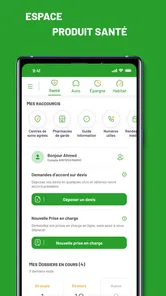
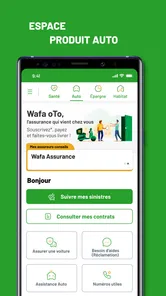
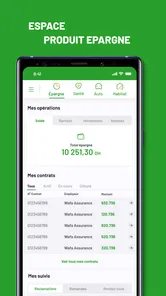
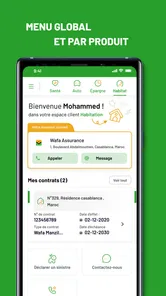
Analysis by Reviewed
I judge an insurance app less by how many buttons it has and more by whether it helps me find the right policy information when I need it. My Wafa - Assur is most useful as a place to bring everyday insurance tasks together. Wafa Assurance’s free app covers auto, health and savings insurance, which makes it relevant if you already use those services and want a quicker way to keep track of them. I’d think of it as a practical companion to your policies, rather than a replacement for understanding what your coverage actually includes.
One provider, several kinds of insurance
Insurance details tend to become important at inconvenient moments: when you need to check a document, remember a renewal, or confirm which policy relates to a particular need. Keeping auto, health and savings information accessible through one account can reduce the back-and-forth between paper files and separate reminders. The real benefit, in my view, is less about adding another app and more about making those details easier to find when time is short.
This provider-specific focus is also the main boundary of the idea. If your insurance is divided among different companies, you should not expect one Wafa Assurance app to become a complete household archive. I’d use it for the policies it is intended to help manage, then keep other providers’ paperwork in a separate, clearly labeled place. That approach avoids the common mistake of assuming that a convenient digital record contains every contract a family member might need.
Make quick access useful, not misleading
A useful habit is to check that the information you rely on is current, then keep any important policy documents available before you travel or expect to need them. An app can help organize access, but I would still read the policy itself for limits, exclusions and conditions. That distinction matters: quick access is convenient, while the document remains the place to verify what a particular contract covers.
I’d also make a simple personal index outside the app if I manage insurance for more than one person: note whose policy is relevant to the car, health needs or savings plan, and where the contract can be found. That is not a substitute for checking the policy, but it can reduce confusion when two documents have similar names or when another family member needs to locate the right one. A provider app is most helpful when the user already knows what question they are trying to answer.
A realistic day-to-day use
For example, if I were preparing for a drive, I’d want to know where to look for the relevant auto insurance details without searching through a drawer. If I also held health or savings insurance with Wafa Assurance, having those services in the same app could make a quick check simpler. It is especially useful for people who manage their own paperwork and prefer a phone-based routine over keeping every detail in a folder.
A more useful routine is to check the relevant document before leaving, rather than wait until a roadside problem or an urgent question forces me to learn the app under pressure. I’d confirm that I can sign in and open the information I expect to need, then make sure I know how to return to it. If the question is about whether a particular event is covered, I would not rely on a quick glance at a summary; I’d check the contract wording and ask Wafa Assurance if that wording leaves room for doubt.
More From Our News Desk

 Gmail
GmailGmail in a Busy Inbox: Who Benefits Most?
From first account to crowded workday, Gmail earns its place through dependable search and flexible sorting—but its best fit depends on how much inbox maintenance you can tolerate.

 Prime Video
Switching to Prime Video: What Changes in Your Viewing Routine
Prime Video can make a compelling second home for streaming, but switching means learning a different catalog, rental layer, and route from browsing to playback.

 Universal TV Remote Control
Universal TV Remote Control Works Best as a Reliable Backup
A phone remote earns its place through quick setup and reliable habits. Here is how to get more from Universal TV Remote Control—and where its limits show.

 Weather - By Xiaomi
Weather by Xiaomi Review: Clear at a Glance, Less Clear Up Close
Xiaomi’s weather app makes everyday forecasts quick to scan, but its calm surface can leave useful details and recovery paths harder to find than they should be.

 X
XX Under Pressure: Can It Recover When Posting Goes Wrong?
A resilience-focused review of X, examining setup, mistaken posts, interruptions, weak connections, and the gaps that matter when recovery needs to be dependable.

 Clash of Clans
Clash of Clans Is Won Between the Battles
Its raids are quick; its community is a long-term project of coordination, teaching, rivalry, and shared responsibility—with all the friction that entails.
Latest News



My Wafa is a Libraries & Demo app from Wafa Assurance, rated for Everyone. It has a 3.8 average from around 7,500 ratings, with over 500,000 installs. It is free, first released on November 9, 2017, and its current version is 4.7.0 for Android 5.0 and later. Those figures suggest an established app, though they don’t guarantee that every user’s experience will be equally smooth.
Getting to Know My Wafa - Assur
When I first stumbled upon My Wafa - Assur, I was intrigued by its promise to streamline and simplify insurance management. This app is designed to help users manage their insurance policies, and the strongest reason to consider it is the convenience of keeping Wafa Assurance matters within a provider-specific app. I see it as a practical starting point for finding and organizing policy information, not as an insurance expert that can interpret every contract for me.
What the all-in-one approach changes
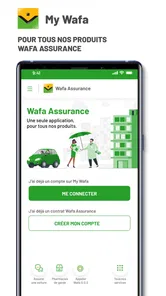
The first thing that caught my eye was its user-friendly interface. I mean, who wants to wrestle with a complicated app when trying to access their insurance details, right? My Wafa - Assur keeps things simple and intuitive. The dashboard is clean and gives you a quick overview of all your policies. No more digging through piles of paperwork or scrolling endlessly to find what you need.
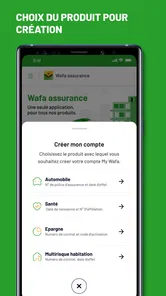
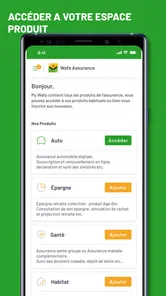
That overview is most valuable when it helps me orient myself before opening a specific policy. If I have auto, health and savings insurance with the same provider, putting those areas in one place can make it easier to remember where to begin. It does not remove the need to identify the right contract, though. I would still check the policy name and the person it belongs to before acting on anything, especially if I am helping a relative or handling a question about a different type of coverage.
One practical tip is to explore the app while I am calm and make a mental note of the route to the information I use most. That small bit of familiarization can matter more than trying to learn every section. Insurance is not something most people want to browse for fun, so I’d focus on the few tasks I actually expect to repeat rather than spend time tapping through screens without a clear purpose.
Notifications need a human check
Another highlight is the real-time notifications. Imagine getting a reminder before your policy expires or receiving an alert when there's a new offer that might interest you. It's like having a personal assistant who never sleeps. I found this feature super handy, especially in today's fast-paced world where it's easy to forget deadlines.
I’d treat a notification as a prompt to check, not as proof that a policy has been renewed or that a particular offer is right for me. A reminder can help bring a date back to my attention, but the next step is to open the relevant details and confirm what action is needed. That is a useful distinction for anyone who tends to rely on phone alerts: they can support a routine, but they should not replace reading a contract or confirming an important change with the insurer.
For a busy household, I’d pair any in-app prompt with one independent reminder for a deadline that would be costly to overlook. This is not because a digital reminder is inherently unreliable; it is simply a sensible backup when an insurance date has real consequences. The app can make the policy easier to revisit, while a calendar entry gives me another cue to take action instead of assuming that seeing an alert is the same as completing the task.
Documents and preparation matter more than speed
Now, let's talk about the app's performance. It's snappy, loads quickly, and I haven't experienced any crashes. That's a big win in my book! Plus, there's a nifty feature that lets you download your policy documents for offline access. So, even if you're in a no-signal zone, you're covered. Literally!
Offline access is most useful when planned for in advance. If I expect to travel somewhere with weak reception, I’d check which policy information I may need while still connected and make sure the relevant documents are available on my device. I would not assume that every screen or account task works offline just because a document can be saved. The sensible approach is to test access before the trip and keep a separate copy of any essential information if the situation calls for it.
There is also a privacy trade-off to consider with any phone-based insurance record. Having documents close at hand is convenient, but a phone can be lost, shared or left unlocked. I’d use the device’s normal security settings and avoid leaving sensitive information open where another person can see it. That does not make digital access a bad choice; it just means convenience works best alongside ordinary care with personal paperwork.
Language and support in context
Moreover, I appreciate how the app supports multiple languages. It's always a plus when an app caters to a diverse audience, making it accessible to more people. And if you're ever in a pinch, customer support is just a tap away. They’re responsive and ready to help with any hiccups you might encounter.
For someone deciding whether to install it, the practical question is whether the language options make the insurance terms easier for them to navigate. I’d still be careful with contract wording: a familiar interface can make it easier to locate information, but policy conditions deserve a deliberate read. If I have a question that affects a claim, payment or coverage decision, I would seek a clear answer from Wafa Assurance rather than infer one from a notification or a short label in the app.
When a provider app beats a general organizer
Compared with a paper folder or a generic document-storage app, My Wafa puts insurance management in a provider-specific setting. That focus can save a few steps if your policies are with Wafa Assurance; it is less compelling if your coverage is spread across several companies, since a single-provider app won’t replace a complete household insurance record. I’d keep other insurers’ documents organized separately rather than assume this app gathers them too.
A generic storage app can be better if my main goal is to keep scanned files from several insurers in one searchable place. A paper folder may be preferable for someone who does not want insurance documents on a phone or who finds physical filing easier to maintain. My Wafa’s advantage is narrower: for a Wafa customer, it offers a provider-centered way to approach auto, health and savings matters without turning a general file cabinet into the only organizing system.
It also helps to distinguish a reminder from a decision. An alert can prompt me to review a policy before a deadline, but I’d still compare the terms and decide whether the coverage suits my situation instead of treating a notification as advice. If you mainly want a broad comparison of insurance products, a comparison service or direct conversations with providers may fit better. If you already have Wafa policies and want easier access to their details, the focused approach is the point.
Who will get the most from it
I’d recommend trying it if you’re a Wafa Assurance customer who handles auto, health or savings paperwork on a phone and values having policy information close at hand. It may also suit someone who wants a nudge to stay attentive to insurance dates. On the other hand, people who do not have Wafa coverage, prefer paper records, or need one tool to manage contracts from multiple insurers may gain little from installing it.
It is particularly suited to someone who already knows which Wafa services they use and wants a more convenient way to return to them. A person who only needs to compare insurance options before choosing a provider has a different job to do, so I would not install this expecting a whole-market comparison tool. Likewise, if a family member manages all the paperwork and I rarely access the policies myself, the app may not change my routine enough to justify making it another place to check.
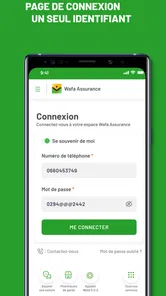
Before relying on any insurance app during a stressful moment, I’d sign in when I have time, locate the documents I’m most likely to need, and check that I can open them. That small bit of preparation is more useful than discovering how the app works while standing at a roadside or trying to sort out an urgent question. For contract-specific answers, I’d use the document and contact the insurer when the wording is unclear.
A practical choice, with realistic expectations
All in all, My Wafa - Assur is a solid choice for anyone looking to stay on top of their insurance game. It's not just about managing policies; it's about peace of mind and knowing that your insurance details are just a tap away. I’d describe its appeal more modestly: it can make Wafa-related information easier to reach, provided I take time to learn where things are and keep my expectations tied to what the app is meant to manage.
So, what are you waiting for? Go ahead and check it out. Your insurance management woes might just become a thing of the past with My Wafa - Assur.
My Wafa - Assur Frequently Asked Questions
Is My Wafa - Assur free to download, and what devices can run it?
My Wafa - Assur is free to download and is intended for managing Auto, Health and Savings insurance. On Android, it requires version 5.0 or later, so checking your device’s operating system before installing is a sensible first step. The app is developed by Wafa Assurance and is rated for Everyone, making it suitable for a general audience.
What is My Wafa - Assur and what services does it offer?
My Wafa - Assur is a comprehensive insurance application designed to provide users with easy access to a variety of insurance services. The app offers features such as policy management, claim submissions, and customer support. It caters to different types of insurance including health, auto, and life insurance, making it a convenient tool for managing all your insurance needs in one place.
How secure is my personal information on My Wafa - Assur?
Security is a top priority for My Wafa - Assur. The app implements advanced encryption technologies to protect users' personal and financial data from unauthorized access. Regular security updates and strict privacy policies ensure that your information remains confidential and secure. Users can confidently use the app knowing that their data is well protected.
Is My Wafa - Assur available for both Android and iOS platforms?
Yes, My Wafa - Assur is available for download on both Android and iOS platforms. Users can find the app on the Google Play Store for Android devices and the Apple App Store for iOS devices. The app is optimized for both operating systems, providing a seamless user experience regardless of the device used.
Can I manage multiple insurance policies through My Wafa - Assur?
Absolutely, My Wafa - Assur allows users to manage multiple insurance policies from a single account. This feature is particularly beneficial for users who have various types of insurance, such as auto, health, and life insurance. The app provides a centralized platform to view, update, and manage all your insurance policies conveniently.
Pros
- User-friendly interface for easy navigation.
- Secure communication with encryption.
- Supports multiple languages for global use.
- Quick customer support response time.
- Regular updates with new features.
Cons
- Limited free features available.
- Occasional connectivity issues.
- Requires stable internet connection.
- Ads can be intrusive at times.
- Large app size may consume storage.










