My Manpower – Job Search
- 124.00
- 3.3
- Installs
- 500.00K
- Price
- Free

Screenshots
Analysis by Reviewed
My first impression of My Manpower was that it is trying to make a job search feel less scattered. Instead of treating career hunting as a one-off task, it places the experience inside a dedicated business app from Manpower Mobile. The idea is straightforward: open the app when you are looking for work, check what is relevant, and return when your situation changes.
That simplicity is both its appeal and its main test. A job-search app can be useful during an active search, but it only earns a permanent place on a phone if it keeps helping after the first burst of enthusiasm. I spent time looking at My Manpower from that angle: how quickly it becomes useful, whether it supports a repeatable routine, and how much effort it demands from someone who may already be tired of searching.
What My Manpower feels like during the first week
The app is free, rated for Everyone, and belongs to the Business category. It has passed half a million installs, so it is not an obscure experiment that only a handful of people have tried. Its current version is 7.5.1, and it works on Android 9 or later. Those details matter because job seekers often use older phones, especially when replacing a device is not a priority while looking for work.
During the first week, the strongest benefit is focus. A general web search can quickly become a pile of browser tabs, saved pages, emails, and half-finished application forms. A dedicated Manpower experience gives the search a clearer home. I found that useful when switching between browsing opportunities and deciding which roles deserved attention first.
The app is especially suitable for someone who wants a practical starting point rather than a complicated career-planning system. If you are returning to work, changing industries, or simply checking what is available, the low barrier helps. You do not need to turn the process into a large project before taking the first step.
That does not mean the first week is effortless. Job searching still requires judgment. A listing can look promising while the schedule, location, contract arrangement, or required experience makes it unsuitable. My Manpower can support the search, but it cannot make those decisions for you. I recommend treating each opportunity as something to investigate, not as an automatic match.
A realistic everyday use case is a person who has a short break before work or after dinner and wants to spend ten minutes checking career options. With the app available, that person can make the search part of a routine instead of relying on memory. The important habit is not endlessly scrolling; it is opening the app with a specific purpose, such as reviewing new possibilities or following up on roles already considered.
More From Our News Desk

Weather by Xiaomi Review: Clear at a Glance, Less Clear Up Close

X Under Pressure: Can It Recover When Posting Goes Wrong?

Clash of Clans Is Won Between the Battles

Android Auto Makes the Case for Quieter Car Software

MobiOffice: Transforming Mobile Productivity with Seamless Integration

EA SPORTS FC™ Mobile Soccer: Redefining Mobile Sports Gaming
For a first-time user, I would begin by deciding what “suitable” means before browsing. Write down the acceptable work area, preferred schedule, minimum experience level, and whether temporary or permanent work is realistic for you. This small preparation prevents the app from becoming an attractive distraction filled with roles that were never genuinely possible.
The first-week appeal also comes from the name behind it. My Manpower is developed by Manpower Mobile, so it feels more targeted than a generic board that collects every kind of employment post in one place. That focus can be reassuring if you already want to explore opportunities connected with Manpower. It is less compelling if your search depends on seeing the widest possible range of independent employers and platforms.
Where it fits beside ordinary job-search methods
I would not view this app as a complete replacement for every other method. General job boards can offer broader coverage, while a company’s own career page may provide the most direct information about a particular employer. Professional networking services are often better for conversations, referrals, and building a visible work history. My Manpower makes more sense as a focused companion, especially when you prefer a structured route through Manpower-related opportunities.
The trade-off is convenience versus breadth. A focused app can reduce noise, but reduced noise may also mean fewer kinds of opportunities than you would find across several sources. I would use My Manpower as one channel during an active search, then compare important roles with the employer’s own information before applying. That extra check is worthwhile when details such as responsibilities or working arrangements affect your decision.
Another practical tip is to keep a separate, simple application record. I would note the role, the date I acted, the version of my résumé used, and any follow-up needed. Even if the app helps you discover opportunities, a personal record prevents repeated applications and makes it easier to remember what happened. This is one of those small workflows that adds more lasting value than merely installing another search tool.
Does it keep earning space after the novelty?
The answer depends heavily on your stage of employment. For someone actively looking, recurring value is easy to understand: the app can become a regular checkpoint. For someone who has already accepted a role and is not considering a change, opening it every day may make little sense. I would not keep it as a permanent daily habit without a current reason.
That is not a weakness unique to this product. Career apps naturally have uneven usefulness. They matter a great deal when your circumstances change and very little when your work situation is stable. The question is whether My Manpower is easy enough to revisit when needed. In my view, it works best as a low-maintenance tool that you return to during transitions, rather than as an app demanding constant attention.
Month-to-month value comes from making the search more deliberate. A person who checks occasionally can notice whether suitable opportunities are appearing, whether expectations need adjusting, and whether the same types of roles keep returning. That pattern can guide a better decision: broaden the search area, improve a qualification, revise the résumé, or stop spending time on options that repeatedly fail to fit.
I would set a personal review rhythm instead of checking without a plan. Once or twice a week may be enough for a casual search, while someone between jobs may need a more active schedule. The right frequency is the one that produces useful actions. If every session ends with aimless browsing and no applications, questions, or notes, the habit is probably consuming energy rather than creating progress.
One non-obvious advantage of this approach is emotional control. Job searching can make people feel as if they must react to every new posting immediately. A planned routine creates a boundary around the process. I found that more sustainable than repeatedly checking whenever anxiety appeared. The app becomes a tool in a routine, not a source of constant pressure.
There is also a useful distinction between discovery and decision-making. My Manpower may help you find an opportunity, but the final decision should involve checking the full role description, considering travel and timing, and thinking about whether the work matches your longer-term direction. Keeping those stages separate stops a promising title from controlling the whole process.
The maintenance burden is manageable, but real
My Manpower is not the kind of app I would describe as demanding daily maintenance. The greater burden is personal: keeping your search criteria clear, updating your résumé when your experience changes, and remembering which opportunities you have already reviewed. If you ignore those tasks, the app cannot compensate for the resulting confusion.
I recommend a short monthly reset when you are actively searching. Reconsider the locations and roles you are willing to accept, remove unrealistic expectations, and identify one improvement to make before the next round of applications. This turns the app into part of a career workflow instead of a passive list to browse.
Another useful habit is to prepare several versions of your application materials outside the app when appropriate. One résumé may not explain your experience equally well for every role. A targeted version can make your application clearer, while a general version is faster for suitable positions that do not need much tailoring. The app can be the place where you find the opening, but preparation often happens elsewhere.
I would also avoid assuming that an opportunity remains relevant simply because it stays visible. Employment information can change, and your own circumstances can change even faster. Before investing time in an application, reread the role carefully and confirm that it still matches your situation. This is a small but important safeguard against treating a career app like a static archive.
The current version, 7.5.1, is worth checking in your device’s app settings if you experience unexpected behavior or if the app seems different from what you remember. I would keep the app updated through the normal store process, particularly on a phone running an older supported system. That is ordinary maintenance, but it can prevent avoidable frustration during an important search.
Because the app is free, the maintenance question is mainly about attention rather than money. You are deciding whether the time spent checking it produces enough relevant possibilities. Free access lowers the risk of trying it, but it does not make every minute spent browsing worthwhile. My recommendation is to judge it by the quality of actions it leads to, not by how often you open it.
What may cause fatigue over time
The first source of fatigue is repetition. Looking through roles can become emotionally draining when many positions appear similar or when the search does not quickly lead to a response. A focused app may make browsing cleaner, but it cannot remove the uncertainty built into employment searches. If you expect immediate results, the experience may feel disappointing even when the app is functioning as intended.
The second source is limited perspective. A Manpower-centered search can be valuable, but no single employment channel should define your entire market view. If you use only one source, you may miss direct employer openings, local organizations, specialist boards, or opportunities that spread mainly through professional contacts. I would keep a second method available when your search is broad or when the first set of results does not match your skills.
The third is the temptation to measure progress by activity. Opening the app, scrolling, and saving possibilities can feel productive without moving an application forward. I prefer a simple rule: each session should end with a concrete next step. That might be applying, preparing a question, researching an employer, revising a résumé, or deciding that a role is not suitable. If there is no next step, close the app and return later.
There is also a personal-fit issue. Someone who wants networking, detailed professional profiles, or extensive learning resources may find a dedicated job-search app too narrow. Likewise, a person who is satisfied in a stable role and has no interest in changing jobs may not gain enough recurring value to justify keeping it visible. In those situations, a professional network or a direct employer relationship may be more useful.
On the other hand, people who dislike the disorder of general search engines may appreciate the narrower purpose. The app can reduce the number of places they need to remember, especially during a period when concentration is already limited. That benefit is strongest when the opportunities available through this route align with the kind of work they actually want.
The public response gives a mixed but meaningful signal: My Manpower has an average rating of 3.3 from around 2,800 ratings, alongside 124 written reviews. I would read that as a reason to keep expectations practical rather than assuming the experience is perfect for everyone. Ratings can reflect many things, including individual job-search outcomes, but the middle-ground result supports my own conclusion that the app is useful in the right context and not universally ideal.
My long-term verdict on My Manpower
After the novelty fades, I think My Manpower earns space for an active job seeker who wants a focused Manpower route and is willing to manage the search thoughtfully. Its strongest quality is not that it eliminates the difficult parts of finding work. It gives those parts a more defined place, which can make a repeated routine easier to maintain.
I would recommend trying it if you are currently searching, returning to employment, or considering a move and want a free business app with a clear career purpose. It is also a sensible option for someone who prefers checking a dedicated source instead of starting from a general web search every time. The Everyone age rating makes it broadly accessible from a content perspective, although the usefulness still depends on your work situation and goals.
I would skip it, or use it only occasionally, if you need the broadest possible employment coverage, rely mainly on networking, or are not seriously considering a job change. In those cases, a general job board, a specialist service, direct company pages, or professional contacts may give you better results. Installing it simply because it is free will not create value by itself.
My best advice is to give it a defined trial period with a clear objective. Decide what roles you want, how often you will check, and what action counts as progress. Keep notes outside the app, compare important details with original employer information, and review your search routine when it starts feeling repetitive. Those steps protect you from the most common problem with career tools: confusing more browsing with better progress.
In the end, My Manpower is most convincing as a practical companion rather than a complete career command center. I would keep returning to it while actively searching, then reduce its place in my routine once the search is over. That balance feels honest: it can be genuinely useful when the timing is right, but its lasting value comes from disciplined use, not from leaving it open indefinitely.
My Manpower – Job Search Frequently Asked Questions
Is My Manpower – Job Search free to download?
Yes, My Manpower – Job Search is free to download. It is a business app from Manpower Mobile, with the short description “My Manpower” and the store summary “Your career starts here.” Its content rating is Everyone. Before installing, check that your device meets the app’s requirements; it supports Android 9 or later.
Who is My Manpower – Job Search intended for?
The app is intended for people exploring employment opportunities through Manpower, whether they are starting a job search or considering a change. It may be useful to applicants interested in different kinds of work and to anyone who wants to keep job-search details together on a mobile device. The experience and relevant opportunities depend on the Manpower services available in your location.
What is My Manpower – Job Search, and what can I use it for?
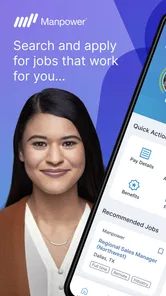
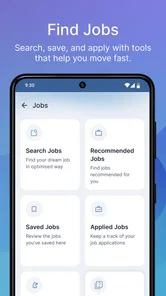
My Manpower – Job Search is a recruitment and employment app designed to help users discover job opportunities, review position details, and connect with Manpower services. After creating or accessing an account, you can search available vacancies using filters such as location, job category, and employment type. The app is particularly useful for people looking for temporary, permanent, or contract work through Manpower.
Do I need an account to apply for jobs through My Manpower – Job Search?
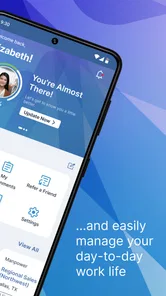
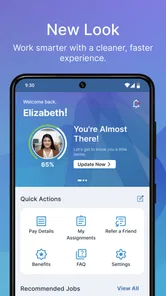
In most cases, you will need to create an account or sign in before completing an application. Registration generally allows the app to save your profile, resume information, application history, and preferred job searches. Some listings may be viewable without signing in, but applying usually requires personal and employment details. Make sure your profile is complete and accurate to improve the quality of available matches.
What information should I prepare before using the app?
Before applying, it is helpful to have an updated resume, employment history, education details, contact information, availability, and any relevant certifications ready. Depending on the vacancy, you may also need to provide work authorization information, transportation details, or references. Completing these sections carefully can make applications faster and help recruiters understand whether your experience fits a particular position.
Pros
- Search jobs by location
- skills
- and preferred employment type.
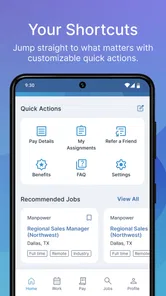
- Personalized job recommendations can simplify your daily search.
- Save interesting vacancies and review them later from your account.
- Apply to selected opportunities directly through the mobile app.
- Useful profile tools help keep your employment information organized.
Cons
- Some listings may redirect you to an external site to complete applications.
- Job availability and features can vary by country or region.
- You may need a complete profile to access the best-matched vacancies.
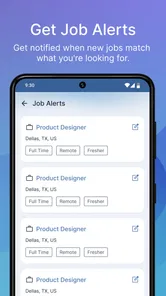
- Frequent notifications can become distracting without careful settings.
- Some job descriptions may be incomplete or require additional verification.











