My BMW
- 4.24K
- 4.8
- Installs
- 500.00K
- Price
- Free

Screenshots

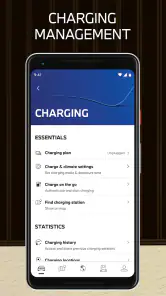
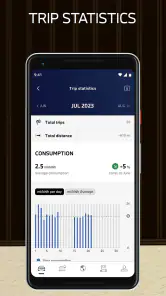
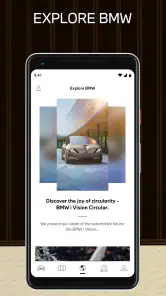
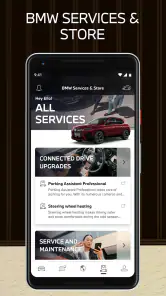
Analysis by Reviewed
For the first few days, a connected-car app can feel like a small bit of magic: I can check in on my BMW without going outside, and a routine drive starts with less guesswork. The useful test comes later, when that novelty wears off. Does the app still help with ordinary errands, trip planning, and keeping up with the car, or does it become one more icon I forget about? My experience is that its lasting value depends on how often you use those practical touchpoints—and on whether your particular vehicle supports the functions you care about.
The appeal in the first week
My BMW is a free Travel & Local app from BMW, rated for Everyone, and it has a clear purpose: bring vehicle information and selected car tasks onto your phone. Its first impression is approachable rather than technical. The layout makes the vehicle feel like the center of the experience, so I can quickly understand why I might open it before leaving home or after parking. With a 4.8 average from around 37,000 ratings, it has clearly found an audience among owners who want that connection close at hand.
That early appeal is strongest when I have a specific question. Did I lock the car? Is the fuel level enough for tomorrow’s commute? Rather than treating the app as something to browse, I get more from it by tying it to a real moment in my routine. A quick status check before bed, for example, can replace a needless walk back to the driveway. The app has over 500,000 installs, but those figures matter less to a new user than this simple test: does it answer questions about your own BMW quickly?
From convenient extra to everyday habit
Have you ever fantasized about having a digital companion that keeps you seamlessly connected with your BMW? Well, the My BMW app does just that! As someone who's always on the lookout for apps that merge convenience with cutting-edge technology, I must say, this app delivers an impressive experience.
Getting Started and Finding a Routine
The setup was surprisingly straightforward. I downloaded the app from the App Store, entered my BMW ID, and voilà! The app instantly recognized my car, showcasing its current status right on my phone's screen. It felt like my car and I were having a conversation through this digital interface. If you're wondering about compatibility, the app works with a wide range of BMW models, so most owners can join in on the fun.
Useful Checks, with Model-Specific Limits
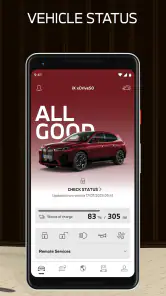
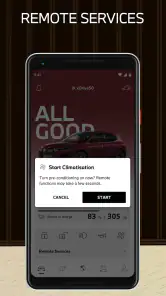
One feature that caught my attention was the remote control. Imagine being able to lock or unlock your car, or even flash the headlights, all from your phone. It's perfect for those moments when you're not quite sure if you locked the car and don't want to walk back. The app also provides real-time vehicle status, including fuel level and mileage, which is super handy for planning those long drives.
For a realistic weekday routine, I would check the car’s status before leaving, then use the remote lock control as reassurance after parking at work. Those are small actions, but they’re the sort that can make an app earn a lasting place on a phone. I’d first confirm which controls are available for my exact vehicle rather than assuming every BMW offers the same set. That model-by-model variation is the central trade-off: the app can be genuinely useful, but its value is tied to the car as much as to the phone.
More From Our News Desk

Clash of Clans Is Won Between the Battles

Android Auto Makes the Case for Quieter Car Software

MobiOffice: Transforming Mobile Productivity with Seamless Integration

EA SPORTS FC™ Mobile Soccer: Redefining Mobile Sports Gaming

How Microsoft OneDrive Became a Mobile Productivity Giant

How Google Translate Breaks Language Barriers Effortlessly
Planning Ahead Instead of Rebuilding the Trip
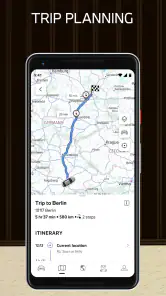
Navigation is another area where the app shines. You can send destinations directly to your car's GPS from your phone. It's like having a personal assistant planning your route. Plus, with the integration of BMW's digital services, you're always in the loop with traffic updates and points of interest along the way.
This is most helpful when I plan a destination before getting into the car: I can look it up while stationary, send it over, and begin the drive with the address ready. It is a different workflow from relying entirely on a general-purpose maps app on the phone. If I mainly want broad map coverage or prefer using one navigation app across every car, my usual maps option may remain the simpler choice. The BMW route handoff makes more sense when I want the destination waiting in the vehicle’s own navigation system.
Service Tasks and the Cost of Keeping It Useful
One of the standout features is the ability to manage your car's service appointments. The app sends reminders for upcoming services, and you can schedule an appointment with just a few taps. It's a game-changer for those of us who tend to forget these things amidst our busy lives.
For me, the best way to make that feature useful is to treat a reminder as a prompt to act, not as a substitute for keeping track of the car. When a notice appears, I can deal with the appointment before it slips behind other tasks. That may matter most to busy owners who handle maintenance between work and family commitments. Drivers who already have a dependable service-booking routine may open this part less often, though it can still keep car-related tasks in one place.
The app itself is free, but its recurring value is not automatic: I need to have a compatible BMW and a reason to check it. It runs on Android with a minimum OS of 9, and version 5.11.2 is the current release. I would keep the app if vehicle status, route preparation, or service reminders solve a real recurring need; if I rarely use connected features, a general maps app and my existing maintenance routine may be enough.
Phone-as-Key Convenience Is Not Universal
And let's not forget the digital key feature. If you've ever left your car keys at home, you'll appreciate being able to use your phone as a key. This feature, however, is available only on compatible models and iOS devices, so Android users might feel a bit left out here.
That limitation is worth checking before building a habit around phone access. A digital key is appealing as a backup, but I would not assume it replaces carrying a physical key unless my car and device support it and I have tested the setup. Android owners can still find value in the app’s other vehicle-related functions, but anyone choosing it mainly for phone-based entry should verify compatibility first. This is one of the clearest cases where the right expectation matters more than the feature’s headline appeal.
When the Interface Stops Feeling New
Aside from the bells and whistles, the app's interface is clean and intuitive. Everything is organized logically, making navigation a breeze. Whether you're a tech enthusiast or someone who's not too savvy with apps, you'll find it easy to use.
Ease of use helps, but it cannot remove every source of fatigue. If I open the app repeatedly without needing a vehicle check, route transfer, or service task, it can start to feel like an extra layer rather than a benefit. The more sensible habit is to use it at useful moments—before a trip, after parking, or when handling maintenance—instead of checking it just because it is there. That selective use also makes it easier to notice when a feature genuinely saves time.
Compared with ordinary travel apps, this one is narrower but more closely tied to BMW ownership. A general navigation app is the better everyday choice for someone who wants a familiar map regardless of vehicle, while a paper note or calendar reminder may be all another driver needs for servicing. I would choose this app when the convenience of checking and preparing for my BMW outweighs the effort of maintaining another app and account.
Does It Earn a Long-Term Place?
All in all, the My BMW app is a must-have for any BMW owner looking to enhance their driving experience. It's like having your car in your pocket, ready to assist you at any moment. While there are some limitations depending on your car model and smartphone, the convenience and connectivity it offers are well worth it. If you haven’t tried it yet, I’d definitely recommend giving it a spin. It's a small step towards the future of driving!
My more measured verdict is that it earns its space for owners who will use at least one practical feature repeatedly, especially status checks, destination handoff, or service planning. It is less compelling if your BMW lacks the functions you want, you prefer one universal maps app, or connected-car tasks rarely come up in your life. BMW released it on March 22, 2021, and its ongoing appeal is less about novelty than whether those small conveniences fit your routine. I’d install it, check compatibility early, and keep it only if it continues to save me a little time or uncertainty.
Making the First Setup Count
Before deciding whether it belongs in my regular routine, I would treat setup as a compatibility check rather than a formality. I would add the vehicle, look through the controls and status information that actually appear for it, and try the most relevant task while parked. That quick trial prevents a common disappointment: expecting a feature because it is associated with the app generally, then discovering that availability depends on the particular car and device.
I would also make a small distinction between information I want occasionally and actions I need often. If I only care about checking a status now and then, there is no reason to turn the app into a daily ritual. If I regularly send destinations or use remote controls, keeping it easy to find on my phone makes more sense. Start with one recurring job, then let the app earn a broader role instead of trying to use every available option from day one.
A Better Fit for Some BMW Owners Than Others
The strongest fit is an owner who already relies on the car’s built-in navigation, wants a convenient way to prepare a destination, and occasionally needs reassurance about the vehicle after parking. It can also suit someone who tends to postpone service planning: having car-related reminders and appointment tasks in the same place may make the next step easier to remember. The benefit is practical rather than dramatic, which is exactly why it can last once the novelty fades.
I would be less enthusiastic if I were shopping for a universal driving companion that works the same way across different makes of car. This is an ownership app, not a replacement for every travel tool on my phone. A driver who uses a preferred maps app for all trips, rarely checks vehicle status, and already has maintenance handled elsewhere may see little reason to open it. The 4.2 thousand reviews offer another sign of an active audience, but personal fit still comes down to the car and the habits behind the wheel.
How It Sits Beside Maps and Reminders
For a weekend trip, I might use a general map app to compare places while away from the car, then send the chosen destination to the BMW before setting off. That division of labor is more realistic than expecting one app to be best at every stage. The phone map can remain my broad discovery tool; the BMW app is useful at the handoff point, when I want the destination ready in the car’s own system.
The same logic applies to maintenance. A calendar reminder is flexible and works for many parts of life, while this app has the advantage of keeping service-related tasks alongside vehicle information. If I already trust my calendar, I need not duplicate every reminder. I would use the in-app service workflow when it removes an extra step, and keep my existing system for anything it does not handle as naturally. One dependable reminder is better than two competing ones.
Small Frictions That Matter Over Time
Connected-car convenience also asks me to depend on the phone, my account, and the car’s supported functions lining up when I need them. That is a different kind of convenience from a physical key or a familiar navigation routine, which is why I would keep those alternatives available rather than treating the app as my only way to manage the car. The app is most reassuring when it supplements a routine, not when I expect it to eliminate every other method.
There is also a modest attention cost: another account to remember and another place to check when a car-related task comes up. That burden is easy to justify if a status check or route transfer solves a real nuisance. It becomes harder to justify if I install it, explore once, and then never have a reason to return. I would judge it after ordinary weeks, not after an enthusiastic first session; a useful app should make a repeat task easier, not create a new one.
The Habit That Makes It Worth Keeping
My preferred long-term pattern would be deliberately light: check the vehicle when I have a reason, prepare destinations before driving, and respond to service prompts when they fit my schedule. That keeps the app from becoming a dashboard I refresh out of habit. It also makes its value easier to judge, because I can tell whether it has saved a walk back to the car, reduced trip preparation, or helped me act on maintenance sooner.
There is no need for every BMW owner to use every part of it. I would keep it if one or two functions reliably remove friction from my week, and I would skip it without guilt if my car or routine makes those functions irrelevant. For a BMW owner who likes having vehicle-specific tools close by, it is a sensible companion; for someone who wants one all-purpose travel app, the familiar map already on their phone may remain the better choice.
My BMW Frequently Asked Questions
Who develops the My BMW app, and what is it for?
My BMW is developed by BMW and sits in the Travel & Local category. Its short store description is simply “My BMW,” while its broader message is “Your World. My BMW.” It is intended as a mobile companion for BMW-related services, bringing vehicle information and connected ownership tools together in one place. The app is free to download, though access to particular features depends on your vehicle and account.
How popular is the My BMW app, and is it available to users of all ages?
The app has an average rating of 4.8 from around 37,000 ratings, with roughly 4,200 written reviews and over 500,000 installs. It is listed as suitable for everyone, so its content rating is not restricted to adults. Those figures can offer a quick sense of its reach, but whether it suits your needs depends on your BMW, your phone, and which connected services you want to use.
Is the My BMW app free, and what devices can I install it on?
The My BMW app is free to download and is intended for mobile devices running a supported operating system. It is available for Android and iOS, and the Android version requires Android 9 or later. Before installing, check that your phone’s software is up to date enough to meet that requirement. The app is developed by BMW and is listed for users of all ages.
Do I need a BMW account or a vehicle to use the app?
The app is designed to connect with BMW ownership and vehicle services, so having a compatible BMW and access to a BMW account is important for using its vehicle-specific features. You can explore the app after installing it, but controls and vehicle information depend on linking an eligible vehicle to your account. Set-up may involve confirming your identity and vehicle details before connected features become available.
What is the My BMW app and what features does it offer?
The My BMW app is a comprehensive mobile application designed to enhance the BMW ownership experience. It offers a variety of features including remote control of your vehicle, real-time vehicle status updates, integrated navigation services, and the ability to schedule service appointments. Additionally, it provides access to digital keys and personalized driving insights, making it a versatile tool for managing your BMW vehicle efficiently.
Pros
- User-friendly interface
- Real-time vehicle updates
- Remote control features
- Integrated navigation system
- Customizable settings
Cons
- Limited compatibility with older models
- Occasional connectivity issues
- Requires stable internet
- Some features are region-specific
- High battery usage
- Category
- Travel & Local
- Version
- 5.11.2