Musora: The Music Lessons App
- 216.00
- 4.3
- Installs
- 100.00K
- Price
- Free

Screenshots




Analysis by Reviewed
I came away from Musora: The Music Lessons App feeling that its biggest strength is not simply the number of instruments it covers, but the way it turns learning into a guided routine. This is an Education app from Musora Media Inc. for people who want step-by-step help with drums, piano, guitar, bass, or singing without immediately committing to a private teacher. I would recommend it to a beginner who needs structure and encouragement, although I would not treat it as a complete replacement for personal feedback.
The app is free to install, carries an Everyone 10+ age rating, and has reached over 100 thousand installs. Its average rating sits at 4.3 from around 2.1 thousand ratings, which fits my impression: this is a useful, approachable learning tool, but its value depends heavily on whether you are willing to practise consistently rather than just browse lessons.
How Musora turns practice into something easier to follow
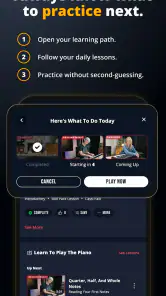
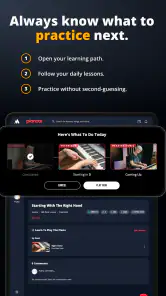
When I use a music-learning app, I want to know what to do next. Random tutorials can be entertaining, but they often leave me jumping between unrelated exercises. Musora makes more sense when I approach it as a course rather than a video library. The step-by-step format gives a new player a path through the early confusion of holding an instrument, understanding basic patterns, and repeating them until they feel less awkward.
That structure matters most during the first few weeks. A beginner may understand that they need to practise chords, rhythm, scales, coordination, or pitch, yet still have no idea which task belongs first. Musora helps reduce that decision fatigue. Instead of spending the entire practice session searching for another lesson, I can begin with the next guided activity and keep my attention on doing the work.
The range of subjects is also more useful than it first appears. Someone may start with guitar and later become curious about singing, or a piano player may want to explore rhythm through drums. Keeping several musical paths in one app makes it easier to experiment without installing a separate service for every interest. That is particularly convenient for households where different people play different instruments.
I also like the psychological advantage of having lessons available on a phone or tablet. A traditional lesson usually requires arranging a time and travelling somewhere. With Musora, a short practice session can fit into an ordinary day: I can work through a lesson after breakfast, repeat a difficult section in the evening, or use a spare half-hour instead of waiting for a full free afternoon.
A practical routine for making the lessons stick
The most effective way I would use Musora is not to open it whenever I feel inspired and then disappear for a week. I would choose one instrument, set a modest practice window, and treat each session as three parts: follow the current lesson, repeat the hardest exercise, and finish by playing something familiar. That final step is important because it lets practice feel musical rather than purely corrective.
More From Our News Desk

Clash of Clans Is Won Between the Battles

Android Auto Makes the Case for Quieter Car Software

MobiOffice: Transforming Mobile Productivity with Seamless Integration

EA SPORTS FC™ Mobile Soccer: Redefining Mobile Sports Gaming

How Microsoft OneDrive Became a Mobile Productivity Giant

How Google Translate Breaks Language Barriers Effortlessly
For example, a new guitar player could open a lesson before work, spend the first portion reviewing the assigned technique, and then repeat the same movement slowly enough to notice mistakes. Later that day, the player could return for a shorter session instead of starting a completely different topic. This two-session approach is often more realistic than expecting one long burst of concentration.
With singing, I would be especially careful about rushing. A guided lesson can suggest what to work on, but the learner still has to pay attention to comfort, breathing, and vocal strain. I would stop when something feels painful rather than assuming that difficulty automatically means progress. The app can organize practice; it cannot physically hear or feel what is happening in the same way a teacher standing nearby can.
For drums, the step-by-step approach can help a beginner avoid trying to play complicated patterns too soon. I would use the lessons to build coordination gradually, then repeat the pattern without looking at the screen. That last habit is a useful test: if I can only perform while staring at instructions, I have probably recognized the movement without fully learning it.
Where the multi-instrument design helps, and where it complicates things
Having drums, piano, guitar, bass, and singing together gives Musora a broad appeal, but it also creates a choice that beginners should make early. I would not recommend switching instruments every day simply because the app makes all of them available. Progress becomes harder to judge when practice time is divided among several unrelated skills.
A better approach is to choose one main instrument for a defined period and use the others only as supporting interests. A guitarist might explore singing to improve musical phrasing, while a bassist might use rhythm exercises from the drum side of the app to strengthen timing. That kind of deliberate crossover can be valuable. Casual hopping between lessons usually feels productive without building enough repetition in any one area.
The app is therefore strongest as a central practice guide, not as a substitute for deciding what kind of musician I want to become. It can show me a route, but I still need to supply the destination. Someone who wants to accompany songs, compose, perform, or simply play for relaxation may need to shape the lessons around a different personal goal.
The main limitation: guidance is not the same as personal correction
My biggest reservation is the natural limitation of app-based instruction. A lesson can demonstrate a movement or concept, but it cannot always identify the exact reason I am struggling. If my guitar hand is tense, my piano fingering is inefficient, my drum timing is drifting, or my singing technique is uncomfortable, I may need another person to observe the problem directly.
This matters because beginners often repeat an error with great confidence. A clear lesson can make a poor habit feel organized rather than correct. I would use a mirror, occasional recordings, or feedback from an experienced musician alongside the app. Recording a short practice attempt is particularly useful: listening back can reveal uneven rhythm or unclear notes that are easy to miss while concentrating on the physical movement.
There is also a motivational trade-off. A teacher can react to my mood, change the exercise, and explain the same idea in a different way when I look confused. An app offers convenience and consistency, but the learner has to notice when a lesson is not landing. If I keep replaying the same material without understanding it, I would rather pause and seek another explanation than assume more repetition will solve everything.
That weakness does not make Musora poor value. It simply defines the role it plays best. I see it as a strong first layer of instruction and a dependable practice companion. For technical problems, performance preparation, or fast correction, a human teacher remains the better choice. For an affordable way to begin and maintain a routine, the app is much more practical.
Cost, access, and what beginners should consider before committing
Musora can be downloaded for free, but it includes in-app purchases ranging from $1.99 to $280.00 per item. I would not judge the app only by the free download label; anyone considering longer-term use should examine which lessons or learning paths are available without payment and decide whether the paid options match a real practice goal.
The broad price range means the financial decision deserves some thought. I would avoid paying for a large package simply because the app contains several instruments. If I only plan to learn piano, access to unrelated guitar or drum material may not justify a bigger purchase. On the other hand, someone who already knows they want a long-term, multi-instrument learning resource may see more value in broader access than someone testing music for the first time.
The app runs on Android 7.0 or later, so it is suitable for many older Android devices as well as newer ones. That is helpful if I want to practise on a spare phone or an older tablet rather than buying dedicated equipment immediately. Still, screen size and placement matter. A phone is convenient for short sessions, while a larger display is easier to follow when the instrument requires both hands and the learner needs to glance at instructions.
The current version is 3.1.12. I would keep the app updated when possible, especially if I depend on it as a regular practice tool. More importantly, I would arrange the device so that checking a lesson does not interrupt playing every few seconds. A stand, stable surface, or nearby tablet can make the difference between a smooth session and repeatedly stopping to pick up a phone.
Who will get the most from this app?
I think Musora suits complete beginners who feel overwhelmed by the amount of music instruction available online. Its guided approach gives them a starting point and reduces the temptation to collect dozens of unrelated tutorials. It is also a good fit for self-directed learners who enjoy practising alone, want flexible timing, and can be honest about whether they are repeating an exercise correctly.
It makes sense for busy adults, students, and casual players who cannot maintain a fixed lesson schedule. A short session during a lunch break or after dinner can still be worthwhile if the learner returns regularly. The app is also appealing to someone who wants to sample more than one musical discipline without managing several separate learning platforms.
Parents should consider the age rating of Everyone 10+ and, more importantly, the child's ability to practise independently. The app may provide direction, but younger learners may still need an adult to help set up the instrument, keep sessions focused, and notice physical discomfort. The age label does not remove the need for supervision when a child is learning a demanding physical skill.
I would be more cautious recommending it to an advanced musician seeking detailed specialization. A player preparing for a specific audition, working on nuanced interpretation, or correcting a long-standing technical issue may outgrow app-led instruction quickly. In those situations, a specialist teacher, focused course, or direct critique would probably be a better investment.
How it compares with common alternatives
The usual alternative is free video instruction scattered across the internet. That option can offer enormous variety and sometimes excellent teachers, but the learner has to judge quality, choose an order, and remember where to continue. Musora's advantage is organization. I spend less time searching and more time practising, provided its teaching path matches my goal.
Private lessons offer the opposite balance. They cost more in time and money, but the teacher can adapt instantly and correct mistakes that a general lesson cannot detect. I would choose private instruction if I felt stuck, uncomfortable, or unsure whether my technique was safe. I would choose Musora when flexibility and a lower barrier to starting matter more than individualized correction.
Instrument-specific apps may go deeper into one area, especially for learners who want a narrow curriculum. Musora is more attractive to people who value breadth or expect their interests to change. Its multi-instrument identity is a strength for exploration, but a specialized service may be the sharper tool for someone with a very precise target.
Small decisions that improve the experience
I would begin by writing down one measurable practice aim in ordinary language, such as keeping a steady rhythm through a short exercise or changing between a small group of chords without stopping. This prevents the app from becoming passive entertainment. Completing a lesson is not the same as being able to use the skill away from the screen.
I would also repeat lessons after I think I have finished them. The first pass is often about understanding instructions; the second reveals whether my hands, voice, or timing can reproduce the idea without constant prompting. This is one of the less obvious benefits of a structured course: returning to earlier material becomes purposeful rather than feeling like starting over.
Finally, I would keep a simple practice note outside the app. I might record the lesson worked on, the part that felt unstable, and the next small target. That note makes it easier to identify patterns, such as always losing focus after a certain length of time or avoiding one particular technique. Musora supplies the lesson path, while this personal record supplies the accountability that many learners need.
After using it as a learning companion, I see Musora as a thoughtful choice for people who need a clear beginning and a flexible way to practise several instruments. Its strongest evidence is the combination of guided progression, broad musical coverage, and easy access from a supported Android device. Its meaningful weakness is equally clear: it cannot watch, listen, and respond like a teacher in the room.
I would recommend it to a beginner who is ready to practise, a returning musician who wants a routine, or a curious player exploring more than one instrument. I would skip it as a primary solution if I needed advanced coaching, urgent correction, or a tightly specialized curriculum. For everyone else, the sensible approach is to start with one instrument, test whether the teaching style keeps you practising, and only then consider the paid options.
My final view is positive but measured. Musora does not remove the effort from learning music, and it should not pretend to. What it does well is make that effort easier to organize. If you want a friendly starting framework rather than an endless pile of disconnected lessons, this Education app is worth trying.
Musora: The Music Lessons App Frequently Asked Questions
What instruments does Musora cover, and does it include singing?
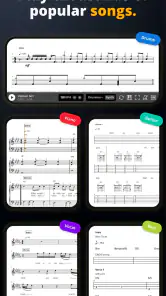
Musora’s step-by-step lessons cover drums, piano, guitar, bass, and singing, making it useful for learners interested in more than one area of music. The depth and available courses can vary across disciplines, so browse the current course catalog to make sure it matches the instrument or vocal skills you want to work on.
What is Musora: The Music Lessons App?
Musora is an online music-learning platform designed to help users develop practical skills on instruments such as drums, guitar, piano, singing, and more. The app combines structured video lessons, guided courses, practice resources, and a broad library of musical instruction. It is aimed at beginners and developing musicians who want a more organized alternative to searching randomly for tutorials.
Which instruments and musical skills can I learn with Musora?
Musora offers lessons across several popular instruments and musical disciplines, although the exact selection and content can change as the platform expands. Depending on the available courses, you may find instruction covering technique, rhythm, chords, songs, improvisation, music theory, ear training, and performance habits. Before subscribing, check the current course catalog to confirm that your preferred instrument is fully supported.
Is Musora suitable for complete beginners?
Yes, Musora is designed to be accessible to people who are starting from scratch, provided they follow the lessons consistently. Courses generally introduce fundamental concepts before moving toward more advanced playing. The app can make practice less intimidating by giving you a clear sequence to follow, but it cannot replace regular hands-on practice, patience, or a properly maintained instrument.
Does Musora require a subscription, and is there a free trial?
Musora is free to download, with in-app purchases for paid access to content or features. Prices and available plans can vary by country, platform, and promotion. Review the subscription screen carefully before confirming payment, including renewal terms, cancellation instructions, and whether a trial automatically changes into a paid plan.
Pros
- Structured lessons make it easier to practice consistently.
- Covers multiple instruments and playing styles in one app.
- Video guidance is convenient for learning at your own pace.
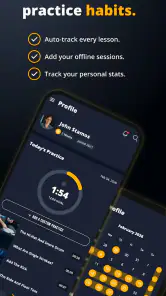
- Progress tracking helps maintain motivation over time.
- Suitable for beginners who need clear
- guided instruction.
Cons
- Most useful content may require a paid subscription.
- Some learners may prefer live feedback from a real teacher.
- Lesson quality and depth can vary between instruments.
- Requires regular practice outside the app for meaningful progress.
- A stable internet connection may be needed for streaming lessons.
- Category
- Education
- Version
- 3.1.12











