Music Audio Editor, MP3 Cutter
- 17.25K
- 4.6
- Installs
- 50.00M
- Price
- Free

Screenshots
Analysis by Reviewed
Have you ever found yourself humming a catchy tune and wishing you could just snip out that perfect piece for your ringtone? Enter the world of Music Audio Editor, MP3 Cutter! This app is a total game-changer for those who love customizing their audio files. Whether you're a music enthusiast or just someone who likes to experiment with sound, this app has got you covered.
Getting Started with Music Audio Editor, MP3 Cutter
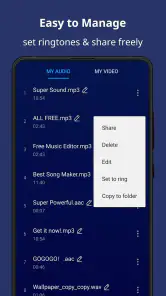
Let me tell you, diving into the features of this app is like opening a box of chocolates – there's something for everyone! Once you download and install it, the interface is refreshingly straightforward. You don't need to be a tech guru to navigate it, which is a huge plus in my book. With just a few taps, you're on your way to cutting and editing audio like a pro.
Features That Hit the Right Note
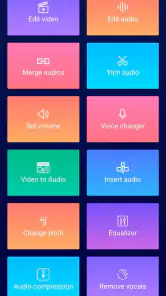
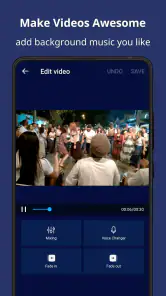
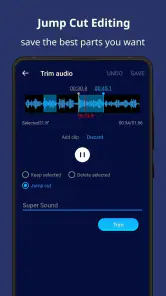
So, what's the scoop on the features? Well, for starters, the Music Audio Editor, MP3 Cutter allows you to cut, merge, and mix audio files effortlessly. It's like having a mini recording studio right in your pocket. Imagine being able to create your own remixes or mashups without breaking a sweat. The app supports various audio formats, so you're not limited to just MP3s. Whether it's WAV, AAC, or AMR, you can slice and dice it all.
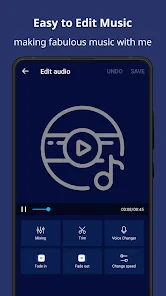
Another cool feature is the ability to add audio effects. You can tweak the pitch, adjust the speed, and even reverse audio tracks. It's perfect for those creative moments when you're feeling inspired to produce something unique. Plus, the app's built-in equalizer lets you adjust sound frequencies to your liking. So, if you want to amp up the bass or smooth out the treble, it's all at your fingertips.
Why You'll Love It
Now, let’s talk about performance. The app runs smoothly without any hiccups, which is crucial when you're editing audio. No one likes a laggy app, right? The developers have done a stellar job ensuring it works seamlessly, even on older devices. And the best part? It's lightweight, so it won't hog your device's resources.
Sharing your creations is a breeze too. Once you've edited your audio masterpiece, you can share it directly from the app to social media or messaging platforms. It's super convenient, especially if you want to show off your skills or just share a fun ringtone with friends.
Final Thoughts
So, what's the verdict? If you're in the market for an audio editing app that's both powerful and user-friendly, Music Audio Editor, MP3 Cutter is definitely worth checking out. It's packed with features that cater to both beginners and seasoned audio editors. Plus, the intuitive design makes it accessible to everyone.
More From Our News Desk

Weather by Xiaomi Review: Clear at a Glance, Less Clear Up Close

X Under Pressure: Can It Recover When Posting Goes Wrong?

Clash of Clans Is Won Between the Battles

Android Auto Makes the Case for Quieter Car Software

MobiOffice: Transforming Mobile Productivity with Seamless Integration

EA SPORTS FC™ Mobile Soccer: Redefining Mobile Sports Gaming
In summary, whether you're crafting the perfect ringtone or diving deep into audio mixing, this app deserves a spot on your device. It's like having a personal DJ at your beck and call. So go ahead, give it a spin and let your creativity flow!
Music Audio Editor, MP3 Cutter Frequently Asked Questions
Can Music Audio Editor, MP3 Cutter record or change voice recordings?
The app is presented as a voice recorder and changer as well as a music editor, so it may suit users who want to work with recorded sound in addition to songs. Its broad audio focus makes it worth considering if you want editing and voice-related tools together on a phone. The available description also mentions mixing and vocal removal.
Is Music Audio Editor, MP3 Cutter suitable for making songs or mixing audio?
Music Audio Editor, MP3 Cutter is described as a song maker and mixer, so its intended use goes beyond trimming an existing track. It may appeal to people who want to combine audio or experiment with music on a mobile device. The app is in the Music & Audio category, and its feature range is aimed at everyday audio projects.
Can I remove vocals from a song with Music Audio Editor, MP3 Cutter?
Vocal removal is one of the uses highlighted for Music Audio Editor, MP3 Cutter. That makes the app relevant to users who want to experiment with a song’s vocals as part of an audio-editing workflow. It is presented alongside tools for making and mixing songs, recording and changing voice, and editing music, giving the app a broad audio focus.
How much storage space does Music Audio Editor, MP3 Cutter require?
Before installing any app, it is sensible to check the available storage on your device, particularly if you plan to keep audio files and edited projects on it. Music Audio Editor, MP3 Cutter is an audio tool, but the space it needs can vary with the app version and the files you work with. Make sure your device has room for the installation and your audio.
Is Music Audio Editor, MP3 Cutter suitable for children?
Music Audio Editor, MP3 Cutter has an Everyone content rating, which indicates that its stated age classification is suitable for a broad audience. It is an audio-editing app rather than a game, with tools focused on music and voice. Parents can still review how a child intends to use any editing features and supervise purchases through the device’s usual settings.
Pros
- User-friendly interface for easy editing
- Supports multiple audio formats
- Fast processing and rendering
- Precision cutting with waveform preview
- No ads in the paid version
Cons
- Limited features in free version
- Occasional crashes on older devices
- No cloud storage integration
- Paid version required for premium tools
- Interface lacks customization options
- Category
- Music & Audio
- Version
- 2.8.2.0












