

MSC for Me
- 1.46K
- 4.7
- Installs
- 1.00M
- Price
- Free

Screenshots

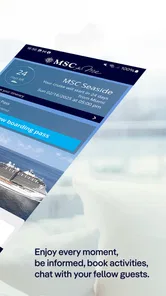
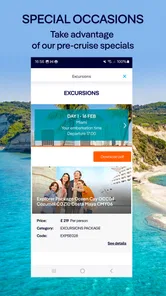
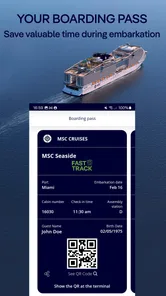
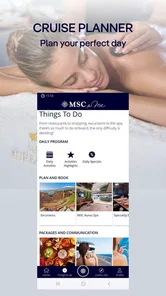


Analysis by Reviewed
I think MSC for Me makes the most sense when you treat it as a companion for the parts of a cruise that happen onboard: finding your way, keeping plans in view, and checking what is going on. It is a free travel app from MSC Cruises S.A., and its focus is narrower than a general trip planner. That is a strength for MSC guests, but it also means it is not a substitute for maps, booking tools, or travel information for a whole holiday.
Where a reliable connection matters
The app’s useful moments depend on having current information available. If I were checking the day’s activities or looking up a reservation, I would open it before leaving my cabin rather than wait until I was already crossing a busy deck. That small habit gives me time to read the details and decide where to go instead of trying to plan while walking.
I would also keep an eye on whether the information I am viewing is current, especially when changing plans around a show, meal, or excursion. An app can make it easier to find details, but it cannot remove the need to check the time and location shown for a specific booking. For anything important, I would confirm the arrangement in the app before setting off.
There is a useful distinction here between having a phone in hand and having a dependable connection. On a ship, the app may be part of a routine, but I would not build a tight chain of plans around the assumption that every screen will load at the exact moment I need it. Checking details early gives me room to react if a page takes time to update or I need to ask someone onboard for help.
Useful in the small, mobile moments
A cruise ship is an unusual place to use a phone: you may be moving between decks, carrying a drink, or trying to meet family members in a crowded area. The ship map is most valuable in those moments, when remembering a route is less convenient than checking it. I would use it to orient myself before choosing a lift or staircase, then put the phone away and follow the route rather than keep staring at the screen.
For a group, the app can help each person keep their own plans straight, but I would not assume it replaces agreeing on a clear meeting place. If someone’s phone is unavailable or a person is not checking the app, a simple landmark and time remain more dependable than expecting everyone to coordinate through one screen.
A practical routine is to check the map before leaving a familiar area, especially if the next stop is on another deck. That is less about saving a few taps than avoiding the awkward moment of wandering while a group waits. I would also choose a specific landmark when arranging to meet: “near the main entrance” is easier to interpret than a vague instruction to find one another somewhere around a busy venue.
More From Our News Desk

 Weather - By Xiaomi
Weather by Xiaomi Review: Clear at a Glance, Less Clear Up Close
Xiaomi’s weather app makes everyday forecasts quick to scan, but its calm surface can leave useful details and recovery paths harder to find than they should be.

 X
XX Under Pressure: Can It Recover When Posting Goes Wrong?
A resilience-focused review of X, examining setup, mistaken posts, interruptions, weak connections, and the gaps that matter when recovery needs to be dependable.

 Clash of Clans
Clash of Clans Is Won Between the Battles
Its raids are quick; its community is a long-term project of coordination, teaching, rivalry, and shared responsibility—with all the friction that entails.

 Android Auto
Android Auto Makes the Case for Quieter Car Software
The car interface is no longer judged by how much it can do, but by how quietly it helps. Android Auto shows what drivers now expect—and what still gets in the way.

 MobiOffice: Word, Sheets, PDF
MobiOffice: Transforming Mobile Productivity with Seamless Integration
MobiOffice: Word, Sheets, PDF is redefining mobile productivity with a surprising blend of functionality and innovation.

 EA SPORTS FC Soccer Mobile 26
EA SPORTS FC™ Mobile Soccer: Redefining Mobile Sports Gaming
Dive into EA SPORTS FC™ Mobile Soccer, where immersive gameplay and strategic depth transform mobile sports gaming.
Latest News



What to do when a plan changes
Plans on a cruise can shift: a family member may want a different activity, a reservation may no longer suit, or you may decide to spend longer in one place. The app’s value is in making it easier to review the options and the schedule, not in guaranteeing that every change can be handled instantly. I would check the relevant details, then use the appropriate onboard contact or booking route if the app does not let me complete the change I need.
That is also why I would avoid making the app my only record of important plans. Keeping a note of key times or agreeing on them with the people travelling with me is a sensible backup, particularly when everyone is splitting up. This is not a criticism unique to MSC; it is a practical way to avoid turning a phone or connection hiccup into a missed appointment.
If a page is slow or a booking detail does not appear as expected, I would first check that I am looking at the right part of the itinerary and give the screen a moment rather than tapping repeatedly. If it still does not resolve the question, asking the relevant onboard staff is a better recovery step than guessing. I would treat the app as a convenient information channel, not as the only authority when a time-sensitive arrangement is unclear.
Using it thoughtfully with mobile data
Before relying on the app, I would check how my phone is connected and what my mobile plan allows while travelling. Cruise connectivity can work differently from using a phone at home, and roaming charges are a separate concern from whether an app is free to download. I would avoid assuming that free installation means every way of accessing the internet is free, and check my carrier and any onboard connectivity options before using data heavily.
For a data-conscious routine, I would open the app when I have a specific task—checking a route, looking up a booking, or reviewing the day—rather than repeatedly refreshing it without a reason. That keeps phone use purposeful and makes it easier to notice whether a screen is loading slowly. If speed matters, checking ahead is better than waiting until you are at the venue door.
It is also worth separating the app’s role from the phone’s broader connectivity needs. Messaging relatives, browsing the web, and checking cruise information are different tasks, even if they all happen on the same device. I would decide what I need the phone for before a sailing and choose my connection approach accordingly, rather than assume one setup will suit every use. That simple distinction can prevent a useful onboard check from turning into unplanned data use elsewhere.
Who will get the most from it
This app is best suited to people already sailing with MSC who want ship-related plans and navigation in one place. It is particularly handy for first-time cruisers, guests travelling with children, and anyone who likes to decide between a scheduled activity and a quieter afternoon. If you are comparing cruise lines, it is not a neutral tool for planning every option: a general travel app is better for comparing destinations, flights, and hotels across providers.
MSC for Me has an average rating of 4.6 from around 33,000 ratings, and more than a million installs. Those figures suggest many travellers find it useful, though they cannot tell me how well it will fit a particular sailing or personal routine. It is rated for everyone, runs on Android versions 8.0 and later, and its current version is 5.4.6. I would install it before travelling, sign in and check that my booking appears, then learn where the map and schedule sit in the interface. Doing that in advance is more useful than trying to figure it out while the ship is busy.
I would especially recommend preparing it before the first busy day rather than waiting until plans start overlapping. A parent keeping track of a child’s activity, for example, may need to compare a scheduled event with a meal or a family meetup; having already found the relevant screens makes that decision less frantic. A solo traveller may use it differently, checking the map and daily options to build a loose plan without committing the whole day to a fixed itinerary.
On the other hand, I would skip it if I wanted one app to organize an entire trip across several operators. It is built around the MSC cruise experience, so it does not replace a general itinerary organizer for flights, hotels, and transport before or after the sailing. Even on an MSC trip, a traveller who prefers paper notes or asks staff for directions may find the app useful only occasionally. Its value depends on whether having the ship’s information on a phone fits the way you travel.
How it compares with other travel tools
Compared with a general map app, this one is more relevant to shipboard orientation and MSC-specific plans, while a general map is more useful for streets, transit, and places ashore. I would not treat those as interchangeable. Before disembarking, a broader travel tool can help with local navigation; onboard, the cruise-focused app is the more natural place to check the ship’s layout and activities described in the original review.
The same distinction applies to booking and planning services. A travel marketplace helps compare options across companies, while this app is most useful once MSC is already the cruise line you are sailing with. I see it as a companion to those tools, not a replacement: use a broader planner for the parts of the holiday beyond the ship, then use the cruise app for ship-related information and arrangements.
Setting Sail with MSC for Me
From the moment you step on board, this app feels like your personal cruise assistant. First off, the app is super user-friendly and has an intuitive design. After a few taps and swipes, I had my entire cruise itinerary right at my fingertips. The app syncs with your booking details, so everything from your dining reservations to your shore excursions is easily accessible. It's like having a concierge in your pocket.
That convenience is strongest when I use it as a quick reference rather than trying to plan every hour from a single screen. Before heading out, I would check the next commitment and nearby options, then leave enough flexibility for the day to unfold. It keeps the itinerary close without making a cruise feel like a checklist.
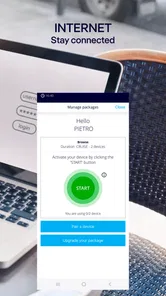
Stay Connected and Informed
One of the coolest features of MSC for Me is the interactive map of the ship. Trust me, if you're anything like me, getting lost on those massive decks is a real possibility. The map helps you navigate from your cabin to the pool or the nearest bar without a hitch. Plus, you can check out what's happening around the ship in real-time, ensuring you never miss out on any fun activities or events.
The map is most helpful as a starting point for orientation, not a reason to walk with your eyes fixed on a screen. I would look up the destination, identify the deck or route, and then pay attention to signs and the people around me. That approach is safer in crowded passages and also helps me learn the ship, so I rely less on repeated checks as the trip goes on.
Customizing Your Cruise Experience
What I loved most is how the app lets you tailor your cruise experience. Want to relax by the pool? You can book a sunbed. Feeling hungry? Reserve a table at one of the specialty restaurants. For the fitness buffs, you can even schedule a session at the gym or a yoga class. The app really puts you in control of your vacation, making it as laid-back or action-packed as you want.
For a realistic day, imagine waking up unsure whether to spend the afternoon at an activity or take it easy. I would check the schedule first, look at the time and place, and compare that with any meal or excursion already in my plans. If the timing works, I can head out with a clear destination; if not, I can leave the slot open. The useful part is having those decisions in view, while the trade-off is that a phone can make it tempting to over-plan a holiday that should also leave room for rest.
Entertainment and Relaxation
MSC for Me also makes it super easy to book tickets for onboard shows and entertainment. Whether you're in the mood for a Broadway-style performance or a quiet evening at the cinema, you can reserve your spot in advance, ensuring you get the best seats in the house. And if relaxation is more your style, the app offers a range of spa treatments you can book to pamper yourself.
For evening plans, I would check the booking details before leaving the cabin, particularly if the day has been busy and I am relying on memory. That small check can help avoid arriving at the wrong place or at the wrong time. I would also keep a little flexibility in the evening: choosing one show or treatment does not mean every other part of the night needs to be scheduled.
The Final Verdict
All in all, MSC for Me is more than just an app; it's a game-changer for anyone going on an MSC cruise. With its seamless integration into the cruise experience, it takes the stress out of planning and lets you focus on what really matters—enjoying your vacation. If you're planning a cruise, downloading this app should be at the top of your checklist. Bon voyage!
My more measured recommendation is to install it if you are sailing with MSC and expect to use ship maps, daily information, or onboard reservations. It is free, has a 4.6 average from around 33,000 ratings, and has reached over a million installs, but popularity does not guarantee it will suit every traveller or connection situation. As a travel app rated for everyone, it makes the most sense as a practical onboard companion; for broader trip planning, I would pair it with tools designed for the rest of the journey.
MSC for Me Frequently Asked Questions
Is MSC for Me suitable for someone planning a first cruise?
MSC for Me is a travel app from MSC Cruises S.A. made to help passengers get more out of a cruise. Its cruise-focused purpose may make it useful to first-time travelers as well as returning passengers who want relevant information and services together on a phone. The app is free to download, so you can explore it before deciding whether it suits your travel routine.
Can I download MSC for Me before my cruise, or is it only useful once I am on board?
You can download MSC for Me ahead of a trip and get familiar with its cruise-related tools before setting sail. Its purpose is to bring information and services for passengers into one mobile app, including planning and onboard use. As with any travel app, the usefulness of particular features can depend on the cruise and the services available for that trip.
Is MSC for Me free to download, and what devices can install it?
MSC for Me is free to download and is designed for cruise travelers who want cruise-related information and services on their phone. It is available for Android and iOS devices, with Android support starting at version 8.0. Before downloading, check that your device’s operating system meets that requirement and that you have enough space for the app.
Who develops MSC for Me, and what is it intended to help with?
MSC for Me is developed by MSC Cruises S.A. and is a travel app intended to help passengers get more out of their cruise. It brings cruise-related information and services together on a mobile device, making it a useful option for travelers who want to organize parts of their cruise and access relevant details through an app.
What are the main features of the MSC for Me app?
MSC for Me is an innovative app designed for cruise travelers, offering features like real-time information on cruise activities, personalized itinerary planning, and the ability to book excursions and dining. The app also provides instant communication with crew members and access to interactive maps of the ship, ensuring a seamless and enjoyable cruise experience.
Pros
- User-friendly interface with intuitive navigation.
- Real-time updates on cruise activities.
- Personalized itinerary planning feature.
- Access to exclusive onboard promotions.
- Seamless integration with MSC Cruise services.
Cons
- Limited functionality without internet connection.
- Occasional bugs affecting performance.
- Requires frequent updates for smooth operation.
- Limited customization options for notifications.
- Some features locked behind membership.











