

Movie Drama & TV Series: Info
- 0.00
- 0.0
- Installs
- 100.00K
- Price
- Free

Screenshots



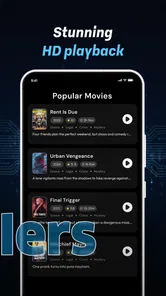

Analysis by Reviewed
I would reach for Movie Drama & TV Series: Info when I want to decide what to watch before opening a streaming service. Its appeal is straightforward: it brings together entertainment details such as cast, audience ratings, reviews, teasers, and release information. That makes it a handy starting point for exploring a title, especially when I know the mood I want but not the exact film or series.
My first impression is of a focused reference app rather than a place to watch anything. That distinction matters. It can help narrow a shortlist or give a familiar title some context, but it should not be mistaken for a streaming service or a full entertainment community. I would use it to inform a choice, then move elsewhere to watch.
Useful when choosing what to watch
I find this kind of guide most useful when I treat it as a way to sharpen a choice, not make the choice for me. Checking a title’s tone, cast, and audience response can reveal whether it deserves a place on tonight’s shortlist, while a quick stopping rule keeps browsing from becoming its own activity. That practical distinction matters even more when comparing several promising options.
A promising first-week companion
In the first few days, the easiest value to notice is how several kinds of information can support one decision. A cast list helps me recognize a film; a teaser gives a quick sense of its tone; ratings and reviews offer other viewers’ reactions; and release information helps place it in context. Each detail answers a slightly different question, so browsing can feel more useful than relying on a single score.
For example, imagine I have half an hour to pick something for a quiet evening. I might check a drama I have heard about, scan the cast to see whether it includes actors I enjoy, and watch a teaser before deciding whether its style fits the moment. If the ratings look strong but the reviews suggest a heavier tone than I want, I can move on before spending the evening on the wrong choice. That is a modest convenience, but a practical one.
The app’s subject is movie dramas and TV series, so it makes the most sense for people who browse those kinds of titles rather than users looking for a broad guide to every form of entertainment. I would also find it useful when someone recommends a show in conversation: looking up the title and checking its basic context is easier than juggling separate searches.
Developed by Pro Apps Laboratory, it sits in the libraries and reference-style entertainment space. It is free to install and marked for Everyone, which makes trying it a low-commitment way to see whether this style of browsing suits you. It has passed 100,000 installs, though popularity alone does not tell me whether its particular mix of information matches an individual viewer’s habits.
More From Our News Desk

 Gmail
GmailGmail in a Busy Inbox: Who Benefits Most?
From first account to crowded workday, Gmail earns its place through dependable search and flexible sorting—but its best fit depends on how much inbox maintenance you can tolerate.

 Prime Video
Switching to Prime Video: What Changes in Your Viewing Routine
Prime Video can make a compelling second home for streaming, but switching means learning a different catalog, rental layer, and route from browsing to playback.

 Universal TV Remote Control
Universal TV Remote Control Works Best as a Reliable Backup
A phone remote earns its place through quick setup and reliable habits. Here is how to get more from Universal TV Remote Control—and where its limits show.

 Weather - By Xiaomi
Weather by Xiaomi Review: Clear at a Glance, Less Clear Up Close
Xiaomi’s weather app makes everyday forecasts quick to scan, but its calm surface can leave useful details and recovery paths harder to find than they should be.

 X
XX Under Pressure: Can It Recover When Posting Goes Wrong?
A resilience-focused review of X, examining setup, mistaken posts, interruptions, weak connections, and the gaps that matter when recovery needs to be dependable.

 Clash of Clans
Clash of Clans Is Won Between the Battles
Its raids are quick; its community is a long-term project of coordination, teaching, rivalry, and shared responsibility—with all the friction that entails.
Latest News



Make the details work together
A useful way to browse is to avoid treating a rating as a verdict. I would start with the premise or teaser, use the cast information to check whether the title is familiar, and then read reviews for clues about pacing, tone, or subject matter. Reviews can explain why a score is high or low; a number by itself usually cannot. This sequence helps turn the app’s assortment of details into a decision rather than a scroll of disconnected facts.
There is also a good reason to check the release information before deciding that a title is new to you. A film or series may have a release context that changes what you expect from it, and that detail can help distinguish an upcoming or recent title from something you simply have not encountered before. I would use this as orientation, not as a substitute for checking the service where I plan to watch.
One practical trade-off is that a teaser can shape expectations more strongly than the finished work deserves. I try to use it to judge broad mood, not to predict whether I will love the story. Likewise, reviews are most helpful when I look for comments that match my own preferences. A viewer who dislikes slow pacing may be warning me away from exactly the kind of drama I enjoy.
From quick lookup to a useful routine
The first-week appeal is discovery. Month to month, the question is whether I keep encountering enough unfamiliar films and series to justify opening another app. If I often ask friends for recommendations, browse entertainment news, or struggle to pick something for a group, a single place to inspect cast, reviews, teasers, and release context can become a small but recurring part of my routine.
For a household, it can support a quick comparison without turning movie night into a long debate. Each person can bring a candidate, and the group can check the tone, cast, and viewer reactions before choosing. The useful habit is not to investigate every title exhaustively; it is to set a short limit, compare a few options, and make the call. That keeps an information app from becoming another reason to postpone watching.
A more specific routine I like is to separate discovery from the final choice. Earlier in the day, I can note a title a friend mentioned and use the guide to understand its general appeal. At viewing time, I can compare that option with one or two alternatives, then switch to the service that actually plays it. This avoids trying to make a single app handle research, availability, and playback, and it gives each stop in the process a clear purpose.
I would not expect it to replace the services or sources I already use. Streaming apps are better for finding what is available to play and starting it immediately. Search engines and entertainment publications are better when I want broad coverage, reporting, or a particular piece of background. This app’s more specific role is to help me assess a movie or series through several familiar reference points before I commit to it.
Keeping the habit light
The maintenance burden appears low in the everyday sense: this is a lookup tool, not a planner that requires a viewing schedule or a catalog I must carefully maintain. I can open it when a title comes up, gather enough context, and leave. That makes it easier to keep around than an app whose value depends on frequent manual organization.
Still, a reference app only earns repeat use if its information is useful at the moment I need it. My advice is to treat it as a quick decision aid rather than a personal archive. If you begin saving or tracking every possibility in your head without a clear reason, the browsing itself may become a chore. A short list of genuine contenders is more valuable than an endless backlog of titles you may never watch.
To keep that boundary practical, I would decide what I need to know before opening a title page. Am I checking whether I recognize the cast, whether the tone suits tonight, or why people recommend it? Once I have an answer, I can stop. This little rule matters because the app brings together several kinds of context, and it is easy to keep sampling them simply because they are available. The benefit is not collecting more facts; it is reaching a choice with less uncertainty.
The app is free, but in-app purchases are offered, with individual items ranging from about forty cents to nearly one hundred dollars. That is worth knowing before making a purchase: I would first use the free experience and decide whether I return often enough to consider paying for anything. The presence of optional purchases does not make the app unsuitable, but it does mean I would check what an item provides and whether I actually need it instead of buying on impulse.
Where browsing can wear thin
The same information-rich approach that helps with discovery can also create fatigue. Ratings, reviews, cast names, and teasers offer more angles for comparison, but more angles do not always make choosing easier. If I keep checking reactions after I already know what I want to watch, I am likely to spend more time researching than enjoying the film. Setting a stopping point is a surprisingly useful part of using a title guide well.
Another limitation is that a guide cannot resolve every personal question. A teaser may not reveal whether a show’s humor works for me, and a cluster of reviews cannot guarantee that its pacing or subject matter will suit my evening. I would be cautious about using one crowd response as a filter for everything. For a title recommended by someone whose taste I trust, their reason for recommending it may be more valuable than a general rating.
It also helps to remember that a viewer’s review and a viewing decision are not the same thing. Reviews can highlight a concern worth investigating, but they can also reflect expectations that have little to do with my own. If a comment says a drama is slow, I would ask whether that means deliberately patient or simply dull to that person. Reading for the reason behind a reaction is more useful than letting a broad label decide for me.
Version 1.7 runs on Android 7.0 and later. That gives the app a broad compatibility range for Android users, while people on other platforms should choose an option available for their device. Its age rating is Everyone, so it is positioned for a general audience; as with any entertainment guide, I would still check the details of a particular film or series when choosing something for a child.
The most useful non-obvious approach is to use the app at different stages of a decision. Before watching, I can check the teaser and cast to see whether a title is worth considering. When a friend mentions a series, I can use reviews to understand why it appeals to them. Later, release information can help me place a title in context. Those are small, distinct jobs; trying to make every section answer every question is where browsing becomes tiring.
When a different tool is the better fit
If my main question is “Can I watch this tonight, and where?”, I would go straight to the streaming service or a dedicated availability finder. A reference guide can make a title more legible without resolving whether it is included in a subscription I already have. Keeping those two questions separate prevents a frustrating detour: first decide whether the title interests me, then verify where it can be played.
Likewise, someone who wants a carefully organized watch history or a long-term queue may be better served by a tracking-focused app. That kind of tool is built around recording what I have seen and what I plan to watch. Here, I would avoid assuming that a collection of entertainment details automatically provides the same workflow. If remembering every recommendation is the priority, a dedicated tracker is a more natural home for that habit.
For deeper analysis, I would turn to critics or publications that devote space to interpretation and reporting. Short reviews and general audience reactions can help me screen a title, but they are not a substitute for detailed criticism when I want to understand a filmmaker’s choices or a series’ themes. The guide is most useful at the “should I look into this?” stage, not as my only source for every question about entertainment.
Who should keep it installed?
I would recommend Movie Drama & TV Series: Info to people who regularly browse dramas and series but want a little more context than a poster and title provide. It is especially suited to indecisive viewers, recommendation collectors, and anyone who likes checking cast and audience reactions before choosing. If you mainly watch whatever your streaming service promotes, or already have a reliable source for this information, its value may fade after the initial exploration.
It is also not the right choice if your main need is finding where a title is available to stream, managing a comprehensive watchlist, or reading in-depth criticism. Those are different jobs, and a specialist service for availability, tracking, or editorial coverage will serve them better. I would keep this app only if its quick reference role saves me time more often than it tempts me into unnecessary browsing.
For a viewer who watches with family, I would use it as a conversation starter rather than a final authority. A cast check or teaser can help explain why someone put a candidate forward, while reviews can surface a possible mismatch in tone. Then the group can decide based on what it actually wants that evening. That is a more realistic use than expecting an app to settle different tastes by producing one universally correct pick.
Overall, I see it as a convenient entertainment guide with a clear, limited purpose. Its first-week charm comes from having several useful clues in one place; its lasting value depends on whether I continue to discover titles or settle everyday viewing choices with it. The developer’s current release is version 1.7, and the app’s free entry point makes that test easy. My verdict is positive for curious viewers who want a lightweight research stop, with one condition: use it to reach a decision, not to keep searching after the decision is already made.
Movie Drama & TV Series: Info Frequently Asked Questions
What is Movie Drama & TV Series: Info?
Movie Drama & TV Series: Info is an entertainment-information app for people who want to browse details about movies and television series. Depending on the version available in your app store, listings may include summaries, genres, cast or crew information, and other title details. It is best understood as a reference and discovery tool; check the store description to confirm the exact features offered by the version you plan to install.
Can I watch movies or TV episodes in the app?
The app’s name suggests that it provides information about movies and TV series, not necessarily video playback. Do not assume that it includes full episodes, films, or streaming access. Before downloading, review its current store listing and in-app feature descriptions to see whether any viewing options are actually provided. Availability of titles and playback rights can also vary by region and may require separate services.
Is Movie Drama & TV Series: Info free to download and use?
The download price and any costs for using the app depend on the listing in your regional Google Play or Apple App Store. An app can be free to install while still containing advertisements, optional purchases, or subscription features. Check the pricing, in-app purchase details, and developer information on the store page before installing, and review any payment terms carefully if the app offers paid access.
What information or permissions might the app request?
The information available and permissions requested can differ between app versions and devices. A catalogue-style app may need an internet connection to load or refresh title information, but you should not grant unrelated permissions without a clear reason. Check the permission prompts during installation and consult the app’s privacy policy and store data-safety section to understand what information may be collected, used, or shared.
How can I check whether the app is compatible with my device and up to date?
Open the app’s Google Play or Apple App Store page to check its supported operating systems, minimum device requirements, latest update date, and regional availability. Reading recent reviews can help you spot reports of crashes, missing information, or other issues on particular devices. Download only from an official store, and install updates through that store to receive the version the developer currently distributes.
Pros
- Provides a convenient way to browse information about movies and TV series.
- Useful for discovering details about titles before deciding what to watch.
- Covers both film and television content in one place.
- A straightforward reference app for users who want quick title information.
- Can help viewers explore shows and movies they may not know about.
Cons
- Information may be incomplete or outdated for some titles.
- The app may not offer streaming or playback features.
- Availability of details can vary between movies and series.
- Users may need another service to check where a title is streaming.
- Its usefulness depends on how often the catalog and information are updated.










