Motive Driver
- 14.04K
- 4.5
- Installs
- 1.00M
- Price
- Free
Screenshots
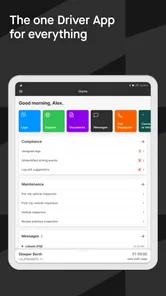
Analysis by Reviewed
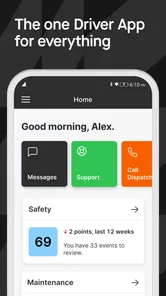
I judge a driver app less by how many buttons it has than by whether I can understand what it needs from me when I’m between jobs, tired, or trying to keep a routine consistent. Motive Driver is aimed at work behind the wheel: it brings together electronic logging compliance, safety-camera tools, and inspections rather than acting like a general-purpose navigation app. That focus makes it most relevant to drivers whose work is organized around a vehicle and a company process, not to someone who only wants directions for a weekend trip.
Choosing it for the work, not just the drive
The first question I’d ask before installing any work-driving app is whether it fits the way the job is organized. Motive Driver makes the most sense when a driver’s routine includes logging, inspections, or safety-camera work and the operation expects those tasks to be handled through this system. If your employer already uses it, having the relevant driver tasks gathered in one place may be more useful than choosing a separate personal tool. If no part of your work depends on it, the app may bring more process than benefit.
That distinction also helps answer whether it suits occasional drivers. I would not choose it just to record a personal road trip or find a route; those needs are better served by a navigation app or a basic mileage tracker. Its value is tied to professional driving routines, so before relying on it, I’d confirm which parts of the workflow are expected in my role and learn those first. That avoids spending time on features that are not part of the day’s work.
Readability and navigation in a workday
In my experience, the main promise is consolidation. Instead of treating a log, an inspection, and a safety workflow as entirely separate tasks, the app puts driver-related work in one place. That can reduce the mental effort of remembering which tool to open next, especially at the start or end of a shift. It is still worth learning the workflow before relying on it during a busy day: a few calm minutes spent understanding where routine actions live can prevent rushed tapping later.
The interface matters because a driver may use it repeatedly, not just during initial setup. Clear organization can help someone who is comfortable with a phone but new to digital logging, while a worker who already has a well-practiced process may need time to adjust. I would treat the first few uses as a chance to build a predictable sequence—check the relevant work area, complete the task, and confirm it is finished—rather than exploring menus while the vehicle is in motion.
Useful when tasks need to stay together
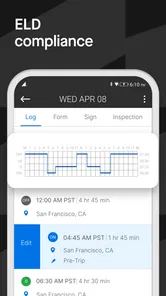
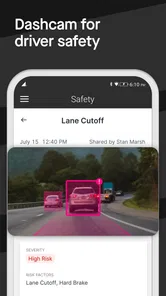
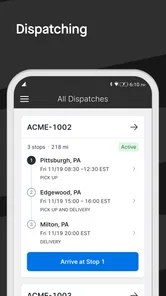
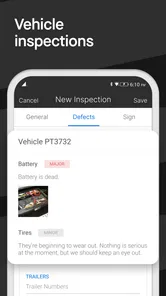
The strongest case for Motive Driver is a working driver who needs more than a standalone logbook. ELD compliance is central to its role, and the safety dashcam and inspection functions make it relevant to a broader daily routine. For a fleet driver, keeping those activities associated with the same driver-focused app may be more practical than juggling unrelated tools. Whether that convenience fits depends on how the driver’s employer or operation uses the system.
A realistic routine might be a driver preparing for a shift, completing an inspection while parked, then checking the app again when work is finished to keep the day’s records in order. I find that kind of planned use more sensible than treating a phone as something to operate constantly on the road. The app’s value is in supporting the work around driving; it should not become a reason to look down at a screen while moving.
More From Our News Desk

Weather by Xiaomi Review: Clear at a Glance, Less Clear Up Close

X Under Pressure: Can It Recover When Posting Goes Wrong?

Clash of Clans Is Won Between the Battles

Android Auto Makes the Case for Quieter Car Software

MobiOffice: Transforming Mobile Productivity with Seamless Integration

EA SPORTS FC™ Mobile Soccer: Redefining Mobile Sports Gaming
Motor and sensory considerations
For anyone with limited dexterity, hand fatigue, or difficulty with small touch targets, the important question is not just whether the screens look tidy but whether the required steps are comfortable to complete. I would try the specific inspection and logging actions on the device that will be used for work, while parked, before making it part of a regular shift. A task that feels easy once may become frustrating when repeated under time pressure.
Drivers who are sensitive to alerts or visual interruptions may also want to establish when they check the app and keep that habit consistent. Notifications can be useful in a work tool, but frequent screen checks are not a substitute for safe attention to the road. If a driver needs larger text, audio guidance, or another accommodation, they should test the phone’s own accessibility settings alongside the app and confirm that essential tasks remain usable.
Practical ways to reduce friction
I’d make the first practice run deliberately simple: do the common pre-shift task while parked, pause to check that it is complete, and then learn the next routine action. That gives a new user a chance to notice whether the sequence is easy to remember without adding the pressure of a live shift. It is also a useful way to identify any phone settings that make the screen easier to read or operate before those adjustments matter in a hurry.
For drivers who share vehicles or rotate duties, the practical trade-off is consistency. A familiar sequence is easier to follow than improvising from one shift to the next, but each person still needs to understand their own responsibilities and confirm the work is recorded as expected. I would not assume that having multiple tasks in one app automatically removes the need to check them; consolidation reduces app switching, not the need for attention.
Where it fits—and where it doesn’t
Motive Driver is a free business app from Motive Technologies Inc. It has a 4.3 average from around 34,000 ratings, and more than a million installs. The app is rated for Everyone, and version 97.0 is listed for devices running Android 9 or later. Those details make it easy to consider, but they do not mean it is the right fit for every driver: its compliance and fleet-oriented purpose is a better match for work use than casual personal driving.
Compared with using separate tools for logs, inspections, and camera-related work, the appeal is having a more unified driver workflow. The trade-off is that a focused work app may feel unnecessary if you only need a simple mileage note or personal trip record. I would also avoid assuming that every feature is useful to every worker; the value depends on which tasks are actually part of the driver’s routine and how the operation handles them.
What to check before depending on it
A sensible first question is whether your work actually uses the app’s compliance and vehicle-task workflow. Another is whether the device you plan to carry can run the current version; the listed Android requirement is version 9 or later. Because this is a work tool, I’d also clarify with the relevant manager or fleet contact which actions are expected in the app and when they should be completed. That is more reliable than guessing from the feature names.
If you are moving from a paper log or another digital system, expect an adjustment period. The useful comparison is not simply paper versus phone: it is whether the app’s combined workflow matches your operation well enough to make routine tasks clearer. Separate tools can be preferable when they are already required or when a worker only needs one narrow function. A single app is convenient only when its workflow fits the work.
A practical inclusive verdict
Overall, I see Motive Driver as most useful for professional drivers who need a work-centered place for compliance and related vehicle tasks, and who can complete those steps safely while stopped. It is less compelling for occasional drivers, people looking only for navigation, or anyone who prefers a minimal personal log. If accessibility is a deciding factor, test the actions you will use most on your own phone before depending on them for a shift; a clean-looking interface alone does not guarantee that every workflow will suit every ability.
That is also why I would make the decision based on a real task rather than a quick look at the home screen. Try the inspection or logging step you expect to repeat, in the conditions where you would normally do it, and consider whether the text, touch interactions, and timing work for you. Phone accessibility settings may help, but a change that improves readability can also alter how much information fits on screen, so it is worth checking the whole task from start to finish.
Let me tell you about my latest experience with the Motive Driver app. This is one of those apps that got me hooked from the moment I started using it. It’s designed to streamline the daily grind of drivers, whether you're a professional trucker or just someone who spends a lot of time on the road.
Getting Started with Motive Driver
Setting up the Motive Driver app was a breeze. I was pleasantly surprised at how intuitive the interface is. You know that feeling when you open an app and everything just makes sense? That’s exactly what happened here. The registration process was smooth, and within minutes, I was ready to explore its features.
Features That Make a Difference
One thing that stands out about this app is its robust feature set. It offers everything from real-time tracking to vehicle diagnostics. I mean, how cool is it that you can monitor your fuel consumption and engine health straight from your phone? Plus, the app provides detailed trip logs, which are incredibly helpful for keeping track of your driving hours and mileage.
Another feature that really caught my attention was the alert system. The app sends notifications about traffic conditions and road safety tips, which is a lifesaver when you’re on a tight schedule. It’s like having a personal assistant who’s always got your back on the road.
User Experience
Now, let’s talk about the user experience. The app’s design is clean and straightforward, which makes navigation a piece of cake. I love how everything is organized so logically. Even if you’re not tech-savvy, you’ll find it easy to get around. The developers clearly put a lot of thought into making this app user-friendly, and it shows.
Also, the performance is top-notch. I haven’t experienced any lags or crashes, which is something I can’t say for every app I’ve tried. It’s super reliable, and that’s crucial when you’re relying on it for your day-to-day driving needs.
Final Thoughts
So, would I recommend the Motive Driver app? Absolutely. Whether you’re a seasoned driver or just someone who wants a more organized driving experience, this app has something to offer. It’s packed with features that genuinely make life easier, and the user-friendly design is just the cherry on top.
In a world where efficiency and safety are paramount, having an app like Motive Driver in your toolkit is a game-changer. It’s one of those tools that once you start using, you’ll wonder how you ever managed without it. So, if you haven’t tried it yet, I’d say it’s high time you give it a spin.
Motive Driver Frequently Asked Questions
Do I need an account or an invitation from my employer to use Motive Driver?
Motive Driver is designed for drivers and fleet operations using Motive’s services, so it is most useful when your organization has included you in its setup. Before downloading, ask your fleet manager whether you need an account, an invitation, or particular sign-in details. That check can help you avoid installing an app you cannot use for your work.
What kinds of work can I use Motive Driver for?
Motive Driver is a business app focused on driver and fleet-related tasks. Its summary highlights ELD compliance, a safety dashcam, and inspections, making it relevant to drivers whose organization uses Motive for these activities. It is not presented as a general navigation app; check with your fleet manager to understand which parts of the app your organization expects you to use.
Is Motive Driver free to download, and who is it intended for?
Motive Driver is a free business app from Motive Technologies Inc., aimed at drivers and fleet operations using Motive’s services. Its store summary highlights ELD compliance, a safety dashcam, and inspections, so it is most relevant to people whose work or fleet already relies on those tools. Before downloading, check with your fleet manager that the app is part of your organization’s setup.
What is Motive Driver and how does it work?
Motive Driver is a comprehensive app designed for fleet management and driver safety. It allows fleet managers to track vehicles, monitor driver behavior, and ensure compliance with regulations. The app integrates seamlessly with the vehicle's telematics and offers real-time data to improve efficiency and safety. Users can access a dashboard to view reports and analytics that help in making informed decisions.
Is Motive Driver compatible with all vehicles?
Motive Driver is compatible with a wide range of vehicles, but it is essential to check the compatibility with your specific fleet. The app supports most commercial vehicles equipped with telematics devices. However, for optimal performance, ensure your vehicles meet the technical requirements outlined by Motive Driver. Contact their support for detailed compatibility information.
Pros
- User-friendly interface for easy navigation.
- Real-time tracking of driving hours.
- Customizable alerts for breaks and schedules.
- Comprehensive trip history for analysis.
- Seamless integration with fleet management tools.
Cons
- Requires constant internet connection.
- Limited offline functionality.
- Subscription required for premium features.
- Occasional app crashes reported.
- High battery usage during GPS tracking.











