Monster Smart Lighting
- 1.45K
- 2.4
- Installs
- 100.00K
- Price
- Free
Screenshots
Analysis by Reviewed
In a shared home, lighting control can be less about creating a dramatic scene and more about avoiding little daily annoyances: someone wants the kitchen bright while another person is winding down in the living room. Monster Smart Lighting is intended to control compatible smart lighting devices, so it makes the most sense when the people using it are already on the same page about which lights they want to manage and when.
Agree on who manages the lights
Before setting up connected lights in a shared space, I’d decide which phone or account will handle the initial setup and make sure everyone knows how the lights are meant to behave. Schedules are useful, but a setting that suits one person can surprise another when a light changes while they are still using the room. For shared areas, I’d start with a simple routine and adjust it after the household has lived with it for a few days.
The app is free, and it comes from JEM Accessories, Inc. Its current version is 2.0.145, and it is rated for Everyone. That age label is about the app’s content, not a substitute for an adult deciding who should control connected devices in the home. I’d keep account access and device setup with a trusted household member, especially if children use the same spaces.
Where connected lighting earns its place
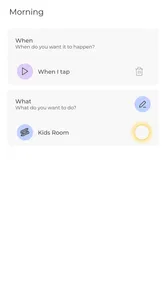
A practical use is setting a light to come on around the time someone usually gets home, then turning it off when the room is no longer in use. That can be more convenient than relying on memory, though it only works well if household routines are reasonably predictable. If people keep different hours, I’d avoid making one schedule govern every room; a shared living-room routine and a separate approach for a bedroom are less likely to cause friction.
Compared with a basic wall switch, an app can offer more flexible control, but it also asks you to manage a phone-based setup and coordinate who changes it. If you only want to switch a light on and off, the physical switch is simpler and more dependable. I’d choose this app when color, schedules, or compatible connected devices are part of the goal, not just because a phone can replace a switch.
Light Up Your Life
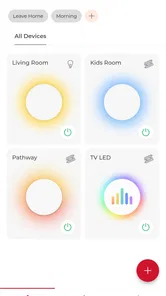
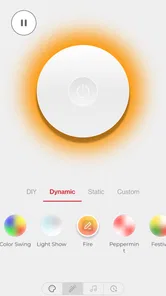
Imagine walking into a room and having the lights adjust to your mood or the time of day. With Monster Smart Lighting, you can do just that. This nifty app offers an intuitive interface that’s as easy as pie to navigate, allowing you to control your lighting setup with just a few taps. It’s like having a magic wand for your home lighting. Whether you're looking to create a cozy ambience for movie night or energize your morning routine with vibrant hues, this app has got you covered.
Features That Shine
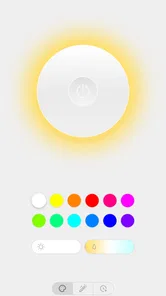
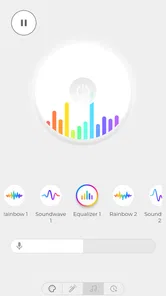
One of the standout features is the scheduling option. You can set your lights to switch on or off at specific times, which is perfect for those of us who often forget to hit the switch on our way out. Plus, the color selection is absolutely dynamic. There’s a whole spectrum to choose from, and you can even sync your lights with music to create a party atmosphere. It’s like having a personal DJ and lighting technician right in your pocket.
More From Our News Desk

 Gmail
Gmail in a Busy Inbox: Who Benefits Most?
From first account to crowded workday, Gmail earns its place through dependable search and flexible sorting—but its best fit depends on how much inbox maintenance you can tolerate.

 Prime Video
Switching to Prime Video: What Changes in Your Viewing Routine
Prime Video can make a compelling second home for streaming, but switching means learning a different catalog, rental layer, and route from browsing to playback.

 Universal TV Remote Control
 Works Best as a Reliable Backup
A phone remote earns its place through quick setup and reliable habits. Here is how to get more from Universal TV Remote Control—and where its limits show.

 Weather - By Xiaomi
Weather by Xiaomi Review: Clear at a Glance, Less Clear Up Close
Xiaomi’s weather app makes everyday forecasts quick to scan, but its calm surface can leave useful details and recovery paths harder to find than they should be.

 X
X Under Pressure: Can It Recover When Posting Goes Wrong?
A resilience-focused review of X, examining setup, mistaken posts, interruptions, weak connections, and the gaps that matter when recovery needs to be dependable.

 Clash of Clans
 Is Won Between the Battles
Its raids are quick; its community is a long-term project of coordination, teaching, rivalry, and shared responsibility—with all the friction that entails.
Latest News



For a household, the useful question is whether a routine helps everyone or just the person who created it. I’d test a schedule on one light first, choosing a time when an unexpected change would be easy to notice and correct. A small trial is a better way to learn whether the timing fits the room than setting several lights at once and asking everyone else to adapt.
A useful first test is to separate the app’s everyday value from its novelty. I’d try the same light in two ordinary situations: a steady color or brightness for a routine evening, and a more expressive setting for a short occasion such as a film or gathering. If the dramatic option is fun but nobody reaches for it again, that tells me the app’s practical value is more likely to come from quick access and schedules than from constant scene changes.
For a person who comes home at an irregular time, a fixed schedule may not be the best answer. I’d keep the main entrance or hallway control straightforward and use a schedule only for a room with a predictable pattern. That way, an automation can reduce a repeated chore without making the household feel as though it has to follow the app’s timetable.
I also love the voice control feature. If you’re like me and often have your hands full, this is a game-changer. Simply pair your lights with smart home assistants like Alexa or Google Assistant and voilà, you’re the maestro of your home’s lighting, orchestrating everything with simple voice commands.
Simple Setup and Seamless Integration
Setting up the Monster Smart Lighting is a breeze. You don't need to be a tech guru to get things rolling. Just follow the straightforward instructions, and you'll have your lights up and running in no time. The app integrates seamlessly with multiple devices, making it easy to manage your lighting from your smartphone, tablet, or computer.
When more than one person is involved, I’d treat setup as a household task rather than a private experiment: agree on the device names and the rooms they refer to before adding routines or voice commands. Clear names make it easier to ask for the right light without trial and error. If you are setting up lighting for someone else, walk them through the basic controls instead of assuming they will want to use your phone or account.
Device names do more work than they seem to. Before adding several lights, I’d give each one a name that describes its room and purpose, not a vague label that only the person who installed it understands. That small bit of housekeeping is especially helpful with voice control: if a spoken command is unclear, people may end up changing the wrong light and conclude that the setup is unreliable.
There is also a trade-off between keeping one person in charge and making controls convenient for everyone. A single person handling changes can prevent accidental edits, but it can become a bottleneck if that person is away or busy. I’d agree on a simple fallback with other household members—such as using the ordinary switch when they only need light—rather than expecting everyone to learn every setting at once.
The app’s broader reception is a reason I’d keep expectations measured: it has an average rating of 2.4 from around 2,200 ratings, despite more than 100,000 installs. That does not tell me exactly how it will behave with a particular device, but it is a sensible nudge to check that your lights are compatible and to try the core controls before building your whole routine around the app. It requires Android 9 or newer.
Compatibility is the question I’d settle before planning a whole room around app control. Since the app is for connected lighting devices, I would check the specific light or accessory packaging and instructions for Monster compatibility, then test one device through the basic controls first. If that initial pairing or everyday switching is troublesome, adding more lights will only make it harder to identify what is causing the problem.
Another great thing is the energy-saving aspect. The app allows you to monitor your energy consumption, ensuring you’re not just basking in beautiful lighting but also keeping your electricity bill in check. It's like having an eco-friendly companion that brightens your day without dimming your wallet.
When I’d choose another approach
If a household needs a system that works equally well for people who do not want to use a phone, a straightforward switch may be the better everyday choice. Likewise, if family members disagree about changing colors or schedules, keeping connected controls limited to one room can prevent a small convenience from becoming a constant negotiation. I’d also avoid relying on a routine as the only way to manage an important light; having a familiar manual option matters when someone just needs illumination without navigating an app.
Monster Smart Lighting sits in the middle between a basic switch and a broader smart-home setup: it can make lighting more flexible, but the benefit depends on compatible devices and a routine that suits the people sharing the room. If you mainly want reliable, simple on-and-off control, the usual switch is hard to beat. If you enjoy adjusting the atmosphere and are willing to coordinate access and settings, the app is a more interesting fit.
That middle-ground role is worth keeping in mind if you already use another smart-home system. A dedicated lighting app can make sense when your priority is controlling compatible lights and adjusting their look; a broader hub may be more convenient if you want one place to coordinate many kinds of household devices. I’d avoid choosing either approach on reputation alone. The better fit is the one that already matches the equipment you own and the amount of setup your household is willing to maintain.
For renters or anyone who cannot make changes to a room’s wiring, connected bulbs or lighting accessories can be an appealing route to more flexible ambience without turning a simple lighting decision into a renovation project. The practical catch is that app control still depends on the compatible device and on people being comfortable using it. If a guest, child, or older relative needs to find the light switch quickly, the ordinary physical control should remain easy to understand.
Another practical question is what happens when plans change. A schedule that suits a normal weekday may not suit a late evening or a guest staying over, so I’d review routines whenever the household’s pattern shifts rather than assuming the original timing will stay useful. If you are unsure whether an automation is helping, temporarily simplify it and see whether people miss it; that is a clearer test than adding more settings to solve a problem that may not need them.
Final Thoughts
In a nutshell, Monster Smart Lighting is a brilliant choice for anyone looking to enhance their home environment. It’s versatile, user-friendly, and packed with features that make managing your lighting fun and efficient. Whether you're tech-savvy or a newbie, this app allows you to effortlessly transform your space and mood with the power of light.
So, if you're ready to add a little magic to your daily routine, give Monster Smart Lighting a spin. Trust me, once you start, you'll wonder how you ever lived without it.
A household verdict
I’d recommend it most to someone who already has compatible Monster lighting, enjoys changing the mood of a room, and is happy to be the person who keeps shared settings sensible. It is less appealing if everyone expects independent control, if a phone-based routine would confuse the household, or if simple switching is all that is needed. With 1.5K reviews and a free price, there is plenty of user feedback to weigh alongside your own small-scale trial. My advice is to begin with one device, check the everyday controls, and only then decide whether schedules and shared routines genuinely make home life easier.
Monster Smart Lighting Frequently Asked Questions
Is Monster Smart Lighting free, and what kind of app is it?
Monster Smart Lighting is a free House & Home app from JEM Accessories, Inc. It is designed to control compatible smart devices, with a focus on lighting. Its audience rating is Everyone, so it is presented as suitable for general household use. Before downloading, consider whether you have Monster smart lighting or another compatible device to manage, since the app’s usefulness depends on having hardware it can connect to.
What features does the Monster Smart Lighting app offer?
The Monster Smart Lighting app allows users to control their smart lighting devices remotely via their smartphone. Key features include scheduling, dimming, color changing, and group control for multiple lights. Additionally, the app supports voice commands through integration with voice assistants like Amazon Alexa and Google Assistant, making it a versatile choice for home automation.
Is the Monster Smart Lighting app compatible with all devices?
The Monster Smart Lighting app is compatible with a wide range of devices, including most smartphones and tablets running on Android and iOS. However, compatibility with specific smart lighting products may vary, so it's essential to check the product specifications to ensure seamless integration and functionality with the app. For Android, the app requires version 9 or later, so check your device’s operating system before installing.
Does the Monster Smart Lighting app require a hub for operation?
No, the Monster Smart Lighting app is designed to work without the need for an additional hub. Users can connect their smart lighting devices directly to the app via Wi-Fi, simplifying the setup process. This hubless operation makes it easier for users to manage their smart lighting without the added cost and complexity of a hub.
How secure is the Monster Smart Lighting app?
The Monster Smart Lighting app prioritizes user security by implementing robust encryption protocols to protect data transmission between the app and devices. Regular updates are provided to address security vulnerabilities, ensuring a safe user experience. Additionally, users are encouraged to use strong, unique passwords for their accounts to enhance security further.
Pros
- Easy to install and set up.
- Compatible with major smart home systems.
- Offers a wide range of colors.
- Energy-efficient LED technology.
- User-friendly mobile app interface.
Cons
- Requires a stable Wi-Fi connection.
- Limited outdoor use options.
- Slight delay in remote commands.
- Premium features require subscription.
- Bulbs can be expensive.