

Monet Launcher - Android TV
- 31.00
- 4.6
- Installs
- 50.00K
- Price
- Free

Screenshots
Analysis by Reviewed
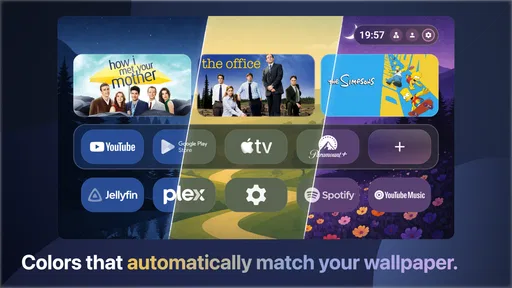
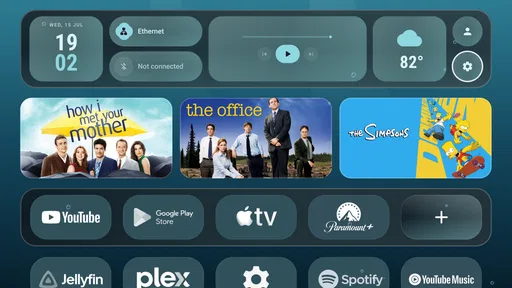
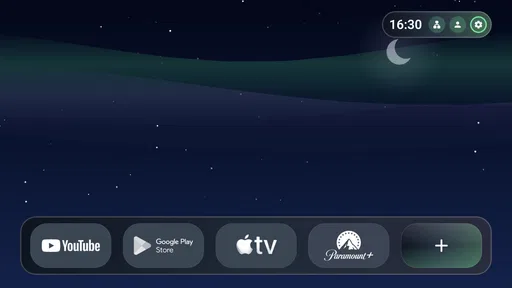
If your Android TV home screen feels more like a storage shelf than a place you want to use, Monet Launcher is designed to make that first screen calmer and more personal. I approached it as a replacement launcher rather than another streaming service: its job is to organize the way you reach apps, surface useful information, and give the television a more cohesive visual identity. The focus is Material You styling, dynamic color, weather live wallpapers, and widgets, all packaged in a free personalization app from Klevico.
My first impression is that this is best understood as a visual and practical refresh, not a complete reinvention of Android TV. It can make the interface feel more deliberate, especially if you like matching colors and a less ordinary background. At the same time, a launcher sits at the center of everyday navigation, so small points of friction matter more here than they would in a simple wallpaper app. The useful question is not whether it looks attractive in screenshots, but whether it helps you get from the remote in your hand to the thing you want to watch.
What to expect before changing your home screen
Monet Launcher belongs to the personalization side of Android software, although its role is more important than a decorative theme. Once selected as the home experience, a launcher influences what you see when you press the Home button, how quickly you find installed apps, and how much visual information is presented before you open anything. That makes it particularly relevant for people who use an Android TV device every day and want the starting screen to feel less generic.
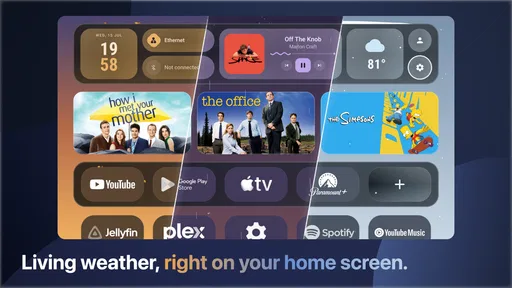
The central idea is Material You: colors and interface elements are intended to feel connected rather than randomly assembled. The weather live wallpaper adds movement and context, while widgets can place selected information directly on the home screen. I like that combination because it gives the television a sense of place without requiring a complicated customization project. You can treat it as a quiet background with useful shortcuts, or spend more time shaping the screen around your preferred routine.
The app is free to install and is suitable for Everyone. Its current version is 1.0.76, and it runs on Android 8.0 or later. Optional in-app purchases are listed at $4.99 per item, so I would begin with the free experience and only consider an extra purchase after deciding that the launcher genuinely improves your daily use. That approach is especially sensible with a home-screen replacement, because appearance alone is not enough if navigation becomes slower.
Its public reception is encouraging: Monet Launcher holds a 4.6 average from around 1.8 thousand ratings and has passed 50 thousand installs. Those figures suggest that the concept has found an audience, but they should not replace your own test on the particular Android TV device you use. Television hardware varies widely in speed, remote behavior, and manufacturer software, so the same launcher can feel effortless on one setup and less convincing on another.
Who will notice the biggest improvement
I would recommend trying it first if your current home screen is crowded, visually inconsistent, or dominated by content suggestions you rarely use. It also makes sense for someone who has installed many streaming, media, or utility apps and wants a more intentional route to them. A shared television can benefit too: a clear arrangement of familiar apps is easier for occasional users than a busy screen that changes emphasis from one session to the next.
More From Our News Desk

 Gmail
GmailGmail in a Busy Inbox: Who Benefits Most?
From first account to crowded workday, Gmail earns its place through dependable search and flexible sorting—but its best fit depends on how much inbox maintenance you can tolerate.

 Prime Video
Switching to Prime Video: What Changes in Your Viewing Routine
Prime Video can make a compelling second home for streaming, but switching means learning a different catalog, rental layer, and route from browsing to playback.

 Universal TV Remote Control
Universal TV Remote Control Works Best as a Reliable Backup
A phone remote earns its place through quick setup and reliable habits. Here is how to get more from Universal TV Remote Control—and where its limits show.

 Weather - By Xiaomi
Weather by Xiaomi Review: Clear at a Glance, Less Clear Up Close
Xiaomi’s weather app makes everyday forecasts quick to scan, but its calm surface can leave useful details and recovery paths harder to find than they should be.

 X
XX Under Pressure: Can It Recover When Posting Goes Wrong?
A resilience-focused review of X, examining setup, mistaken posts, interruptions, weak connections, and the gaps that matter when recovery needs to be dependable.

 Clash of Clans
Clash of Clans Is Won Between the Battles
Its raids are quick; its community is a long-term project of coordination, teaching, rivalry, and shared responsibility—with all the friction that entails.
Latest News



The strongest match is a person who cares about the atmosphere of a room as much as the mechanics of launching an app. A weather-based animated background can make a television feel less like a black rectangle waiting for input, particularly when it is idle. If you prefer a completely static, minimal screen, however, the live wallpaper element may feel unnecessary. Likewise, users who depend heavily on a manufacturer’s built-in recommendations may prefer to stay with the original launcher rather than change the way those suggestions are presented.
Starting carefully instead of rushing the switch
After installing the app, I would not immediately spend time adjusting every visual option. First, open it and look at the basic arrangement from the distance at which you normally watch television. A layout that seems attractive close to the screen may be harder to scan from a sofa. I pay attention to whether the main app shortcuts are obvious, whether the text is comfortable to read, and whether the remote can move through the screen without awkward detours.
If Android TV asks which launcher should handle the Home action, choose Monet Launcher only after you have seen its initial screen. This gives you a reference point before customization changes the layout. It also makes troubleshooting easier: if something feels wrong later, you can tell whether the problem came from the initial arrangement or from an adjustment you made yourself.
For a first setup, I would keep the number of widgets modest. A television is not a phone, and information that looks useful in a small grid can become visual noise when viewed across a room. Start with the widget or widgets that answer a question you actually have while sitting down to watch something. Weather is a natural example because it can help you decide whether to stay in or go out, but the broader lesson is to make every item earn its space.
The color system deserves a similar gradual approach. Dynamic color can tie the background and interface together, yet strong colors may reduce the sense of calm you wanted from a home screen. I prefer checking the launcher in both a bright room and a dim room before settling on a look. Television viewing conditions change during the day, and a design that is easy on the eyes at lunchtime may be more distracting at night.
Your first meaningful success
The first useful result should be simple: press Home, identify the app you want, and open it without thinking about the launcher. To test that, choose one application you use frequently, such as your main streaming service, and place your attention on the path rather than on the decoration. If Monet Launcher lets you reach that app more naturally than your old screen, you have already learned more than a long customization session could teach you.
I also recommend testing the Back and Home buttons several times. A launcher can look excellent while still feeling unfamiliar when you move between an active video app and the home screen. Try opening an app, returning, moving to another shortcut, and repeating the cycle with the remote. This small routine exposes whether the arrangement supports real use or merely looks organized when nothing is happening.
A realistic evening test would be to sit down after work, open the launcher, check the weather widget, and launch the service you normally watch. Then repeat the same sequence the following day without changing anything. If you stop noticing the launcher and simply reach your content, that is a better sign than being impressed by it for five minutes. A home screen succeeds when it reduces hesitation rather than asking you to admire it.
One useful habit is to keep a mental “first row” of priorities. Put the apps that serve the household most often where the remote reaches them quickly, and leave less frequent tools farther away. This is not just tidiness. On a television, every extra directional press is more noticeable than on a touchscreen, where a quick tap can bypass a crowded arrangement. Monet Launcher is most valuable when its personalization is used to shorten a routine, not only to change colors.
Where new users may become confused
The biggest adjustment is understanding that a launcher is not the same as a wallpaper or a widget pack. It can affect the place you return to after pressing Home, which means the change may feel broader than expected. If you install it only because the weather background looks appealing, you may be surprised when the entire starting experience feels different. I suggest treating the first session as an orientation period rather than assuming every element should match your previous setup immediately.
Another possible confusion is the difference between a visual change and a functional improvement. Dynamic color can make the interface feel more unified, but it does not automatically make a poorly arranged app collection easier to use. Widgets can provide at-a-glance information, but adding more of them does not necessarily create a better television interface. I get the best results by deciding what I want to accomplish first and then using the visual tools to support that goal.
Weather live wallpapers can also change the mood of the room more than a static image would. Some viewers will enjoy that sense of movement; others may find it distracting, especially when the television is left on in the background. If you share a screen with people who have different tastes, the practical solution is to agree on a restrained setup rather than treating every available visual element as something that must remain active.
There is also a learning curve when a familiar manufacturer launcher has trained your habits. You may instinctively look for recommendations, settings, or app categories in their old positions. Give yourself a few ordinary sessions before judging the new arrangement. On the other hand, do not force yourself to adapt indefinitely: if opening common apps consistently takes more steps, or if the remote feels less predictable, returning to the original launcher may be the more sensible choice.
Useful workflows beyond the first screen
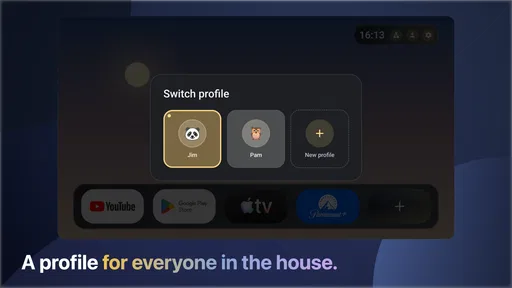
One less obvious way to evaluate Monet Launcher is to build separate expectations for different viewing situations. For casual browsing, a visually rich home screen with weather information may be pleasant. For a household member who wants one familiar app, a simpler arrangement with fewer distractions is probably better. The same launcher can serve both situations if you prioritize shared shortcuts and avoid filling the screen with personal experiments.
I would also use the launcher as a reset point for an overgrown device. Instead of deleting apps immediately, place the services you actually use in the most visible positions and let the rest stay out of the way. After a week, you will have a clearer idea of which shortcuts deserve prominence. This workflow is safer than making a large cleanup decision during setup, because it separates interface organization from app removal.
A second practical trade-off involves live presentation versus long-term calm. When guests are in the room, a weather wallpaper can be a pleasant detail that makes the television look finished. During focused viewing, a quieter arrangement may be preferable. I would therefore avoid designing the screen only for its idle appearance. The launcher should still feel comfortable when you are repeatedly opening, leaving, and reopening apps.
The app is also a reasonable option for someone setting up an older Android TV device that still meets the Android 8.0 requirement but feels visually dated. I would keep expectations realistic: a new launcher can reorganize the experience, but it cannot turn slow hardware into fast hardware. If delays already occur inside streaming apps or while the system loads menus, Monet Launcher may improve the presentation without solving the underlying performance issue.
How it compares with staying on the standard launcher
The built-in Android TV launcher remains the safer choice for users who value familiarity, manufacturer integration, and the fewest changes. It is already part of the device, so there is no learning period and no question about whether the original Home behavior suits your remote. If your current screen is clear and you rarely think about personalization, switching may not deliver enough practical benefit to justify the adjustment.
Monet Launcher makes more sense when the standard experience feels visually disconnected from your preferences. Its combination of Material You styling, dynamic color, weather live wallpapers, and widgets gives it a stronger identity than a basic shortcut replacement. Compared with installing a separate wallpaper app, it also aims to connect the background with the way you enter your apps. That is the reason I see it as more than decoration.
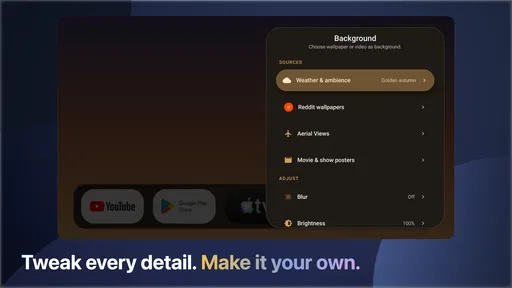
Compared with a highly configurable launcher, the appeal here is approachability. A power user who wants deep control over every row, transition, and behavior may prefer a tool built around extensive manual configuration. Monet Launcher is better suited to someone who wants a coherent look and useful home-screen elements without turning the television into a constant project. The trade-off is that a more focused design may not satisfy people who enjoy adjusting every detail.
When I would skip it
I would skip Monet Launcher if several people in the household already know the standard launcher well and do not want their habits changed. I would also hesitate on a device where the original interface is tightly connected to the television manufacturer’s controls or recommendations. In those cases, the cosmetic improvement may not compensate for unfamiliar navigation.
I would be cautious if your priority is absolute visual stillness. The weather live wallpaper is part of the app’s character, but anyone who dislikes motion on an idle screen may prefer a simpler alternative. The same applies if you want a launcher primarily for advanced automation or unusually detailed layout control; this app’s identity is centered on a polished, personal home screen rather than an enthusiast’s laboratory.
Finally, consider the optional purchase carefully. The free installation gives you a chance to judge the basic experience, and I would not spend money merely because the interface looks good in a preview. Use it through a normal routine first, then decide whether any paid item solves a real annoyance or adds a feature you will use repeatedly. That is the fairest way to assess the $4.99-per-item model.
The next step after setup
Once your first shortcut works smoothly, leave the layout alone for a day or two. This is where many launcher experiments go wrong: constant rearranging prevents you from learning whether the design actually supports your habits. After a short trial, change only one thing at a time, such as moving a frequently used app closer or removing a widget that you never read. Small revisions reveal what matters.
I would then test the launcher with the people who use the television most. Ask them to open their usual app without instructions. Their hesitation is valuable feedback, especially if you are the person who performed the customization. A home screen should be understandable to the least technical regular user, not just to the person who installed it.
For my own recommendation, Monet Launcher is worth trying when your Android TV home screen feels dull, crowded, or disconnected from the room around it. The combination of dynamic color, weather presentation, and widgets gives the interface a distinct personality, while the launcher format can make frequently used apps easier to organize. The best result comes from using personalization to remove friction, not from adding every visual option at once.
Klevico’s app is free, rated for Everyone, and has enough adoption to make it a credible experiment rather than an obscure customization gamble. I would start with the default arrangement, verify that Home and Back behave naturally, and complete one ordinary viewing routine before considering any optional purchase. If that routine becomes clearer and more pleasant, Monet Launcher earns a place on your Android TV. If it makes familiar navigation harder, the standard launcher is still the better tool for your household.
Monet Launcher - Android TV Frequently Asked Questions
What devices and Android version do I need to use Monet Launcher - Android TV?
Monet Launcher is a personalization app for Android TV, and it requires Android 8.0 or newer. Before downloading, check the operating system on your television or streaming device, since older versions may not support installation. Even on a compatible version, the experience can vary between devices, so confirm that your TV permits third-party launchers and that you can navigate its menus with your remote.
What does Monet Launcher offer to personalize an Android TV home screen?
Monet Launcher is described as a Material You TV launcher with dynamic color, weather live wallpapers, and widgets. These features are intended to give the television’s home screen a more personalized look rather than simply leaving the manufacturer’s default layout unchanged. The exact appearance and available controls can depend on your device and Android TV version, so explore the launcher’s options after installation to see what suits your setup.
What is Monet Launcher - Android TV, and what does it do?
Monet Launcher - Android TV is an alternative home-screen launcher designed for Android TV devices and compatible television boxes. After installation, it can replace the default launcher with a different interface for accessing installed apps, settings, and shortcuts. Its main purpose is to provide a cleaner or more personalized way to navigate your TV, although the exact appearance and available options may depend on your Android TV version and device manufacturer.
Is Monet Launcher - Android TV compatible with every Android TV device?
Compatibility can vary between televisions, streaming boxes, and Android TV versions. Before downloading, check whether your device allows third-party launchers and whether the application is available through its supported installation method. Some manufacturers restrict changes to the default home screen, while others may require additional permissions or configuration. Performance can also differ depending on your device’s memory, Android version, and remote-control support.
Can Monet Launcher replace the default launcher permanently?
Monet Launcher may be used as the main home-screen application on supported devices, but whether it can fully replace the factory launcher depends on the Android TV system. Some devices let you select a new default launcher, while others continue opening the original interface in certain situations, such as after pressing a dedicated home button or restarting the television. Keep the original launcher available until you confirm everything works correctly.
Pros
- Clean
- TV-friendly interface designed for large screens
- Provides a modern alternative to the default Android TV launcher
- Quick access to installed apps and favorite content
- Runs smoothly on many Android TV devices
- Useful customization options for organizing the home screen
Cons
- Some features may require payment or in-app purchases
- Compatibility can vary across Android TV boxes and smart TVs
- May use more system resources than the stock launcher
- Occasional layout issues may appear on unusual screen resolutions
- Changing the default launcher may require extra device permissions











