

MochiCloner Premium & Add‑ons
- 1.00
- 3.5
- Installs
- 100.00K
- Price
- Free

Screenshots

Analysis by Reviewed
When recurring services and their extras start blending together, I find it helpful to separate the question “What am I paying for?” from “Do I still need it?” MochiCloner Premium & Add-ons is aimed at that small but persistent organizational problem. I would consider it a focused place to review subscriptions and add-ons, not a general-purpose library or a place to browse entertainment. That distinction matters: it may help someone who wants a repeatable way to inspect recurring choices, but it is less compelling if a calendar reminder or an existing household routine already does the job.
Start with the decision you need the app to make easier
The best reason to try MochiCloner is not simply that you have several subscriptions. It is that the details are scattered: one service is paid through an app store, another through a website, and an add-on may be easy to forget after the original signup. A dedicated subscription and add-on manager can give that clutter a single place to review. I would judge this app by whether it makes that review clearer and more dependable for your own habits.
Before moving anything into a new manager, decide what you want to get out of it. If your main goal is to remember renewal dates, a calendar or reminder app may already cover the job with less setup. If you want to inspect subscriptions and their extras together, a specialized tool is a more natural fit. The useful question is whether the extra organization changes what you do: for instance, whether you notice a forgotten add-on before another billing cycle, or can make a calmer decision about a service you no longer use.
This is an app in the Libraries & Demo category, developed by lyt team. That placement may make it feel less like a polished financial dashboard and more like a focused utility, so I would keep expectations practical. Its name points to premium access and add-ons, but I would not assume that the name alone tells you exactly which management actions are available. A sensible first step is to explore the app’s own screens and terms before relying on it for a time-sensitive decision.
Where a dedicated manager can earn its place
The strength of a tool like this is the opportunity to think about a subscription and its extras as one decision. People often remember the main service but overlook the smaller add-on that was enabled for a particular project, family need, or short period. Keeping those details together can make a review more useful than scanning a list of service names alone. The insight is simple but easy to miss: an add-on should be evaluated against the use that justified it, not just against the total cost of the main subscription.
A practical routine is to review your entries when you already have a natural pause, such as the end of a busy month or after finishing a short-term project. For each item, ask what you actually used, what you expect to use next, and whether an extra still supports that purpose. That turns the app from a passive inventory into a prompt for a real decision. I would avoid treating any manager as an automatic cancellation service unless its own controls clearly say that it can make changes with the provider.
There is also value in separating “I might want this later” from “I am paying for this now.” When you are considering a new service, note the reason you want it and the point at which you expect to reassess it. That small bit of context can be more helpful than a bare reminder, because it gives you a standard for deciding whether the subscription earned its place. This workflow is especially useful for people who start temporary access for a specific task and then return to normal routines.
More From Our News Desk

 Gmail
GmailGmail in a Busy Inbox: Who Benefits Most?
From first account to crowded workday, Gmail earns its place through dependable search and flexible sorting—but its best fit depends on how much inbox maintenance you can tolerate.

 Prime Video
Switching to Prime Video: What Changes in Your Viewing Routine
Prime Video can make a compelling second home for streaming, but switching means learning a different catalog, rental layer, and route from browsing to playback.

 Universal TV Remote Control
Universal TV Remote Control Works Best as a Reliable Backup
A phone remote earns its place through quick setup and reliable habits. Here is how to get more from Universal TV Remote Control—and where its limits show.

 Weather - By Xiaomi
Weather by Xiaomi Review: Clear at a Glance, Less Clear Up Close
Xiaomi’s weather app makes everyday forecasts quick to scan, but its calm surface can leave useful details and recovery paths harder to find than they should be.

 X
XX Under Pressure: Can It Recover When Posting Goes Wrong?
A resilience-focused review of X, examining setup, mistaken posts, interruptions, weak connections, and the gaps that matter when recovery needs to be dependable.

 Clash of Clans
Clash of Clans Is Won Between the Battles
Its raids are quick; its community is a long-term project of coordination, teaching, rivalry, and shared responsibility—with all the friction that entails.
Latest News



For a household, the same review can help start a conversation without turning it into an argument about who signed up for what. I would use the app as a shared checklist only if everyone involved agrees on how entries are maintained. Otherwise, one person may assume another is keeping the list current. The tool’s value depends on the quality of the information you put into it, so establish a simple habit: add a subscription when you start it, and revisit it when your reason for having it changes.
What the audience and price suggest
MochiCloner is free to install, and its content rating is Everyone. The app has an average rating of 3.5 from 208 ratings, alongside one written review, so I would treat the public response as a reason to try it carefully rather than as a decisive endorsement or warning. A middle-of-the-road score can reflect different expectations: some users may want a straightforward tracker, while others may expect more automation or a broader finance tool.
The app has reached over 100,000 installs, which indicates that people have found the category worth exploring, but popularity does not establish that its workflow will suit yours. It was released on March 24, 2026, and version 1.0.1 is the current version. Because that is an early version, I would pay attention to whether the app feels stable in your own use and whether its available options match your needs before making it part of an important routine.
In-app purchases range from $3.99 to $79.99 per item. That is a wide span, so I would not assume that every feature is included in the free experience or that a paid option is necessary. Start by identifying the exact task you need help with, then check what the app offers for that task and what any purchase unlocks. If you only need a basic list and occasional reminders, paying for additional access may not make sense. If a paid option addresses a regular pain point, weigh its cost against the time and attention it saves you.
When another kind of app is the better choice
Compared with a spreadsheet, a specialized manager may feel more convenient for checking subscriptions in one place, while a spreadsheet gives you more freedom to design columns, notes, and review dates. I would choose the spreadsheet if you want a custom household budget or need to combine subscriptions with other spending. I would try MochiCloner if you would rather use a purpose-focused app than maintain your own template, provided its actual workflow covers the information you care about.
A calendar is a stronger alternative when the only failure point is forgetting a date. It can put a reminder alongside the rest of your schedule without asking you to maintain a separate inventory. A budgeting app may be better if your central concern is total monthly spending across many categories, rather than keeping track of subscriptions and add-ons specifically. These are not shortcomings unique to MochiCloner; they are different jobs. Choosing the right tool starts with knowing whether you need a list, a prompt, or a broader view of your money.
I would also be cautious about expecting the app to replace the official account pages for each service. A manager is most useful as an overview and decision aid, while the provider’s own account controls are the place to verify a billing detail or make a change. That distinction prevents a common mistake: seeing a subscription recorded in a tracker and assuming the record itself has altered the subscription. Check directly with the service when a renewal or cancellation matters.
For privacy-minded users, the right approach is to review what information the app asks you to enter and avoid storing anything you do not need for your chosen workflow. You can often make a useful list with service names and personal review notes rather than sensitive payment details. I would not put account passwords or full payment credentials into a subscription manager unless its design and handling practices clearly justify doing so. Keeping the list minimal also makes it easier to maintain.
Make switching a small, reversible experiment
Moving from a spreadsheet, calendar, or memory-based system should not be an all-at-once project. Start with a small set of current subscriptions and their associated extras. Check whether you can record the information that actually helps you decide: why you keep each item, when you want to revisit it, and whether an add-on still has a purpose. If the app makes those details awkward to maintain, that is useful evidence that another tool may fit better.
Keep your existing reminders until you have confirmed that the new routine works. This is a practical safeguard, not a judgment about the app: switching systems creates a brief period when a date can fall between them. Once you have checked the entries and completed a review cycle, you can decide whether to retire the old method. If you stop using MochiCloner, retain your own essential notes somewhere you control so that the effort of organizing your subscriptions is not lost.
Android support begins with version 8.0, which makes the app an option for devices running that operating system or later. If you are deciding between platforms or helping someone else set it up, check compatibility on the device they will actually use before building a routine around it. The more important question is not merely whether it installs, but whether the person responsible for updating the list will find it easy enough to keep current.
A realistic routine makes the difference
Imagine you sign up for a service to finish a project, then add an extra because it helps with one specific part of the work. Weeks later, the project is over, but the recurring charge is still easy to overlook among other account activity. A useful way to use MochiCloner is to record both the service and the reason for the extra when you add them, then revisit that note when the project wraps up. The note gives your future self context instead of asking you to remember why the extra seemed worthwhile.
I would also avoid trying to build a perfect catalogue on the first day. Begin with the subscriptions you are most likely to forget or the ones that have add-ons attached. That prioritization helps answer a practical question early: does having the details together actually make review easier? If it does, you can add less urgent entries later. If not, you have tested the workflow without turning setup into another chore.
For a household, a short monthly check-in can be more useful than asking one person to maintain an exhaustive list alone. Agree on who adds a new service and who confirms changes with the provider. The app can help structure that conversation, but it cannot resolve conflicting assumptions about ownership or payment. Treat it as a shared prompt only when the people involved have a clear routine for keeping entries accurate.
Know what to check before relying on it
A common question is whether installing a tracker changes a subscription or stops a renewal. I would not assume that it does. Use the relevant provider’s account page to confirm billing status and make cancellations or plan changes, then update your personal overview so it reflects what you did. This two-step habit is less convenient than hoping one app handles everything, but it avoids confusing a note about a subscription with control over the subscription itself.
Another sensible question is whether to enter payment information. For a basic review, I would start with only the details that help me recognize an item and decide when to revisit it. Keep credentials and full card information out of the list unless there is a clear, trusted reason to include them. The less sensitive information you maintain, the less you have to think about when deciding whether this is the right home for your subscription notes.
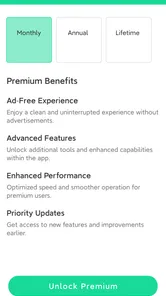
Before paying for an add-on or premium option, look at the exact task it is meant to improve and consider how often that task comes up. The available in-app purchases span a broad range, so comparing the specific option with your actual need is more useful than treating “premium” as an automatic upgrade. If the free setup already gives you a dependable way to review the entries you care about, there may be no reason to spend. If you repeatedly hit a limitation that a paid option directly addresses, then you can make that decision with a clearer sense of its value.
My recommendation for the right kind of user
I would recommend MochiCloner to someone who wants a dedicated place to review subscriptions and add-ons, and who is willing to spend a little time keeping that overview accurate. Its most promising use is not dramatic automation; it is making an otherwise scattered set of recurring choices easier to inspect. The app is especially worth considering if extras are the details you tend to forget, or if you want a repeatable moment to ask whether each service still earns its place.
I would skip it if you only need one or two reminders, prefer to keep financial tracking inside a broader budget tool, or do not want another list to maintain. I would also avoid depending on it as the sole source of truth for a provider’s billing status. Use the official service account to confirm important changes, and treat the manager as a planning aid unless its own functions clearly do more.
My practical verdict is to try it as a lightweight decision tool, not as a substitute for every subscription account you have. Begin with a few entries, note why each one matters, and see whether the app helps you make a clearer keep-or-review choice. If that process feels natural, it may be a useful home for the recurring details that tend to slip through the cracks. If it feels like duplicate admin, a calendar or a simple spreadsheet is likely the more comfortable fit.
That is the standard I would use before spending on an add-on: first confirm that the free experience improves a real part of your routine, then consider a purchase only if the additional option solves a problem you actually have. With that measured approach, MochiCloner Premium & Add-ons is easiest to assess on its own merits: a focused organizer for people who want to stay intentional about recurring services, rather than another app to install simply because subscriptions are common.
MochiCloner Premium & Add‑ons Frequently Asked Questions
What is MochiCloner Premium & Add-ons?
MochiCloner Premium & Add-ons appears to be a premium offering connected with MochiCloner, an app-cloning tool. Cloning apps can let you use separate accounts for supported services on one device, but available features depend on the app version, Android version, and the apps you want to duplicate. Check the product listing and developer details before downloading, since the name alone does not confirm exactly which premium features or add-ons are included.
Does MochiCloner Premium let me run two accounts for every app?
Not necessarily. App-cloning tools commonly support only selected apps, and some services may block cloned versions or require additional setup. Compatibility can also vary between devices and operating-system releases. Before relying on MochiCloner for a particular account, check its compatibility information and test with a nonessential account first. Avoid assuming that every messaging, social, banking, or work app will function correctly in a cloned environment.
Is MochiCloner Premium & Add-ons safe to use?
Safety depends on where you obtain the app, what permissions it requests, and how you use cloned apps. Download it only from a source you trust, review the developer and requested permissions, and keep your device security protections enabled. Cloning can expose account data to additional software components, so avoid cloning sensitive apps unless you understand the risks. Never provide passwords or verification codes to unofficial support channels.
Is MochiCloner Premium free, and what do the add-ons cost?
The word “Premium” suggests that some capabilities may require payment, while “Add-ons” may refer to separately available extras. Pricing, included features, trial availability, and subscription terms can change by store, region, and release. Review the current listing and checkout screen before confirming a purchase, including renewal dates and cancellation rules. Do not assume that paying once unlocks every feature or guarantees future updates.
What should I check before downloading MochiCloner Premium & Add-ons?
Confirm that the download is compatible with your device and operating-system version, and verify the publisher, recent update history, and user feedback on the source you choose. Check whether the app requires an existing MochiCloner installation, a subscription, or separate add-on purchases. Also consider storage use, permissions, privacy information, and whether your target apps allow cloning. Back up important data before experimenting with account or app duplication.
Pros
- Clone supported apps to use multiple accounts on one device.
- Separate app copies help keep work and personal accounts apart.
- Premium access may remove limits found in the basic version.
- Add-ons can extend cloning options for supported apps.
- Useful for managing several social or messaging accounts.
Cons
- Some apps may block cloned versions or require extra verification.
- Cloning can increase battery use and consume additional storage.
- Not every Android app is compatible with the cloning tool.
- Premium and add-ons may require separate purchases or subscriptions.
- Cloned apps may not receive notifications reliably in the background.










