

Mobs Maker for Minecraft PE
- 136.00
- 3.2
- Installs
- 500.00K
- Price
- Free
Screenshots
Analysis by Reviewed
Before opening Mobs Maker for Minecraft PE, I’d decide what you want to get out of the session: a creature concept to experiment with, or a finished addition ready for a world. That distinction matters. This is a creator-focused app in the Libraries & Demo category from PA Technologies, and its Blockbench connection points toward making and preparing a mob rather than simply choosing one from a catalogue. I find it most appealing when the process itself sounds fun, not when I’m in a hurry to change a game.
Start with a small, testable idea
A good first project is one with a clear visual purpose: perhaps a familiar creature with a distinctive silhouette or a single unusual detail. Keeping the concept narrow gives you something concrete to judge when you test it. If the result feels wrong, you can tell whether the issue is the design or the next step in getting it into Minecraft, rather than trying to diagnose a dozen changes at once.
I’d also separate “I made a model” from “I have a finished mob for play.” Those are different milestones. Blockbench is part of the app’s creator-oriented workflow, but model-making and getting a result working in your Minecraft setup can involve different stages. If you enjoy that process, the learning curve is part of the appeal. If you want an immediate, ready-to-use creature, an existing add-on is likely a better fit.
Make the handoff part of the plan
When you’re choosing a tool, think about what happens after the creative work. An app that helps you shape a mob is useful only if its output fits the way you plan to use Minecraft PE. I’d try a basic project early, before sinking a long session into details. That quick check can reveal whether your device and intended game workflow are a comfortable match.
For a shared project, I’d agree on the goal before editing: is the mob meant to look distinctive, suit a particular build, or simply give everyone a chance to experiment? A small group can otherwise spend more time debating details than making anything. Keeping the first version simple also makes it easier to compare ideas and decide what to change next.
Making a mob is only the first step
Have you ever found yourself wishing for a new kind of mob to spice up your world? Well, that's where Mobs Maker for Minecraft PE steps in. This app is a game-changer, letting you create and customize mobs like never before. From cute little bunnies with an attitude to fierce dragons ready to guard your castle, the possibilities are endless. As soon as I opened the app, I was greeted with a user-friendly interface that made customization a breeze.
Where creators can get stuck
The appeal is easy to understand: you can shape an idea for a Minecraft creature without starting by writing code. But a finished design and a mob that behaves as you imagined are not automatically the same thing. A useful way to begin is to keep the first project modest: decide what visual identity you want, make one clear change at a time, and check the result before piling on more ambitious adjustments. That makes it easier to tell whether a problem comes from the design choice or from the handoff to the game.
More From Our News Desk

 Gmail
GmailGmail in a Busy Inbox: Who Benefits Most?
From first account to crowded workday, Gmail earns its place through dependable search and flexible sorting—but its best fit depends on how much inbox maintenance you can tolerate.

 Prime Video
Switching to Prime Video: What Changes in Your Viewing Routine
Prime Video can make a compelling second home for streaming, but switching means learning a different catalog, rental layer, and route from browsing to playback.

 Universal TV Remote Control
Universal TV Remote Control Works Best as a Reliable Backup
A phone remote earns its place through quick setup and reliable habits. Here is how to get more from Universal TV Remote Control—and where its limits show.

 Weather - By Xiaomi
Weather by Xiaomi Review: Clear at a Glance, Less Clear Up Close
Xiaomi’s weather app makes everyday forecasts quick to scan, but its calm surface can leave useful details and recovery paths harder to find than they should be.

 X
XX Under Pressure: Can It Recover When Posting Goes Wrong?
A resilience-focused review of X, examining setup, mistaken posts, interruptions, weak connections, and the gaps that matter when recovery needs to be dependable.

 Clash of Clans
Clash of Clans Is Won Between the Battles
Its raids are quick; its community is a long-term project of coordination, teaching, rivalry, and shared responsibility—with all the friction that entails.
Latest News



This is also where expectations matter. The app’s connection to Blockbench is part of its creator-oriented purpose, so it makes most sense if you’re willing to think in terms of building and preparing an asset, rather than tapping a button and getting a fully polished world addition. If you mainly want ready-made content with no editing, browsing existing Minecraft add-ons is likely a quicker route. If you enjoy learning by changing a model and testing the outcome, the creation process is the point.
Setup checks before you start
Before spending time on a detailed creature, I’d check that the device can run the app and that Minecraft PE is available on the same device or in the workflow you plan to use. The app is free to install, is rated Teen, and its current version is 1.3.7; it requires Android 7.0 or later. Some in-app purchases are offered at $3.49 per item, so I’d look carefully at any purchase prompt and decide whether a paid item is actually relevant to the project you want to make.
A practical habit is to save or preserve a simple version of your idea before making a major round of edits. Then, if the more elaborate version proves awkward to use, you still have a baseline to return to. For a school project, a themed world, or a small creative challenge with friends, this also helps keep the work manageable: make a basic creature first, test it, then add detail only when you know the initial setup is working.
Features That Make You Go "Wow!"
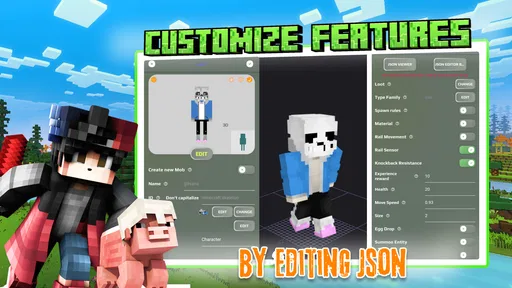
One of the standout features of this app is its intuitive design. You don't need to be a coding wizard to bring your mob ideas to life. The app offers a variety of templates to kickstart your creativity, or you can start from scratch if you're feeling adventurous. I particularly loved how easy it was to adjust mob behaviors and characteristics. Want a zombie that shoots fireballs? No problem! How about a cow that flies? You got it! The editing tools are straightforward, yet powerful enough to let your imagination run wild.
Another feature worth mentioning is the seamless integration with Minecraft PE. Once you've created your masterpiece, exporting it into your game is as simple as a few taps. I was amazed at how quickly I could bring my new mob into my blocky world. Plus, sharing your creations with friends is a breeze, so you can collaborate and enjoy each other's imaginative mobs.
Recovering a workflow when a result disappoints
If a creature does not appear or behave as expected, I wouldn’t immediately assume the editor is broken. First, go back to the smallest version of the project and try the handoff again. If that works, reintroduce changes gradually; doing so narrows down which edit may have caused trouble. It’s a more useful test than repeatedly changing several settings at once, because you can actually learn what affected the result.
It’s also worth separating design work from game-side testing. A mob can look convincing in an editor and still need adjustment once you see it in the context of a Minecraft world. I’d keep notes on what you changed between attempts, especially if you’re building a creature for a shared world or a themed map. That simple record can prevent you from rebuilding the same version just to rediscover which choices worked.
Why It Stands Out
What really sets Mobs Maker for Minecraft PE apart is its community aspect. The app boasts a vibrant community of Minecraft lovers who share their creations and exchange tips. Browsing through other users' mobs was not only inspiring but also a great way to learn new tricks. I found myself spending hours just exploring the community section, downloading new mobs, and tweaking them to fit my style.
The developers are constantly updating the app, adding new features and fixing bugs, which is always a plus in my book. It shows they really care about the user experience and are committed to making the app the best it can be.
When the app may not be the cause
A failed test can come from more than one place: the way a project was prepared, the transfer into Minecraft, or the game environment where you’re trying it. I’d check each stage separately instead of assuming one tap should solve everything. Confirm that you’re using a compatible Android device, repeat the test with a simple project, and make sure you’re looking in the intended Minecraft setup. If a basic project also fails, that points toward a workflow or compatibility issue rather than a complicated design choice.
For an everyday example, imagine making a themed creature for a weekend build with friends. I’d sketch the idea, choose one defining visual feature, test a simple version, and only then spend time refining it. If the group needs a finished mob immediately, an existing add-on is the safer choice; if the fun is inventing something personal together, this app offers a more satisfying process. The trade-off is time: creating and testing gives you control, but it asks more of you than downloading something already made.
There’s a reason it has attracted more than 500,000 installs, though its average rating is 3.5 from around 1,600 ratings, alongside 117 written reviews. I read that as a sign of a useful but somewhat particular tool: creators may enjoy the hands-on approach, while players expecting a frictionless one-tap result could be disappointed. It was released on February 8, 2023, and the listed version is 1.3.7, but I’d still judge it by whether its editing workflow matches your own patience and goals.
Choosing between a maker, an add-on, and a general editor
The usual alternatives serve different moods. Browsing ready-made add-ons is the most direct option when you want a creature in a world with minimal creative work. A general-purpose modeling tool can make more sense if your goal is learning broader 3D design skills or creating assets unrelated to Minecraft. This app sits between those choices: it is specifically aimed at mob creation for Minecraft PE, so the focus is useful, but that narrower purpose may feel limiting if you want a flexible modeling workspace.
That focus is also why I wouldn’t judge it only by how quickly it produces a result. The useful question is whether it helps you move from an idea to something you can test in your Minecraft workflow. A creator who likes revising a design will get more from that loop than someone who sees editing as an obstacle between them and playing.
Who will enjoy the hands-on route
I’d recommend giving it a try if you already play Minecraft PE and like making personal touches for a world, especially if you’re curious about how a custom creature is put together. It can suit a solo player looking for a small creative project, or friends planning a themed build who are happy to divide the work between ideas, design, and testing. The strongest use case is not necessarily a complicated creature; it may be a simple mob that makes a familiar world feel more personal.
I’d skip it if you’re looking for a polished add-on with no setup, if you don’t want to troubleshoot a handoff, or if you need a broad 3D editor for work outside Minecraft. It is also a poor choice for a last-minute group activity when everyone expects an instant result. In those situations, choosing existing content is more predictable, while a wider modeling tool is a better match for open-ended asset creation.
A practical verdict for Minecraft creators
In conclusion, if you're a Minecraft PE player looking to inject some fresh creativity into your game, Mobs Maker for Minecraft PE is a must-have. It's easy to use, packed with features, and backed by a supportive community. Whether you're a seasoned player or just starting out, this app will add a whole new dimension to your Minecraft adventures. So, what are you waiting for? Go ahead and unleash your creativity!
My recommendation is more specific: try it if you like making and testing your own creature ideas, and begin with a small project so you can understand the workflow before investing a lot of effort. Skip it if you only want ready-to-use content or prefer a conventional modeling tool with a broader purpose. For the right Minecraft PE player, the strongest reward is not just having another mob in a world; it’s getting to shape an idea and learn from each test along the way.
Mobs Maker for Minecraft PE Frequently Asked Questions
Does Mobs Maker for Minecraft PE work with Blockbench?
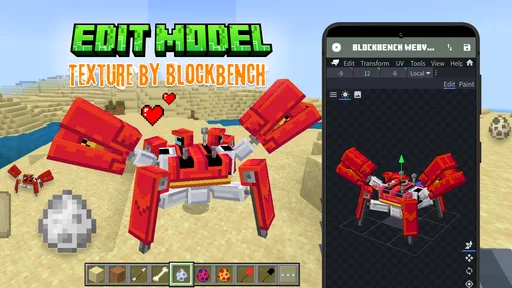
The app is intended to help Minecraft PE creators make their own mob using Blockbench, so it is aimed at people interested in building and customizing Minecraft-style creations. Before downloading, consider whether you are comfortable working with a creative tool and the workflow involved in making a mob. It is an app in the Libraries & Demo category, rather than Minecraft itself.
What devices can install Mobs Maker for Minecraft PE?
Mobs Maker for Minecraft PE requires Android 7.0 or later. Check your device’s Android version before downloading so you can avoid compatibility issues. The app is listed for Android, and its purpose is to help Minecraft PE creators make mobs using Blockbench. It is a separate app, so installing it does not itself install Minecraft or guarantee that a creation will work in every Minecraft setup.
What is Mobs Maker for Minecraft PE?
Mobs Maker for Minecraft PE is an innovative application designed for Minecraft enthusiasts who wish to create and customize their own mobs within the game. It offers a user-friendly interface and a wide array of tools that allow users to design unique mobs with specific behaviors, skins, and abilities, enhancing the gameplay experience. Its focus is on helping MCPE creators make their own mob using Blockbench, so it is best suited to users who want to explore mob creation rather than simply browse ready-made content.
Is Mobs Maker for Minecraft PE free to use?
Mobs Maker for Minecraft PE is free to download, with in-app purchases priced at $3.49 per item. The app’s core purpose is to help creators make mobs, while optional purchases may be relevant if you want to access paid content or features. Check the purchase details in the app before buying, and make sure you are comfortable with any costs that appear during use.
How user-friendly is Mobs Maker for Minecraft PE for beginners?
Mobs Maker for Minecraft PE is designed with beginners in mind, offering an intuitive and easy-to-navigate interface. The app provides step-by-step tutorials and guides to help new users understand the mob creation process. Additionally, the app’s interface is visually appealing and straightforward, making it accessible for users of all ages and skill levels. Since its creation workflow involves Blockbench, newcomers may still want to take time to learn the tools and experiment with a simple mob first.
Pros
- User-friendly interface for easy navigation.
- Wide range of customization options.
- Compatible with latest Minecraft PE versions.
- Regular updates with new features.
- Supports both Android and iOS devices.
Cons
- Some features require in-app purchases.
- Occasional bugs and crashes reported.
- Limited free assets available.
- Requires internet connection for updates.
- Ads can be intrusive at times.










