

MN on a Stick
- 89.00
- 5.0
- Installs
- 10.00K
- Price
- Free
Screenshots
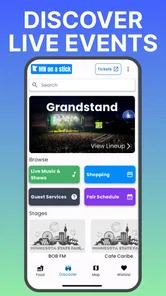
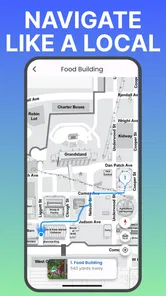
Analysis by Reviewed
MN on a Stick is a free events app from LoomLabs built around discovering the Minnesota State Fair. I approached it as a practical companion rather than a general travel planner, and that distinction matters. Its purpose is narrow, but a focused app can be more useful than a crowded tool when you are already thinking about a fair visit, a food stop, or a day out with family.
The app has a 5.0 average from around 177 ratings, with more than 10,000 installs. Those figures suggest that it has found a small but enthusiastic audience, although they should not be mistaken for proof that it will suit every visitor. I found the strongest case for it is someone who wants a simple way to engage with the MN State Fair experience, not someone looking for a complete replacement for maps, calendars, ticketing tools, or a carefully planned itinerary.
How MN on a Stick feels in everyday use
The first thing I noticed is the app’s clear identity. It is not trying to be a broad events directory covering every local activity. The entire experience points toward the Minnesota State Fair, which makes it easier to understand what it is for. When I opened it with the fair in mind, I did not have to translate a generic event platform into something useful; the subject was already the center of the experience.
That focus is especially helpful when the fair becomes part of a larger day. Imagine meeting friends before the gates open, deciding where to begin, and then checking the app during a break rather than repeatedly searching through unrelated web pages. In that situation, MN on a Stick can act as a lightweight reference point. I would still keep a map and any official planning information nearby, but I would not want to replace the app with a random collection of browser tabs.
The free price also lowers the barrier to trying it. You do not have to commit money before finding out whether its style fits your visit. For a casual user, that is important: an event companion should be easy to test, easy to keep for the season, and easy to ignore when it is no longer relevant.
Its Everyone content rating makes it suitable for a broad audience, including households planning a visit together. That does not automatically make every decision simple for parents, though. A family may still need to coordinate meeting places, transport, food preferences, accessibility needs, and timing outside the app. I see MN on a Stick as one piece of that preparation rather than the entire family logistics system.
A focused companion instead of a complete planner
There is a useful trade-off here. A general calendar app may be better for combining the fair with concerts, appointments, and travel reservations. A map app will usually be better for turn-by-turn navigation. An official event website may remain the better place to confirm changing practical details. MN on a Stick earns its place by keeping attention on the fair itself.
More From Our News Desk

 Gmail
GmailGmail in a Busy Inbox: Who Benefits Most?
From first account to crowded workday, Gmail earns its place through dependable search and flexible sorting—but its best fit depends on how much inbox maintenance you can tolerate.

 Prime Video
Switching to Prime Video: What Changes in Your Viewing Routine
Prime Video can make a compelling second home for streaming, but switching means learning a different catalog, rental layer, and route from browsing to playback.

 Universal TV Remote Control
Universal TV Remote Control Works Best as a Reliable Backup
A phone remote earns its place through quick setup and reliable habits. Here is how to get more from Universal TV Remote Control—and where its limits show.

 Weather - By Xiaomi
Weather by Xiaomi Review: Clear at a Glance, Less Clear Up Close
Xiaomi’s weather app makes everyday forecasts quick to scan, but its calm surface can leave useful details and recovery paths harder to find than they should be.

 X
XX Under Pressure: Can It Recover When Posting Goes Wrong?
A resilience-focused review of X, examining setup, mistaken posts, interruptions, weak connections, and the gaps that matter when recovery needs to be dependable.

 Clash of Clans
Clash of Clans Is Won Between the Battles
Its raids are quick; its community is a long-term project of coordination, teaching, rivalry, and shared responsibility—with all the friction that entails.
Latest News



That narrow purpose can also feel limiting if you expect a full itinerary builder. I would not install it expecting a universal event-management tool. If your main question is how to organize an entire weekend across several venues, another app will probably do more. If your question is how to make the State Fair feel easier to explore, this focused approach makes more sense.
One practical tip is to use it before leaving home, not only after arriving. A busy fairground is a poor place to make every decision from scratch. I would look through the app while charging my phone, identify the parts of the visit that matter most, and then use it as a reminder during the day. That workflow reduces screen time in the crowd and helps prevent the common problem of spending the first hour deciding what to do.
What the current release tells me
The current version is 1.0.24, while the app was released on August 13, 2024. That places MN on a relatively early product path rather than presenting it as a long-established platform with years of visible evolution. I read that as both an opportunity and a caution: a focused first-generation app can feel fresh and direct, but it may still be developing the depth that experienced fair visitors expect.
I would separate what is visible now from what I hope to see later. The current evidence supports treating it as a dedicated way to discover the MN State Fair. It does not justify assuming that every possible planning feature has been added or that the app will cover every detail of a complicated visit. The version number shows active iteration, but a version number alone does not explain the size or importance of each change.
For someone already using an earlier release, the sensible approach is to update and then judge the app by the tasks that matter personally: finding useful fair information, returning to something quickly, and using it without unnecessary friction. I would not update simply because the number changed; I would update because a current event companion is more valuable when its content and behavior are kept aligned with the present experience.
For a new user, the same version is a reason to keep expectations realistic. I would install it as a focused companion, spend a few minutes learning its organization, and decide whether it complements the tools I already use. That is a better test than judging it against a large travel platform with a completely different purpose.
How it can improve a real fair day
My favorite use case is a group with different priorities. One person wants to discover food, another cares about attractions, and someone else mainly wants to avoid wasting time. Instead of letting the most decisive person control every choice, the group can use MN on a Stick as a shared starting point for discussion. Each person can identify what sounds worthwhile, then the group can build a loose route around those preferences.
The important word is “loose.” I would not create a rigid schedule for every hour. Fairs are full of interruptions, queues, weather changes, spontaneous performances, and people who suddenly need a rest. A better method is to choose a few anchors and leave room between them. The app is more useful in that flexible workflow than as a tool for pretending the day will run exactly on time.
Another less obvious use is settling disagreements quickly. When friends are standing near an entrance and cannot decide where to go, a dedicated fair reference is faster than opening several social posts or searching broad web results. Even if the final choice is made elsewhere, the app can shorten the debate and get the group moving.
I also see value for repeat visitors who do not need a full introduction to the fair. Someone who already knows the layout may use it selectively, checking for discoveries rather than learning the entire event from the beginning. That makes the app less about basic orientation and more about refreshing a familiar visit.
There is a trade-off for people who prefer spontaneous exploration. A dedicated discovery tool can encourage you to follow recommendations instead of wandering. If the charm of the fair for you is turning a corner and finding something unexpected, I would use MN on a Stick as a reference, not as a route you must obey. The best experience may come from checking it once, then putting the phone away.
Where the app is genuinely convenient
The strongest convenience is concentration. Fair-related information is easier to act on when it is presented in a context that already matches the outing. I do not have to begin with a blank calendar or reconstruct the event from scattered searches. That saves mental effort, especially when I am planning with other people.
Its free access also makes it reasonable for occasional visitors. A person attending only once may not want to pay for a specialized planner or learn a complex system. The app can be tested without turning preparation into another purchase decision. That is a meaningful advantage for students, families watching their spending, and visitors who are unsure how much planning they will actually do.
The app’s audience also benefits from its simplicity. A first-time fair visitor may feel overwhelmed by the size and variety of the event. A focused companion can provide a starting point without requiring knowledge of advanced planning software. I would recommend it most confidently to someone who wants help getting oriented but does not want to manage a detailed database of tasks.
For older phones, the minimum operating-system requirement is Android 7.0 or later. That gives people using older Android devices a reasonable chance of compatibility, though the real experience will still depend on the phone’s performance, available storage, battery condition, and network environment. I would install it before the visit rather than waiting until I am already in a crowded venue with a nearly empty battery.
That preparation is one of my most useful practical recommendations. Open the app at home, notice how quickly the material appears, and decide what you want to remember. If you depend on the phone throughout the day, take a portable charger and keep another navigation option available. A specialized event app can be helpful without being the only tool you trust.
Limits that should shape your expectations
The biggest limitation is scope. MN on a Stick is about discovering the MN State Fair, so it should not be judged as though it were a complete city guide. If you need restaurant reservations outside the fair, hotel planning, public-transit routing, or a combined schedule for several events, a broader app will be more appropriate.
I would also avoid assuming that a discovery app can guarantee a smooth visit. Crowds, closures, queues, weather, accessibility requirements, and changes to event arrangements can affect your day independently of the software. Before making a long trip, I would confirm important practical details through current official channels and use MN on a Stick for discovery and orientation rather than treating it as the final authority on every operational question.
Another point is content freshness. The app’s usefulness depends on whether its fair-focused material remains timely and easy to interpret. A new user should pay attention to how clearly current information is distinguished from general discovery content. If you are making a decision that affects tickets, travel, or a tight schedule, double-check it before relying on it.
There is also a social limitation. Not everyone in a group will want to install a specialized app for one outing. I would not make the entire day depend on every friend having the same setup. A practical compromise is for one or two people to use MN on a Stick as the group’s reference while everyone else keeps their usual tools for messaging, navigation, and coordination.
People who dislike phone use during leisure activities may want to skip it entirely. The app is most valuable when it reduces uncertainty, but it can become a distraction if you keep checking it instead of enjoying the fair. I would recommend setting a few moments for planning and then returning attention to the surroundings.
How it compares with the usual alternatives
Compared with a general calendar, MN on a Stick offers more relevance and less setup for a fair-specific outing. A calendar is excellent for remembering appointments, but it does not naturally help with discovery. Compared with a map, this app is likely to be more event-centered, while the map remains the better choice for physical navigation. Compared with a browser search, it should feel more focused, although a browser may be stronger when you need the latest official operational detail.
The comparison is not about finding one winner. I would use the tools together: MN on a Stick for deciding what deserves attention, a map for getting there, messaging for coordinating people, and official information for confirming details that may change. That combination is more realistic than expecting a small event app to replace every service involved in a day out.
It also compares favorably with doing nothing if you are a first-time visitor who feels overwhelmed. Even a short planning session can make the day less reactive. On the other hand, experienced visitors with a settled routine may gain little from adding another app. If you already know exactly where you want to go and how you will get there, the benefit may not justify the extra screen on your phone.
Who should install it, and who should pass
I would recommend MN on a Stick to first-time visitors, families building a flexible fair day, and repeat visitors who want to discover something beyond their usual stops. It is also a sensible choice for anyone who wants a free, dedicated event companion instead of assembling information manually from unrelated sources.
I would be more cautious for professional event planners, visitors managing several destinations, or people who need detailed transport and accessibility planning in one place. Those users may prefer a broader planning workflow and should treat this app as supplementary at most.
It is also not the right choice for someone expecting a large social network, a comprehensive ticketing system, or a replacement for official announcements. Its value comes from focus, not from trying to become every tool at once. That focus is a strength when your goal matches it and a weakness when your needs extend beyond the fair.
What I would watch as the product develops
Because the app is still early in its release history, I would watch how LoomLabs handles updates around future fair seasons. The most meaningful progress would be easier preparation, clearer discovery, and smoother use during a busy day. I would pay less attention to cosmetic changes than to whether returning users can find relevant information faster and whether new visitors understand what to do next.
I would also watch the balance between freshness and simplicity. An event companion can become cluttered if every possible detail is added without a clear structure. The best evolution would preserve the direct identity that makes MN on a Stick approachable while adding depth only where it helps a real visitor make a better decision.
For existing users, future releases are worth judging through concrete routines: Can you prepare before leaving, return to useful information without hunting, and keep the app from becoming a distraction? For new users, those same questions are a quick evaluation checklist. If the answers are positive, the app has earned a place beside your normal travel tools.
My final view is favorable but deliberately practical. MN on a Stick is most successful when you use it as a focused fair companion, not as an all-purpose planner. It is free, accessible to a broad audience, and specific enough to make preparation feel less scattered. I would install it before a Minnesota State Fair visit, use it to choose a few priorities, verify important logistics elsewhere, and leave room for spontaneous discoveries. That combination plays to its strengths while keeping its limits in perspective.
MN on a Stick Frequently Asked Questions
Who develops MN on a Stick, and what is it designed for?
MN on a Stick is an events app from LoomLabs, with the short description “MN on a Stick.” Its stated purpose is to help users discover the MN State Fair. If you are looking for an app connected with the fair, this gives you a clear idea of its focus before you download it. It is listed for everyone.
What is MN on a Stick and what can I do with it?
MN on a Stick is a mobile application designed to provide a convenient way to access and use its specific tools or content directly from an Android or iOS device. Before downloading, users should review the app’s store description carefully, since available features, supported devices, and the exact purpose of the application may vary between versions and platforms.
Is MN on a Stick free to download and use?
MN on a Stick is free to download. The download price and available features may depend on the platform, region, and current version of MN on a Stick. Some functions may be available at no cost, while others could require in-app purchases, a subscription, or additional content. It is recommended to check the official Google Play or App Store listing for the latest pricing and payment information before installing it.
Does MN on a Stick require an internet connection?
Whether MN on a Stick works fully offline depends on the feature being used and the version installed. Basic functions may be accessible without a constant connection, but downloads, synchronization, account services, updates, advertisements, or online content can require Wi-Fi or mobile data. Users with limited data plans should check the app’s requirements before relying on it offline.
Is MN on a Stick safe to install and what permissions does it request?
As with any mobile application, MN on a Stick should be downloaded only through a trusted official store or verified source. Before installation, review the developer information, privacy policy, recent user feedback, and requested permissions. If the app asks for access that seems unrelated to its purpose, consider refusing that permission or avoiding installation until the request is clearly explained.
Pros
- Quick access to MN weather updates from your home screen
- Simple interface makes forecasts easy to check at a glance
- Useful for planning commutes
- errands
- and outdoor activities
- Provides localized information for Minnesota residents
- Lightweight app that should not require much storage space
Cons
- Limited usefulness for people who do not live in Minnesota
- Forecast accuracy depends on the available weather data source
- May offer fewer features than full-featured weather apps
- Some information may require an active internet connection
- Updates and support may vary depending on the app’s maintenance











