Mirror Link Car
- 224.00
- 3.5
- Installs
- 500.00K
- Price
- Free
Screenshots
Analysis by Reviewed
My first impression of Mirror Link Car is that it aims to make a familiar phone screen feel at home in the car. The appeal is easy to understand: instead of glancing down at a handset to check a route or choose audio, you can bring phone content to the car’s display. That idea can feel especially inviting during the first few drives, when the larger screen makes everyday tasks seem simpler. The lasting question, though, is whether the connection becomes dependable enough to earn a regular place in your routine.
The first-week appeal: a bigger view of familiar tools
Mirror Link Car is a free app from Flavapp in the Libraries & Demo category, built around phone-to-car screen mirroring and wireless CarPlay and Android Auto features. It is available to everyone, and its current version is 37.0. I’d think of it as a bridge between a compatible phone and an in-car display, rather than as a replacement for the apps you already use. Its promise is most relevant if your car supports the connection method you want to use and you prefer seeing familiar phone content on a larger screen.
That first-week novelty can be genuinely useful, but I would not treat “mirroring” as a guarantee that every phone app will behave like a purpose-built car app. A phone interface is designed for touch and close viewing; a dashboard is a different setting, with different controls and safety demands. Before relying on a feature on the road, I’d test the connection while parked and learn what appears on the car display, which controls work there, and what is easier to manage from the phone before setting off.
A realistic commute, not a showroom demo
Picture a weekday drive to an unfamiliar appointment. Before leaving, I’d connect the phone while parked, set the destination, choose audio, and check that the car display is showing what I need. Once moving, the useful result is not having to reach for the phone just to keep track of the route. If something needs a change, I’d pull over rather than assume screen mirroring makes every interaction safe to perform while driving. That small habit matters more than the novelty of seeing a phone screen on the dashboard.
The app’s appeal also depends on the car, the phone, and the connection working together. A smooth experience in one vehicle does not automatically tell you how it will behave in another. If you share cars or switch between vehicles, I’d treat each new setup as something to check while parked, rather than expecting the same controls and display behavior everywhere. That is a practical trade-off: the app may bring phone content closer, but the hardware environment still shapes the experience.
Connecting Your Smartphone to Your Ride
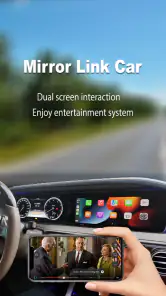
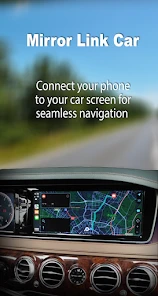
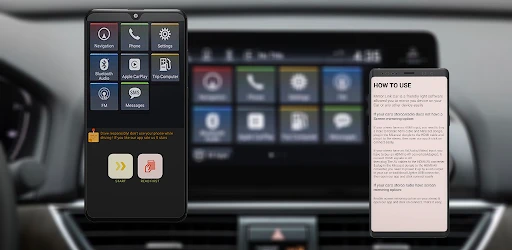
Using Mirror Link Car is like having your smartphone ride shotgun. The app enables you to connect your phone directly to your car's display system, allowing you to access apps, music, navigation, and more with ease. Once you’ve got it set up, which is a breeze, you'll wonder how you ever drove without it.
Seamless Integration
One of the standout features of Mirror Link Car is its seamless integration. Whether you're using Android or iOS, the app syncs smoothly, ensuring that you have all your essential apps right at your fingertips. Imagine having your maps, favorite music, and even messages accessible without having to fumble with your phone while driving. It's a game-changer for those long road trips or daily commutes.
More From Our News Desk

Clash of Clans Is Won Between the Battles

Android Auto Makes the Case for Quieter Car Software

MobiOffice: Transforming Mobile Productivity with Seamless Integration

EA SPORTS FC™ Mobile Soccer: Redefining Mobile Sports Gaming

How Microsoft OneDrive Became a Mobile Productivity Giant

How Google Translate Breaks Language Barriers Effortlessly
For recurring use, I’d judge integration by the details that matter after the first successful connection: does the display come up when you expect it, can you reach the audio or navigation you need without extra fiddling, and does the setup still make sense after you have not used it for a while? These are better tests than simply confirming that a phone can appear on the screen once. If the connection takes attention every time, the convenience can quickly lose its shine.
Month-to-month value: build a small, repeatable routine
The app has 500K+ installs, with an average rating of 3.5 from 10K ratings and 224 reviews. I take that as a reason to approach it with measured expectations, not as a verdict that it will work identically for every driver. The useful question is whether it solves a recurring problem for you: perhaps you want a familiar route or audio app visible in a car whose built-in interface feels limiting. If your vehicle already offers the same tools in a form you like, the added step may not be worth keeping in your routine.
A good way to assess its value is to use the same short checklist during several ordinary trips. Connect before moving, confirm the route or audio you need, and notice whether you can leave the phone alone once underway. If that sequence becomes predictable, the app may justify its place. If each drive starts with troubleshooting, or if you keep switching back to the car’s own system, that is a clear sign that the novelty is doing more work than the everyday benefit.
User-Friendly Interface
The app boasts a user-friendly interface that even the least tech-savvy driver can navigate. The icons are large and easy to press, ensuring that you can keep your eyes on the road at all times. Plus, the setup process is straightforward, so you won't need to spend hours figuring it out. Just connect, and you're good to go.
Maintenance without making the car another project
For a phone-to-car tool, maintenance is less about constant adjustment and more about keeping the basics consistent. I’d start by confirming the phone and vehicle connection while parked, then avoid changing several settings at once if something stops behaving as expected. That makes it easier to identify whether the issue is the phone, the vehicle display, or the way the connection was started. If you regularly lend your car or use more than one phone, allow a moment to check which device is connected before setting off.
It is also sensible to keep the driving workflow simple. Decide before departure which screen or task you need, and do not use a moving car as the place to experiment with controls. This is a useful habit even when everything works: screen mirroring can bring more choices within reach, but more visible choices can also invite distraction. The best setup is the one that lets you do less once the car is moving, not the one that puts the largest number of phone functions in front of you.
Where it sits beside built-in systems and other options
Compared with a car’s native infotainment system, a mirroring app can be appealing when you would rather work from phone apps and familiar content. The trade-off is that a built-in system is already part of the vehicle’s interface, while mirroring adds a connection step and depends on compatibility. Compared with using a phone mounted within view, a car display can feel more integrated, but a mount may be simpler for someone whose vehicle does not support the needed connection. Neither alternative is automatically better; the right choice depends on what your car already does well and how often you want phone content on its screen.
I would especially consider this app if I drive the same compatible car regularly, have a clear use for phone-based navigation or audio, and am willing to check the setup while parked. I would be more cautious if I change vehicles often, dislike troubleshooting connections, or mainly need a stable, distraction-conscious route display. In those cases, the car’s native system or a straightforward phone mount may involve fewer steps. The app is not a reason to replace a working setup just because mirroring sounds more modern.
Stay Connected, Stay Safe
While the app keeps you connected to your smartphone's features, it does so without compromising on safety. Mirror Link Car allows you to manage calls and messages hands-free, so you can focus on driving. The voice command feature is particularly impressive, offering a truly hands-off experience.
I’d be careful not to read hands-free access as permission to handle every message or call while driving. A voice control can reduce the need to touch a screen, but it does not remove the distraction of a conversation or an unexpected notification. My practical rule is to set up what I need before departure, use only controls that do not pull attention away from the road, and leave anything complicated until I am safely parked. If a task cannot be completed without looking away or fiddling, the safer choice is to wait.
What can wear thin over time
The main source of fatigue is likely to be friction around the connection, not a lack of new things to explore. If the display does not come up as expected, if switching between the car and phone feels awkward, or if a small change in routine prompts a fresh setup, a previously handy tool can become one more thing to manage. I would give it a fair trial across normal drives, but I would not keep troubleshooting indefinitely just because the first connection felt impressive.
There is also a difference between putting a phone view on a dashboard and having an interface designed specifically for driving. A larger display can make information easier to see, yet it can also make more content tempting to interact with. For that reason, I would use mirroring selectively: navigation or audio may be useful parts of a drive, while browsing around for other phone functions is a poor trade. If you want a narrow, predictable set of driving controls, a car’s own interface may be the calmer option.
People often wonder whether they need a particular phone system, whether it will work in every car, and whether setup is worth repeating after a change of vehicle. The app is presented for Android and iOS use, but the car’s own support and the phone-to-display connection still matter in practice. I’d check compatibility with the specific vehicle and phone before making it part of a daily routine. If you are evaluating it in a borrowed car, use a parked trial and avoid assuming that a successful connection there will carry over to your own vehicle.
Long-term verdict: keep it only if the habit sticks
Released on September 19, 2020, and now at version 37.0, Mirror Link Car has had time to establish its purpose as a screen-connection utility. For me, its lasting value would come from a repeatable routine rather than from the initial wow factor: connecting without fuss, using the display for a specific need, and then leaving the phone alone while driving. Its free price makes trying it less of a commitment, but time and attention are still costs. If it saves a small annoyance on most trips, that can be enough; if it adds steps to nearly every trip, free does not make it worthwhile.
My bottom line is that this app is most interesting to drivers who already know why they want phone content on a car display and can confirm their vehicle supports the experience they need. I would not recommend it as a universal upgrade or as a substitute for safe driving habits. Try it in a controlled, parked setup, repeat the same useful workflow on ordinary journeys, and judge it by whether you stop thinking about the connection. If the answer is yes, it may earn a place in your routine; if not, the native system or a simpler setup is probably the better long-term choice.
Final Thoughts
In the grand scheme of car gadgets, Mirror Link Car stands out for its ease of use and practicality. It's perfect for tech enthusiasts and casual drivers alike. Once you’ve taken it for a spin, you’ll understand why it’s become a must-have for anyone looking to enhance their driving experience. So next time you're on the road, make sure your smartphone is riding shotgun with Mirror Link Car.
Mirror Link Car Frequently Asked Questions
Is Mirror Link Car free, and what should I expect before installing it?
Mirror Link Car is a free app from Flavapp in the Libraries & Demo category. It focuses on phone mirroring and describes wireless CarPlay and Android Auto features. The app is rated for Everyone, so its content rating is suitable for a general audience. Before installing, consider whether your phone and vehicle support the connection method you plan to use.
What phone requirements does Mirror Link Car have?
Mirror Link Car requires Android 6.0 or later. Its described features are intended to link a smartphone with a vehicle display, but a compatible phone alone does not guarantee that the car will support mirroring. Check your device’s Android version and your vehicle’s infotainment capabilities before downloading, then follow the app’s connection instructions to see which options are available.
What is Mirror Link Car and how does it work?
Mirror Link Car is an app that allows seamless integration of your smartphone with your car's infotainment system. By mirroring your phone's display on the car's screen, it enables you to use navigation, music, and other apps hands-free. The app works by using a USB connection or Bluetooth to link your phone with the car, providing a safer driving experience.
Is Mirror Link Car compatible with any smartphone and car model?
Mirror Link Car supports a wide range of smartphone models, particularly Android devices. However, compatibility with car models varies, as not all cars come with Mirror Link support built-in. It's essential to check with your car manufacturer or consult the app's compatibility list to ensure that your vehicle and smartphone are compatible before downloading the app.
What are the benefits of using Mirror Link Car?
The primary benefit of using Mirror Link Car is the enhanced safety and convenience it offers. By mirroring your phone's display on the car's infotainment system, you can use navigation, music, and other apps without taking your eyes off the road. This hands-free approach reduces distractions, making driving safer while still allowing you to enjoy your smartphone's functionality.
Pros
- Seamless phone-car integration
- Supports various apps like navigation
- music
- Easy setup process
- Improves driving safety
- User-friendly interface
Cons
- Limited compatibility with phone models
- Occasional connectivity issues
- Not all apps are supported
- Requires stable internet connection
- Can drain phone battery quickly
- Category
- Libraries & Demo
- Version
- 37.0











