

Milwaukee® Pipeline Inspection
- 14.00
- 3.5
- Installs
- 10.00K
- Price
- Free

Screenshots


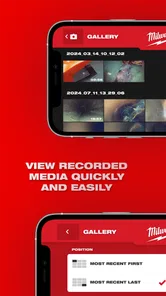
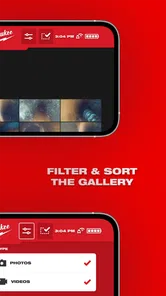
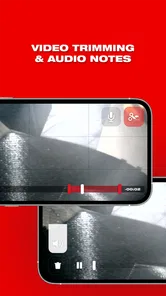

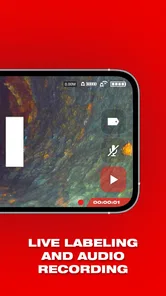
Analysis by Reviewed
Milwaukee® Pipeline Inspection is a specialized House & Home app from Milwaukee Tool, built around the company’s pipeline inspection equipment rather than general household maintenance. I approached it as a companion for someone who already works with Milwaukee’s inspection system, and that distinction matters immediately: this is not a DIY plumbing guide, a home inventory tool, or a broad repair app. Its value depends on whether your work involves looking inside pipes and managing that inspection process.
My overall impression is practical but narrow. The app makes the most sense as part of a professional workflow, where a phone or tablet sits beside the inspection equipment and helps turn a difficult visual job into something easier to review. If you are simply trying to diagnose a blocked sink at home, the usual alternatives—calling a plumber, using a basic inspection camera, or relying on a service report—will probably be more appropriate. For the right Milwaukee user, however, the focused design is more useful than a crowded general-purpose app.
How the app fits into a pipeline inspection workflow
The current release is version 2.1.2, and the app is available free of charge for devices running Android 7.0 or later. That relatively broad operating-system support is helpful for teams that do not replace work phones frequently. The content rating is Everyone, although the intended audience is clearly more specialized than the age label suggests.
In everyday use, I would treat the app as a field companion rather than the main tool. The physical inspection system does the difficult job of reaching into a pipeline and producing the visual information. The mobile application is useful because it gives that work a more convenient digital surface: a technician can work near the inspection point, keep the phone available for review, and avoid treating the camera hardware as a completely separate device.
That separation between hardware and software is important. Installing the app alone does not turn a phone into a pipeline inspection camera. Someone considering it should already know which Milwaukee inspection equipment the app is intended to accompany. This is the first practical question I would ask before downloading it, because the application’s usefulness is tied to that equipment ecosystem rather than to the phone’s camera.
A realistic scenario would be a maintenance technician arriving at a property where a drain or pipeline problem is suspected. Instead of relying only on a verbal description, the technician uses the inspection system to examine the line and keeps the mobile device nearby to help handle the inspection session. Later, the visual record can support a clearer conversation with a property manager or customer. The benefit is not that the app magically identifies every fault; the benefit is that it can make the inspection process easier to handle and explain.
Who will get the most from it
The strongest audience is a professional or serious trade user who already uses Milwaukee equipment and wants a mobile companion dedicated to pipeline inspection. It may also suit a small maintenance team that shares inspection responsibilities and needs a consistent way to work with the same system. The app’s focused purpose can reduce the clutter found in broader field-service software.
More From Our News Desk

 Gmail
GmailGmail in a Busy Inbox: Who Benefits Most?
From first account to crowded workday, Gmail earns its place through dependable search and flexible sorting—but its best fit depends on how much inbox maintenance you can tolerate.

 Prime Video
Switching to Prime Video: What Changes in Your Viewing Routine
Prime Video can make a compelling second home for streaming, but switching means learning a different catalog, rental layer, and route from browsing to playback.

 Universal TV Remote Control
Universal TV Remote Control Works Best as a Reliable Backup
A phone remote earns its place through quick setup and reliable habits. Here is how to get more from Universal TV Remote Control—and where its limits show.

 Weather - By Xiaomi
Weather by Xiaomi Review: Clear at a Glance, Less Clear Up Close
Xiaomi’s weather app makes everyday forecasts quick to scan, but its calm surface can leave useful details and recovery paths harder to find than they should be.

 X
XX Under Pressure: Can It Recover When Posting Goes Wrong?
A resilience-focused review of X, examining setup, mistaken posts, interruptions, weak connections, and the gaps that matter when recovery needs to be dependable.

 Clash of Clans
Clash of Clans Is Won Between the Battles
Its raids are quick; its community is a long-term project of coordination, teaching, rivalry, and shared responsibility—with all the friction that entails.
Latest News



I would be more cautious if you are a homeowner, occasional renovator, or student looking for general plumbing advice. The category label places it in House & Home, but that should not be confused with a consumer home-improvement app. Its purpose is closer to specialized equipment support than to step-by-step household troubleshooting.
It is also not the obvious choice for a company that needs a complete job-management platform. A full service application may be better when the main requirements are scheduling, estimates, customer records, invoicing, team dispatch, or long-term asset management. Milwaukee® Pipeline Inspection can fit into such a workflow, but I would not choose it as a replacement for all those business functions.
What I noticed about the focused approach
The narrow scope is both the app’s main strength and its main limitation. Because the product is centered on pipeline inspection, the experience should be judged by how well it supports that particular task, not by whether it offers the wide range of tools found in a general home-maintenance app.
That focus can be valuable in the field. A technician working in a cramped utility area does not necessarily want a dashboard filled with unrelated household features. A purpose-built companion is easier to understand when the immediate goal is to inspect a line, review what the equipment is showing, and continue with the job.
There is a trade-off, though. A specialist app can feel incomplete if you expect it to handle the entire journey from first customer call to final invoice. I would plan the surrounding workflow in advance: decide where job notes live, how inspection findings are communicated, and how any important records are retained. The app should be viewed as one part of the process, not automatically as the process itself.
What the current release says about its development
The app was released on February 21, 2021, and its current version is 2.1.2. Those details suggest an established product that has moved beyond its initial launch, but they do not by themselves prove that every modern workflow need has been addressed. I see the version history as evidence of continued product evolution, while keeping expectations realistic about what a focused equipment companion should provide.
For an existing user, the move to the current release is mainly worth considering when the app is already part of regular inspection work. Staying current can help maintain compatibility with the supported Milwaukee setup and with newer phones that may be used by a team. I would still update outside an active job whenever possible, then test the complete equipment-and-phone workflow before relying on it at a demanding site.
That testing step is one of my more important recommendations. Do not judge the app solely from the installation screen. Pair or connect the relevant equipment in a controlled setting, open the inspection workflow, and confirm that the phone is comfortable to use with gloves, poor lighting, or limited space. A technically successful installation is not the same as a smooth field experience.
The current rating is around three and a half stars from roughly thirty ratings, with fourteen written reviews. That is a small enough sample that I would not treat the average as a definitive verdict on the product. It does, however, suggest that experiences are mixed rather than universally effortless. In a specialist tool, a modest rating can reflect compatibility, setup, or a narrow audience just as much as the core idea of the app.
The app has passed ten thousand installs, which gives it a meaningful user base without making it a mass-market household application. I interpret that scale as consistent with its specialist role. It is large enough to be a real product in the Milwaukee ecosystem, but not so broad that every reviewer is likely to be using the same equipment or facing the same job conditions.
How existing users may feel the evolution
For someone who has used an earlier release, the most noticeable improvement may not be a dramatic new feature. It may be the less visible benefit of a maintained companion: a better chance that the app remains usable as phones, operating systems, and field habits change. That matters when the application is used alongside equipment that represents a significant investment.
At the same time, I would avoid assuming that a higher version number means the app has become a full digital inspection suite. The confirmed release information shows where the product is now, but it does not justify promises about capabilities that are not clearly part of the experience. Existing users should update with a specific goal in mind—compatibility, stability, or a workflow issue they want to reassess—rather than expecting a completely different product.
One useful practice is to compare the new release with the way your team actually works. Ask whether technicians can start an inspection without searching through unrelated menus, whether the phone remains usable while standing near the equipment, and whether the resulting information fits your reporting routine. Those questions reveal more than a version number alone.
Small workflow choices that make a difference
My first tip is to prepare the phone before reaching the inspection location. Keep the device charged, remove unnecessary distractions, and make sure the person operating the equipment knows which screen should remain visible. This sounds basic, but specialized inspection work often happens in awkward places where stopping to troubleshoot a phone is frustrating.
My second tip is to separate inspection evidence from interpretation. Use the app and equipment to observe what is in the pipeline, but do not treat a visual finding as a complete diagnosis without considering the surrounding plumbing problem. A camera view can show an obstruction or damaged area, yet the repair decision may still require trade knowledge and an on-site assessment.
My third tip is to establish a naming routine for jobs before a team begins using the app regularly. Even if the application is only one part of the record-keeping process, consistent property, line, and visit names make later review easier. This is especially useful when several inspections happen at the same property or when a customer asks for clarification after the technician has left.
A fourth practical point is to plan for handoff. The person holding the phone may not be the person explaining the result to the customer or supervisor. Decide how the relevant inspection information will move from the field operator to the next person. A focused inspection app can support observation, but a clear internal process is what turns that observation into a useful service outcome.
Where the experience may still leave users wanting more
The biggest gap is the app’s dependence on a compatible Milwaukee pipeline inspection setup. That dependence is not a flaw for the intended audience, but it makes the application a poor standalone download. Someone without the related hardware may install it, look around, and find little practical value.
Another limitation is scope. Users who want a single place for inspection images, customer communication, quotations, invoices, and maintenance history may need additional software. A general field-service platform can be a better choice for administrative work, while the Milwaukee companion remains dedicated to the inspection side.
The small review base also means I would be careful about drawing broad conclusions from other people’s experiences. A plumber using the app every day may judge it very differently from an occasional user testing equipment for one project. Before standardizing it across a company, I would run a short pilot with the actual phones, equipment, and reporting habits used by the team.
There is also a human-factor issue that is easy to overlook. Pipeline inspection happens in environments where hands may be wet or dirty, visibility may be poor, and attention is divided between the line, the equipment, and safety. A mobile interface that feels fine at a desk may be less convenient in a basement, service corridor, or outdoor work area. I would evaluate the app in those real conditions rather than relying only on a clean indoor demonstration.
For casual household use, the trade-off is even clearer. The free price removes a financial barrier, but it does not remove the need for specialized hardware or specialist knowledge. If your problem is a slow drain and you want immediate advice, a plumbing guide or a qualified professional will probably deliver more value. Downloading this app first is unlikely to be the shortest route to an answer.
What I would watch as the product continues
For future development, I would pay attention to how well the app keeps pace with changing mobile devices and with the expectations of technicians who work across multiple jobs in a day. Compatibility is especially important for a companion application: even a strong inspection workflow becomes inconvenient if setup is unreliable or if teams cannot use their preferred current phones.
I would also watch for signs that Milwaukee is improving the bridge between inspection and reporting. The most useful evolution would be anything that helps a technician move from seeing a pipeline condition to communicating it clearly, without turning the app into an overloaded business platform. The best direction would preserve the focused inspection purpose while reducing repetitive work around each job.
Another area worth monitoring is team use. A solo technician and a larger maintenance department have different needs. A solo user may care most about speed and simplicity, while a team may need consistent handoffs and dependable records. Future changes will be more meaningful if they address those differences without making the basic inspection workflow harder to navigate.
My recommendation after using it
I recommend Milwaukee® Pipeline Inspection to people who already work with the relevant Milwaukee pipeline inspection equipment and want a dedicated mobile companion. The free app, Everyone age rating, and support for Android 7.0 or later make it approachable from a device perspective, while the specialist purpose keeps the audience focused. For that audience, it is worth testing as part of a real inspection routine rather than judging it as a normal home app.
I would skip it if you are looking for general plumbing instructions, a household maintenance organizer, or a complete field-service business system. Those needs are better served by tools designed around education, home records, or administration. This app earns its place when the physical inspection system is already central to the job.
My final view is cautiously positive. The product’s strength is its clear connection to a real Milwaukee inspection workflow, and its weakness is the same narrow focus. Version 2.1.2 shows an app that has continued past its original release, but the sensible way to approach it is still practical: confirm that your equipment is supported, test the complete setup before a live call, and decide whether its inspection role fits your wider reporting process. If it does, this is a useful specialist companion; if it does not, the free download alone will not make it the right tool.
Milwaukee® Pipeline Inspection Frequently Asked Questions
Is Milwaukee® Pipeline Inspection free, and who develops it?
The app is free to download and is developed by Milwaukee Tool. It is a practical companion for people who already use compatible Milwaukee inspection equipment, rather than a replacement for that hardware. Its House & Home category reflects its connection to home maintenance and inspection work, though its tools are especially relevant to tradespeople and service professionals.
What devices and age group is the app intended for?
Milwaukee® Pipeline Inspection is rated Everyone and is available for Android devices running version 7.0 or later. If you use an iPhone or iPad, check the relevant app store for device availability and requirements before downloading. The app is designed around inspection work, so its usefulness depends more on having compatible Milwaukee equipment than on the user’s age.
What is Milwaukee® Pipeline Inspection used for?
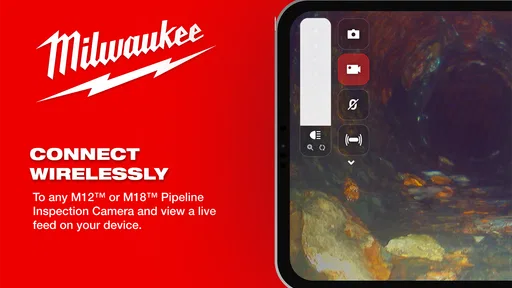
Milwaukee® Pipeline Inspection is designed to support professional inspection and maintenance work on pipelines, drains, and other hard-to-reach areas. It works with compatible Milwaukee inspection equipment to help users view live footage, identify blockages, cracks, or damage, and document findings more efficiently. It is primarily aimed at tradespeople, contractors, plumbers, and maintenance teams rather than casual home users.
Is Milwaukee® Pipeline Inspection compatible with every Milwaukee inspection camera?
No. Compatibility can depend on the specific Milwaukee inspection camera, control unit, cable, and software version being used. Before downloading or relying on the app, check the official Milwaukee product information and your equipment documentation. Some features may only be available with supported hardware, while older devices may provide limited functionality or require a firmware update.
Does the app require additional Milwaukee hardware to work?
Yes, the application is generally intended to work alongside compatible Milwaukee inspection equipment and is not a standalone camera or pipeline-monitoring solution. Without the required hardware, users may be unable to access live inspection views, controls, recording tools, or other professional functions. Confirm that your camera system and mobile device meet the stated requirements before installation.
Pros
- Designed for professional pipeline inspection workflows
- Helps organize inspection data in one dedicated mobile app
- Supports fieldwork away from a desktop computer
- Can improve consistency when recording inspection details
- Useful for teams already using Milwaukee inspection equipment
Cons
- May have limited value without compatible Milwaukee inspection hardware
- Professional features may be excessive for occasional users
- Field performance can depend on device battery and storage
- Users may need training to follow inspection procedures correctly
- Availability and functionality may vary by region or account access







