

Microblink Identity
- 5.00
- 4.4
- Installs
- 10.00K
- Price
- Free

Screenshots
Analysis by Reviewed
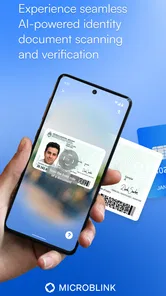
I approached Microblink Identity as a focused document-scanning app rather than a complete digital identity toolkit, and that distinction matters. Its main appeal is immediate: it is built to recognize identity documents quickly, with very little ceremony between opening the app and pointing the camera at a document. In my experience, that makes it more useful as a demonstration and testing tool than as an everyday document-management companion.
The app comes from Microblink Ltd and sits in the Libraries & Demo section, which gives a useful clue about its purpose. It is free, suitable for Everyone, and available for Android devices running at least Android 7.0. I would recommend trying it if you want to see how fast identity-document scanning can feel, especially before choosing a larger service that includes verification, storage, or account workflows. I would not choose it as my only solution for organizing passports, licenses, or other personal records.
What the scanning experience gets right
The strongest part of the experience is its narrow focus. Instead of surrounding the scan with unrelated tools, Microblink Identity puts the document-recognition idea at the center. That makes it approachable for someone who simply wants to test whether a phone camera can read an identity document without manually typing every visible detail.
A realistic use case is a developer or product tester checking an identity-verification flow. Rather than building a camera screen from scratch, the person can use this app to understand the basic interaction: present the document, keep it visible, and see how the recognition process behaves. For that audience, the app is easier to evaluate than a general scanner because its purpose is directly connected to identity documents.
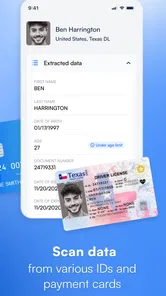
I also found the quick-scan concept valuable for ordinary users who occasionally need to inspect a document digitally. A passport or identity card is awkward to type from, and manual entry invites mistakes in names, numbers, and dates. A recognition-focused tool can reduce that initial effort. The practical benefit is not simply speed; it is avoiding the small transcription errors that appear when people copy information under pressure.
One useful habit is to prepare the document before opening the camera. I get better results when the document is flat, fully visible, and away from strong reflections. This is not a special feature, but it is an important part of using a scanner well. Glossy identity cards can reflect a ceiling light, and even a fast recognition system cannot compensate for text hidden behind glare.
The app’s presentation also makes it suitable for demonstrations. If I wanted to show a colleague how mobile identity recognition works, I would rather use a dedicated example than a crowded office-scanning app with many unrelated buttons. The limited scope keeps the explanation simple: this is about scanning identity material, not creating a full archive of receipts, notes, and contracts.
More From Our News Desk

 Gmail
GmailGmail in a Busy Inbox: Who Benefits Most?
From first account to crowded workday, Gmail earns its place through dependable search and flexible sorting—but its best fit depends on how much inbox maintenance you can tolerate.

 Prime Video
Switching to Prime Video: What Changes in Your Viewing Routine
Prime Video can make a compelling second home for streaming, but switching means learning a different catalog, rental layer, and route from browsing to playback.

 Universal TV Remote Control
Universal TV Remote Control Works Best as a Reliable Backup
A phone remote earns its place through quick setup and reliable habits. Here is how to get more from Universal TV Remote Control—and where its limits show.

 Weather - By Xiaomi
Weather by Xiaomi Review: Clear at a Glance, Less Clear Up Close
Xiaomi’s weather app makes everyday forecasts quick to scan, but its calm surface can leave useful details and recovery paths harder to find than they should be.

 X
XX Under Pressure: Can It Recover When Posting Goes Wrong?
A resilience-focused review of X, examining setup, mistaken posts, interruptions, weak connections, and the gaps that matter when recovery needs to be dependable.

 Clash of Clans
Clash of Clans Is Won Between the Battles
Its raids are quick; its community is a long-term project of coordination, teaching, rivalry, and shared responsibility—with all the friction that entails.
Latest News



Its public reception is encouraging without being overwhelming. The app has a 4.4 average from around 90 ratings, with roughly five written reviews, and has passed 10,000 installs. I read those figures as evidence of a small but interested user base rather than proof that it is the universal choice for document work. The numbers make it worth exploring, but they do not remove the need to decide whether its focused purpose matches your own workflow.
Another strength is the low barrier to trying it. Because it is free, I can test the scanning experience without committing money or signing up for a paid document service first. That is particularly helpful for students, independent developers, and people comparing identity-related utilities. The Everyone age rating also makes the app broadly approachable, although the documents themselves may contain sensitive personal information and should still be handled carefully.
There is a subtle trade-off here. A dedicated scanner can feel clearer than a general-purpose app, but it may also leave the user wanting more after the scan. If your goal is only to see recognition in action, that restraint is a benefit. If your goal is to scan, rename, sort, export, annotate, and retrieve documents later, the same restraint becomes the central limitation.
How I would use it in a practical workflow
For a short task, I would use Microblink Identity as the recognition step and then move the result into whatever trusted workflow I already use. For example, when preparing information for a form, I would scan the document, check every recognized field against the physical card, and then enter the information where it is needed. I would not treat the first scan as automatically perfect, especially with unusual names, worn documents, shadows, or reflective surfaces.
That verification step is one of my most important recommendations. Fast recognition is useful, but identity information is exactly the kind of content that deserves a second look. A single incorrect character in a document number can cause a form submission to fail, while a mistaken birth date or name spelling can create a more serious administrative problem. The app can reduce typing, but it should not replace careful checking.
I would also avoid scanning while moving through a crowded place. A steady setup gives the camera a better chance to see the whole document, and it reduces the risk of accidentally exposing personal information to people nearby. For a quick demonstration, this may not matter much. For real identity documents, privacy and control over the surroundings matter more than saving a few seconds.
Another practical tip is to separate recognition from storage. I would use the app to help read information, then decide deliberately whether any resulting image or text needs to be kept. A scanner that is good at capturing a document is not automatically the best place to maintain a long-term archive. Keeping fewer copies of identity documents can make a workflow easier to manage and may reduce unnecessary exposure.
The limitation that changes who should choose it
The meaningful weakness is that its focused identity-scanning role does not make it a full document-management solution. I would not install it expecting the broad toolkit found in a general mobile scanner. People who need searchable folders, routine PDF creation, page rearrangement, annotations, cloud organization, or a polished archive will probably feel constrained.
This matters because “scan a document” can mean two different things. One person may mean “recognize the information on my identity card.” Another may mean “create a clean digital file that I can store, send, and edit.” Microblink Identity is much closer to the first interpretation. If your intended result is a conventional document file, a dedicated PDF scanner may be a better match.
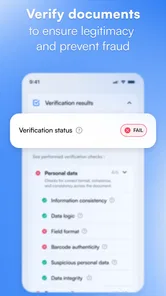
I also see a limitation for users who want a complete verification journey. An identity scan is only one part of a larger process that may include checking authenticity, confirming that the person matches the document, managing consent, or connecting the result to an account. I would not assume that a quick scan alone provides all of those steps. For a business workflow, the app is more convincing as a way to explore recognition than as a finished replacement for a complete verification platform.
The camera experience can also be sensitive to how the document is presented. That is a normal challenge for this kind of tool, but it affects the promise of instant results. A dark room, angled card, glare, cropped edges, or a busy background can turn a quick scan into repeated repositioning. I would not call that a deal-breaker, though it does mean “in a blink” should be understood as the best-case interaction, not a guarantee for every document and environment.
There is a further trade-off between convenience and confidence. The faster a tool feels, the easier it is to accept its output without checking. With identity information, that is the wrong habit. I prefer to treat the app as an assistant that accelerates capture, not as an authority that makes the final decision. That mindset makes the tool more dependable in practice.
Microblink Identity compared with familiar alternatives
Compared with a standard phone camera, this app has a clearer purpose. A camera can photograph anything, but it leaves the user to interpret the image and copy information manually. Microblink Identity is more specialized, so it makes sense when the important task is understanding the identity document rather than simply keeping a picture of it.
Compared with a general document scanner, the difference is about workflow. A general scanner is usually the stronger choice for receipts, letters, multi-page paperwork, and PDFs. It may offer a more natural route from camera capture to saved file. Microblink Identity is the more interesting choice when the document itself is the subject and recognition is more important than page layout.
Compared with a full identity-verification service, this app is easier to approach but narrower in scope. A larger service may be preferable for organizations that need a complete user journey and operational controls. I would choose Microblink Identity for exploration, a small test, or a simple recognition-oriented task; I would look elsewhere when the scan must become part of a broader, repeatable business process.
That comparison also explains why the app can appeal to two very different groups. A curious individual may appreciate the directness and free access, while a developer may value the ability to see the central interaction without committing to an elaborate system. Neither group should confuse a focused demonstration-style app with a complete personal records manager.
Who will get the most value from it
I think the best audience includes developers, students, testers, and technically curious users who want a straightforward look at mobile identity-document recognition. It is also reasonable for someone who has a specific short-term need to inspect information from an identity document and is willing to verify the result manually.
The app is less suitable for a family archive, a professional records office, or anyone who expects a polished document library. If you routinely scan several pages, need consistent file naming, or send finished PDFs to other people, I would start with a general scanner instead. If your work involves formal identity verification, I would choose a purpose-built service that covers the entire process rather than relying on a recognition demo alone.
I would also think carefully before handing the app a document simply because the scan is convenient. Identity cards and passports are sensitive. My approach would be to use it only when the task is clear, keep the session focused, review the result immediately, and avoid creating extra copies unless they are genuinely needed. The app’s Everyone rating makes it accessible, but age suitability does not change the sensitivity of the material being scanned.
For Android users, the technical entry point is fairly broad because the app supports Android 7.0 and later. It is currently at version 5.0.0, so I would install it on a compatible device and judge the experience with the documents I actually need to handle. Camera quality, lighting, and document condition can affect the result more than a short store summary suggests.
My verdict after looking beyond the quick scan
Microblink Identity succeeds when I judge it by its central idea: give users a direct way to experience identity-document scanning without turning the app into a general office suite. The free price, accessible age rating, and established presence from Microblink Ltd make it easy to try. Its strongest quality is clarity, while its biggest weakness is that clarity comes from leaving many broader document tasks outside the experience.
My recommendation is specific: use it as a focused identity-scanning tool, not as your all-purpose document app. It makes sense for testing, learning, and occasional recognition-oriented work. It is not the right pick for long-term storage, PDF-heavy routines, or complete identity verification. If you understand that boundary, the app can be genuinely useful; if you need a finished document workflow, a different category of tool will serve you better.
In the end, I would keep Microblink Identity in mind as a practical first step rather than a final destination. It shortens the path from a physical identity document to readable information, but the responsible user still checks the result and decides what happens next. That balance—quick capture followed by human review—is where I found its real value.
Microblink Identity Frequently Asked Questions
Is Microblink Identity free, and what kind of app is it?
Microblink Identity is listed as a free app in the Libraries & Demo category, developed by Microblink Ltd. Its short description is simply “Microblink Identity,” while its summary says, “Scan documents in a blink.” Keep in mind that the app’s listing price does not explain whether a separate business or service using Microblink technology has its own fees or account requirements.
Will Microblink Identity work on my Android device?
The listed minimum Android requirement is version 7.0, so check your device’s software version before downloading. The app is currently at version 5.0.0, and its store listing is rated for Everyone. If you are being asked to verify your identity through another company’s app or website, that service may have its own device or browser requirements in addition to those for Microblink Identity.
What is Microblink Identity used for?
Microblink Identity is an identity verification solution designed to help businesses confirm a person’s identity remotely. It can scan identity documents such as passports, national identity cards, and driving licences, then use information from the document and, where enabled, facial verification or liveness checks to compare the user with their ID. It is mainly intended for onboarding, compliance, account recovery, and fraud-prevention workflows rather than everyday personal use.
Is Microblink Identity safe and does it protect my personal information?
Microblink Identity is built for handling sensitive identity information, so privacy and security are important parts of the verification process. However, the exact data collected, stored, processed, and retained depends on the company or service using the technology and its privacy policy. Before completing verification, users should check who controls their data, why it is requested, how long it is retained, and whether biometric information is involved.
Which identity documents can Microblink Identity recognize?
The supported documents depend on the implementation, country, and version used by the business providing the verification service. In general, Microblink technology is designed to recognize many passports, identity cards, driving licences, and other official documents. A document may still fail if it is expired, damaged, poorly lit, cropped, unsupported, or issued by a region not included in the service’s current document database.
Pros
- Fast document scanning with automatic data extraction
- Supports identity verification workflows for businesses
- Can detect document tampering and suspicious details
- Reduces manual data entry and onboarding time
- Designed to integrate with existing apps and services
Cons
- Some features may require a business account or paid integration
- Verification quality depends on lighting and camera clarity
- Not intended for casual personal use
- Users may need to share sensitive identity documents
- Compatibility can vary across document types and regions










