Mico - Live Wallpaper & Widget
- 545.00
- 4.6
- Installs
- 5.00M
- Price
- Free

Screenshots
Analysis by Reviewed
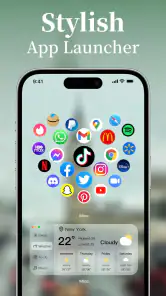
I like changing my phone’s look without having to rebuild its whole layout, and Mico - Live Wallpaper & Widget is aimed squarely at that kind of quick personalization. Its central appeal is putting moving backgrounds and home-screen widgets in the same place, so you can work toward a coordinated look instead of choosing a wallpaper and leaving the rest of the screen untouched.
A moving backdrop changes the feel of a home screen
The key idea is simple: rather than treating a wallpaper as a picture behind your icons, Mico makes motion part of the screen’s overall look. That can make a familiar phone feel a little more personal without changing how you open apps or organize your pages. I see the benefit less as a practical upgrade and more as a small, visible detail that can make the device feel like yours.
This approach is useful if you enjoy visual variety but do not want to spend time rebuilding a layout around a new launcher. You can begin with the background and use a widget to bring some of its colors into the rest of the screen. The result can be more cohesive than picking unrelated elements one at a time, though the best outcome depends on keeping enough room and contrast for your everyday icons.
It is also worth thinking about what “personalization” means to you. If you want a different mood when you glance at your phone, a moving scene can do that quickly. If you want to change icon shapes, app drawers, gestures, or the behavior of the whole interface, a wallpaper-and-widget app is not a substitute for a launcher. Mico’s strength is a focused visual refresh, not a complete redesign of Android.
Why Mico Stands Out
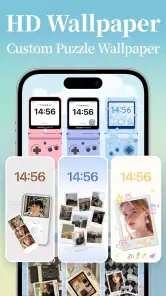
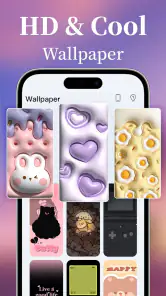
First off, let’s talk about the live wallpapers. Unlike the static images that most of us are used to, these wallpapers add a dynamic flair to your screen. Imagine glancing at your phone and seeing a gentle snowfall or a serene waterfall cascading down your display. Pretty cool, right? The app offers a wide selection, so whether you’re into nature, abstract art, or something a bit quirky, Mico has got you covered.
Widgets That Wow
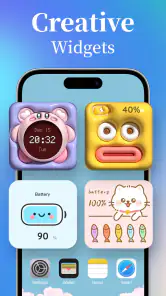
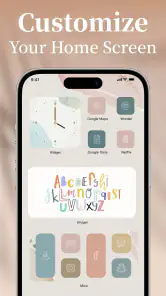
But wait, there’s more! It’s not just about the visuals; Mico also packs in some functional awesomeness with its widgets. These aren’t your ordinary, run-of-the-mill widgets. We’re talking about customizable options that let you tweak everything from size to color, making sure they perfectly match your wallpaper and overall theme. It’s like having a tiny interior designer right in your pocket.
The useful trick here is to choose the wallpaper first, then shape the widget around its colors and available screen space. That order makes it easier to avoid a busy home screen where the moving background competes with large or high-contrast widgets. I’d keep the most-used app icons visible and treat the widget as an accent, rather than trying to decorate every open patch of the screen.
Easy Peasy Customization
Customization is where Mico truly shines. The app’s interface is super user-friendly, even for those who might not be the most tech-savvy. With just a few taps, you can transform your phone’s look and feel. Plus, the app regularly updates its content, so there’s always something new to try out. You’ll never get bored!
For a realistic everyday use, I’d set up a calmer theme for work or study, then make a more colorful choice for the weekend. Because the wallpaper and widget can be adjusted separately, you can also change one without starting the whole arrangement from scratch. If readability matters more than a perfectly matched palette, give the widget enough contrast against the background; a stylish combination is less helpful when its information is hard to pick out at a glance.
Making a theme work in everyday use
A practical way to start is to decide what your home screen needs to do before choosing its decoration. If you check a widget frequently, place it where your eyes naturally land and keep the background behind it relatively calm. If you mostly launch apps from icons, leave a clear route to those icons and use the wallpaper as the main visual change. This small bit of planning avoids the common trap of making a screen look attractive in a preview but awkward during a normal day.
For example, imagine checking your phone between classes or during a work break. A gentle animated background can make that brief glance feel less plain, while a compact widget can keep a useful detail in view. But if you need to read something quickly in bright light or while moving, clarity should win over a perfectly coordinated theme. I would test the layout in the places I actually use the phone, not only while sitting still and customizing it.
Another useful trade-off is how much visual change you want at once. Changing the wallpaper and widget together gives a stronger makeover, but it also makes it harder to tell which choice is causing clutter or poor contrast. I’d change one element, check the whole screen, then adjust the next. That slower sequence is more reliable than repeatedly switching several settings and losing track of which combination felt best.
Another cool feature is the app’s battery optimization. While live wallpapers can sometimes be a drain on your phone’s battery, Mico has been designed to minimize power usage. So, you get all the beauty without sacrificing performance. Now that’s a win-win!
What to Consider Before You Customize
Live motion is the main trade-off: some people enjoy a screen that feels animated, while others prefer a still image that stays visually quiet. If you often keep your home screen open while focusing, or simply want the least distracting setup, a static wallpaper from your phone’s built-in options may suit you better. Likewise, someone who wants deep control over every icon and launcher element may prefer a dedicated launcher; Mico’s appeal is the quicker visual refresh through wallpapers and widgets.
Compared with the usual alternatives, Mico sits between a basic wallpaper picker and a full launcher. Built-in wallpaper tools are a sensible choice if you only need one still image and want the fewest moving parts. A launcher is better when the goal is to change how the entire interface behaves. Mico is for the person in the middle: someone who wants a more coordinated screen, including a widget, without making a larger commitment to a different home-screen system.
That distinction also helps answer whether it is worth trying. If you are curious about a more expressive display and enjoy adjusting small details, the free download gives you a low-friction place to begin. If you already have a setup you like and rarely look at your home screen, the extra customization may not add much to your day. I would not install it expecting it to organize apps or solve a productivity problem; its value is visual, with widgets contributing to the look and feel.
Choosing without overdoing it
One non-obvious way to get a cleaner result is to think about the wallpaper’s busiest area before placing a widget. A scene may look balanced as a full-screen image but become distracting once text or icons sit over its most detailed part. I’d use a less visually crowded patch for the widget, or reduce the number of decorative elements around it, rather than trying to make every color match exactly. A little empty space often makes a theme feel more deliberate.
Another point to consider is whether you want one setup to work everywhere or prefer to change it for different parts of your routine. A calm look can make sense during focused work, while a brighter scene may feel more enjoyable in personal time. The practical question is how often you will actually want to switch. If you like experimenting, separate adjustments make that flexible; if you want a set-and-forget phone, choose a combination you can live with all week instead of chasing a new look every day.
The app is free to download and is made by MICO LTD. It has a 4.6 average from around 128,000 ratings and has been installed over five million times. Optional in-app purchases range from $0.49 to $29.99 per item, so I’d explore the free customization first and decide whether any paid choices are worth it to me rather than assuming I need to spend. It’s rated for Everyone, and version 1.50.0 requires Android 6.0 or later.
That makes the first decision straightforward: try the free options and see whether the available style choices suit your taste before considering a purchase. The range of optional prices is broad, so I would treat paid items as a personal choice, not a requirement for getting started. If you are setting up a phone for someone else, the Everyone age rating is reassuring as a basic content guide, while the visual style still comes down to that person’s preferences.
On Android, the minimum system requirement is worth checking before planning a setup, particularly if you are using an older device. Once it is installed, give yourself a moment to check how the finished screen looks with your normal icon arrangement. A design that feels spacious on one phone may feel crowded on another, so the useful test is always the actual home screen you will use, not an imagined ideal layout.
If you switch themes often, save yourself a little trial and error by checking the full home-screen view after each change: icons, widget, and wallpaper can look different together than they do in a selection preview. That quick check also helps you spot whether a moving background makes labels harder to read. Mico makes sense for someone who enjoys refreshing a phone’s appearance without learning a complicated setup; it is less compelling if a single plain background already does everything you want.
Who will get the most from it?
I think the best fit is someone who likes a personal-looking phone, wants more than a static background, and is happy to spend a little time balancing decoration with readability. It can also suit someone who enjoys seasonal or mood-based changes but does not want to rearrange every part of the interface. The widget gives the screen another point of coordination, while the moving wallpaper supplies the main change in atmosphere.
I’d suggest skipping it if you strongly prefer a quiet, minimal screen, if motion distracts you, or if your main goal is deep control over icons and navigation. People who only want a photo behind their apps can use their phone’s built-in wallpaper settings instead. And if you are particularly careful about battery use, treat the live effect as something to assess on your own device rather than assuming any animated background will feel identical across phones and routines.
For someone undecided, I’d start with one wallpaper and one modest widget, then use the phone normally for a day. Notice whether the movement feels pleasant or gets in the way, whether the widget is genuinely useful to glance at, and whether the icons remain easy to find. That everyday test is more informative than choosing a theme based only on how polished it looks during setup.
Final Thoughts
In a world where personalization is key, Mico - Live Wallpaper & Widget offers a delightful way to make your device truly yours. It’s more than just a wallpaper app; it’s a statement of style and individuality. Whether you’re looking to impress your friends or simply want to enjoy a more aesthetically pleasing interface, Mico delivers on all fronts. So go ahead, give it a whirl and let your phone reflect the unique you!
My recommendation is to approach it as a focused visual tool, not an all-purpose customization suite. Its strongest idea is bringing a moving background and a styled widget into the same personalization routine, which can make a screen feel thoughtfully put together without changing how Android works. The payoff depends on your taste: if you enjoy that bit of motion and are willing to protect space for readable icons, it can be a pleasant refresh; if simplicity is your priority, a still wallpaper may be the better choice.
Mico - Live Wallpaper & Widget Frequently Asked Questions
What should I check before downloading Mico - Live Wallpaper & Widget?
Mico is free to download and focuses on personalizing a phone with aesthetic widgets, HD wallpapers, and themes for the home and lock screens. It is designed for Android devices running Android 6.0 or later. Checking your device’s operating system before downloading can help you avoid compatibility surprises. The app also offers in-app purchases, so take a moment to review any purchase details before choosing paid content.
Who develops Mico, and what kind of app is it?
Mico is a personalization app developed by MICO LTD. Its central idea is to give your phone a more individual look through wallpapers, widgets, and themes that can be used on the home and lock screens. If you enjoy changing your device’s appearance to suit your taste, its focus is easy to understand: it brings these visual customization options together in one app.
Which devices can run Mico - Live Wallpaper & Widget?
Mico is a personalization app for Android, and its minimum operating system requirement is Android 6.0. Before downloading, check that your device meets this requirement so you can install and use the app. Mico is offered by MICO LTD, and its home- and lock-screen focus makes it relevant to people who want to change the look of their phone.
Is Mico suitable for younger users?
Mico has an Everyone content rating, so it is presented as suitable for a general audience. As with any personalization app, parents may still want to look through its available content and settings with younger users. The app centers on aesthetic widgets, HD wallpapers, and themes for the home and lock screens, giving users ways to tailor their device’s appearance.
What is Mico - Live Wallpaper & Widget?
Mico - Live Wallpaper & Widget is a versatile application designed to enhance your smartphone's visual experience. It offers a wide variety of live wallpapers and widgets that can be customized according to your preferences. The app is a personalization app from MICO LTD, with an average rating of 4.6 from around 128,000 ratings.
Articles Related to Mico - Live Wallpaper & Widget
Clash of Clans Is Won Between the Battles
Its raids are quick; its community is a long-term project of coordination, teaching, rivalry, and shared responsibility—with all the friction that entails.
Android Auto Makes the Case for Quieter Car Software
The car interface is no longer judged by how much it can do, but by how quietly it helps. Android Auto shows what drivers now expect—and what still gets in the way.
MobiOffice: Transforming Mobile Productivity with Seamless Integration
MobiOffice: Word, Sheets, PDF is redefining mobile productivity with a surprising blend of functionality and innovation.
EA SPORTS FC™ Mobile Soccer: Redefining Mobile Sports Gaming
Dive into EA SPORTS FC™ Mobile Soccer, where immersive gameplay and strategic depth transform mobile sports gaming.
Pros
- Extensive wallpaper selection
- Customizable widgets
- User-friendly interface
- Frequent content updates
- Battery-efficient design
Cons
- Requires internet connection
- Ads in free version
- Limited widget customization
- Some wallpapers are premium
- Occasional app crashes

- Category
- Personalization
- Version
- 1.50.0











