MyWalmart
- 16.62K
- 4.5
- Installs
- 1.00M
- Price
- Free

Screenshots

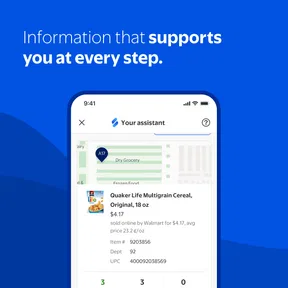

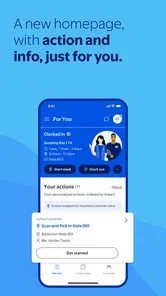
Analysis by Reviewed
When I’m trying to plan a week around changing work hours, the hard part is often gathering the basics: when I’m expected in, what I need to check about work, and where to find pay information. Me@Walmart is aimed at that specific routine. It is a free business app from Walmart for store associates, rather than a general workplace tool meant for any employer. That focus is useful if Walmart is already the center of your workday, but it also sets a clear boundary: someone who does not work in a Walmart store is unlikely to get much from it.
A practical place to begin
I’d treat the app as a place to check work details, not as a replacement for every conversation or process at the store. If I’m planning childcare, a ride, or another commitment around a shift, having the schedule in one place can make the first step easier. I’d still check that I’m looking at the current schedule before making plans; a phone app is convenient, but a quick glance should not become an assumption that nothing has changed.
Unpacking the Features
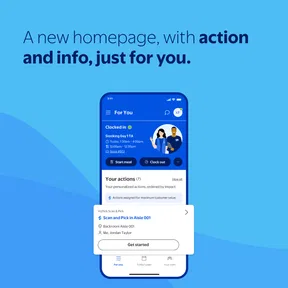
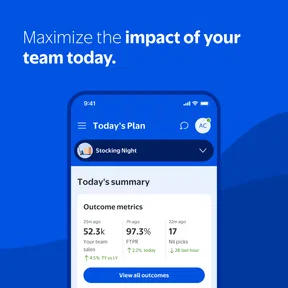
The first thing you notice about Me@Walmart is its clean and user-friendly interface. It’s like the app knows exactly what you need, and places everything within reach. From scheduling to paystubs, the app caters to all the essentials. Imagine not having to call or check in with your manager for your work schedule. It’s all right there, updated in real-time. I mean, how convenient is that?
Stay in the Loop with Scheduling
One of the coolest features is the scheduling tool. You can view your shifts and even swap them with colleagues directly through the app. No more sticky notes on the fridge or hastily scribbled reminders! It’s like having a personal planner that updates itself. Plus, getting notifications about shift changes or available slots is a game-changer. You’re always in the loop, and that’s something I really appreciate.
A useful habit is to check the schedule before arranging a swap, then confirm the change rather than relying on a conversation alone. That keeps the app’s view of the shift and your own plans aligned. A coworker may be willing to trade, but the practical outcome depends on the change being reflected through the work process; I wouldn’t treat an informal agreement as final. For a worker juggling school or family commitments, that distinction can prevent a last-minute surprise.
Paystub Access on the Go
Gone are the days of waiting for a paper paystub. With the app, you can access your pay information anytime, anywhere. It’s especially handy when you need to verify your earnings or check deductions. Just a few taps and you’re sorted! This feature really stands out for me because it provides peace of mind, knowing I have all my financial info right at my fingertips.
I find pay information most useful when I have a specific question in mind: for example, checking a deduction against a recent pay period or keeping a record for personal budgeting. Looking at it on a phone is quicker than hunting through saved paperwork, but it is still worth reviewing the figures carefully. If something looks unclear, the app can help me locate the information; it does not replace asking the appropriate workplace contact to explain it.
More From Our News Desk

Weather by Xiaomi Review: Clear at a Glance, Less Clear Up Close

X Under Pressure: Can It Recover When Posting Goes Wrong?

Clash of Clans Is Won Between the Battles

Android Auto Makes the Case for Quieter Car Software

MobiOffice: Transforming Mobile Productivity with Seamless Integration

EA SPORTS FC™ Mobile Soccer: Redefining Mobile Sports Gaming
Networking Made Easy
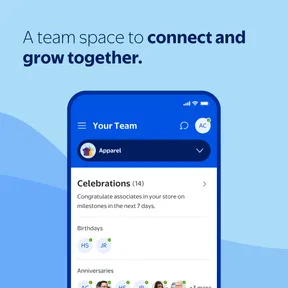
Another highlight is the ability to connect with your coworkers. Whether you want to discuss shift swaps, share ideas, or just catch up, the app has got you covered. It’s like having a mini social network dedicated to work. You can even get in touch with HR directly if needed. It just makes communication so much smoother and more efficient.
That communication is most helpful for a straightforward handoff: I can raise a work-related question or coordinate with a colleague without switching to a personal messaging app. I would still keep sensitive or complicated matters to the right workplace channel, and use a direct conversation when nuance matters. The convenience is having a work-focused starting point, not a guarantee that every issue can be settled inside a message.
From a shift check to a finished plan
Here’s how I’d use it on an ordinary busy day. Before arranging a ride or asking someone to cover childcare, I’d open the schedule and check the shift I’m planning around. If the timing clashes with a commitment, I’d contact a coworker about a possible swap and then look for the change to appear through the app’s work process before treating the plan as settled. That small pause matters: a conversation starts a handoff, but the confirmed schedule is what I’d rely on when coordinating the rest of the day.
Once the shift is settled, I’d put the personal commitment in my usual calendar. That gives me one place for work details and another for everything else, without expecting either tool to do both jobs. If a pay question comes up later, I can check the relevant pay information separately rather than trying to reconstruct it from memory. The useful outcome is less back-and-forth and a clearer view of what I need to act on; the app does not remove the need to follow workplace procedures.
This flow is especially practical when different people need different parts of the information. A coworker may be involved in a shift discussion, while family members only need to know the final time I’ll be working. I would share the outcome with them after confirming it, rather than treating a tentative swap as definite. Keeping that distinction clear is a simple way to avoid passing along outdated plans.
Where it fits better than familiar alternatives
A paper calendar is dependable for jotting down appointments, and a general calendar can show work alongside personal plans. But those tools depend on me entering and correcting every shift myself. A messaging app is useful for a quick conversation, yet it can leave the final arrangement scattered across messages. Me@Walmart’s advantage is that it brings work-related schedule and communication tasks into a Walmart-specific place, so I can use it as the source to check before updating my wider plans.
That does not make it the best tool for every part of the week. I’d choose a general calendar for coordinating several jobs, family events, and personal appointments in one view. I’d keep using ordinary messaging for people who are not workplace contacts. And if I’m trying to manage shifts for an employer other than Walmart, this app is not a substitute for that employer’s system. Its strength is narrow and useful, rather than universal.
Who will get the most from it
This is a better fit for Walmart store associates who regularly need to check shifts, keep an eye on pay information, or reach coworkers and HR. A realistic routine might be checking the next shift while planning the week, following up on a proposed swap, then looking at a paystub when a budgeting question comes up. The value comes from having those separate tasks close at hand, rather than from turning the app into a general planner.
Compared with a paper calendar, a personal notes app, or ordinary messaging, the advantage is that work details and work contacts sit in a Walmart-specific setting. Those alternatives can still be better for broader life planning or conversations with people outside work. If you are not a Walmart associate, or you need a tool for managing shifts across several employers, this app is not the right choice. It is for store associates, and its focused purpose is also its main limitation.
Fit, expectations, and everyday friction
Me@Walmart is listed as Everyone-rated, with a 4.7 average from around 239,000 ratings and more than a million installs. Walmart released it in 2019, and version 1.34.4 supports Android 8.0 and later. Those details make it easy to judge whether it suits your device and workplace, but they do not tell me how smoothly every task will fit an individual store’s routine. The app is free, which makes trying it straightforward if you are an associate.
For a new user, I’d start with the immediate need rather than trying to make the app the center of every work task: check the schedule, learn where pay information sits, and see how work communication is handled. Keep another calendar for personal commitments if you need a wider view, and verify important changes before acting on them. That practical split avoids expecting one employer-focused app to manage everything.
There is also a useful way to think about alerts and quick checks: treat them as prompts to review, not as a substitute for looking at the schedule itself when a decision has consequences. A notification can draw attention to a change or opportunity, but if I’m arranging transport or coordinating with someone else, I’d open the schedule and check what it currently shows. That is a low-effort habit, and it reduces the chance that a glance at an old message becomes the basis for a real commitment.
For pay details, I’d use the same deliberate approach. Rather than opening the app without a question and hoping a number makes sense, I’d compare the relevant information with the pay period or deduction I’m trying to understand. If the issue is about how a figure was calculated, a workplace contact is still the better next step. The app helps me find and review information; knowing when to move from checking to asking is part of using it well.
When the workflow hits a boundary
The main friction is that the app can organize access to work information without controlling every decision behind it. A coworker may be open to a swap, but a personal conversation does not by itself settle the schedule. A pay entry may prompt a question, but viewing it does not explain every workplace decision. In both cases, I’d use the app to identify what needs attention, then follow the appropriate workplace process rather than assuming the screen alone resolves it.
That makes it a poor fit for anyone expecting a complete employee-management system or a shared planner for a household. Its purpose is more modest: give Walmart store associates a convenient place for work-related tasks. If you want a single calendar that automatically combines work with personal events, you will still need another tool. If you are uncomfortable checking work information on a phone, a familiar workplace contact or another available work process may suit you better.
I’d also avoid making the app the only place I remember a consequential commitment. Once a shift is confirmed, copying it into a personal calendar can help when I’m looking at appointments or family plans in a different app. That is not busywork so much as a practical handoff between work scheduling and everyday life. The work app is best for checking the work side; my calendar is better for seeing the whole day.
To wrap it up, Me@Walmart is more than just an app, it's your work-life buddy. It's designed to make your job easier and your life a little less stressful. Whether you're a tech-savvy employee or someone who prefers simplicity, this app adapts beautifully to your needs. So if you’re part of the Walmart family, don’t miss out on this digital helper. Trust me, once you start using it, you’ll wonder how you ever managed without it!
MyWalmart Frequently Asked Questions
Does Me@Walmart work on a personal phone, or do I need a work-issued device?
Me@Walmart is designed for Walmart associates and is available as a mobile app, so associates can use it on a personal smartphone rather than treating it as a customer shopping app. Before downloading, consider whether you want work-related information and tools on that device, and make sure you can access the Walmart identification details needed for sign-in.
Is Me@Walmart a shopping app for customers?
No. Me@Walmart is intended for Walmart associates, not for browsing or buying products as a customer. Its focus is workplace use, including information and tools related to an associate’s job. Customers looking for a shopping experience should use an appropriate customer-facing Walmart app instead; Me@Walmart is most relevant to people who work for Walmart and need associate-focused mobile access.
Is Me@Walmart only for Walmart associates, or can customers use it too?
Me@Walmart is designed for Walmart associates rather than as a general shopping app for customers. Its store description says the app is available for associates in stores, and its workplace focus is reflected in features such as schedules and work-related information. If you are looking for an app to browse or buy products as a customer, Me@Walmart is not intended for that purpose.
What is Me@Walmart and what can I use it for?
Me@Walmart is a mobile application designed specifically for Walmart employees to manage their work schedules, communicate with colleagues, and access important work-related information. The app provides features such as shift scheduling, swapping shifts, viewing paystubs, and staying updated with company news. It's an essential tool for Walmart associates to streamline their daily work activities and stay connected with their workplace.
Is Me@Walmart available for both Android and iOS devices?
Yes, Me@Walmart is available for both Android and iOS platforms. Employees can download the app from the Google Play Store for Android devices or the Apple App Store for iOS devices. This accessibility ensures that all Walmart employees, regardless of their smartphone preference, can benefit from the app's features to manage their work life efficiently. On Android, it is a free app rated for Everyone, and it requires Android 8.0 or later.
Pros
- Easy to use interface
- Real-time schedule updates
- Shift swap feature
- Employee discount access
- Company news notifications
Cons
- Limited offline functionality
- Occasional login issues
- Slow customer support response
- No direct messaging feature
- Requires frequent updates













