

Metrolink
- 504.00
- 3.4
- Installs
- 500.00K
- Price
- Free

Screenshots
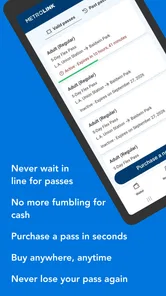
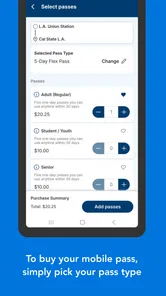
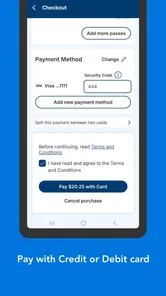
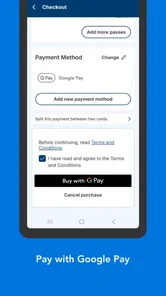
Analysis by Reviewed
I think a rail app earns its place on my phone when it helps me make a decision before I reach the station, not just when I’m already on the platform. Metrolink is a free travel and local app from the Southern California Regional Rail Authority, aimed at people using its train service. Its central appeal is practical: plan a trip and handle ticketing from a phone, rather than treating the app as a general-purpose guide to every kind of transit.
A focused tool for rail journeys
That focus is useful if Metrolink is already part of your routine. For a regular rider, the app can sit alongside a calendar or commute checklist: check the journey, sort out the ticket, then head out. A first-time rider may also appreciate having the travel task in one place, although I’d still check the station and route details carefully before leaving, especially when a connection or tight arrival time matters.
It is less compelling as a universal city-transit planner. If most of your travel involves buses, local transit agencies, or walking between several unrelated services, a broad mapping app may be a better starting point. Metrolink is most useful when the train itself is the core of the trip, rather than one small piece of a complicated door-to-door itinerary.
Buying a ticket without adding station friction
The strongest everyday use case is deciding to travel and buying the ticket before you reach the station. Imagine finishing work, checking that a train suits your plans, and taking care of the purchase while walking to the platform. That can make the start of a trip feel less rushed than joining a queue or trying to sort out payment at the last moment. I’d still leave a little buffer: a phone-based purchase is convenient, but it does not make a late departure any less stressful.
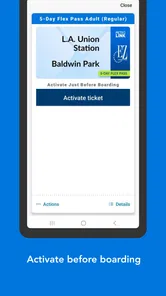
One practical habit is to get the app and your account or payment details ready before the day you need them. That avoids learning the screens under pressure. I’d also keep the phone charged and make sure the ticket is accessible before boarding, rather than assuming that a weak signal or a hurried login will be easy to resolve at the station. Those are small preparations, but they matter more when the app is part of the actual boarding routine.
Getting Started with Metrolink
First things first, let’s talk about getting started with Metrolink. The app is available for both Android and iOS, making it quite accessible for everyone. When I first opened it, the interface was surprisingly intuitive. You know how some apps make you feel like you need a degree just to navigate them? Not the case here! Everything is laid out in a user-friendly manner, which I genuinely appreciated.
Features That Stand Out
So what's all the fuss about? Well, Metrolink isn’t just your average train schedule app. It offers real-time updates, which is crucial for every commuter. No more guessing or relying on outdated info. This feature alone saves you from the classic "Am I at the right platform?" panic.
More From Our News Desk

 Weather - By Xiaomi
Weather by Xiaomi Review: Clear at a Glance, Less Clear Up Close
Xiaomi’s weather app makes everyday forecasts quick to scan, but its calm surface can leave useful details and recovery paths harder to find than they should be.

 X
XX Under Pressure: Can It Recover When Posting Goes Wrong?
A resilience-focused review of X, examining setup, mistaken posts, interruptions, weak connections, and the gaps that matter when recovery needs to be dependable.

 Clash of Clans
Clash of Clans Is Won Between the Battles
Its raids are quick; its community is a long-term project of coordination, teaching, rivalry, and shared responsibility—with all the friction that entails.

 Android Auto
Android Auto Makes the Case for Quieter Car Software
The car interface is no longer judged by how much it can do, but by how quietly it helps. Android Auto shows what drivers now expect—and what still gets in the way.

 MobiOffice: Word, Sheets, PDF
MobiOffice: Transforming Mobile Productivity with Seamless Integration
MobiOffice: Word, Sheets, PDF is redefining mobile productivity with a surprising blend of functionality and innovation.

 EA SPORTS FC Soccer Mobile 26
EA SPORTS FC™ Mobile Soccer: Redefining Mobile Sports Gaming
Dive into EA SPORTS FC™ Mobile Soccer, where immersive gameplay and strategic depth transform mobile sports gaming.
Latest News



One cool feature I found is the trip planner. It’s like having a personal assistant in your pocket. You plug in your starting point and destination, and boom, you get a detailed route complete with different options. Whether you want the fastest route or the most scenic, Metrolink has got you covered.
Usability and Design
As someone who uses public transport regularly, the usability of an app is paramount. The design of Metrolink is sleek and modern, with just the right amount of flair. It’s not over-the-top, but it’s not drab either. The color scheme is easy on the eyes, which is a plus when you’re groggy in the morning.
Moreover, the app is pretty lightweight, so it doesn’t hog your phone’s resources. I’ve had apps that make my phone sluggish, but not this one. It runs smoothly, and I haven’t encountered any crashes or bugs, which is always a relief.
Current version and everyday reliability
The app is currently at version 7.8.35, and it first appeared on March 1, 2016. That history gives it time to mature as a rail companion, but a version number alone cannot tell me which changes matter most to a particular rider. For someone already using it, I’d judge each update by whether the ticket flow, trip planning, and information needed for a real journey remain clear and dependable.
It has a 3.4 average from around 1.1 thousand ratings, with 504 reviews, and more than 500 thousand installs. I take that as a reason to set expectations sensibly rather than as a verdict: a commuter’s experience depends on the route, the timing, and the phone in hand. The app is free, rated for everyone, and requires Android 7.0 or later, which makes the basic decision to try it straightforward for many Android users.
Planning around the app’s strengths
I’d use the trip planner as a starting point for a rail journey, then check the pieces that matter most to my day: the station I need, the timing of the train, and how I’ll get from the station to my final destination. That last leg is easy to overlook when a rail app keeps the train portion front and center. A map app can fill that gap, but I wouldn’t expect one tool to replace the other.
For a regular commute, a useful routine is to look up the trip before leaving home instead of waiting until the station. That gives you time to notice whether the proposed rail journey fits your schedule and to consider another option if it doesn’t. If a change would affect a meeting or pickup, I’d check the travel information again before setting out rather than relying on what I saw earlier.
For a less familiar trip, I’d also avoid treating the first suggested route as automatically best. A quicker rail option may not be the most comfortable choice if it leaves you with a tight connection or a difficult final walk. The practical trade-off is between speed and a plan that gives you enough breathing room. I find a route is only useful when it works with the rest of the day, not just on paper.
Where it fits beside other travel apps
Compared with a general map or transit app, Metrolink has a narrower job: it is centered on its own train service and brings rail planning and ticketing into the same place. That makes it a sensible companion for someone whose regular journey is built around Metrolink. A citywide planner is usually more helpful when the trip involves several operators, buses, walking directions, or unfamiliar neighborhoods.
I wouldn’t frame those tools as rivals so much as different parts of a travel kit. I might use Metrolink to handle the rail portion, then turn to a map for a walk or a local connection. That two-app approach takes a little more switching, but it can be more realistic than expecting a dedicated rail app to cover every step from the front door to the destination.
There is also a useful distinction between planning and reassurance. A route planner helps me work out a possible journey; current travel information helps me decide whether to follow it now. For an ordinary trip with flexible timing, the app may be enough to get organized. When the arrival time matters or a transfer is involved, I’d compare the broader journey and keep an alternative in mind.
Everyday cases where convenience matters
Picture a rider who usually drives but wants to take the train to an appointment. They can look into the rail journey before leaving, get the ticket task out of the way, and avoid arriving at the station still trying to work out the basics. The app is especially useful in that situation because the ticket and the train plan are connected to the same service. It reduces a few steps, even though it cannot decide whether the train is the right choice for that appointment.
For a frequent commuter, the benefit is less dramatic but more repetitive: there is one familiar place to check a rail trip and prepare the ticket. That can help make a weekday routine feel more orderly. I’d still keep a backup plan for days when the schedule does not suit me, because convenience should not turn into dependence on a single route or a single screen.
A visitor who only expects to use the service once faces a different calculation. Downloading a dedicated app may be worthwhile if they want to purchase a ticket and plan a rail trip in one place. If their day is mostly about navigating several types of transit across a city, a broad mapping tool may be easier to use as the main guide, with Metrolink reserved for the train-specific part.
Where I’d be cautious
My main caution is to treat an app as one part of a travel plan, not as a guarantee that every disruption or connection will be handled for you. For an unfamiliar journey, check the route before setting off and leave room for a change of plan. If your trip depends on a bus connection or another operator, compare the full journey in a broader transit or map app too; a dedicated rail tool and an all-network planner solve different problems.
That distinction also helps answer who should skip it. If you rarely ride Metrolink, prefer buying tickets another way, or mainly need help navigating a whole city’s mixed transit network, installing a dedicated app may add little. If you take Metrolink often, on the other hand, having ticket purchase and rail trip planning close at hand can make repeated journeys easier to organize.
There are practical limits to relying on a phone at the point of travel. A low battery, a slow connection, or an account issue can turn a convenient ticket workflow into a distraction, so I’d prepare before boarding and keep the device usable through the trip. The sensible question is not just whether mobile ticketing is easier on a good day, but whether you are comfortable making your phone part of the boarding routine.
I’d also be careful about assuming that an app’s focus on rail means it can answer every local travel question. It may help with the Metrolink portion, but a multi-stop day involving other transit services still benefits from checking those legs separately. That extra check is not a knock against a focused tool; it is simply how I’d avoid confusing a rail plan with a complete door-to-door itinerary.
Why You Should Try It
If you’re someone who relies on public transport, Metrolink is definitely worth a try. It’s packed with useful features that make commuting a breeze. From real-time updates to personalized trip planning, it’s like having a travel guru in your pocket.
Plus, it’s constantly being updated with new features and improvements. The developers seem to really care about the user experience, which is reflected in the app’s performance and reliability.
What I’d watch on future journeys
For existing users, the useful test is not whether an update sounds impressive, but whether it makes a repeat trip simpler: can you find the right journey, complete a ticket purchase without fuss, and understand the information when plans shift? I’d pay attention to those basics over time, especially if you rely on the app for a time-sensitive commute. New versions may bring changes, but I wouldn’t assume what they are until they appear in the app.
When an update arrives, I’d judge it in the context of my own routine rather than by the version number. A change is valuable if it makes a task I actually do easier or makes important information clearer. If the core journey still works for me, there may be no reason to change how I travel; if a familiar step becomes confusing, I’d allow time to get used to it before depending on it for a tight trip.
For someone deciding whether to install it, the practical question is simple: do you expect to use Metrolink often enough for a dedicated rail companion to save effort? If yes, the combination of planning and ticket handling gives it a clear role. If not, a general map app may be enough for occasional route research, and you can choose the ticket method that best suits that trip.
In conclusion, if you’re tired of the typical commute chaos and want something that actually helps you get from point A to B with minimal fuss, give Metrolink a shot. It's one of those apps that once you start using, you wonder how you ever lived without it. Happy commuting!
Metrolink Frequently Asked Questions
Who develops Metrolink, and what kind of app is it?
Metrolink is a travel and local transportation app developed by the Southern California Regional Rail Authority. Its central purpose is to help people handle train travel, including buying a ticket through the app. The app is free to download, and its age rating is Everyone, making it suitable for a broad range of users.
What should I know about Metrolink’s current version and device requirements?
Metrolink’s current version is 7.8.35, and it requires Android 7.0 or later on Android devices. Before downloading, check that your phone meets that operating-system requirement so you can install and use the app. The app is also available on iOS, giving Apple-device users a way to access Metrolink’s mobile ticketing service.
What is Metrolink and what can I do with it?
Metrolink is a comprehensive public transportation app designed to provide users with real-time updates, schedules, and routes for trains, buses, and other transit options in their city. With Metrolink, users can plan their journeys efficiently, track their rides in real-time, and receive notifications about delays or changes in service, ensuring a smooth commuting experience.
Is Metrolink available for both Android and iOS devices?
Yes, Metrolink is available for download on both Android and iOS platforms. Users can access the app through the Google Play Store for Android devices and the Apple App Store for iOS devices. This cross-platform availability ensures that users have access to vital transit information regardless of their smartphone type.
Does Metrolink provide real-time updates and alerts?
Absolutely. Metrolink is equipped with real-time tracking features, allowing users to receive instant updates on train and bus arrivals, delays, and cancellations. This feature is particularly useful for commuters who need to adjust their travel plans on the go, making Metrolink a reliable tool for daily transit needs.
Pros
- User-friendly interface for easy navigation.
- Real-time updates on train schedules.
- Supports multiple payment options.
- Available on both Android and iOS.
- Offers route planning with estimated times.
Cons
- Requires internet connection for updates.
- Limited offline functionality.
- Ads can be intrusive at times.
- Some features may require premium access.
- Occasional bugs affecting performance.











