

Metro Transit
- 544.00
- 3.1
- Installs
- 100.00K
- Price
- Free

Screenshots
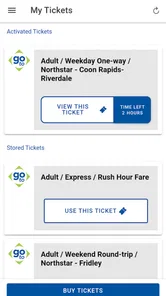
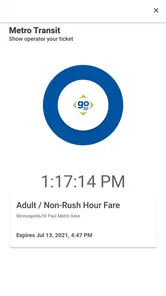
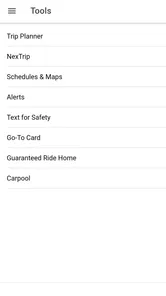
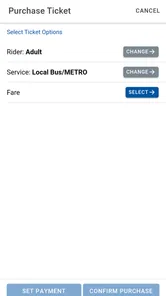
Analysis by Reviewed
Choosing a transit app is less about finding the most attractive interface and more about deciding what you need at the exact moment you are trying to travel. I look for three things first: whether the app comes from the transit organization itself, whether it makes ticket handling less stressful, and whether it fits the way I normally plan a trip. Metro Transit is aimed at riders who want an official mobile ticketing tool rather than a general travel planner. That focus makes it useful in a very specific way, although it also means it may not replace every travel app on your phone.
Metro Transit sits in the Travel & Local category and is developed by Metropolitan Council - Old. It is free to install, rated for Everyone, and supports devices running Android 6.0 or later. The app has been available since November 3, 2016, and its current version is 4.11.0. Those details matter because this is not a brand-new experiment: it has had time to become a familiar part of a rider’s routine, while the older minimum operating-system requirement also makes it accessible on many devices that are no longer recent.
How I Would Decide Whether Metro Transit Fits
My first decision criterion is the kind of journey I take. If I already know I am using Metro Transit and mainly want to handle a ticket from my phone, an official app is a sensible starting point. I do not have to sort through a broad collection of unrelated transport services before getting to the tool I need. The app’s identity is clear: it is the mobile ticketing option associated with Metro Transit.
That clarity is valuable before boarding. A third-party map app may be better at combining walking directions, driving, cycling, and several transport providers, but it may not be the place where I want to manage a transit ticket. Conversely, someone who only needs directions may find a mapping app more convenient. The important distinction is that Metro Transit is best judged as a ticket-focused companion, not as a universal replacement for every navigation service.
I would also consider how often I ride. Regular passengers benefit more from having a dedicated ticketing app ready than someone who takes public transport only once during an occasional visit. For a frequent rider, reducing the number of separate steps before a journey can be worthwhile. For an infrequent rider, the installation and account setup process may feel like extra preparation compared with simply using whatever payment or ticket option is already familiar.
The public response gives a mixed but useful signal. Metro Transit holds an average rating of 3.1 from around 1.1 thousand ratings, alongside more than 500 written reviews. I would not treat that score as a complete verdict, because ticketing apps are often judged during rushed, high-pressure moments. Still, it suggests that the experience is not universally smooth, and I would keep a backup plan for an important journey rather than relying on any single phone-based method without preparation.
Its reach is substantial, with over 100 thousand installs. That does not prove that every rider will enjoy it, but it does show that the app is established enough to be recognized by a sizeable group of people. I see that as a reason to try it when Metro Transit is part of my regular travel, not as a reason to assume it will suit every trip or every phone.
More From Our News Desk

 Weather - By Xiaomi
Weather by Xiaomi Review: Clear at a Glance, Less Clear Up Close
Xiaomi’s weather app makes everyday forecasts quick to scan, but its calm surface can leave useful details and recovery paths harder to find than they should be.

 X
XX Under Pressure: Can It Recover When Posting Goes Wrong?
A resilience-focused review of X, examining setup, mistaken posts, interruptions, weak connections, and the gaps that matter when recovery needs to be dependable.

 Clash of Clans
Clash of Clans Is Won Between the Battles
Its raids are quick; its community is a long-term project of coordination, teaching, rivalry, and shared responsibility—with all the friction that entails.

 Android Auto
Android Auto Makes the Case for Quieter Car Software
The car interface is no longer judged by how much it can do, but by how quietly it helps. Android Auto shows what drivers now expect—and what still gets in the way.

 MobiOffice: Word, Sheets, PDF
MobiOffice: Transforming Mobile Productivity with Seamless Integration
MobiOffice: Word, Sheets, PDF is redefining mobile productivity with a surprising blend of functionality and innovation.

 EA SPORTS FC Soccer Mobile 26
EA SPORTS FC™ Mobile Soccer: Redefining Mobile Sports Gaming
Dive into EA SPORTS FC™ Mobile Soccer, where immersive gameplay and strategic depth transform mobile sports gaming.
Latest News



The everyday situation where it makes the most sense
Imagine I am leaving work for an evening appointment and already know I will take Metro Transit. I can prepare the ticket before I reach the stop instead of waiting until the last moment. That small change is more important than it sounds: crowded platforms, poor weather, low battery, or a rushed transfer are exactly when fumbling with a payment method becomes irritating. Using the app earlier gives me a chance to check that the phone is charged and that the ticket is ready before boarding.
My practical advice is to avoid making the first test of the app during an urgent trip. Install it at home, explore the ticket flow when I have time, and make sure I understand what the app expects me to do before boarding. I would also avoid closing the preparation step until I know the ticket is available in the way I need. This is one of the less obvious advantages of a dedicated tool: it encourages me to separate ticket preparation from the stressful moment of catching a vehicle.
Another useful habit is to think about the return journey before leaving. If I am heading somewhere with limited signal, a crowded venue, or few charging opportunities, I would prepare as much as the app allows while I still have a reliable connection and power. I would not assume that a phone ticket should be treated exactly like a paper ticket or a general payment card. The workflow may be simple, but it still depends on my device being usable when the trip begins.
What I like about the official approach
The strongest point is trust of purpose. Metro Transit is not trying to be a general-purpose travel marketplace in my experience of its role. It is tied directly to the transit service I am considering, which reduces one common source of confusion: wondering whether a ticket shown in a third-party app actually belongs to the correct network or service. When the journey is already decided, that direct relationship is reassuring.
The app is also free, so trying it does not require a purchase decision before I know whether it fits my routine. That matters for occasional riders and for people who are comparing it with other ways to manage transit. I can test the basic flow without committing money, then decide whether the convenience is worth keeping the app installed.
The Everyone age rating is another practical advantage for households. It does not mean every child should independently manage travel payments, but it does make the app feel appropriate as a general household utility rather than a tool restricted to a particular age group. A parent, student, commuter, or older family member can evaluate it based on comfort with smartphones rather than an age gate.
Compatibility with Android 6.0 or later is helpful for people who keep an older phone as a backup. I would still check that the device has enough battery and storage for normal use, but the operating-system requirement itself is not demanding by modern standards. This makes Metro Transit a more realistic option for riders who are not upgrading their phone frequently.
The friction I would plan around
The average rating is the clearest warning that an official app is not automatically a perfect app. Ticketing software is especially unforgiving because a small delay feels serious when a vehicle is waiting. A screen that takes too long to load, an unclear confirmation, or uncertainty about whether a ticket is active can undermine confidence even if the app eventually works correctly.
That is why I would not install it moments before an important departure and assume everything will be effortless. I would complete the initial setup in advance, learn where the ticket controls are, and keep another practical option available for a time-sensitive journey. This is not an argument against using Metro Transit; it is a sensible response to the fact that phone-dependent travel has more failure points than a simple physical alternative.
There is also a psychological trade-off. An official ticketing app can make the ticket itself easier to manage, but it may not answer every broader question I have about a trip. If I need a detailed door-to-door route, several alternative departures, walking guidance, or a comparison across different transport modes, I may still need a mapping or journey-planning app. Installing Metro Transit does not necessarily eliminate those other tools.
I would also be careful about treating the phone as the entire travel plan. A dead battery, a damaged screen, or a forgotten login can turn a convenient digital ticket into a source of stress. Before leaving, I would check the phone, keep the app accessible, and avoid assuming that a screenshot or an unrelated receipt will serve the same purpose as the ticket workflow inside the app. The safest routine is to know exactly what I need to show or activate before I board.
Metro Transit Compared with the Usual Alternatives
There are three broad alternatives I would compare with it. The first is a general map or journey-planning app. That category usually makes more sense when I am still deciding how to get somewhere, especially if the route involves walking, multiple operators, or a choice between public transport and another mode. Its strength is the wider trip picture. Its weakness, in this comparison, is that it may not be as directly focused on Metro Transit ticket handling.
The second alternative is a transit operator’s website used in a mobile browser. This can be convenient when I do not want another installed app, particularly for a one-off journey. The trade-off is that a browser-based process may feel less immediate when I am in a hurry, and I may have to repeat more steps each time. Metro Transit is the better fit if I expect to ride often and prefer having a dedicated place for the task.
The third alternative is a non-digital or in-person ticket method. That may be preferable for someone with an unreliable phone, limited data access, low battery confidence, or a strong preference for physical transactions. I would choose that route when the cost of a phone problem is higher than the convenience of digital preparation. The app’s free price removes a financial barrier, but it does not remove the practical dependence on a working device.
Metro Transit wins when the question is, “How do I handle my Metro Transit ticket from my phone?” It is less compelling when the question is, “What is the best complete route from my current location to a destination using every possible option?” That distinction should guide the download decision. Choosing a specialist tool for the task it is designed around is more realistic than expecting it to behave like a map, timetable, wallet, and travel assistant all at once.
Who should use it regularly
I would recommend trying Metro Transit to regular Metro Transit riders, commuters who want to prepare before reaching a stop, and people who prefer an official channel for mobile ticketing. It is particularly suitable for someone who already knows the network they intend to use and wants to reduce the amount of last-minute ticket handling.
It can also suit families or groups where one person organizes the journey and wants to prepare before leaving home. I would still make sure every traveler understands which ticket belongs to whom and what needs to happen at boarding. The app can simplify the organizer’s preparation, but it does not remove the need for clear communication when several people are traveling together.
Occasional visitors may also find it worthwhile if they expect more than one Metro Transit journey. Because the app is free and supports an Everyone rating, there is little reason not to test it ahead of time if mobile ticketing is the preferred method. The key is to test it before the first departure, not while standing at the stop with a vehicle approaching.
Who may be better served elsewhere
I would hesitate to make Metro Transit my only travel tool if I regularly compare several transport networks or plan complicated journeys across a city. A broader navigation app may offer a clearer overview for that purpose. I would also think twice if I rarely use Metro Transit and already have a reliable way to buy a single ticket without installing anything.
People who dislike managing tickets on a phone may be happier with a physical option. The app is not automatically the right choice simply because it is official and free. Convenience depends on personal habits: some riders feel calmer with a digital ticket prepared in advance, while others feel safer carrying something that does not depend on battery life or an app opening correctly.
There is also a difference between wanting information and wanting ticketing. If my main need is to discover routes, compare departure choices, or navigate unfamiliar streets, I would start with a journey planner. I might still keep Metro Transit for the ticket itself, but I would not expect it to replace the broader planning experience I prefer.
The real cost of switching to a mobile ticket routine
Since the app is free, the main cost of switching is not money. It is attention. I need to install it, become familiar with the screens, and build a habit of preparing before travel. That is a small investment for frequent riders, but it can feel unnecessary for someone making one isolated trip.
There is also a reliability cost to consider. Once I depend on a digital ticket, I need to remember my phone, keep it charged, and avoid leaving the ticket process until the last second. I would treat those steps as part of the fare routine, just as someone using a physical ticket would remember to carry it. The app can make preparation easier, but it cannot make an uncharged phone usable.
My suggested transition is gradual. I would first use Metro Transit for a familiar, non-urgent journey. I would prepare before leaving, observe how the ticket flow fits my routine, and then decide whether it is dependable enough for work or appointments. This approach gives me useful experience without making the first attempt carry the pressure of an important connection.
For a regular rider, that learning cost is likely to pay off through easier preparation and less reliance on last-minute transactions. For a rare rider, the browser or an established alternative may be simpler. The right answer depends less on the app’s download count than on how often I use the service and how comfortable I am with a phone-based ticket.
My recommendation after weighing the trade-offs
I recommend Metro Transit with a clear qualification: use it as the official mobile ticketing companion for Metro Transit, not as a universal travel planner. Its free availability, broad device compatibility, and direct connection to the transit service make it a logical choice for regular riders. The current version is 4.11.0, and the app’s long presence since 2016 suggests an established tool rather than a temporary experiment.
My recommendation is strongest for commuters and repeat passengers who can prepare tickets before leaving home. I would install it, learn the process during a low-pressure trip, and keep the app easy to reach. I would also maintain a backup plan for critical journeys until I have enough personal experience to trust the routine.
I would skip it, or at least postpone installing it, if I only need general directions, rarely use Metro Transit, or do not want my phone involved in ticket handling. In those cases, a broader navigation service or a non-digital method may fit better. The 3.1 average rating means I would approach it with realistic expectations rather than assuming every interaction will be seamless.
Overall, Metro Transit earns a place on my phone when the job is specific: preparing and managing Metro Transit travel digitally. The best reason to choose it is not that it does everything, but that it focuses on the ticketing task I actually need. If that matches your routine, the app is worth trying for free; if your needs begin before ticketing or extend beyond one transit service, pair it with a broader option instead of asking it to do a different job.
Metro Transit Frequently Asked Questions
Who develops Metro Transit, and is this the official app?
Metro Transit is published by Metropolitan Council - Old and is presented as the official mobile ticketing app from Metro Transit. That makes it a relevant option for passengers looking for Metro Transit services on a phone. Before relying on it for a journey, check that the app matches the transit system and service area you intend to use.
What devices can install Metro Transit?
Metro Transit is available for Android devices running version 6.0 or later, so it is worth checking your phone’s operating system before downloading. The app is free, and its content rating is Everyone. Compatibility can still depend on your particular device, so confirm that the app is offered for your phone in its app store.
What is Metro Transit and what can I use it for?
Metro Transit is a public transportation app designed to help passengers plan journeys, check routes, and stay informed about bus and rail services operated by participating Metro Transit systems. After selecting or allowing access to your service area, you can typically search for nearby stops, view schedules, compare travel options, and receive information that makes daily commuting easier and more predictable.
Does Metro Transit provide real-time arrival and service information?
In supported transit regions, Metro Transit can display estimated arrival times, vehicle locations, departure schedules, and service alerts. The accuracy of these details depends on the local transportation agency’s information, network availability, and the quality of the vehicle tracking system. Users should still allow extra time because traffic, weather, maintenance, and unexpected disruptions may affect actual arrival times.
Can I use Metro Transit to plan a complete trip?
Yes, the app is intended to help users plan trips from one location to another using available public transportation services. You can enter a starting point and destination, review suggested routes, and compare departure times or transfers where the feature is supported. Before leaving, check the selected service area, walking instructions, stop names, and current alerts to avoid following outdated route information.
Pros
- Real-time arrival updates help reduce waiting at stops.
- Route planning supports buses
- trains
- and transfers in one app.
- Service alerts make disruptions and schedule changes easier to track.
- Saved routes provide quick access to frequently used trips.
- Useful coverage for navigating the Minneapolis–Saint Paul transit network.
Cons
- Real-time data may be inaccurate during outages or GPS issues.
- Some features depend on an active internet connection.
- The interface can feel crowded for first-time users.
- Coverage is limited outside the Metro Transit service area.
- Transit schedules may change before the app refreshes its information.











