memoryOS: Improve Your Memory
- 1.10K
- 4.8
- Installs
- 100.00K
- Price
- Free

Screenshots


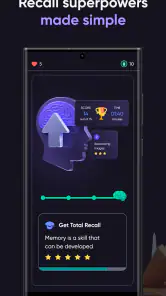
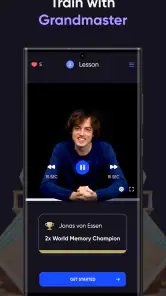

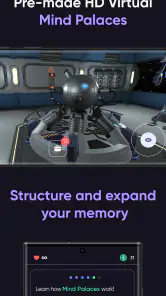
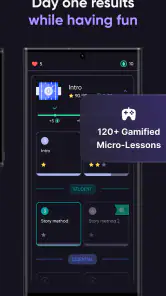
Analysis by Reviewed
I approached memoryOS: Improve Your Memory as a small daily training tool rather than a replacement for studying. That distinction matters. The app sits in the education category and focuses on exercises intended to support memorization and concentration, so its value depends less on one impressive session and more on whether you can fit it into a routine you will actually keep.
My first impression was that it is easiest to understand when treated like a mental warm-up. I would open it before reading, revising, or starting a task that required attention, complete a short exercise, and then move on to the real work. That makes the experience feel practical instead of turning it into another obligation. It is free to start, rated for Everyone, and developed by Encoder Inc., which gives it a broad audience: students, adults who want a structured brain-training habit, and anyone who prefers active exercises to passive memory advice.
How memoryOS fits into everyday learning
Network-dependent moments change the rhythm
The most important connectivity question is not whether the app looks attractive on a phone; it is how smoothly it behaves when your connection is inconsistent. A memory exercise is naturally something I might want to do in a waiting room, on public transport, or between appointments. Those are precisely the moments when mobile reception can be unreliable. I would therefore avoid building a routine that depends on opening the app at the exact second I have a spare minute.
When the connection is stable, the experience feels better suited to deliberate sessions. I can open the app, settle into the exercise, and give the task my full attention instead of treating it as a rushed distraction. That makes a difference because memory practice loses some of its value when I am simultaneously switching between apps, checking messages, and trying to remember the instructions.
I would also keep expectations realistic around network behavior. The available product information does not establish that every exercise or part of the experience works without a connection, so I would not assume that it does. For a dependable habit, I would launch it while connected before leaving home, rather than discovering during a commute that the session I expected to use is unavailable or interrupted.
This is a subtle but useful distinction from a paper flashcard deck. A physical deck is always ready, while a digital training app can be affected by loading, account activity, or other connection-related steps. On the other hand, the app is easier to carry and more guided than loose cards. If you want a structured prompt instead of deciding what to practise yourself, that convenience can outweigh the need to plan around connectivity.
Short mobile sessions work best with a clear purpose
Using the app on a phone encourages brief sessions, and I think that is its strongest mobile use case. I would not open it expecting a complete lesson in memory science. I would use it before a study block, during a quiet break, or at the end of the day when I wanted something more focused than scrolling. The phone format makes starting easy, but it also makes stopping important.
More From Our News Desk

Clash of Clans Is Won Between the Battles

Android Auto Makes the Case for Quieter Car Software

MobiOffice: Transforming Mobile Productivity with Seamless Integration

EA SPORTS FC™ Mobile Soccer: Redefining Mobile Sports Gaming

How Microsoft OneDrive Became a Mobile Productivity Giant

How Google Translate Breaks Language Barriers Effortlessly
A useful routine is to decide what comes after the exercise. For example, I might complete a session and immediately review a page of notes, practise a language list, or recall the main points from a meeting. That workflow turns the app from an isolated brain game into a preparation step. The exercise itself is not proof that I will remember unrelated information; the benefit comes from applying the attention and recall mindset to a real task.
One practical tip is to use it before, rather than during, demanding work. If I interrupt revision every few minutes to train, I create more context switching than concentration. A single session before studying is cleaner. For a student, that could mean opening it before a textbook chapter. For a professional, it could sit before reviewing a presentation or preparing for a conversation where names and details matter.
The mobile format is also useful for people who dislike long lessons. Traditional memory courses can feel too formal, while ordinary flashcards require preparation and maintenance. Here, the app gives me a defined activity without asking me to build the entire system first. The trade-off is that a guided exercise may be less directly connected to the exact material I need to learn than a carefully made flashcard set.
What happens when a session fails or gets interrupted
Interruption is where I would judge the app most carefully. A phone call, a weak signal, a low battery warning, or an accidental swipe can break concentration. In a memory exercise, that is more disruptive than it would be in a casual game because the task depends on holding information in mind. I would not treat a disrupted attempt as an accurate reflection of my ability.
My recovery approach would be simple: restart calmly, avoid chasing the previous result, and note whether the problem repeats. If the app opens normally but a particular activity fails to load, I would close unrelated apps, check the connection, and try again later. If I had been using it as a pre-study ritual, I would continue with the study task instead of allowing a technical interruption to cancel the whole plan.
This is one reason I prefer a low-pressure schedule. If every session must be completed perfectly, a single interruption can make the habit feel fragile. A better approach is to define success as returning to the routine. The app is more useful when I treat a missed or interrupted session as a small gap, not as evidence that the method has failed.
There is also a learning issue after interruption. If I was halfway through remembering a sequence or set of details, I might no longer know whether I am responding from memory or from a partial visual impression. In that situation, repeating the exercise is fairer than forcing an answer. I would rather preserve the quality of the practice than protect a score that no longer represents a clean attempt.
Users who need guaranteed continuity should think about this before making the app their only study tool. A notebook, printed prompts, or a separate set of personal flashcards can act as a fallback. That is not a criticism of the app specifically; it is a sensible response to using any phone-based learning tool in places where connection and interruptions are outside your control.
Using it without wasting mobile data or attention
Because this is a mobile education app, I would use it deliberately on a data plan rather than opening it repeatedly throughout the day. Starting a session while connected to a trusted network is the simplest habit. It also gives me a chance to decide whether I have enough uninterrupted time, which is just as important as saving data.
I would avoid tapping through exercises while doing something else. Memory training is not a good background activity. If I am walking through a busy station, answering messages, or listening to a conversation, the app may still be open, but my attention is divided. That makes the session less meaningful and can create the false impression that I have trained when I have only interacted with the screen.
A more data-conscious workflow is to schedule one intentional visit, finish it, and close the app. I would also avoid repeatedly reopening it just to check whether there is something new unless I actually plan to practise. This reduces unnecessary network activity and protects the habit from becoming another form of compulsive phone checking.
Privacy-minded users should apply the same sensible caution they use with any connected app. I would review the permissions and account prompts shown on my own device before proceeding, and I would avoid entering personal information that is not needed for my learning goal. The product facts identify the developer and the app’s educational purpose, but they do not establish a particular privacy setup, so I would make decisions based on the current screens and system notices rather than assumptions.
Free access, optional spending, and what to expect
The app is free to download and use at the entry level, which makes it easy to test without committing money first. There are in-app purchases ranging from under a dollar to well over one hundred dollars per item, so I would look carefully at each offer before confirming anything. The wide range suggests that the optional purchase structure deserves attention, especially for families sharing a device.
My advice is to use the free experience long enough to answer a practical question: does this fit your routine? If I am not opening it consistently, paying for additional material will not solve the real problem. If I am using it regularly and understand what an optional purchase adds, then the decision becomes easier. I would still compare the cost with alternatives such as a notebook-based recall system, a conventional flashcard app, or a course focused on a specific subject.
This is also where the app’s general-purpose nature matters. Exercises that target memory and focus can support learning, but they are not the same as practising the exact vocabulary, formulas, names, or procedures I need to retain. For targeted academic preparation, a subject-specific tool may be more efficient. I would choose memoryOS when I want a guided mental workout alongside my learning, not when I need a complete curriculum.
Who will benefit most from this approach?
I think the strongest audience is people who want a repeatable prompt. Some learners know they should practise recall but never decide what to do. A structured exercise removes that first barrier. It can also suit adults who want a short, focused activity without signing up for a long lesson, provided they are comfortable using a phone and planning around connectivity.
It may be particularly helpful before tasks involving names, instructions, reading comprehension, or presentations. I would not expect it to make information stick automatically, but it can help me arrive at the task in a more attentive state. The most valuable habit is to connect the exercise to a real recall challenge immediately afterward.
I would be more cautious recommending it to someone who wants measurable mastery of one subject. A student preparing for a specific exam may get more direct results from practice questions and spaced repetition built around the exam syllabus. Likewise, someone who dislikes screen-based activities may find a handwritten memory method more comfortable and easier to use in places with poor reception.
How it compares with familiar alternatives
Compared with ordinary flashcards, the app requires less setup but gives me less control over the exact information being practised. Flashcards are excellent when I already know the material I need to review. memoryOS is more appealing when I want the app to provide the exercise and I am looking for general support with memorization and focus.
Compared with meditation apps, it is more active and task-oriented. Meditation can help me settle down, but it does not necessarily ask me to encode and retrieve information. Compared with puzzle games, the educational framing makes the purpose clearer, although I would still judge it by whether the activity improves my real study behavior rather than by entertainment alone.
There is no universal winner. I would combine tools rather than force one app to do everything: use memoryOS as a brief preparation exercise, use flashcards for exact facts, and use practice questions to test whether I can apply what I learned. That combination respects the difference between general mental training and subject-specific recall.
Device compatibility and everyday expectations
The current version is 1.5.7, and the app supports Android 8.0 or later. That makes checking your phone’s operating system worthwhile before planning around it. On a compatible device, I would still keep the app updated through the normal store process, particularly if a connection-related problem appears after a system update.
The app has built a strong public reception, with an average rating of 4.8 from around thirteen thousand ratings and more than one hundred thousand installs. Those figures tell me that many people find the concept appealing, but they do not guarantee that every user will experience the same benefit. A high rating cannot replace testing whether the exercises suit your attention span, learning goals, and available connection.
The Everyone age classification also makes it approachable for a wide range of users. Even so, I would introduce it to younger learners as a supplement, not as a substitute for teaching, reading, practice, or sleep. Memory is influenced by the whole learning routine, and no short mobile session can carry that responsibility alone.
My connectivity verdict
After looking at the app through the lens of connection and mobile use, I see it as a convenient guided practice tool that works best when I prepare the conditions around it. I would open it on a stable connection, give the exercise my full attention, and follow it with a real recall task. I would not depend on it as my only learning resource or assume that every spontaneous offline moment will be supported.
The biggest strength is the low barrier to starting: I do not need to design a complete exercise before I can practise. The biggest limitation is the distance between general memory training and the exact information I may need to learn. Add the possibility of interruptions, optional purchases, and connection-sensitive moments, and the right choice becomes clear.
My recommendation is to try the free experience as a short, intentional part of a broader study routine. If you want guided exercises for memorization and focus, and you are willing to plan around your connection, it is worth exploring. If you need offline certainty, precise exam preparation, or total control over every prompt, a paper system or subject-focused flashcard app will probably serve you better. For me, memoryOS is most convincing not as a magic memory fix, but as a practical nudge to pause, concentrate, and then remember something that matters in daily life.
memoryOS: Improve Your Memory Frequently Asked Questions
What language is memoryOS available in, and is it suitable for learning on the go?
memoryOS is a mobile education app built around guided lessons and memory exercises, so it can fit short practice sessions into a busy day. Before downloading, check the app’s language and lesson presentation on your device to make sure they work for you. The training is most useful when you can give the instructions your attention and practice actively, rather than simply opening the app in the background.
How much time and effort should I expect to put into memoryOS?
memoryOS is designed as a structured training experience, so getting value from it involves more than a quick download or occasional tap through an exercise. You’ll need to follow the lessons, try the techniques, and revisit them through practice. There is no single schedule that suits everyone; choose a routine you can maintain and apply what you learn to information you want to remember in daily life.
Is memoryOS free to download, and what should I know about its cost?
memoryOS is free to download, so you can install it without paying upfront. It also offers in-app purchases, with prices ranging from $0.99 to $149.99 per item. Check the purchase details shown in the app before confirming anything, especially if you are choosing a paid option. That makes it easier to understand the cost and decide whether the available training is right for you.
Which devices can run memoryOS: Improve Your Memory?
memoryOS is available for Android devices running version 8.0 or later. Before downloading, check your device’s operating system version so you can avoid compatibility problems. The app is an education-focused memory-training tool, and its guided lessons and exercises are intended for use on a mobile device. If your phone or tablet meets the minimum requirement, you can install the app and explore its training approach.
Who developed memoryOS, and is it a well-established app?
memoryOS is developed by Encoder Inc. It has an average rating of 4.8 from around 13,000 ratings, with about 1,100 written reviews and over 100,000 installs. These figures suggest that many people have tried the app and that its users have generally rated it positively. As with any learning app, it is still worth considering whether its teaching style and purchase options fit your own needs.
Pros
- Short daily lessons make memory training easy to fit into a busy routine.
- Interactive exercises help turn memory techniques into practical habits.
- Progress tracking can encourage consistent practice over time.
- Visual and story-based methods make information easier to remember.
- Suitable for beginners with no previous memory-training experience.
Cons
- Many lessons and features require a paid subscription.
- Some exercises may feel repetitive after extended use.
- Results depend heavily on practicing regularly outside the app.
- The learning approach may not suit users who prefer academic methods.
- Certain content and exercises may require an internet connection.
- Category
- Education
- Version
- 1.5.7











