Meeting - Video Conference
- 48.00
- 4.1
- Installs
- 500.00K
- Price
- Free

Screenshots


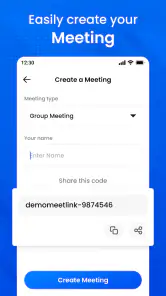




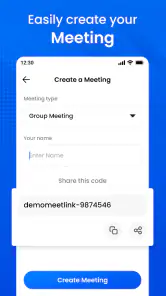
Analysis by Reviewed
When several people share a phone or tablet at home, a video meeting can be less straightforward than simply tapping a call button. Someone may need the device for a work conversation while another person wants to join relatives, and the practical question is whether everyone can get connected without mixing up accounts or interrupting each other. I see Meeting - Video Conference as a straightforward option for that kind of occasional call, provided the household agrees on who is using the device and gets it ready before the meeting begins.
A shared screen needs a little planning
A realistic use might be setting a tablet on the kitchen table so a relative can join a family catch-up while one person helps with the call. Beforehand, I’d check that the device is charged, the room is quiet enough, and the person hosting knows which meeting they intend to open. That small routine matters more on a shared device than choosing a particular video app: it prevents someone else’s work call or conversation from being disrupted.
One useful household habit is to set a clear handoff point: finish the call, leave the meeting, then pass the device to the next person. That is more dependable than assuming the next user will know whether the previous conversation is still active. If a relative needs help joining, I’d have the host remain nearby rather than handing over the device and hoping the steps are obvious. It keeps the person who knows the meeting details in charge without turning a casual catch-up into a complicated setup exercise.
The app is free to install, while in-app purchases range from $0.99 to $99.99 per item. I’d check the purchase screen carefully before confirming anything, especially if other household members can use the device. That is a sensible boundary for any shared app with paid options, not a reason to assume that family accounts, purchase approvals, or parental controls are included.
Keep account and meeting roles clear
For a household, I would decide in advance who is responsible for starting the meeting and managing the device. If one person uses it for business and another for personal calls, keeping those uses separate in your own routine can reduce confusion. I would also avoid leaving a meeting open when the next person takes the device. These are simple habits rather than special app functions, but they make shared use calmer and help prevent an unintended call from becoming an awkward surprise.
That division of responsibility also helps when a meeting involves more than one household member. One person can take care of joining and keeping the device positioned, while the others focus on the conversation. If the call is for work, I’d reserve the tablet or phone for that slot rather than letting a second person use it for a personal call at the same time. On shared equipment, a short agreement about timing and responsibility can do more for a smooth meeting than trying to improvise after everyone has gathered.
For a group that mainly needs to coordinate a time, a messaging app or a shared calendar may be easier than arranging a video call. For face-to-face conversation, this app is more relevant; for a workplace already committed to a particular meeting platform, using that platform may be more convenient because colleagues already know how to join. The best choice depends less on a feature checklist than on what the people you need to reach already use.
More From Our News Desk

Clash of Clans Is Won Between the Battles

Android Auto Makes the Case for Quieter Car Software

MobiOffice: Transforming Mobile Productivity with Seamless Integration

EA SPORTS FC™ Mobile Soccer: Redefining Mobile Sports Gaming

How Microsoft OneDrive Became a Mobile Productivity Giant

How Google Translate Breaks Language Barriers Effortlessly
Age, trust, and expectations
The app is rated for Everyone, which makes its stated age context broad, but that rating does not replace a household’s own rules for children using a camera or joining conversations. I would have an adult help younger users understand who they are calling and when the camera is on. It is also wise to keep the device nearby during a family call if a child needs help navigating it. Those are practical safeguards, not claims about built-in family supervision.
For younger users, I’d explain the purpose of the call before it starts and make sure they know which adult is helping them. That guidance is useful whether the child is simply saying hello to relatives or watching an adult share something on screen. If the household needs detailed controls over children’s accounts, access, or meeting participation, I would look for a service that explicitly provides the particular supervision tools the family wants rather than treating a broad age rating as a substitute.
Rustom Studio is the developer, and the app sits in the business category despite being usable for personal catch-ups too. It has a 4.1 average from around 5,000 ratings, with 500,000+ installs. That gives a prospective user a sense of its reach, but popularity alone cannot tell you whether it fits your group’s habits or your privacy expectations.
Getting Started with Meeting - Video Conference
First things first, downloading and setting up the Meeting - Video Conference app is a piece of cake. Available on both Android and iOS, you can easily find it on your respective app store. The installation is swift, and once you open the app, you’re greeted with an intuitive interface. I was quite impressed by how user-friendly it is. No rocket science here! Just a few taps, and you’re ready to roll.
For a shared device, I’d treat that first opening as a quick orientation rather than assuming everyone should start a call immediately. Work out who will host, where the tablet will sit, and who will be responsible for ending the session. If different people use the device for separate purposes, make the intended use clear before opening the app. This little bit of coordination can spare the family from trying to untangle meeting details while a guest is already waiting.
Features That Stand Out
One of the coolest features I discovered is the app’s ability to host up to 100 participants at once. Whether you're organizing a large business meeting or a virtual party, this app has got you covered. Another standout feature is the screen sharing option. It’s super handy for presentations or collaborative projects. I tried it out during a meeting, and it worked like a charm without any lag.
Screen sharing has a practical trade-off that is easy to overlook when everyone is focused on the presentation: the shared screen becomes part of the conversation. I’d open the material in advance and close unrelated pages or documents before presenting, especially on a device used by several people. That preparation is useful for a business walkthrough, but also for showing a family member a photo or document without fumbling through personal content in front of the group.
Another nifty feature is the chat function. It allows participants to send messages during the call, which is great for sharing links or notes without interrupting the speaker. Plus, the app supports HD video and audio, ensuring that your meetings are crystal clear. No more "Can you hear me now?" moments!
Chat can be handy when someone wants to pass along a detail without talking over the current speaker, but it does not remove the need to keep the meeting organized. In a family conversation, I’d agree on who is helping with messages if a younger participant is using the shared screen. In a work call, I’d keep the host focused on the agenda and use chat for brief notes or links rather than letting it become a second conversation that others have to follow.
Security and Privacy
In today’s world, privacy is paramount, and I was pleased to see that this app takes it seriously. With end-to-end encryption, your calls are kept secure, which gives peace of mind, especially when handling sensitive information. The app also allows you to lock your meetings, ensuring only invited participants can join. Nice touch!
Even with meeting controls, I would still use ordinary care about what is said and shown. Check who is expected to join, keep the device in a suitable place, and avoid displaying material that does not belong in the call. On a household tablet, it is especially worth ending the meeting before handing the device to someone else, so the next person does not inherit an open conversation. I see these as sensible habits around any meeting app, not a replacement for understanding the privacy choices available to the people in the call.
Wrapping It Up
All in all, the Meeting - Video Conference app is a solid choice for anyone in need of a reliable video conferencing tool. It’s packed with features that make virtual meetings easy and enjoyable. While no app is without its hiccups, I found this one to be quite dependable. So, if you’re in the market for a new video conferencing app, give this one a shot. It might just become your go-to app for staying connected!
Who I’d recommend it to
I’d consider it for a small business team that wants screen sharing and in-call chat, or for relatives who prefer seeing one another rather than coordinating everything by text. The app is free to get, its current version is 3.1.3, and it requires Android 8.0 or later. If your household uses an older Android device, check compatibility before planning a call around it. iOS users can find it on their app store as well.
It is a better fit for groups that can agree on a common meeting routine than for people who need a complicated organization-wide system. A small team that already wants video, chat, and the option to present material may find its mix more useful than a plain phone call. By contrast, if everyone you need to meet already uses a different work platform, asking them to switch may create more friction than value. The familiar tool is often the practical choice, even when another app has features you like.
My practical tip is to test the basic joining process with one other person before scheduling a larger conversation. That lets you sort out device placement, audio, and who will share the screen while there is no audience waiting. For a presentation, prepare the material on the device you intend to share and close anything private first; screen sharing is useful, but it also makes whatever is visible on that screen part of the meeting.
For a routine family call, I’d keep the first session simple: have the host open the meeting, place the device where everyone can see and hear comfortably, and let one person help relatives who are less confident with video calls. If the conversation is only about choosing a time or passing along a quick message, text or a shared calendar will usually be quicker. Saving the video call for moments when seeing one another matters makes it feel more worthwhile and avoids turning every small coordination task into a meeting.
A sensible household choice, with limits
The app was released on July 25, 2024, and its Everyone age rating can make it seem suitable across a household, but shared-device etiquette still matters. I would not choose it as a replacement for a family communication service with explicit household management tools, nor as the default for a company whose meetings depend on another platform’s established workflow. I’d also avoid relying on any video call for urgent coordination when a direct phone call or short message would be quicker.
There are a few useful questions to settle before making it the household’s regular option. Can the people you want to reach use the same meeting app comfortably? Is the shared phone or tablet available at the time you need it? Who will host, and who will help if someone gets stuck? If those answers are straightforward, a trial call is a low-pressure way to see whether the app fits your routine. If the group needs managed child access or a company depends on another service, choosing a tool built around those needs is the more sensible path.
For a household that wants occasional video conversations and can keep device use organized, it offers a useful route from setup to a group call without demanding much technical confidence. If you need tightly managed child access, a different service with controls that match your needs would be a better fit. My verdict is that it is worth trying for straightforward meetings, as long as everyone understands who is hosting, checks purchases before confirming them, and treats privacy as a shared responsibility.
Meeting - Video Conference Frequently Asked Questions
What devices and operating systems can I use with Meeting - Video Conference?
Meeting - Video Conference is a business app for mobile devices. It supports Android and iOS, so people using either platform can use it to join or arrange video meetings. The Android version requires Android 8.0 or later. If you switch between a phone and a tablet, the app is intended to provide a consistent experience across different screen sizes.
Who makes Meeting - Video Conference, and what is the app like?
Meeting - Video Conference is developed by Rustom Studio and is presented as an online video conference meeting app. Its short description is simply “Meeting,” which reflects its focused purpose: bringing people together for online conversations. It is rated for Everyone, so its content rating is suitable for a broad audience. The app may appeal to people looking for a straightforward mobile option for business meetings.
What platforms does the Meeting - Video Conference app support?
The Meeting - Video Conference app is versatile, supporting both Android and iOS platforms. This ensures that users across different mobile systems can seamlessly connect and utilize the app’s features. Additionally, the app is fully optimized for various device screens, providing a consistent experience whether on a smartphone or tablet.
Is the Meeting - Video Conference app free to use?
The Meeting - Video Conference app is free to download, with in-app purchases available. The app’s purchase options range from $0.99 to $99.99 per item, so check the purchase details in your app store before buying. Whether you need a paid option depends on how you plan to use the app; review the available choices and terms before making a purchase.
How secure is the Meeting - Video Conference app for confidential discussions?
Security is a priority for the Meeting - Video Conference app. It employs end-to-end encryption to protect the privacy of conversations. Additionally, features such as password-protected meetings and waiting rooms are available to ensure only authorized participants can join, making it a secure choice for confidential discussions.
Pros
- High-quality video and audio
- Supports large group meetings
- User-friendly interface
- Cross-platform compatibility
- Reliable connection
Cons
- Can be resource-intensive
- Limited free version features
- Occasional connectivity issues
- Requires account registration
- No end-to-end encryption
- Category
- Business
- Version
- 3.1.3











