Medical ID (premium)
- 496.00
- 4.7
- Installs
- 50.00K
- Price
- $6.99

Screenshots
Analysis by Reviewed
I think a medical profile becomes especially useful in a household when people share responsibility for someone’s care. Imagine a relative feeling faint while you’re out together: if they can’t explain an allergy or name a contact, having key details available on their phone could help someone nearby understand whom to call. That is the practical appeal of Medical ID (premium) to me: it gives emergency information a place that is easier to reach than a paper note buried in a wallet.
One phone, one person’s information
Shared use needs a little care. A phone may be used by several people, but the medical details shown for an emergency should belong clearly to the person carrying it. I would avoid treating one profile as a household record or assuming that a contact’s information describes the phone owner. If you help a relative set things up, check each entry with them and make sure their emergency contacts know they have been listed.
That small review matters more than adding every possible detail. A concise, current profile is easier to interpret under pressure than a long collection of old notes. I’d prioritize information that could change an immediate response, then revisit it when a medication, condition, or contact changes. The app is most helpful when the person who may need assistance has their own phone and can keep its emergency information associated with them.
Coordination without assuming account sharing
Medical ID is a medical app from Elaunira, and its focus is access to emergency details and contacts rather than household scheduling. That distinction is useful: I wouldn’t choose it to coordinate appointments, track everyone’s health, or replace a conversation about care. A family member can help another person enter information, but that is not the same as a shared-care system with automatic oversight.
For a household, I’d use it alongside ordinary communication. Agree on who should be contacted, confirm that the listed numbers are still useful, and let those people know why they may receive an emergency call. If several relatives have separate phones, each person should check their own profile instead of relying on a single device. This avoids a common weak spot in emergency planning: the right information exists, but it is attached to the wrong person or an outdated contact.
Age, privacy, and trust
The app is rated for Everyone, but that does not remove the need for an age-appropriate conversation when setting it up for a child or someone who relies on a caregiver. I’d explain what the emergency details are for, involve the phone’s owner as much as possible, and keep the profile limited to information they are comfortable making available in that context. For someone who cannot manage a phone independently, a caregiver may still need another dependable way to share essential details.
Medical information is personal, so I would not add sensitive details casually just because a field is available. Before relying on a lock-screen display or any emergency access setting, test what another person can actually see on that phone. Also check that the information remains accurate after a device change; a backup can help preserve entries, but it doesn’t make outdated details correct.
More From Our News Desk

Clash of Clans Is Won Between the Battles

Android Auto Makes the Case for Quieter Car Software

MobiOffice: Transforming Mobile Productivity with Seamless Integration

EA SPORTS FC™ Mobile Soccer: Redefining Mobile Sports Gaming

How Microsoft OneDrive Became a Mobile Productivity Giant

How Google Translate Breaks Language Barriers Effortlessly
What is Medical ID all about?
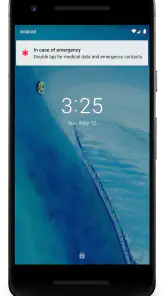
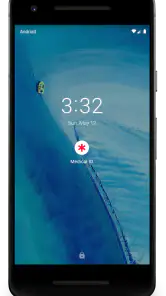
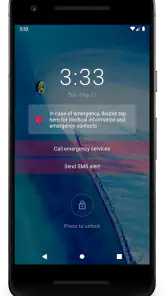
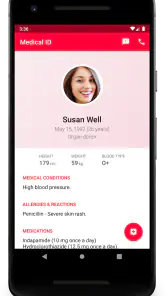
At its core, Medical ID (premium) is designed to provide quick access to vital medical information for first responders and healthcare professionals during an emergency. It’s like having a medical bracelet but in app form. You can set it up to display your critical health data on your lock screen, which is a game-changer if you’re in a situation where you can’t communicate.
Features that Stand Out
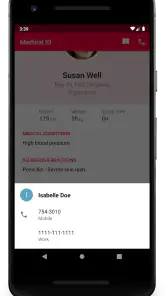
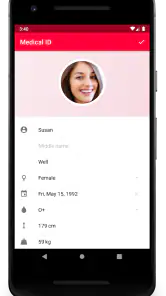
One of the first things I noticed about Medical ID is its clean, user-friendly interface. Setting up your profile is straightforward, and you can include a wide range of information: allergies, blood type, medical conditions, and even emergency contacts. You can also add notes about medications or specific medical instructions, which is incredibly handy.
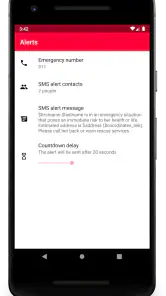
The app also offers a widget feature, which is perfect for those who want quick access without unlocking their phone. Plus, if you’re in a noisy environment or can’t speak, the app’s emergency alert system can notify your emergency contacts with your GPS location. How cool is that?
Getting the Most Out of Medical ID
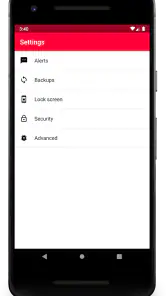
Using Medical ID effectively requires a bit of setup time, but it’s worth it. The premium version, which is ad-free, offers additional features like cloud backup, so you won’t lose your data if you switch phones. You can also set up multiple profiles, which is great if you’re managing information for family members.
Another feature I found useful is the app's ability to integrate with other health apps. This means your medical information stays updated and consistent across all platforms you use. It’s peace of mind knowing that wherever you are, your critical health information is just a tap away.
Who benefits most—and who may prefer another option?
I’d recommend this most to someone who wants a ready-to-open medical summary on their phone and is willing to maintain it. It may suit a person with allergies, ongoing conditions, or a medication routine, but it can also be useful for someone whose emergency contacts simply need an easy way to be reached. The app has a 4.7 average from around 2,800 ratings and more than 50,000 installs, which suggests it has found an audience, though those figures can’t tell you whether its workflow suits your phone or household.
It costs $6.99, so I’d compare it with the emergency medical information already built into a phone before paying. A built-in option may be enough if all you need is a basic emergency card and contact details. I’d choose this app when its profile, widget, backup, or contact-alert options fit a specific need; I’d skip it if I wanted a full family health organizer or didn’t plan to keep the entries current. For urgent medical help, it should complement—not replace—calling local emergency services or wearing a medical alert item when one is appropriate.
Everyday checks that make the setup more useful
One practical habit is to review the profile after any meaningful change, rather than waiting for an annual reminder. I’d also ask a trusted person to see whether the emergency details are genuinely reachable while the phone is locked. That simple check tests the real-world handoff, not just whether the information looks complete inside the app.
If you use the location alert, think through who receives it and whether the contact is likely to notice it. A location message is most useful when recipients recognize the situation and know how to respond; it is not a substitute for describing symptoms or making an emergency call. Likewise, cloud backup is useful during a phone switch, but after restoring information I would still verify the profile and contacts on the new device rather than assume everything is ready.
Choosing it for a household routine
One detail I would settle before setup is who will do the upkeep. If an older relative asks me to enter their information, I’d have them check each field rather than quietly taking over the profile. That keeps the details personal and gives them a chance to correct a medication name, explain which contact is best, or decide what they are comfortable displaying. If they later manage their own phone, they should also know how to review the profile themselves.
Multiple profiles can be useful when one person helps organize information for relatives, but I would treat that convenience as a trade-off, not as proof that every person’s emergency details will stay in sync. Before relying on separate entries, make sure it is clear which profile belongs to whom and how the correct one is selected. On a device used by more than one person, confusion at the moment of an emergency could make a tidy collection of profiles less helpful than a short, clearly identified record on each person’s own phone.
For a household with children, I would not assume an app entry replaces the practical information a caregiver may need when the child is away from their phone. For a relative who travels alone, meanwhile, a current profile and a reachable contact may be more useful than a family-wide record nobody checks. The best setup depends on who carries the phone, who can unlock or access its emergency view, and who is likely to act on an alert.
How it compares with built-in emergency cards
The closest alternative for many people is the emergency medical information already available on a phone. I’d start there, because it may cover the basic need without buying another app. The reason to consider Medical ID is the particular combination described in its workflow: a medical profile, a widget, backup, multiple profiles, and contact alerts with location. Those extras are only worthwhile if you will use them and if they work with the way you carry and maintain your phone.
It is also different from a medical bracelet or wallet card. Those can remain useful when a phone is unavailable, out of battery, damaged, or difficult for someone to access. A phone profile is easier to revise when details change, but it depends on the device being present and its emergency information being accessible. I see the app as one layer in a sensible plan, not a reason to discard a physical identification method that matters for a particular person.
Nor would I use it in place of a health record or family-care app. Its strength is getting selected emergency details in front of someone quickly, not documenting every appointment, test, or care decision. If your main goal is ongoing coordination, reminders, or a shared history, a dedicated tool for those tasks is a better fit. Keeping those purposes separate makes it less likely that an emergency profile becomes cluttered with information that is hard to interpret quickly.
Small checks before relying on an alert
When setting up emergency contacts, I’d choose people who can realistically respond, not simply the closest relatives by default. Tell them they are listed and agree on what they should do if a location alert arrives. A contact who is driving, asleep, or unfamiliar with the alert may not be able to help promptly. It is worth having a backup person where that suits the situation, while keeping the profile readable.
I would also test the access route in ordinary circumstances with a trusted person beside me. Check what is visible without unlocking, whether the widget is convenient, and whether the intended contact details are legible. Do not assume that a setting behaves the same way across devices or after an operating-system change. If the emergency view is awkward to find, that is a meaningful limitation, not a detail to discover during a crisis.
Location sharing deserves the same practical thought. It can give a contact a useful starting point, but a location alone does not explain what happened or what help is needed. Keep expectations modest, and make sure everyone knows that urgent medical care still requires the appropriate emergency services. I’d only enable a notification workflow after understanding who receives it and being comfortable with that arrangement.
Everyday checks that make the setup more useful
One practical habit is to review the profile after any meaningful change, rather than waiting for an annual reminder. I’d also ask a trusted person to see whether the emergency details are genuinely reachable while the phone is locked. That simple check tests the real-world handoff, not just whether the information looks complete inside the app.
If you use the location alert, think through who receives it and whether the contact is likely to notice it. A location message is most useful when recipients recognize the situation and know how to respond; it is not a substitute for describing symptoms or making an emergency call. Likewise, cloud backup is useful during a phone switch, but after restoring information I would still verify the profile and contacts on the new device rather than assume everything is ready.
Why You Should Consider Downloading It
In a world where technology and health increasingly intersect, having an app like Medical ID is a smart move. It’s not just for those with chronic illnesses; it’s for anyone who wants to ensure their health information is accessible in emergencies. Plus, the potential to save lives by providing first responders with immediate access to your health information is reason enough to give it a try.
The app is listed as a paid medical tool for Everyone, and its current version is 7.17.2; it first appeared on Jun 28, 2014. For an emergency profile, the version matters less to me than whether the key details are accurate and easy to reach. I’d treat setup as a small maintenance task: check the contact list, confirm the lock-screen route, and make sure the person whose details are stored understands how the app is used.
My household verdict
For a household, I’d recommend Medical ID when a particular person needs their emergency information to be easy to find and someone is willing to keep it current. It can help relatives think through practical questions—whose phone carries whose details, who gets contacted, and whether that contact can act—without pretending to coordinate care automatically. That makes it useful as a focused emergency tool, provided everyone understands its limits.
I’d pass if the built-in emergency card already does everything you need, if you want one shared system to manage appointments and care, or if nobody will maintain the entries. I’d also keep another way to communicate essential information for anyone who may not have their phone available. My overall view is that the app can make a carefully prepared profile more accessible, but the quality of that profile and the household’s plan matter more than the presence of an app.
So, if you’re looking for an app that offers both practicality and peace of mind, Medical ID (premium) might just be worth downloading. It’s more than just an app; it’s a lifesaver in your pocket.
Medical ID (premium) Frequently Asked Questions
What should I prepare before setting up Medical ID (premium)?
Before using Medical ID (premium), think about which medical details and emergency contacts you want to keep readily available. The app is intended to make medical data and contacts accessible in an emergency, so taking time to enter information carefully can make the profile more useful. Review the details you add and keep them current if your health information or contact choices change.
What features does the Medical ID (premium) app offer?
The Medical ID (premium) app provides a comprehensive set of features including the ability to create detailed medical profiles, emergency contact lists, and personalized medical records. It also offers advanced functionalities like location tracking for emergencies, real-time notifications to emergency contacts, and integration with health devices for constant monitoring. Available both offline and online, it ensures that your medical information is always accessible when needed.
Is Medical ID (premium) compatible with all Android and iOS devices?
While Medical ID (premium) is designed to work with most Android and iOS devices, users should verify their device’s compatibility before downloading. The Android minimum listed for the app is version 5.1. Some features may vary depending on the device's hardware capabilities, such as GPS for location tracking or NFC for quick sharing of medical information.
How secure is my personal information on Medical ID (premium)?
Security is a top priority for Medical ID (premium). The app uses encryption to safeguard your medical data and personal information. Additionally, users can set up password protection and biometric authentication to prevent unauthorized access. Regular updates ensure that security protocols are up-to-date, keeping your information safe from potential threats.
What is the cost of Medical ID (premium) and are there any subscription options?
Medical ID (premium) is listed as a paid application costing $6.99. The app’s price may be worth considering alongside the purpose it serves: keeping medical information and emergency contacts accessible. No subscription model is described here, so assess the purchase as a paid download rather than relying on ongoing membership benefits when deciding whether it suits your needs.
Pros
- Provides critical medical info on lock screen
- Customizable profile for personal health data
- Supports multiple profiles for family use
- Offline access to medical data anytime
- Simple and intuitive user interface
Cons
- Limited free version features
- Premium version may be costly
- No integration with some health apps
- Occasional syncing issues
- Limited language support
- Category
- Medical
- Version
- 7.17.2