

Medical and surgical logbook
- 6.00
- 2.3
- Installs
- 10.00K
- Price
- Free

Screenshots
Analysis by Reviewed
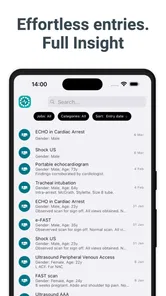
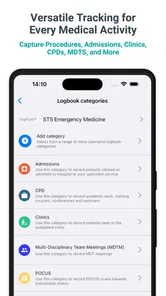
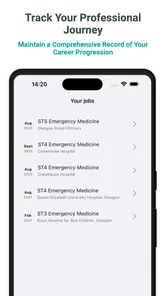
Keeping a reliable medical record is one of those jobs that sounds simple until the details start piling up. A procedure may need to be remembered weeks later, an outpatient encounter may belong to a particular clinic, and academic activity can become difficult to reconstruct when it is scattered across notebooks, messages, and spreadsheets. Medical and surgical logbook is designed around that exact problem: it gives medical users a focused place to record procedures, clinics, outpatients, admissions, and academic work.
I approached it less like a general productivity app and more like a digital notebook for professional training and clinical organization. That distinction matters. It is not trying to be a full hospital information system, a patient-management platform, or a replacement for official clinical documentation. Its useful role is narrower: helping an individual keep a personal logbook in a consistent format.
The app is made by Logitbox Ltd and is available free of charge, although it includes in-app purchases ranging from $5.49 to $47.99 per item. It is rated for Everyone, runs on Android 9 or later, and has passed the ten-thousand-install mark. The current version is 202607291. Those details make it accessible to many Android users, but the average rating of 2.3 from around 75 ratings is an important reason to approach it carefully rather than assuming the experience will suit every trainee.
What the logbook approach gets right
I like the logbook approach most when it turns record-keeping into a small, repeatable habit rather than a catch-up project. In this section, I’ll focus on how a clear separation between kinds of clinical and academic activity can make later reflection more useful, especially when I review a week’s work instead of relying on whatever happened to feel most memorable.
A focused alternative to paper notes and ordinary spreadsheets
The strongest idea here is concentration. A paper logbook can be flexible, but it becomes awkward when I need to search old entries, separate different types of work, or keep academic activity alongside clinical exposure. A spreadsheet offers more structure, yet it often requires me to design the columns, filters, and categories myself. This app starts with the medical context already in mind.
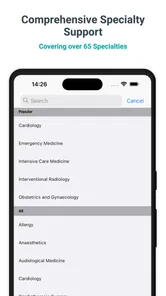
That makes it particularly relevant to students, junior doctors, surgical trainees, and other healthcare learners who need a running record of experience. The categories named in the app’s purpose—procedures, clinics, outpatients, admissions, and academia—suggest a broader workflow than simply counting operations. I can think of it as a personal activity record that follows the shape of training rather than the shape of a generic notes app.
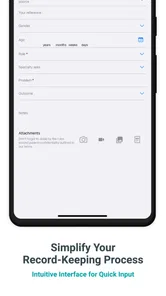
In everyday use, the value comes from reducing the delay between doing something and recording it. After a busy clinic, I might remember the broad outline of several encounters but forget the exact sequence by the end of the day. A dedicated logbook encourages me to capture the entry while the details are still fresh. That is a practical advantage over keeping loose notes and promising myself that I will organize them later.
More From Our News Desk

 Gmail
GmailGmail in a Busy Inbox: Who Benefits Most?
From first account to crowded workday, Gmail earns its place through dependable search and flexible sorting—but its best fit depends on how much inbox maintenance you can tolerate.

 Prime Video
Switching to Prime Video: What Changes in Your Viewing Routine
Prime Video can make a compelling second home for streaming, but switching means learning a different catalog, rental layer, and route from browsing to playback.

 Universal TV Remote Control
Universal TV Remote Control Works Best as a Reliable Backup
A phone remote earns its place through quick setup and reliable habits. Here is how to get more from Universal TV Remote Control—and where its limits show.

 Weather - By Xiaomi
Weather by Xiaomi Review: Clear at a Glance, Less Clear Up Close
Xiaomi’s weather app makes everyday forecasts quick to scan, but its calm surface can leave useful details and recovery paths harder to find than they should be.

 X
XX Under Pressure: Can It Recover When Posting Goes Wrong?
A resilience-focused review of X, examining setup, mistaken posts, interruptions, weak connections, and the gaps that matter when recovery needs to be dependable.

 Clash of Clans
Clash of Clans Is Won Between the Battles
Its raids are quick; its community is a long-term project of coordination, teaching, rivalry, and shared responsibility—with all the friction that entails.
Latest News



A realistic day with the app
Imagine finishing a morning that includes an outpatient session, observing a procedure, and attending an academic teaching meeting. Instead of writing everything in one long note, I would record each activity in the relevant part of the logbook. Later, when preparing for a supervision conversation, I could review the different kinds of work separately rather than trying to decode a chronological page of shorthand.
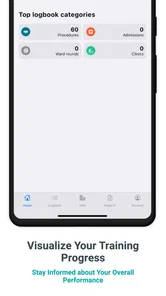
The same workflow can help reveal gaps. If my procedure entries are growing but my clinic exposure is thin, that becomes visible in a way that a collection of unstructured notes may not show. Conversely, I might discover that I am attending plenty of teaching but failing to record admissions consistently. The app’s real benefit is therefore not just storage; it is the possibility of making my own training pattern easier to inspect.
I would still treat every entry as a personal record that needs care. A quick tap made at the end of a tiring shift can be incomplete or ambiguous. My practical tip would be to establish a short routine: record the activity soon after it happens, use the same wording for recurring procedures, and review recent entries regularly. Consistency will matter more than filling the logbook with maximum detail.
Where it fits in a professional workflow
This is best understood as a companion to formal systems, not a substitute for them. Hospitals and training programs may have their own approved documentation, assessment tools, or electronic records. Those systems serve institutional, legal, and clinical purposes that a personal logbook cannot automatically replace.
I would use this app to maintain my own overview, then compare it with official records when preparing a portfolio or discussing progress with a supervisor. That approach avoids a common mistake: treating a personal log as the definitive source for patient care or institutional reporting. A private record may be useful for reflection and organization, but it should not become the only place where important clinical information exists.
This distinction also answers an important question for prospective users: is it suitable for recording patient details? I would be cautious. The app is presented as a medical and surgical logbook, but that does not by itself establish that it is approved for identifiable patient information, formal clinical documentation, or sharing sensitive records. I would keep entries limited to what is genuinely needed for my own logbook and follow the rules of my workplace or training body before entering anything sensitive.
Trust starts with what the app visibly offers
Trust is especially important in a medical app. I do not judge a tool only by whether it has convenient categories; I also want to know what control I have over the information I enter, how clearly the app explains its choices, and whether it encourages safe behavior around sensitive material. In this case, the public-facing identity is clear enough at a basic level: it is a medical-category app from Logitbox Ltd, offered free with optional purchases rather than a mandatory upfront price.
That clarity helps me understand the commercial model, but it does not answer every privacy question a medical user may have. I would not assume that “free” means risk-free, nor would I treat the app as suitable for confidential patient data without checking its in-app notices and the expectations of my institution. The responsible approach is to inspect the permissions and privacy explanations shown on the device before entering real-world information.
My advice is simple: install it first as a trial with harmless sample entries. Look at what the app asks to access, whether account creation is required, and what options appear when an entry is edited or removed. This is not busywork. It gives me a chance to understand the app’s boundaries before my logbook contains information that would be difficult or inappropriate to move elsewhere.
Verified controls matter more than assumptions
When I review a medical record tool, I look for visible controls rather than guessing what may happen behind the scenes. Can I decide what to enter? Can I correct a mistake? Can I remove an entry? Is there a clear way to distinguish my own training notes from official patient documentation? These are the practical questions that affect trust every day.
Medical and surgical logbook’s purpose gives users a structured place for several activity types, which is already a form of control over organization. Instead of forcing every event into a single generic note, the medical context encourages more deliberate classification. That can reduce confusion when I return to older records, especially if I use a stable naming style and avoid vague descriptions.
At the same time, I would not confuse categories with validation. A labeled entry is not automatically accurate, approved, or complete. If I record a procedure incorrectly, the app’s structure cannot correct my memory. I would build in a monthly review with a trusted source such as a rota, teaching schedule, or official log, while respecting local policies about what may be copied into a personal tool.
The app’s current version is 202607291, so users should keep an eye on changes after installation. Updates can alter screens, controls, or the way information is handled. I make a habit of rereading any permission prompt or privacy notice that appears after an update, particularly for an app used to store professional records. That habit is more useful than assuming the first installation experience will remain unchanged.
The sensitive moments are not always obvious
The most sensitive moment is not necessarily when I type a patient name. It can happen when I add a rare procedure, a distinctive date, a location, or a combination of details that could identify someone indirectly. Even without a full name, an unusual case may be recognizable to people who know the clinical setting.
For that reason, I would keep the logbook focused on activity and learning outcomes rather than narrative patient histories. A short, non-identifying description of the procedure or clinic may be enough for personal tracking. If a training requirement demands more detail, I would first confirm that the app is accepted for that purpose and that the information is permitted under workplace policy.
Another sensitive moment comes when the phone is shared, lost, repaired, or viewed by someone else. A personal logbook can feel private because it sits on my device, but physical access to a device is different from a carefully governed institutional record. I would use the phone’s own security features, avoid leaving the app open in public, and think about whether a particular entry needs to be stored there at all.
Backups and transfers deserve the same caution. If I move a logbook to another device or include it in a portfolio, I would review the contents first and remove anything unnecessary. The safest workflow is usually the one that minimizes sensitive detail from the beginning. That is a more dependable principle than trying to clean up a large archive later.
How the free model affects the decision
The free entry point makes it easier to test the workflow without committing immediately. That is useful because a logbook is personal: the right structure for a surgical trainee may feel excessive or restrictive to someone who only wants a simple study journal. I would spend time entering representative activities before deciding whether the app fits my routine.
Optional purchases between $5.49 and $47.99 per item mean that some users may encounter paid features or upgrades. I would not pay simply because the app has a medical label. I would first identify which function I actually need, whether it improves my daily recording process, and whether I can export or retain my information in a way that remains practical if I later change tools.
This is also where the low average rating deserves attention. A 2.3 average from around 75 ratings does not prove that the app will fail for me, but it does signal that the experience has frustrated a portion of its users. I would test the basics before relying on it: create several kinds of entries, correct one, remove one, close and reopen the app, and see whether the workflow still feels dependable. A medical logbook should reduce administrative stress, not add another source of uncertainty.
Who will benefit most from this specific design
I see the best fit in people who want a dedicated Android logbook and whose work naturally divides into procedures, clinics, outpatient activity, admissions, and academic tasks. A trainee who currently uses scattered notes may appreciate having those areas brought together. Someone preparing for regular progress discussions may also benefit from a record that encourages broader coverage rather than focusing only on memorable procedures.
It may also help users who dislike building their own spreadsheet. Designing a spreadsheet requires decisions about headings, filters, and maintenance before the actual recording begins. A specialized app removes some of that setup burden. The trade-off is that I have less freedom than I would in a completely custom system, so the value depends on whether the app’s structure resembles my training requirements.
I would be more hesitant to recommend it as the main tool for a department, a hospital, or a team. The description centers on a personal logbook, not shared administration. A team usually needs permissions, audit trails, standardized reporting, and institutional oversight. Those are different requirements from keeping an individual record of experience.
Who should choose another option
I would skip this app if I need a formal electronic health record, patient scheduling, team collaboration, or a guaranteed institutional workflow. A general notes app may be better for someone who only wants reflective writing, while a spreadsheet may suit a user who needs custom columns and detailed analysis. An official training platform is the stronger choice when a school, hospital, or professional body requires submissions in a particular format.
I would also look elsewhere if privacy documentation and account controls are central to my decision and the app does not give me enough confidence after inspection. Medical information deserves a higher threshold than ordinary shopping lists or personal reminders. If I cannot clearly understand how I control my entries, I would keep sensitive material out and choose a tool with governance that matches the risk.
There is a practical trade-off between convenience and portability too. A dedicated logbook can be faster than constructing a system from scratch, but a custom spreadsheet may be easier to reshape when requirements change. Before investing time in a long history, I would confirm how comfortably I can preserve my records for future reference and whether the format works with the portfolio process I expect to use.
My cautious verdict after weighing usefulness against trust
Medical and surgical logbook has a sensible, clearly targeted purpose. I like the idea of bringing procedures, clinics, outpatients, admissions, and academic activity into one personal record instead of leaving them in disconnected notebooks. For the right Android user, that focused approach can make routine documentation more consistent and can expose gaps in training that are easy to miss when notes are scattered.
My recommendation is conditional rather than enthusiastic. I would try it with non-sensitive sample entries, inspect every visible permission and account choice, and test the editing and removal workflow before using it seriously. I would then keep the content minimal, avoid identifiable patient information unless its use is explicitly authorized, and continue treating official systems as the authoritative record.
The free price makes that cautious trial reasonable, while the optional purchases and the low average rating make it sensible to test before spending money or building a large archive. It is a useful candidate for a personal activity log, not a universal medical-record solution. If its structure matches my training and its controls make me comfortable, it could replace a messy paper notebook. If I need institutional assurance, collaboration, or stronger evidence of governance, I would choose a more formally managed alternative instead.
In short, I would recommend giving it a careful trial to a trainee who wants a dedicated logbook and understands its limits. I would not recommend treating it as a secure clinical system by default. The right way to use this app is as a restrained personal record: organized enough to support reflection, cautious enough not to become an unofficial patient file.
Medical and surgical logbook Frequently Asked Questions
Who is Medical and Surgical Logbook intended for?
Medical and Surgical Logbook is aimed at people who need to keep track of clinical activity, including medical students, interns, residents, and healthcare professionals. Its focus is on recording procedures, clinics, outpatient encounters, admissions, and academic activity. If you want a dedicated place to organize experiences during training or practice, its medical logbook approach may be relevant to your needs.
What is Medical and Surgical Logbook used for?
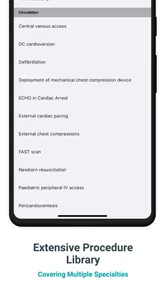
Medical and Surgical Logbook is designed to help medical students, interns, residents, and healthcare professionals record and organize clinical experiences. Users can document procedures, operations, patient encounters, diagnoses, assisting roles, dates, locations, and supervisors. It provides a structured alternative to paper records, making it easier to review progress and prepare evidence for training requirements or professional assessments.
Can I use the app to record confidential patient information?
The app may allow detailed clinical notes, but users should avoid entering identifiable patient information unless the application clearly provides appropriate security and their institution permits it. Do not record names, full dates of birth, addresses, medical record numbers, or unnecessary personal details. Always follow local privacy laws, hospital policies, and professional confidentiality standards when creating or storing logbook entries.
Does Medical and Surgical Logbook work offline?
Offline availability depends on the version and device configuration, so it is worth checking the app description and testing it before relying on it during rotations. If offline entry is supported, you can generally record cases without an internet connection and synchronize later. However, users should confirm that saved entries are not lost and that synchronization works correctly before deleting local data.
Can I export or share my surgical and clinical records?
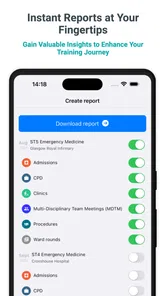
Many users choose a medical logbook specifically because they need to present their experience to supervisors, training programs, or examination bodies. Depending on the app’s available tools, records may be exportable or shareable in a document or spreadsheet format. Before downloading, verify supported export options, whether summaries can be filtered by procedure or date, and whether shared files protect confidential information.
Pros
- Keeps medical and surgical cases organized in one searchable place.
- Useful for tracking procedures
- diagnoses
- roles
- and clinical experience.
- Can support portfolio building for training and professional development.
- Helps identify gaps in experience across specialties or procedure types.
- Digital records are easier to update than paper-based logbooks.
Cons
- May require regular manual entry after busy clinical shifts.
- Data accuracy depends entirely on consistent and careful user input.
- Sensitive patient information requires strict privacy and security practices.
- Some advanced reporting or export tools may be limited or paid.
- Not a substitute for official hospital records or training documentation.











