

Med Standards
- 20.00
- 4.2
- Installs
- 10.00K
- Price
- Free

Screenshots
Analysis by Reviewed
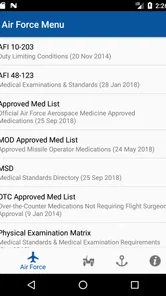
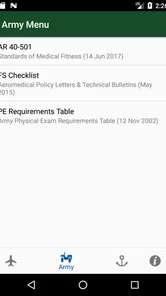
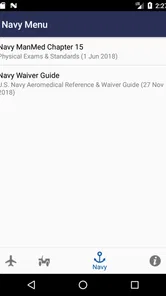
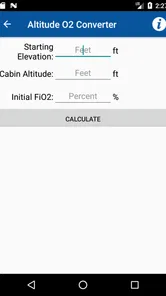
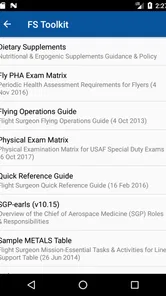
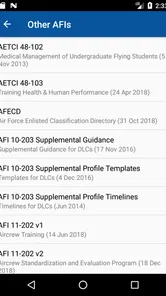
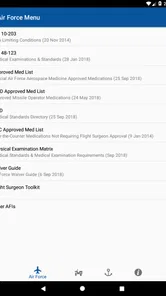
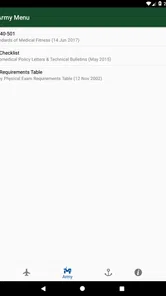
I came away from Med Standards with the impression that it is best understood as a compact reference tool, not a complete medical companion. Its purpose is focused: it brings together medical standards associated with the Army, Navy, and Air Force in a form that is easier to consult than scattered notes or a general web search. I would recommend it to someone who regularly needs that kind of reference and values having a dedicated app ready on a phone.
The app is free, aimed at everyone, and developed by KP Apps, LLC. It belongs to the medical category, although its practical audience is narrower than that label suggests. A general user looking for symptom advice, medication reminders, appointment management, or emergency guidance will not find this to be the right type of medical app. Its usefulness comes from the standards reference itself, especially when the reader already knows what kind of military medical information they are trying to check.
Its current version is 2.1.1, and it runs on Android 8.0 or later. The app has passed the early-installation stage with over ten thousand installs, while its average rating sits at 4.2 from roughly fifty ratings and about twenty written reviews. Those numbers suggest a small but reasonably positive user base rather than a mass-market medical service. I would treat that as a sign of practical appeal, not as proof that it will suit every workflow.
Where people usually get stuck
The first point of friction is expectation. A title like this can sound broader than the actual task it serves. Someone may open it expecting a general military health guide, a diagnostic tool, or an official channel for determining eligibility. I would not use it that way. A standards reference can help you locate relevant information, but it does not replace a medical professional, an official review, or the current authority responsible for a decision.
The second obstacle is knowing what you want to look up before opening the app. Reference applications are most useful when the question has already been narrowed. If you are simply browsing without a topic in mind, the material may feel dense or less immediately approachable than a general health app. I found that the best experience comes from treating the app like a handbook: identify the issue, consult the relevant standard, and then verify how the information applies to your situation.
That distinction matters because military standards can involve context, documentation, and interpretation. A person reading a passage about a condition may be tempted to turn it into a personal conclusion. That is risky. The same wording can have a different practical meaning depending on the service branch, the role, the record available, and the formal process being followed. The app can support preparation for a conversation, but it should not be the final voice in a medical or administrative decision.
Another common sticking point is reading on a phone. Even when the content is well organized, standards are not always comfortable to scan on a small screen. Long passages, formal language, and similar-looking sections can make it easy to lose your place. I recommend slowing down rather than jumping to the first phrase that appears to match your concern. Read the surrounding material, note the branch involved, and keep track of any definitions or conditions attached to the passage.
More From Our News Desk

 Gmail
GmailGmail in a Busy Inbox: Who Benefits Most?
From first account to crowded workday, Gmail earns its place through dependable search and flexible sorting—but its best fit depends on how much inbox maintenance you can tolerate.

 Prime Video
Switching to Prime Video: What Changes in Your Viewing Routine
Prime Video can make a compelling second home for streaming, but switching means learning a different catalog, rental layer, and route from browsing to playback.

 Universal TV Remote Control
Universal TV Remote Control Works Best as a Reliable Backup
A phone remote earns its place through quick setup and reliable habits. Here is how to get more from Universal TV Remote Control—and where its limits show.

 Weather - By Xiaomi
Weather by Xiaomi Review: Clear at a Glance, Less Clear Up Close
Xiaomi’s weather app makes everyday forecasts quick to scan, but its calm surface can leave useful details and recovery paths harder to find than they should be.

 X
XX Under Pressure: Can It Recover When Posting Goes Wrong?
A resilience-focused review of X, examining setup, mistaken posts, interruptions, weak connections, and the gaps that matter when recovery needs to be dependable.

 Clash of Clans
Clash of Clans Is Won Between the Battles
Its raids are quick; its community is a long-term project of coordination, teaching, rivalry, and shared responsibility—with all the friction that entails.
Latest News



What to check before relying on a result
Before using a passage from the app in a serious conversation, I would write down three things: the exact topic, the service branch, and the reason you are checking it. This simple habit prevents a surprisingly common mistake—finding relevant-looking language but applying it to the wrong context. It also gives you a clearer question to take to a recruiter, clinician, supervisor, or official office.
I would also check whether your phone meets the Android requirement. Med Standards needs Android 8.0 or later, so an older device may be the explanation if installation or updating fails. On a compatible phone, the safest first steps are ordinary ones: confirm that the device has a stable connection, make sure there is enough storage, and restart the store app or phone if the installation appears stuck.
Because the app is free, price is not likely to be the barrier. That does not mean every installation problem comes from the app itself. Store services, device settings, account restrictions, or an outdated operating system can all interrupt a download. If other apps are also failing to install, I would investigate the phone or store account before assuming that this particular medical reference is broken.
Once it opens, give yourself a moment to learn its layout instead of immediately searching for a conclusion. The most useful setup is not a technical one; it is a reading routine. Keep a note of the topic you are researching, avoid mixing standards from different branches, and mark the wording that needs professional clarification. This turns a quick lookup into a more reliable preparation tool.
A practical setup routine
Install the app on a device running Android 8.0 or newer, then open it once while you have a dependable connection.
Choose a quiet moment to identify the exact medical or eligibility topic you need to review.
Read the relevant section in context rather than relying on one keyword or isolated sentence.
Record questions and uncertainties separately from the information you understand.
Use the notes when speaking with the appropriate professional or official source.
This routine is useful because it separates two jobs that are easy to confuse. The app can help you find and read standards. A qualified person must help determine what those standards mean for an individual case. Keeping those roles separate is the most important safety habit when using any reference material related to military medical decisions.
Recovering when the workflow breaks
There are several ways a lookup can go wrong without the app actually being unusable. You might search with a broad phrase, open a nearby topic, and then assume the result answers your question. You might also read a section for one branch while thinking about another. If the wording does not seem to fit, the first recovery step is to return to the original question and identify which part is uncertain.
I find a two-pass method helpful. On the first pass, I look only for the general area that matches the issue. On the second, I reread the surrounding material and note qualifications, exceptions, or references to a particular service. This is slower than scanning, but it reduces the chance of carrying a partial sentence into a high-stakes discussion.
If the app closes, freezes, or behaves strangely, I would begin with basic recovery rather than repeatedly tapping the same screen. Close and reopen it, restart the phone, and check whether the operating system is supported. If the issue affects several apps, focus on the device. If it affects only this one, reinstalling may be a reasonable next step after preserving any notes you made elsewhere.
I would not treat reinstalling as a way to solve a misunderstanding. Technical recovery can restore access, but it cannot correct a wrong branch, an incomplete reading, or an outdated assumption about what a standard means. In that situation, the better recovery is to restate the question in plain language and seek confirmation from the relevant professional or official source.
A useful workaround for difficult reading is to avoid doing the whole task in one sitting. Read enough to identify the applicable section, write down the terms you need to clarify, and return later with a more focused question. This is particularly helpful if you are anxious about a medical issue. Rushing through formal language tends to make every sentence feel more definitive than it really is.
When the phone is working but the answer still feels unclear
Uncertainty is not automatically a sign of poor app performance. Standards often require interpretation, and a concise reference cannot reproduce every detail of an individual evaluation. If the app helps you locate the relevant subject but leaves you with questions, it may still have done its job. The next step is to use the passage as a starting point for a conversation, not to force it into a yes-or-no answer.
This is where Med Standards differs from ordinary health apps. A symptom checker usually begins with how a person feels and offers possible explanations. A medication app focuses on schedules, interactions, or reminders. A general medical encyclopedia aims for broad education. This app is more targeted: it is useful when your question is tied to military medical standards and less useful when you need everyday health guidance.
Compared with a web search, the dedicated format can reduce distractions and make the subject easier to revisit. The trade-off is that a web search may provide broader context, newer discussions, or direct access to official pages. I would use the app for a focused first reference, then confirm important or time-sensitive matters through the responsible official channel. That combination is stronger than relying on either source alone.
The app is also not the right choice for urgent symptoms. If someone needs immediate medical attention, an offline reference about standards is not a substitute for emergency services or direct clinical care. Likewise, a person trying to manage a chronic condition, track treatment, or understand a new diagnosis should choose a tool designed for that purpose. The narrow focus is a strength only when it matches the question.
Who will benefit from it most
I see the greatest value for people preparing for a military-related medical discussion, reviewing terminology before an appointment, or trying to understand which area of standards they need to ask about. It can also help a reader organize questions before contacting a recruiter or another knowledgeable authority. In those situations, having the material grouped in one app is more convenient than beginning from a blank search page.
It is less suitable for someone who wants a polished, conversational explanation. The subject itself calls for careful reading, and the app should be approached with patience. If you prefer visual summaries, guided questionnaires, or personalized recommendations, a different medical resource will probably feel more comfortable. I would especially avoid using it as a self-assessment tool when the result could affect a major personal decision.
One realistic example is a prospective service member who has a past medical issue and wants to prepare for an appointment. Instead of searching the web late at night and collecting unrelated opinions, they can use the app to identify the relevant standard, write down the exact language that concerns them, and bring those questions to the appointment. The benefit is not that the app decides the outcome; the benefit is that the person arrives better prepared and less likely to forget an important question.
My practical verdict
After looking at its purpose and the way it fits into a real research routine, I think Med Standards succeeds as a focused reference rather than an all-purpose health application. Its free availability makes it easy to try, and its Everyone content rating keeps the entry barrier low. The Android 8.0 requirement is reasonable for many users, though owners of older devices should check compatibility before planning around it.
The developer, KP Apps, LLC, has kept the concept straightforward: put Army, Navy, and Air Force medical standards in a dedicated mobile resource. That focus is the main reason I would recommend it to the right person. It avoids the distraction of a broad wellness platform, but it also means the app cannot answer every question that appears under the general heading of medical information.
My strongest advice is to use it as a preparation and reference aid. Start with a precise question, confirm the branch and context, read beyond the first matching phrase, and keep a written list of points that need clarification. If the app is difficult to install, check Android compatibility and basic device conditions before blaming the content. If the wording remains uncertain, treat that uncertainty as a reason to ask a qualified person—not as permission to guess.
The app is most valuable when it improves the quality of your next question, not when it tries to make the decision for you. For military medical standards, that is a sensible boundary. I would install it if I needed a focused reference in this area, while keeping an official source and professional guidance in the loop for anything consequential.
Med Standards Frequently Asked Questions
Is Med Standards free, and what should I know before downloading it?
Med Standards is a free medical app from KP Apps, LLC, with a 4.2 average rating from around 47 ratings. Its content rating is Everyone, and it has reached over 10,000 installs. Those details can help you decide whether to try it, but they do not replace checking that its medical reference material suits your training and intended use.
Which devices can run Med Standards?
Med Standards is available for devices running Android 8.0 or later, and its current version is 2.1.1. Before downloading, check your device’s operating system and available storage, and make sure you are choosing the version offered for your platform. Keeping the app current can help you access its latest available version and reference content.
What is Med Standards, and who is it designed for?
Med Standards is a medical reference app intended to help healthcare professionals, students, and other medically trained users review clinical standards and related information in a convenient mobile format. It can be useful for quick revision, study, and point-of-care reference, but it should not replace professional judgment, local protocols, official guidelines, or advice from a qualified clinician.
What type of medical information can I find in Med Standards?
The app generally focuses on organized medical standards, recommendations, and reference material that can help users review common clinical topics more efficiently. The exact subjects and depth may vary by version, region, or subscription level, so it is worth checking the in-app categories and the store description before downloading. Users should also confirm that the available content matches their specialty and professional needs.
Can Med Standards be used to diagnose patients or choose treatment?
Med Standards should be treated as an educational and reference tool rather than an independent diagnostic or treatment system. Medical decisions require a complete patient assessment, current evidence, clinical experience, and awareness of local regulations and hospital policies. Before acting on information shown in the app, verify important recommendations against official sources and consult an appropriately qualified healthcare professional.
Pros
- Clear reference for common medical standards and terminology.
- Useful for students
- clinicians
- and healthcare support staff.
- Information is organized for quick consultation.
- Can support consistent communication across medical teams.
- Helpful as a supplementary offline reference tool.
Cons
- Content may require regular updates as standards and guidelines change.
- Not a substitute for professional medical advice or clinical judgment.
- Some topics may be too technical for general users.
- Coverage may vary by specialty or healthcare region.
- Users may need internet access for certain features or updates.











