

Maven Clinic
- 78.00
- 4.7
- Installs
- 50.00K
- Price
- Free

Screenshots
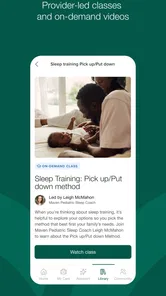
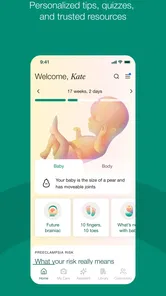
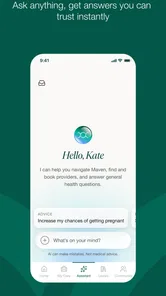
Analysis by Reviewed
I approached Maven Clinic as a practical medical app rather than another general wellness download. Its purpose is to make virtual care easier to reach for families, and that focus is clear from the first use: this is an app you open when you need guidance, preparation, or a more convenient route to care, not something designed to keep you entertained every day. In my experience, that distinction matters. A medical app succeeds when it reduces uncertainty and unnecessary effort, and Maven Clinic is at its best when it helps turn a stressful health question into an organized next step.
The app comes from Maven Clinic Co and is available free of charge for everyone. It has built a strong store presence, with a 4.7 average from around 579 ratings and more than 50 thousand installs. Those figures suggest that it has found a real audience, although they should not be mistaken for a guarantee that every person will receive the same level of support. Access to care can depend on the service arrangement behind the app, the kind of help a user needs, and whether virtual care is suitable for the situation.
How Maven Clinic fits into everyday family care
I find it useful to think about Maven Clinic as one person’s route into care, even when that person is coordinating concerns for a household. Before opening a health app on a shared device, I would decide whose account and information are involved, then keep the conversation focused on that person’s needs. That simple boundary makes it easier to move from the household situation to the practical question of how to set things up.
A useful starting point when the question is not an emergency
The most convincing role for this app is as a first stop for ordinary family-health concerns. Parents and caregivers often need to decide whether a symptom deserves a routine appointment, a conversation with a professional, or more urgent attention. That decision can be difficult late at night, during a busy workday, or when arranging transport is inconvenient. A virtual-care service can make the first conversation less disruptive than immediately searching for an in-person appointment.
I would especially consider it for situations where context matters and a person wants to explain what is happening rather than rely on a generic search result. Family care can involve several connected questions, and a focused medical conversation is usually more useful than reading a long list of possible conditions. The app’s value is therefore less about replacing every visit and more about creating a sensible route into care.
A realistic example would be a parent noticing that a child is uncomfortable while also trying to manage work and school arrangements. Instead of spending a long evening comparing search results, the parent can use the app to organize the concern, describe what has changed, and seek professional direction. If the issue needs an examination or testing, virtual care may point toward that next step rather than pretending the screen is enough.
What I would prepare before opening it
My strongest practical tip is to prepare the question before starting a consultation. Write down when the concern began, what has changed, any relevant symptoms, and what you have already tried. This is particularly useful when several family members are involved or when stress makes it easy to forget details. A short timeline can make a remote conversation much more efficient.
More From Our News Desk

 Gmail
GmailGmail in a Busy Inbox: Who Benefits Most?
From first account to crowded workday, Gmail earns its place through dependable search and flexible sorting—but its best fit depends on how much inbox maintenance you can tolerate.

 Prime Video
Switching to Prime Video: What Changes in Your Viewing Routine
Prime Video can make a compelling second home for streaming, but switching means learning a different catalog, rental layer, and route from browsing to playback.

 Universal TV Remote Control
Universal TV Remote Control Works Best as a Reliable Backup
A phone remote earns its place through quick setup and reliable habits. Here is how to get more from Universal TV Remote Control—and where its limits show.

 Weather - By Xiaomi
Weather by Xiaomi Review: Clear at a Glance, Less Clear Up Close
Xiaomi’s weather app makes everyday forecasts quick to scan, but its calm surface can leave useful details and recovery paths harder to find than they should be.

 X
XX Under Pressure: Can It Recover When Posting Goes Wrong?
A resilience-focused review of X, examining setup, mistaken posts, interruptions, weak connections, and the gaps that matter when recovery needs to be dependable.

 Clash of Clans
Clash of Clans Is Won Between the Battles
Its raids are quick; its community is a long-term project of coordination, teaching, rivalry, and shared responsibility—with all the friction that entails.
Latest News



I would also keep a list of current medicines, known conditions, allergies, and recent appointments nearby. That is not a special feature claim; it is simply the best way to use a medical service responsibly. The more clearly you explain the situation, the less likely the conversation is to become a vague exchange that ends with more uncertainty.
Another useful habit is to decide what outcome you want from the interaction. You may need reassurance, help understanding whether a routine appointment is appropriate, advice about what to monitor, or direction to another type of care. Stating that goal early can prevent the session from becoming unfocused.
Where it compares well with ordinary alternatives
Compared with searching the open web, Maven Clinic has the obvious advantage of putting a health question into a care-oriented setting. Search engines are quick, but they often mix reliable medical information with alarming possibilities and advice that does not fit the individual. A professional conversation can provide context that a search page cannot.
Compared with a standard clinic visit, virtual care can be more convenient for questions that do not obviously require a physical examination. It can reduce travel and make it easier for a caregiver to ask for help without reorganizing an entire day. That convenience is meaningful for families, especially when the person needing support is at home and the issue is not immediately dangerous.
Compared with a general appointment-booking app, its family-care orientation is more relevant to users who want guidance rather than only a calendar slot. Booking tools are excellent when you already know which clinician or appointment type you need. Maven Clinic is more useful earlier in the process, when you are still working out what kind of help makes sense.
That comparison also shows the main trade-off. A local clinic remains better when a hands-on assessment, testing, urgent treatment, or a detailed physical examination is needed. A general medical information source may be better for learning about a condition without beginning a care interaction. Maven Clinic sits between those options: more personal than a search page, but not a universal substitute for in-person medicine.
The current experience and its practical limits
The app is categorized as medical, and I think users should approach it with the same care they would bring to any health service. It is not a diagnostic shortcut. A virtual conversation can help with direction and support, but it cannot reliably reproduce every part of a physical appointment. Anyone with severe, rapidly worsening, or potentially life-threatening symptoms should seek appropriate urgent help instead of waiting for an app-based response.
There is also a psychological limitation. Some people feel calmer after speaking with a professional remotely, while others need the reassurance of being examined in person. If you know that you will remain worried unless someone can perform a physical assessment, a local provider may be the better choice from the beginning.
Convenience can create its own friction too. Because opening an app feels easy, it may be tempting to use it for every small uncertainty. I would avoid treating it as a replacement for an established primary-care relationship. The best experience comes when the app is part of a broader care plan, not the only place where medical decisions are recorded or discussed.
What the version information tells existing users
The current version is 202608.2.0, while the app’s release history begins on June 19, 2018. That combination tells me this is an established product rather than a newly launched experiment. A long-running medical app has had time to evolve, and the current version is the one existing users should judge in daily use rather than relying on impressions from its earliest release.
For someone returning after a long break, I would treat the update as a reason to review the app carefully before an important consultation. Check that your account details, family information, notifications, and preferred contact habits still match your needs. I would not assume that a familiar older workflow is unchanged simply because the app’s purpose remains the same.
The version number itself does not tell me that every part of the service has been transformed, and I would not read it as a promise of a particular new feature. What it does show is that the product is actively maintained at a current release level. That is reassuring for an app handling health-related interactions, but the real test is whether the current workflow feels clear when you are tired, busy, or worried.
How product evolution affects people who already use it
Long-term users usually care less about a new version label than about continuity. When a medical app changes, the important questions are practical: Can I still find the right area quickly? Are my previous conversations and information easy to understand? Do notifications arrive in a way that supports care rather than creating noise? Even a well-intended redesign can be frustrating if it makes a familiar task harder.
My advice is to avoid waiting until a stressful moment to rediscover the app. Open it when there is no urgent concern, review the main navigation, and make sure you understand how to begin the type of interaction you are likely to need. This small trial run can expose account or workflow problems while there is still time to use another route.
New users should take a slightly different approach. Rather than exploring every section without a goal, start with the family-care need that brought you there. Learn where to find support, how to describe a concern, and how to recognize when the app is directing you toward another level of care. That focused introduction is more useful than treating the service like a general content library.
Questions I would ask before relying on it
One important question is whether virtual care is appropriate for the problem in front of you. If the concern requires a physical examination or immediate intervention, the answer is no. The app can still be useful for planning or follow-up in suitable cases, but it should not delay urgent care.
Another question is whether you need a one-off answer or ongoing coordination. For a single, non-urgent concern, virtual support may be a convenient first step. For a complicated condition, repeated symptoms, or a long-term treatment plan, I would also maintain contact with a regular clinician who can see the wider medical history and examine changes over time.
People also wonder whether a free app means every possible service is automatically available to every user. I would not make that assumption. The sensible approach is to review what care route the app presents for your own account and situation before depending on it for a time-sensitive need. The app is free to download, but the practical experience is shaped by the care access connected to it.
Finally, ask whether you are comfortable communicating health information through a mobile service. Medical conversations require attention and privacy. I would use the app in a quiet setting, avoid rushing through details, and keep any instructions or follow-up points in a place I can revisit. The app can simplify access, but it does not remove the user’s responsibility to communicate carefully.
Three less obvious ways to get more from the experience
First, use it as a preparation tool even when you expect to see a clinician in person later. Organizing symptoms, questions, and timing before an appointment can make that appointment more productive. The benefit is not merely speed; it helps separate the main concern from secondary worries that might otherwise be forgotten.
Second, make the distinction between “I need information” and “I need a decision” before you begin. If you only want background reading, a trusted medical reference may be more efficient. If you need help deciding what to do next, a care-oriented interaction is more appropriate. Making that distinction prevents disappointment when the app does not function like a searchable encyclopedia.
Third, use a follow-up mindset. After receiving guidance, note what you were told to watch, what action you planned to take, and what would make you seek additional help. This turns a brief remote conversation into a clearer plan. It also helps you notice when the situation has changed enough that the original advice no longer fits.
A fourth insight is about household organization. If several people depend on one caregiver, it helps to gather the relevant information before opening the app instead of switching between messages, notes, and memory during the interaction. This is a small workflow improvement, but it can make family care much less chaotic.
Who should choose it, and who should skip it
I would recommend Maven Clinic to people who want a convenient virtual-care entry point for family-related health needs and who understand the boundary between remote guidance and hands-on medicine. It is particularly appealing to caregivers who value preparation, direct communication, and fewer unnecessary trips for questions that can reasonably begin online.
I would be more cautious if you dislike remote communication, have limited patience for account-based health workflows, or already know that your concern needs examination or testing. In those cases, a local clinic, established primary-care provider, or urgent service may be more efficient. The app is not a better choice simply because it is easier to open.
The Everyone age rating makes it broadly approachable, but that does not mean every health situation is suitable for every user. Parents and caregivers still need to provide accurate context and make decisions appropriate to the person receiving care. The age label describes accessibility, not medical suitability.
What I would watch as the app continues to evolve
Because the product has been available since 2018 and now has a current version of 202608.2.0, I would watch for improvements that make returning users feel secure rather than merely adding more places to tap. Clearer navigation, dependable continuity, and better preparation for consultations would matter more to me than a crowded collection of optional tools.
I would also pay attention to how well the service handles the boundary between convenience and escalation. The strongest medical apps make it obvious when virtual support is enough, when a routine appointment is sensible, and when urgent help should come first. That clarity protects users from both unnecessary alarm and dangerous delay.
For families, another important measure is whether the app remains understandable during stressful moments. A polished everyday workflow is valuable, but the real test comes when a caregiver is tired, a child is uncomfortable, and several questions need answers at once. Any future evolution should make that situation easier to manage, not demand more technical confidence from the user.
My recommendation after using it
Maven Clinic is a focused medical app with a sensible place in modern family care. I like it most as a bridge: it can connect a person with appropriate virtual support, help organize a concern, and make the first step less intimidating than an open-ended web search. Its free availability and mature history make it easy to try, while its 4.7 average from around 579 ratings shows that many users have responded positively.
My recommendation comes with one firm condition: use it as part of responsible care, not as an automatic substitute for a clinician who can examine you. Prepare your questions, describe changes accurately, and treat any need for urgent or hands-on attention as a reason to choose another route. With that understanding, Maven Clinic can be a genuinely useful option for families who want medical guidance without making every non-emergency concern into a full trip to a clinic.
Maven Clinic Frequently Asked Questions
Is Maven Clinic available on both Android and iOS, and what device do I need?
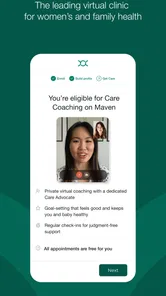
Maven Clinic is a medical app for people seeking virtual care for themselves and their families. Before installing it, check that your phone or tablet runs a supported operating system; the listed minimum is version 12. You can find the app through the relevant mobile app store, but access to care and program features still depends on your eligibility.
How do I get started with Maven Clinic after downloading it?
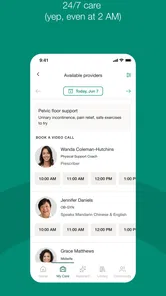
After installing Maven Clinic, create an account and follow the registration prompts. You may need to identify or verify an eligible employer, health plan, or membership before reaching clinical services. Once enrolled, explore the care options available to you, review provider profiles, and choose an appropriate way to connect, such as an appointment or messaging. The available steps and features can vary by program.
What is Maven Clinic, and who is it designed for?
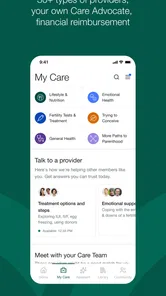
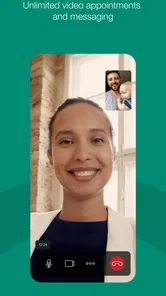
Maven Clinic is a digital healthcare platform that connects members with healthcare professionals through virtual appointments, messaging, educational content, and care programs. It is designed to support areas such as pregnancy, fertility, parenting, menopause, women’s health, and broader family health. Availability depends on the user’s employer, health plan, location, and eligibility, so downloading the app does not always guarantee access to every service.
Do I need an employer or health-plan invitation to use Maven Clinic?
In most cases, Maven Clinic is offered as an employee benefit or through a participating health plan rather than as a completely open healthcare app. During registration, you may be asked to verify your employer, insurance provider, or membership details. If your organization does not provide Maven, you might be unable to use the main clinical services, although some public educational resources or limited features may still be visible.
What types of healthcare professionals can I consult through Maven Clinic?
Depending on your eligibility and selected program, Maven Clinic may provide access to professionals such as physicians, nurses, midwives, lactation consultants, mental-health specialists, nutritionists, doulas, and other qualified providers. Appointments are generally conducted virtually by video or messaging. The exact specialists, appointment times, languages, and services vary by program and region, so users should check the available provider directory before relying on the platform for a specific need.
Pros
- Virtual visits make healthcare accessible from home.
- Supports women’s
- family
- and reproductive health needs.
- Care teams can help coordinate appointments and treatment.
- Educational resources make health topics easier to understand.
- Available support can reduce the time spent navigating healthcare.
Cons
- Availability and services may depend on your employer or health plan.
- Some appointments may still require an in-person provider visit.
- Response times can vary depending on specialty and demand.
- Not all prescriptions
- tests
- or referrals are handled in-app.
- The app may feel less useful without an active Maven benefit.











