

Manage My Wedding Planner
- 11.00
- 4.2
- Installs
- 10.00K
- Price
- Free

Screenshots
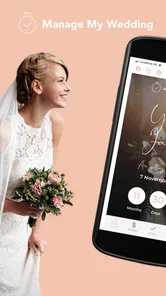
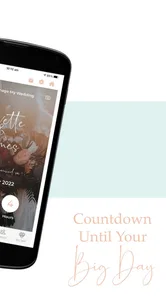
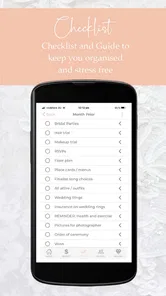
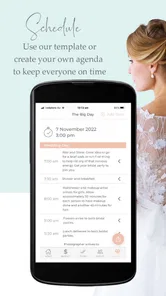
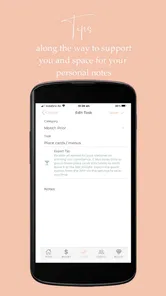
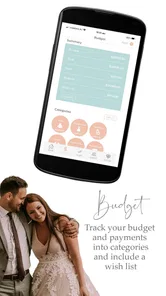
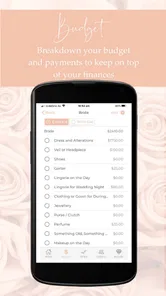
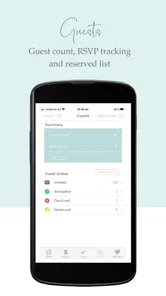
Analysis by Reviewed
Planning a wedding can become stressful long before the big day arrives. Guest decisions, spending choices, appointments, ideas, and small tasks quickly spread across messages, notes, spreadsheets, and memory. Manage My Wedding Planner is designed to bring that planning into one place, and after spending time with it, I see its main value less as a source of inspiration and more as a way to make an already complicated process feel easier to handle.
This is a free events app from Yvette Sitters, aimed at people who want a practical planning companion rather than another social feed or wedding inspiration gallery. Its store summary promises help with planning the wedding of your dreams without the overwhelm, while the short description reduces the idea to “Manage My Wedding.” That simplicity is actually a useful clue: the app is best judged by how well it supports organization, not by whether it replaces every wedding professional or every other planning tool.
The app has a 4.2 average from around 66 ratings and has passed 10K installs. Those figures suggest a modest but established audience rather than a huge mainstream platform. It is free, rated for Everyone, and works on Android 6.0 or later. The current version is 7.1.0, so owners of older devices still have a reasonable chance of using it without needing a recent phone.
What I looked for before trusting it with wedding planning
Before I trusted a wedding planner with the details that shape a real event, I wanted to know whether it could help me keep decisions and next steps clear without becoming another chore. In this section, I focus on the habits and boundaries I would set first, so the planner supports the couple’s process rather than taking over every note, message, and document.
The first test is whether it reduces mental clutter
For me, the most important question was not whether the app looked wedding-themed. It was whether opening it gave me a clearer next step. A useful planner should help separate urgent decisions from ideas that can wait, and it should make it easier to return to a plan after a busy day. Manage My Wedding Planner makes sense for that kind of routine because its purpose is centered on managing the wedding rather than simply browsing content.
I would judge it by a simple habit: after a conversation with a partner, family member, or supplier, can I turn what was discussed into something organized instead of leaving it buried in a chat? That is the difference between a planner that becomes part of the process and one that is opened once, admired, and forgotten.
The app is particularly suited to couples who want a single planning space and do not enjoy building their own spreadsheet system. A spreadsheet can be powerful, but it asks you to design the categories, formulas, labels, and workflow yourself. A wedding-focused app starts with the assumption that the event has many connected moving parts. That makes the first setup less intimidating for someone who wants guidance without learning a new productivity system.
More From Our News Desk

 Gmail
GmailGmail in a Busy Inbox: Who Benefits Most?
From first account to crowded workday, Gmail earns its place through dependable search and flexible sorting—but its best fit depends on how much inbox maintenance you can tolerate.

 Prime Video
Switching to Prime Video: What Changes in Your Viewing Routine
Prime Video can make a compelling second home for streaming, but switching means learning a different catalog, rental layer, and route from browsing to playback.

 Universal TV Remote Control
Universal TV Remote Control Works Best as a Reliable Backup
A phone remote earns its place through quick setup and reliable habits. Here is how to get more from Universal TV Remote Control—and where its limits show.

 Weather - By Xiaomi
Weather by Xiaomi Review: Clear at a Glance, Less Clear Up Close
Xiaomi’s weather app makes everyday forecasts quick to scan, but its calm surface can leave useful details and recovery paths harder to find than they should be.

 X
XX Under Pressure: Can It Recover When Posting Goes Wrong?
A resilience-focused review of X, examining setup, mistaken posts, interruptions, weak connections, and the gaps that matter when recovery needs to be dependable.

 Clash of Clans
Clash of Clans Is Won Between the Battles
Its raids are quick; its community is a long-term project of coordination, teaching, rivalry, and shared responsibility—with all the friction that entails.
Latest News



My decision criteria for an app like this
I considered four practical questions. Can I use it at different stages of the engagement? Does it help with both large decisions and tiny follow-ups? Is it comfortable for two people with different planning styles? And does it remain useful once the initial excitement of downloading it has passed?
That last question matters. Wedding planning is not one task completed in one sitting. It is a long sequence of small choices, delays, changes, and reminders. A planner has to survive the weeks when one person is enthusiastic and the other is busy. It also needs to cope with decisions that are provisional, such as an early guest idea or a venue preference that may change after a conversation.
My practical advice is to use the app as the home for decisions, not as a replacement for every communication channel. Keep conversations with suppliers where they already happen, but record the resulting action in the planner. For example, if a venue asks you to confirm a detail later, the useful part is not just the message itself; it is remembering what must be confirmed, by whom, and when.
A realistic evening with the planner
Imagine a couple sitting down after work on a Wednesday. They have spoken to a venue, received a few ideas from relatives, and realized that their guest list is still uncertain. Instead of opening several message threads, they can use the app to review the wedding tasks they already consider active, decide which question needs an answer first, and leave less urgent ideas for another session.
The important benefit in that scenario is not speed for its own sake. It is the reduction of repeated discussions. When planning is scattered, couples often revisit the same decisions because nobody remembers what was agreed. A central planning routine gives the evening a beginning and an end: review what is open, make one or two decisions, record the next action, and stop.
I also like this approach for couples who are sharing the work unevenly. One person may handle appointments while the other compares options or speaks with family. A planner can provide a common reference point, even when the two people do not organize information in the same way. It does not remove the need to talk, but it can make those conversations more concrete.
Where Manage My Wedding Planner earns its place
The lasting value of a wedding app depends less on the initial setup than on whether it still helps during ordinary, busy weeks. Here I look at the practical routines that can make Manage My Wedding Planner worth returning to, including how to use it alongside existing tools and how to tell when its role should stay small.
It focuses on the job of planning rather than the fantasy of planning
Many wedding services are built around visual inspiration. That can be enjoyable at the beginning, but it does not automatically help when a decision is overdue. Manage My Wedding Planner appeals to me because its identity is more practical. It belongs in the category of wedding management tools, where the goal is to turn a large event into manageable pieces.
That distinction is useful when choosing between alternatives. If you mainly want decoration ideas, dress inspiration, or a stream of images, an inspiration-led service may feel more rewarding. If you already have plenty of ideas and need to keep track of what happens next, this app is pointed in the more useful direction.
The free price changes the decision
Because the app is free, the cost barrier is low. That makes it easier to test during the early planning stage without committing money to a system before you understand your own needs. I would still avoid treating “free” as a reason to move every wedding document into it immediately. Start with a small, active part of the plan and see whether the workflow fits your habits.
A good trial might be the next group of decisions you already need to make. Use the app to organize those items, then check whether you can find them quickly after a few days. Notice whether you and your partner interpret the organization in the same way. If it helps you act, keep expanding its role. If it only creates another place to check, stop before switching your entire system.
The free model is also valuable for couples with limited planning budgets. Money is usually better reserved for the event itself, and paying for a planning tool is not automatically worthwhile if a simpler option meets the need. Manage My Wedding Planner gives budget-conscious users a chance to try a dedicated wedding app rather than immediately settling for a general notes application.
The age rating and device support make it approachable
The Everyone content rating makes the app suitable for general household use, including situations where relatives may help with planning. The minimum requirement of Android 6.0 is also relatively accommodating for people who keep an older phone as their main device. That matters more than it sounds: wedding planning often involves several family members, and not everyone upgrades devices at the same time.
Still, I would not assume that a suitable age rating means every family member should be given the same responsibility inside the planning process. A better approach is to decide what information each person actually needs. Relatives might help with ideas or specific arrangements, while the couple keeps final decisions and sensitive details under closer control. The app can support organization, but clear boundaries still come from the people using it.
Three less obvious ways I would use it
- Use it as a decision log, not just a task list. When a choice is made, record the conclusion in a way that prevents the same debate from restarting. This is especially helpful for guest questions, style disagreements, or family suggestions.
- Separate “waiting” from “doing.” A supplier response, family answer, or document you are expecting should not compete with tasks you can complete today. Keeping those two kinds of work mentally distinct makes a busy planning week feel less chaotic.
- Run a short weekly reset. Rather than opening the app only when something goes wrong, review the plan at the same time each week. Remove stale ideas, identify the next practical action, and leave the rest alone. This turns the planner into a routine instead of an emergency tool.
These workflows are not flashy features, but they are where a wedding planner can become genuinely useful. The app’s value depends on how deliberately you use it. A couple who treats it as a shared working list is likely to get more from it than someone who expects the app to make decisions automatically.
Where the experience may feel limited
A focused wedding planner is not automatically a complete project-management system. Couples with complex supplier arrangements, detailed financial tracking, formal document storage, or intensive collaboration may eventually need additional tools. I would not force every invoice, contract, conversation, and design file into one mobile app simply because it is wedding-specific.
There is also a natural trade-off between simplicity and depth. An app that is easy to approach may not satisfy a user who wants highly customized categories, advanced reporting, or a carefully engineered spreadsheet. If you enjoy designing your own planning system, a general productivity app may give you more control. The question is whether that control saves time or becomes another project.
Another limitation is behavioral rather than technical: one planner cannot solve inconsistent communication. If one person records changes and the other relies on memory, disagreements can still happen. I recommend agreeing on a rule before using it, such as treating the app as the place where the latest decision is written down. That small agreement can matter more than adding more categories.
How it compares with the usual alternatives
Compared with paper notebooks, Manage My Wedding Planner should be easier to update when plans change. A notebook can feel personal and satisfying, but changing a guest decision or rearranging priorities may leave crossed-out pages and scattered notes. Paper remains a good choice for people who think visually or want a keepsake, but it is less convenient when two people need the same current plan.
Compared with a general notes app, the wedding-focused approach should require less effort to shape into something useful. Notes are excellent for collecting ideas, copying messages, or writing rough thoughts. They become less comfortable when the event develops many related actions. I would use notes for raw material and the planner for decisions that deserve follow-through.
Compared with spreadsheets, this app is likely to appeal to users who want less setup. Spreadsheets are better when you need custom calculations, detailed sorting, or a structure built exactly around your event. They can also become difficult to maintain on a phone, particularly when several people edit them. A dedicated planner is the better starting point when convenience matters more than total flexibility.
Compared with hiring a wedding planner, the app is obviously a different kind of solution. A professional can negotiate, interpret etiquette, manage suppliers, and react to problems. An app cannot replace that judgment. The sensible comparison is not “app or professional” in every case; it is whether you need human expertise or mainly need a clearer way to manage your own decisions.
The real cost of switching from your current system
Switching tools always has a cost, even when the new tool is free. The cost is your time, your attention, and the risk of creating duplicate information. If your current notebook or spreadsheet already works, moving everything just because a wedding app exists may create more friction than benefit.
I would switch gradually. First, choose one planning area that currently feels messy. Re-enter only the active items, not every old idea. Use the app for a week or two of real decisions. If you and your partner naturally return to it, add another area. If you keep checking the old system first, that is a clear sign that the new arrangement is not yet earning its place.
Before switching fully, decide what should remain outside the app. Contracts, receipts, long supplier emails, and large collections of images may be easier to manage in dedicated storage. The planner should be the place that tells you what matters next, while other tools hold material that needs more space or formal record-keeping.
This staged approach also answers a common concern: do you need to be highly organized before using it? No. In fact, the best time to try it is when your planning feels scattered, provided you begin with a manageable section rather than attempting a complete migration in one sitting.
Who should choose it, and who should skip it?
I would recommend Manage My Wedding Planner to an engaged couple who wants a dedicated, free starting point for organizing wedding decisions on an Android phone. It is especially suitable for people who feel overwhelmed by scattered notes, couples who are dividing planning duties, and anyone who wants a wedding-specific structure without paying for a premium planning service.
I would be more cautious if you already have a reliable shared spreadsheet, a professional planner, or a highly customized project system that everyone actually uses. In those cases, the app may be unnecessary unless it solves a specific weakness. I would also look elsewhere if your main goal is visual inspiration, supplier discovery, or detailed financial analysis rather than everyday organization.
The developer is Yvette Sitters, and the app’s current version is 7.1.0. Those details are worth checking when installing, particularly if you are using an older Android phone. Since it is free and rated for Everyone, trying it does not require a financial commitment, but I would still approach it with a clear test rather than downloading it without a plan.
My final recommendation
Manage My Wedding Planner is a sensible choice when the central problem is wedding-planning overwhelm. I would not describe it as a replacement for every wedding service or every productivity tool. Its strongest role is more grounded: it gives a couple a dedicated place to turn conversations into next steps and keep the event moving.
My recommendation is to start small, use it for active decisions, and establish one shared rule about where final choices are recorded. If that habit reduces repeated conversations and makes weekly planning calmer, the app is doing exactly what it needs to do. If your needs quickly move toward complex budgets, extensive documents, or professional coordination, keep the planner as a simple companion and use a more specialized alternative alongside it.
In short, I see this as a practical first step rather than an all-in-one wedding command center. For a free events app with a clear management focus, that is a reasonable position. If you want less wedding-planning noise and a more deliberate way to handle the next decision, this is worth trying before you build a complicated system of your own.
Manage My Wedding Planner Frequently Asked Questions
What devices can run Manage My Wedding Planner?
Manage My Wedding Planner is available for Android devices running Android 6.0 or later. It is a wedding-planning app in the Events category, so it may suit couples who want to organize arrangements from a compatible phone or tablet. Before downloading, check that your device meets the minimum operating-system requirement and that you are choosing the version offered for your platform.
Is Manage My Wedding Planner popular with other users?
The app has more than 10,000 installs and an average rating of 4.2 from 66 ratings, with 11 written reviews. These figures can offer a quick sense of how other users have responded, but they do not guarantee that every feature will suit your planning style. Reading recent reviews can help you decide whether its approach to organizing a wedding matches what you need.
What is Manage My Wedding Planner and who is it designed for?
Manage My Wedding Planner is a wedding organization app intended for couples who want to keep their planning details in one place. It can help you arrange tasks, suppliers, appointments, budgets, guest information, and other important wedding notes. The app may be useful whether you are planning a small celebration independently or coordinating a larger event with several services and deadlines.
What features can I use to organize my wedding?
The app is designed to provide a central space for managing common wedding-planning responsibilities. Depending on the version and platform, you may be able to create to-do lists, track expenses, record supplier details, manage guest information, organize appointments, and monitor progress toward the wedding date. These tools are particularly helpful for replacing scattered notebooks, messages, and spreadsheets.
Does Manage My Wedding Planner include a budget and expense tracker?
Budget management is one of the most useful reasons to consider a wedding-planning app, and Manage My Wedding Planner is intended to help users monitor wedding-related costs. You can use it to record planned expenses, compare spending with your budget, and keep financial information together. However, you should check the current app listing to confirm which budgeting features are included in your region and version.
Pros
- Keeps vendor contacts
- quotes
- and notes organized in one place.
- Helpful checklists make it easier to track planning tasks and deadlines.
- Budget tools can improve visibility into wedding-related spending.
- Useful for coordinating details with a partner or wedding party.
- Simple layout makes essential planning information easy to find.
Cons
- Some features may require manual updates as plans and costs change.
- Limited customization may not suit highly complex wedding arrangements.
- Entering every vendor and expense can feel time-consuming at first.
- Reminders may lack the flexibility needed for unusual timelines.
- The app may not replace detailed contracts or direct vendor communication.











