

Magic Fluid Live Wallpapers 5D
- 69.00
- 4.0
- Installs
- 1.00M
- Price
- Free

Screenshots
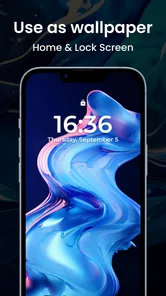
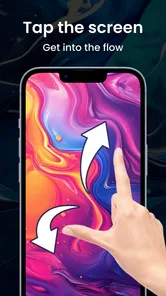
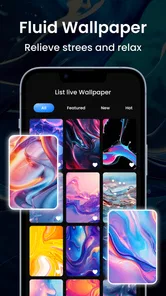
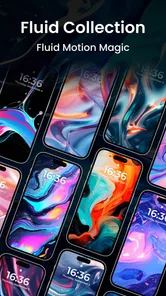
Analysis by Reviewed
I judge a live wallpaper by more than its first burst of color: I want to know whether it stays pleasant after the novelty wears off and whether it suits the way I actually use my phone. Magic Fluid Live Wallpapers 5D is a personalization app from Sun Mobile built around fluid, moving visuals. Its current version is 4, and it is free, so it is easy to try if you want a screen that feels less static without committing to a paid customization tool.
Where moving color fits into a real day
I find this kind of wallpaper works best in small moments: waking the screen while waiting for a kettle, checking the time between errands, or taking a quick pause before returning to a task. The shifting colors can make those brief glances feel a little less routine, but the effect is subtle in purpose. It does not replace a break, music, or a proper relaxation exercise; it simply gives the screen something more engaging to look at.
That distinction helps set expectations. If I want a background that stays out of the way while I work, a still photograph or muted gradient is usually better. If I enjoy interacting with visual patterns for a few seconds, the fluid approach has more appeal. The app is most compelling for people who like changing the feel of their home screen without redesigning every part of the phone.
A wallpaper that rewards a brief pause
The best use I see for this kind of app is not as a constant showpiece, but as a small visual break. Picture checking your phone between tasks: instead of another plain background, you can let the shifting colors hold your attention for a moment, then get on with your day. Touch-responsive movement makes the experience feel more personal than a static image, though it is still decoration rather than a full relaxation routine. If moving patterns bother you or you prefer a quiet, uncluttered screen, a still wallpaper will probably suit you better.
I would also think about where the wallpaper will sit in your everyday setup. A busy fluid design can look striking on a clean home screen, but icons and widgets may compete with its movement. Try it behind the screen you use most, then check whether app labels remain easy to scan. If the animation makes your layout feel crowded, a calmer color choice or a static background is a more practical alternative. This simple check matters more than choosing the most dramatic-looking design.
How the fluid wallpaper feels in daily use
From the moment you open Magic Fluid Live Wallpapers 5D, you're greeted with a vibrant display of swirling colors and patterns that seem to dance across your screen. The app is all about creating stunning visual experiences with dynamic wallpapers that respond to your touch. Imagine gently gliding your fingers across the screen and watching the colors ripple and flow like liquid magic. It's as if your screen has come alive, and you're the conductor of this digital symphony.
Choosing a look that remains comfortable
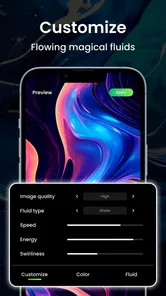
One of the coolest aspects of this app is its sheer variety. Whether you're into psychedelic swirls, galaxy-inspired designs, or calming nature scenes, there's something here for everyone. The app offers a wide range of preset designs, but if you're feeling creative, you can even customize your own wallpapers. Adjust the colors, speed, and movement to match your mood, and voila—you've got a personalized masterpiece at your fingertips!
More From Our News Desk

 Gmail
GmailGmail in a Busy Inbox: Who Benefits Most?
From first account to crowded workday, Gmail earns its place through dependable search and flexible sorting—but its best fit depends on how much inbox maintenance you can tolerate.

 Prime Video
Switching to Prime Video: What Changes in Your Viewing Routine
Prime Video can make a compelling second home for streaming, but switching means learning a different catalog, rental layer, and route from browsing to playback.

 Universal TV Remote Control
Universal TV Remote Control Works Best as a Reliable Backup
A phone remote earns its place through quick setup and reliable habits. Here is how to get more from Universal TV Remote Control—and where its limits show.

 Weather - By Xiaomi
Weather by Xiaomi Review: Clear at a Glance, Less Clear Up Close
Xiaomi’s weather app makes everyday forecasts quick to scan, but its calm surface can leave useful details and recovery paths harder to find than they should be.

 X
XX Under Pressure: Can It Recover When Posting Goes Wrong?
A resilience-focused review of X, examining setup, mistaken posts, interruptions, weak connections, and the gaps that matter when recovery needs to be dependable.

 Clash of Clans
Clash of Clans Is Won Between the Battles
Its raids are quick; its community is a long-term project of coordination, teaching, rivalry, and shared responsibility—with all the friction that entails.
Latest News



That ability to adjust the look and motion is useful for more than making a wallpaper flashy. I would start with a restrained speed and colors that leave visual breathing room around icons, then increase the movement only if the result still feels comfortable. A design that looks impressive while you are choosing it may become distracting when you are reading notifications or opening apps. Treat the customization as a way to make the screen fit your routine, not just as a set of effects to maximize.
One practical tip is to make changes one at a time. I would first settle on a color palette, check it against the icons and widgets I actually use, and only then adjust motion. If I change several things at once, it is harder to tell which choice made the screen more comfortable. This small bit of restraint turns customization into a useful fitting process rather than a hunt for the most intense preview.
What's more, the app is surprisingly easy to use. With just a few taps, you can set your favorite design as your wallpaper or screensaver. The interface is intuitive, making it a breeze to navigate through the different options. Plus, the app doesn't hog your phone's resources, so you don't have to worry about it draining your battery or slowing down your device.
In practice, I would check the result after setting it rather than assuming the preview tells the whole story. Home-screen icons, widgets, and the lock screen can change how a moving design feels once it is part of your normal routine. If you notice the motion pulling your eyes away from what you are doing, switch to a slower or simpler look—or remove the live wallpaper. That flexibility is more useful than keeping an effect that looks good only in a preview.
Who will enjoy it—and who may prefer still images
For someone who likes visual customization but does not want to build a complicated theme, the appeal is the directness: choose a fluid look, make it feel more personal, and use it as the phone background. I would especially recommend trying it if you tend to get bored with the same static image and enjoy a little interaction when you touch the screen. It can also suit a secondary device where a playful appearance matters more than keeping the display strictly utilitarian.
There are good reasons to skip it. People sensitive to motion, anyone who wants a background that never competes with text, and users who favor a clean, nearly blank home screen may be happier with a still image. The same goes for someone who wants a wallpaper to communicate useful information or coordinate a complete icon-and-widget theme. This is an appearance-focused choice, not a substitute for those other kinds of personalization.
Why You'll Love It
Let's be honest: we all spend a significant amount of time looking at our phones. Why not make that experience a little more magical? The Magic Fluid Live Wallpapers 5D app not only adds a touch of whimsy to your device but also offers a moment of relaxation and escape. It's like having a stress ball for your eyes, providing a break from the hustle and bustle of daily life.
The choice between this and the usual wallpaper alternatives comes down to what you want from your screen. A photo wallpaper gives you a fixed image and can be more personal; a plain color or gradient keeps the interface especially calm. This app is for someone who wants movement and hands-on visual play instead. It is less suitable if you prioritize a minimal home screen, need every background element to stay still, or find animation distracting. I would not choose it expecting tools for broader phone theming: its appeal is specifically the fluid wallpaper experience.
There is also a useful trade-off between novelty and legibility. A detailed pattern might be fun when viewed on its own, but a simpler, darker, or less busy choice can make app names easier to pick out during a rushed moment. I would judge a design while the screen is populated with my usual shortcuts, not on an empty preview. That check is particularly worthwhile if the home screen doubles as a work or navigation launchpad.
And here's the best part: it doesn't matter if you're an Android or iOS user. The app is available on both platforms, so everyone can join in on the fun. Just head to your respective app store, download it, and let the magic begin!
For an everyday trial, I would set a design before a low-pressure part of the day, use the phone normally, and notice whether the animation remains enjoyable when I am checking messages or moving between apps. That gives a better answer than repeatedly opening the wallpaper screen to admire it. If your device feels less comfortable with the motion, choosing a static background is a sensible trade-off; visual novelty is not worth making routine use harder.
What the current release tells existing users
For someone already using it, the practical question is not whether a higher version number sounds impressive; it is whether the current experience still gives them a design and level of motion they like. I would revisit the settings after changing my icon layout or adding widgets, because a wallpaper that once felt balanced can become visually crowded as the home screen changes. The same design can read differently when its surroundings do.
If you are moving from another fluid wallpaper, compare the experience by the things you notice every day: how easy it is to find a look you like, whether the movement feels comfortable, and whether the finished screen remains usable. A large collection is only valuable if you can settle on an option that works in context. For a person who mostly wants a still photograph or a coordinated theme, the difference in animation will not make this a better fit.
The app has an average rating of 4.0 from around 3.4 thousand ratings, with 69 written reviews and over a million installs. It is rated for Everyone and supports Android 5.0 and later. Those details suggest a widely tried, accessible personalization option, but ratings cannot tell you whether a particular animation will suit your eyes or home-screen layout; a short personal trial is still the best test.
Version 4 is the current release, and the app’s release date is October 24, 2024. For someone already using it, the practical question is whether the current selection and customization remain enjoyable, rather than assuming a version number alone means a particular change. I would keep an eye on future releases for improvements that matter to my own use—such as smoother everyday setup or more ways to keep motion unobtrusive—without treating those possibilities as features already present.
What to watch during your own trial
A sensible first test is to choose one design, set it, and leave it alone through ordinary phone use rather than repeatedly changing options. Notice whether the movement catches your eye at inconvenient times, whether icons stay readable, and whether you still like the color after seeing it in different lighting. These are personal fit questions, and a brief preview cannot answer them as well as a normal day can.
People often wonder whether a live background is worth choosing over a still one for regular use. My answer is conditional: choose motion if you enjoy that small bit of interaction and it does not make your screen harder to use; choose a static image if calm, consistency, or a meaningful personal photo matters more. Likewise, if you are unsure whether the app will suit your layout, there is little downside to treating the free option as a trial rather than deciding in advance that the animated style must become permanent.
Overall, I recommend giving it a try if you enjoy tactile, colorful backgrounds and are willing to tune the motion to your taste. If you want a completely still image, a highly minimal interface, or a wallpaper that serves a practical purpose beyond appearance, another option will fit better. For everyone else, the appeal is straightforward: it turns an ordinary screen into a small, interactive visual moment, while leaving you free to return to a simpler background whenever the movement stops feeling relaxing.
Magic Fluid Live Wallpapers 5D Frequently Asked Questions
What should I know about the app before downloading it?
Magic Fluid Live Wallpapers 5D is a personalization app by Sun Mobile, with the short description “Magic Fluid.” Its store summary invites users to experience mesmerizing 5D fluid live wallpapers for stress relief and relaxation. It is free to download, is rated for Everyone, and has a 4.0 average from around 3,400 ratings. Those details offer a quick sense of the app and its intended mood before you install it.
What is Magic Fluid Live Wallpapers 5D and how does it work?
Magic Fluid Live Wallpapers 5D is a dynamic and interactive wallpaper application that transforms your device's background into a mesmerizing fluid simulation. It utilizes advanced graphics technology to create colorful and fluid-like animations that respond to touch and motion. Users can customize the color schemes, patterns, and fluid dynamics to match their personal style and device aesthetics. The app is designed to be lightweight, ensuring it doesn't drain your battery excessively while providing a stunning visual experience.
Is Magic Fluid Live Wallpapers 5D compatible with all devices?
Magic Fluid Live Wallpapers 5D is compatible with most Android and iOS devices. However, the app requires certain hardware specifications to function optimally, such as a minimum operating system version and graphics processing capability. It is recommended to check the app's compatibility with your device in the respective app store before downloading to ensure smooth performance and avoid any technical issues. The Android version requires Android 5.0 or later.
How does Magic Fluid Live Wallpapers 5D affect my device's battery life?
Magic Fluid Live Wallpapers 5D is designed to be energy-efficient, but as with any live wallpaper, it can have an impact on your device's battery life. The app developers have optimized the animations to run smoothly without consuming excessive power. However, the extent of battery usage may vary based on the complexity of the animation settings you choose and the frequency of interaction with the wallpaper. It's advisable to monitor your device's battery performance and adjust settings accordingly.
What customization options are available in Magic Fluid Live Wallpapers 5D?
Magic Fluid Live Wallpapers 5D offers a wide range of customization options to enhance user experience. Users can choose from various color palettes, adjust fluid dynamics, and select different animation patterns to create a unique and personalized wallpaper. The app also allows for customization of touch and motion responsiveness, enabling users to tailor the interactions based on personal preferences. These features make it possible to create a distinctive and visually appealing live wallpaper that reflects individual style.
Pros
- Visually stunning fluid animations.
- Highly customizable settings.
- Smooth performance on most devices.
- Battery-friendly operation.
- Supports both portrait and landscape.
Cons
- Limited free features.
- Contains ads in free version.
- Not all devices are supported.
- Occasional lag on older devices.
- Premium features require payment.











