Magic fluid: Live 4D wallpaper
- 28.00
- 4.2
- Installs
- 5.00M
- Price
- Free
Screenshots
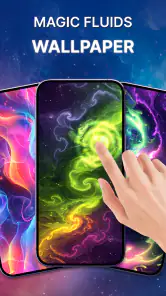
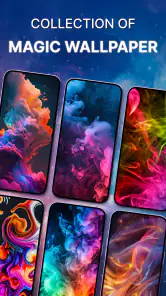
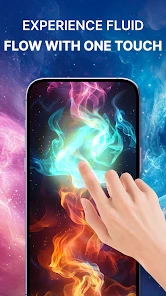
Analysis by Reviewed
I like changing my phone’s look, but live wallpapers have to earn their place after the first burst of novelty. Magic fluid: Live 4D wallpaper makes a screen feel less static by turning color and motion into something you can play with, rather than just glance at. Its appeal is immediate; the more useful question is whether that small moment of interaction stays enjoyable once the wallpaper becomes part of your everyday routine.
What makes the first week appealing
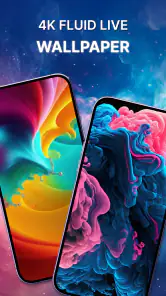
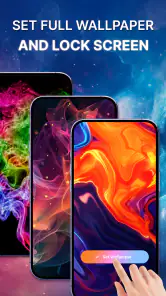
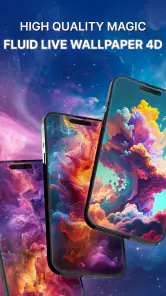
When I first stumbled upon Magic fluid: Live 4D wallpaper, I was intrigued. The app promises to turn your static phone screen into a living piece of art. And boy, does it deliver! Upon downloading and launching the app, you’re greeted with a kaleidoscope of colors that you can control with just a swipe or tap. It's like having a mini art studio in your pocket. The colors flow seamlessly, and the patterns evolve as if they have a life of their own.
That instant response is what makes the opening experience work: you do not need to learn a complicated editor before seeing a result. I can imagine trying it while waiting for a call or taking a brief break between tasks, then leaving a look I enjoy on the screen. It is especially suited to someone who likes expressive, animated visuals and wants a personal touch without making a whole theme from scratch. If you prefer a quiet, plain background that keeps icons and text visually dominant, though, this much movement may feel like distraction rather than decoration.
For a realistic first-day test, I would set the wallpaper, use the phone normally for a few hours, and notice whether I enjoy the movement when I am not deliberately interacting with it. That is more useful than spending a long stretch watching the colors move, because the wallpaper’s job is to sit behind the ordinary things I do on my phone. If the animation feels pleasant during quick checks but does not pull my attention away from a message or app, it is doing its job well.
From playful experiment to everyday wallpaper
One of the standout features of this app is its interactivity. You can influence the movement and colors of the fluid by simply touching the screen. It’s not just a wallpaper; it’s an interactive experience. I found myself lost in creating different patterns and experimenting with various color combinations. The app is intuitive and easy to use, making it accessible to everyone, regardless of their tech-savvy level.
Customization that rewards a little restraint
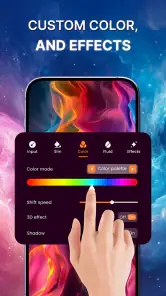
If you love to customize your tech, this app will be your new favorite tool. Magic fluid offers a range of settings that allow you to tweak the fluid's behavior and appearance to your liking. You can adjust the color palette, fluid type, and even the speed of the motion. It’s like being a digital artist, crafting a masterpiece right on your phone screen. I spent hours just playing around with the settings, and each time I’d create something unique and captivating.
A practical way to use those controls is to settle on one palette and motion style that remains readable behind your icons, instead of changing everything whenever you open the app. I would test a setting on the screen where I spend the most time, then make a small adjustment if the effect competes with the layout. That turns customization into a short, purposeful routine rather than an endless series of experiments. The trade-off is that a setting which looks striking when watched closely may be too busy as a background you see dozens of times a day.
More From Our News Desk

Weather by Xiaomi Review: Clear at a Glance, Less Clear Up Close

X Under Pressure: Can It Recover When Posting Goes Wrong?

Clash of Clans Is Won Between the Battles

Android Auto Makes the Case for Quieter Car Software

MobiOffice: Transforming Mobile Productivity with Seamless Integration

EA SPORTS FC™ Mobile Soccer: Redefining Mobile Sports Gaming
I would also make one change at a time. If I switch the colors, fluid style, and movement speed together, it is harder to tell which adjustment made the screen more comfortable. Keeping a favorite look as a baseline makes experimentation easier to reverse: I can try a bolder combination, compare it with the calmer one, and return to the setup that works behind my icons. This small habit is useful for anyone who enjoys tweaking visual details but does not want the process to become a daily chore.
The comparison that matters: motion versus stillness
Compared with choosing a static image or a conventional decorative background, this app’s defining difference is that touch and motion are part of the visual experience. That is a real advantage when a still picture feels lifeless, but it is not automatically an improvement for every screen. A static wallpaper is usually the simpler choice if you want a consistent composition, minimal visual activity, or a background that never draws your attention away from notifications and app icons. I would pick Magic fluid for playful atmosphere and a still image for restraint.
It also occupies a different niche from a carefully arranged theme. A theme built around matching icons, widgets, and a specific image can create a coordinated look, while this app’s main contribution is the moving fluid itself. If I want the whole interface to feel designed as one piece, I would look for options that change more than the background. If I mainly want the home screen to feel less static and enjoy touching the colors, this app is the more direct choice. The distinction matters because a live wallpaper cannot make a cluttered layout feel organized on its own.
Moreover, the app’s performance is smooth, with no noticeable lag or stutter, even on older devices. It’s optimized to ensure that your phone doesn’t overheat or drain the battery excessively while running the live wallpaper. This is a crucial aspect, as a live wallpaper app that slows down your phone or drains the battery would be a deal-breaker for many users.
Even so, I would judge battery impact on my own phone over a normal day rather than assume every device behaves alike. If you notice that your battery routine changes, or the moving background becomes distracting, switching back to a static image is a sensible test. This is also a good choice for someone who enjoys adjusting a phone’s appearance but does not want to maintain a complicated theme; its appeal comes from the fluid display, not from rebuilding the rest of the interface around it.
A simple comparison over two ordinary days can help separate impression from habit: use the fluid wallpaper for a day, then switch to a still background for a similar day and notice whether anything feels different in battery routine, comfort, or focus. I would not treat one day as a technical benchmark, since phone use varies, but the comparison can answer the practical question that matters to me: does the animation add enough enjoyment to justify keeping it active? If not, there is little reason to force myself to keep a live background.
Who is likely to keep it installed?
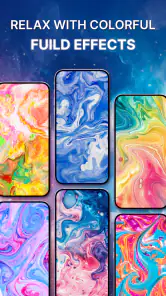
Whether you’re feeling energetic and creative, or calm and relaxed, Magic fluid: Live 4D wallpaper has something for you. The wide array of color options and fluid dynamics means that you can set your wallpaper to match your mood or even change it throughout the day. It’s like having a mood ring, but way cooler and more visually stunning.
The longer-term test is whether you still enjoy seeing the effect when you are not actively touching the screen. For me, that makes this a better fit for people who like ambient motion and occasional hands-on experimentation than for users who want their wallpaper to disappear into the background. If you are deciding whether to keep it, try one setup through ordinary routines—checking messages, opening apps, and glancing at the phone between tasks—before spending more time fine-tuning it. That reveals whether the effect complements your habits or simply catches your eye at first.
I can see it working particularly well for someone who often pauses with the phone in hand between tasks and likes a small visual diversion, but not for someone who needs every glance at the home screen to be calm and efficient. It is also a reasonable pick for people who enjoy changing a background to reflect a mood without searching for a new image each time. On the other hand, users who rarely see their wallpaper because they open apps directly may get little lasting value from any animated background, however attractive it is at first.
One everyday use case is a short break after work: I might open the screen, make a few gestures to shift the fluid, then put the phone away. That is a pleasant, low-commitment interaction when I want a moment of color without starting a game or browsing for something to watch. I would not use it as a substitute for a relaxation routine, though; its value is simply that the background can be interactive and visually absorbing for a moment. If I find myself repeatedly reaching for the phone just to see it, that is a sign to consider whether the novelty is helping or distracting from what I meant to do.
Practical details before you settle on it
This is a free personalization app from GREEVIL'S GREED, rated for Everyone, with a 4.2 average from around 4,400 ratings and over 5 million installs. It was released on May 26, 2024, and version 1.0.18 requires Android 8.0 or later. Optional in-app purchases range from $3.99 to $12.99 per item, so I would begin with the free experience and decide whether the available customization is enough before considering a purchase. The review count is 28, a useful reminder that the larger rating total reflects more user responses than written reviews.
For someone wondering whether there is a reason to pay, my approach would be to use the free experience until I can name a specific limitation I want an optional purchase to address. The visual concept is easy to understand without committing money, so I would not buy anything simply because I had enjoyed the first few minutes. If I am still using the wallpaper after the initial experimenting and know which kind of customization I want more of, then I can weigh the in-app options against how often I actually use them.
One useful habit is to treat the wallpaper as a visual accent, not a screen you need to keep checking. Pick a combination that stays comfortable at a glance, then leave it alone for a few days; frequent tweaking can make the app feel like a task instead of a small pleasure. If your main question is whether it suits your phone, the practical answer is to try the free version on your everyday home screen and see whether the motion remains enjoyable during normal use. If your priority is a motionless background, low visual stimulation, or a carefully composed photograph, another kind of wallpaper is likely a better match.
There is a useful maintenance boundary here: I would revisit the look when it stops feeling right, not every time I unlock the phone. A quick check after changing the home-screen layout can make sense, because the same fluid colors may compete differently with a new arrangement of icons. Beyond that, leaving a comfortable preset alone helps the wallpaper recede into daily life. The app is at its best when setting it up is the fun part and keeping it installed does not require constant attention.
Where visual fatigue can creep in
Motion that feels lively during a first session may become tiring when it is always behind the same icons. A bright palette or fast-moving effect can pull the eye during moments when I only want to check a notification and move on. That does not make the app poorly suited to everyone; it means the best setup depends on how often the home screen is visible and how much visual activity feels comfortable. If I notice myself avoiding the screen or wanting a calmer look, changing to a still background is a sensible response rather than a failure to appreciate the app.
There is also a difference between enjoying the wallpaper as an activity and enjoying it as a backdrop. Touching the fluid can be entertaining, but most phone use is not spent interacting with the background. I would judge the app mainly on whether its passive appearance remains pleasant, then treat the interactive part as an extra. If that balance is reversed for me—if I enjoy the demo but dislike seeing it during routine use—the app may be fun to revisit without being a permanent choice.
Does the novelty last?
In conclusion, if you're looking for a way to breathe new life into your device and enjoy a bit of artistic expression, Magic fluid: Live 4D wallpaper is definitely worth checking out. It’s not just an app; it’s a delightful escape into a world of color and motion, right at your fingertips. So go ahead, download it, and let your creativity flow!
My more measured recommendation is to give it a try if you genuinely enjoy animated backgrounds and want touch-responsive color rather than a static picture. Its strongest lasting value is the ability to make a familiar screen feel a little more personal without demanding a complicated setup. The novelty may fade if you rarely notice your wallpaper or find movement distracting, and that is a fair reason to remove it. For me, it earns space when the chosen look remains pleasant in daily use—not simply because it looked impressive on the first launch.
Ultimately, I would keep it only if the animated backdrop fits into my routine without asking for much from me. The free starting point makes that an easy decision to test, while the option to return to a still image keeps the choice low-pressure. For someone who values motion, color, and a little interaction on the home screen, it can remain a small source of enjoyment after the first week. For someone who prizes quiet, legibility, or a fixed photographic composition, a conventional wallpaper will probably serve them better over time.
Magic fluid: Live 4D wallpaper Frequently Asked Questions
Is Magic Fluid: Live 4D Wallpaper free to download, and are there optional purchases?
Magic Fluid: Live 4D Wallpaper is free to download, so you can try its fluid-style wallpaper experience without paying upfront. The app also offers in-app purchases, which are listed at $3.99 to $12.99 per item. If you prefer not to make purchases, check the available options in the app and your device’s purchase settings before using them.
Who makes Magic Fluid, and what kind of app is it?
Magic Fluid is a personalization app from GREEVIL'S GREED, designed around animated fluid effects for your device’s screen. Its short description is simply “Magic fluid,” while the longer summary highlights relaxing with a fluid simulation wallpaper. It has an Everyone content rating, making it suitable for a general audience, though individual preferences for animated visuals can vary.
What is Magic Fluid: Live 4D Wallpaper and how does it enhance my device?
Magic Fluid: Live 4D Wallpaper is an innovative application that transforms your device's screen into a dynamic, fluidic display. Using advanced algorithms, it simulates real fluid motion, providing a mesmerizing and interactive experience. This app not only enhances the aesthetic appeal of your device but also offers a soothing and visually engaging environment that can be customized to suit your mood and style.
How do I customize the fluid effects and colors in Magic Fluid?
Customizing the fluid effects in Magic Fluid: Live 4D Wallpaper is straightforward. Users can access a range of settings where they can adjust the viscosity, color, and movement patterns of the fluid. The app offers a palette of vibrant colors and preset themes, allowing users to create a unique and personalized wallpaper that reflects their preferences. Additionally, interactive touch controls enable users to manipulate the fluid in real-time for a truly immersive experience.
Will Magic Fluid drain my battery quickly?
Magic Fluid: Live 4D Wallpaper is optimized to minimize battery consumption, ensuring it doesn't significantly impact your device's performance. While live wallpapers naturally use more resources than static ones, this app includes settings to adjust the frame rate and resolution, allowing users to balance visual quality with battery efficiency. It's advisable to experiment with these settings to find the optimal balance for your device.
Pros
- Visually stunning dynamic wallpapers.
- Highly customizable settings.
- Smooth and fluid animations.
- Low battery consumption.
- Compatible with most devices.
Cons
- Limited free content options.
- Occasional performance lags.
- Ads can be intrusive.
- In-app purchases required for full features.
- Limited support for older devices.
- Category
- Personalization
- Version
- 1.0.18











