

Luzia: AI Assistant & Chat
- 485.00
- 4.3
- Installs
- 10.00M
- Price
- Free

Screenshots
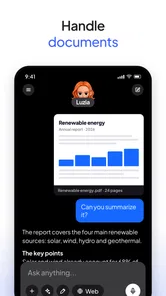

Analysis by Reviewed
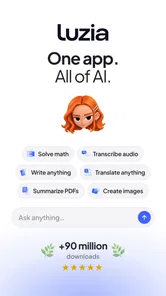
I judge an assistant by whether it makes an ordinary task easier without turning every request into a project. Luzia: Your AI Assistant is an education-category app from Luzia, and its appeal is the idea of having an AI helper on a phone for questions and everyday needs. That can be useful when I want to explore an idea, get a first pass at a task, or work through a question in plain language. It is free to install, rated for Everyone, and has a 4.5 average from around 108,000 ratings, so there is a substantial audience behind it; still, popularity alone does not tell me whether it suits a particular routine.
Choosing an assistant that fits your routine
Before installing any AI assistant, I would ask what I actually want it to do. If the goal is open-ended help with learning, drafting, or thinking through a problem, a conversational assistant can feel more natural than a traditional tool with fixed menus. If I mainly need alarms, calendar entries, or device controls, the assistant already built into a phone may be the more direct choice. Those are different jobs, and I would not assume one app is automatically best at both.
Where Luzia can earn a place on your phone
Setting up Luzia: Your AI Assistant was a breeze. The app's user-friendly interface makes it super easy to get started. Once installed, Luzia takes you through a quick setup process, ensuring it understands your preferences. It's like having a personal assistant who knows exactly what you need, without having to ask twice.
What grabbed my attention right from the start was Luzia’s ability to seamlessly integrate with other apps on my phone. Whether it's scheduling meetings, setting reminders, or even sending a quick text, Luzia handles it all with flair. The voice recognition is spot on, which means no more shouting at your phone trying to get the assistant to understand you. It's like talking to a friend who actually listens.
Another feature that's worth highlighting is its ability to learn from your habits. The more you use it, the smarter it gets. Imagine having an assistant that not only understands your current needs but anticipates future ones as well. It's a bit like having a crystal ball, but much cooler and definitely more practical.
A useful companion for specific kinds of work
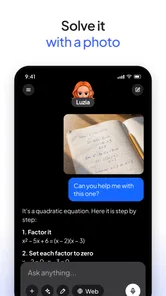
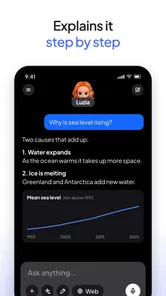
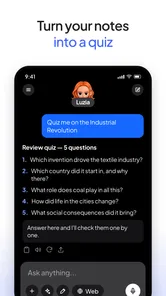
I can see the conversational format helping a student who wants a difficult subject explained in simpler terms, or someone planning a day who needs to turn a loose set of thoughts into a clearer order. One practical approach is to start with a broad question, then follow up with a specific constraint: ask for a simple explanation, request an example, and then ask what part is easiest to misunderstand. That back-and-forth is often more useful than treating an AI answer as a finished result.
For a realistic everyday case, imagine I have a few errands, a class assignment, and a message to write before leaving home. I could use an assistant to help sort the assignment into manageable steps, draft a polite message, and think through an order for the errands. I would check important details myself and copy any final text only after reviewing it. This workflow makes the app a starting point and sounding board, not an authority whose output should be followed uncritically.
More From Our News Desk

 Instagram
Instagram’s Power Comes From Its Place in Your Phone
A close look at how Instagram turns Meta’s reach, recommendation systems and everyday camera habits into durable platform power—and what that costs users.

 Gmail
GmailGmail in a Busy Inbox: Who Benefits Most?
From first account to crowded workday, Gmail earns its place through dependable search and flexible sorting—but its best fit depends on how much inbox maintenance you can tolerate.

 Prime Video
Switching to Prime Video: What Changes in Your Viewing Routine
Prime Video can make a compelling second home for streaming, but switching means learning a different catalog, rental layer, and route from browsing to playback.

 Universal TV Remote Control
Universal TV Remote Control Works Best as a Reliable Backup
A phone remote earns its place through quick setup and reliable habits. Here is how to get more from Universal TV Remote Control—and where its limits show.

 Weather - By Xiaomi
Weather by Xiaomi Review: Clear at a Glance, Less Clear Up Close
Xiaomi’s weather app makes everyday forecasts quick to scan, but its calm surface can leave useful details and recovery paths harder to find than they should be.

 X
XX Under Pressure: Can It Recover When Posting Goes Wrong?
A resilience-focused review of X, examining setup, mistaken posts, interruptions, weak connections, and the gaps that matter when recovery needs to be dependable.
Latest News



Making a conversation useful rather than just longer
One small habit I recommend is giving the assistant the context that actually changes the answer, instead of adding a long personal backstory. For a study question, that might mean naming the topic, saying what level of explanation you want, and pointing out the step where you got lost. For a draft, identify the audience and the tone you want. Clear boundaries help me judge whether the result fits, and they make follow-up questions more focused.
I would also separate brainstorming from fact-checking. If I am working through an unfamiliar subject, I can ask for a plain-language explanation and then use the response to identify terms worth checking in a textbook or trusted reference. That is a more dependable learning loop than copying an answer straight into an assignment. The assistant can help me find the shape of a question; the student still needs to understand and support the final work.
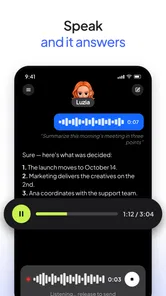
Voice can be handy when my hands are occupied or I am away from a keyboard, but I would choose it selectively. A spoken request is convenient for a rough idea or quick wording prompt; anything sensitive, complicated, or easy to mishear is better entered and reviewed carefully. In either mode, I would read a response before acting on it, especially if it contains several steps or names details that matter.
What to compare before you switch
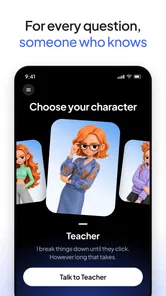
In a world crowded with AI assistants, what makes Luzia stand out is its customization options. You can tweak it to suit your lifestyle, which means whether you’re a busy professional or a student juggling multiple assignments, Luzia adapts to your schedule. It’s like having a personalized assistant who evolves with you.
Compared with a search engine, a chat-based assistant is better suited to refining a question over several turns; search is still preferable when I need to inspect sources directly or verify a current fact. Compared with a note-taking or task app, an assistant can help shape an idea, but a dedicated organizer is usually the safer home for deadlines and records I need to retrieve reliably. I would use Luzia to get unstuck, then move any important result into the tool I already trust for keeping it.
That distinction matters when deciding whether to replace something. A search engine gives me a set of pages to compare, while a conversational tool offers a synthesized response that can be easier to work with but may need checking. A calendar is better for a fixed appointment because it is designed to preserve a date and alert me later. A writing app is better for maintaining a document through revisions. Luzia makes most sense in the space between those tools: helping me turn a vague request into a clearer next step.
Plus, the app's sleek design and intuitive navigation make it a pleasure to use. No more fumbling around trying to find features; everything is right where you expect it to be. And did I mention how secure it is? Your data is well-protected, which is a huge relief in today's privacy-conscious world.
One thing that really resonated with me was how Luzia manages to strike a balance between functionality and fun. It’s professional when you need it to be, yet casual enough to feel like a part of your everyday life. It's like having a Swiss Army knife in app form, ready to tackle any task you throw its way.
Trade-offs, cost, and who should pass
The app is free, although it offers in-app purchases from $1.99 to $39.99 per item, so I would check the purchase terms before paying for anything and decide whether the free experience already covers my needs. Luzia is on version 5.6.0 and requires Android 8.0 or later. It has passed 10 million installs, but those figures do not remove the basic trade-off: an AI can save time on a first draft while still requiring me to check the answer, especially for schoolwork, money matters, health questions, or anything time-sensitive.
I would treat any paid option as a decision to make only after I have tried the app for the kinds of requests I expect to use regularly. A purchase is easier to assess when I can name the recurring task it would improve, rather than paying because a feature sounds promising in the moment. If I only need occasional help rewriting a message or unpacking a tricky idea, I would first see whether the free use is enough for that pattern.
There is also a switching cost that is easy to overlook: the effort of deciding where useful information belongs. If a conversation produces a deadline, a plan, or a final draft, it still needs to be transferred into the calendar, notes, or document where I will find it later. That extra step is manageable, but it means Luzia should not become a replacement filing system by accident. I would keep durable records in the app designed for them.
I would also avoid making an assistant the only place where I keep important information. A useful habit is to ask for a concise summary at the end of a long exchange, then save the parts I need in my own notes. That reduces the effort of returning to a conversation later and makes it easier to spot missing steps. If I need dependable device automation, a full calendar workflow, or citations I can inspect, I would choose a tool built specifically for that purpose instead.
For privacy-sensitive topics, I would pause before entering details that do not need to be shared to get a useful answer. I can describe a situation in general terms, remove identifying information, and still ask for help organizing my thoughts. That is a sensible habit with any conversational assistant, even when an app feels casual and personal. I would not use it as a place to store confidential records or as a substitute for professional advice.
Luzia is a better fit for people who enjoy asking follow-up questions and want one place to explore ideas in everyday language. It may be a poor fit for someone who expects every answer to be correct without checking, or who wants a narrowly focused utility rather than a conversational layer. The app’s Everyone age rating makes it broadly accessible, but younger users should still treat generated explanations as material to discuss and verify, not as a substitute for a teacher or trusted adult.
It is also not the right choice if the main need is a guaranteed action, a source-backed answer, or a record that must be retained in a precise format. In those cases I would go directly to a dedicated calendar, reference source, or specialist service. Someone who dislikes typing follow-up prompts may also find the conversational approach less efficient than tapping through a purpose-built tool. The benefit depends on being willing to guide the exchange and check what comes back.
My recommendation
So, is Luzia worth your time? Absolutely! Whether you're looking to simplify your digital life or just want a reliable companion to help manage your day-to-day tasks, Luzia is the way to go. It’s not just an app; it’s an experience that transforms the way you interact with technology. Give it a shot, and who knows, you might just find yourself wondering how you ever got by without it. After all, who wouldn't want a trusty AI assistant to make life a little bit easier?
My recommendation is more measured: try it if a conversational helper would fit naturally into your study or planning routine, and keep the first tasks low-stakes while you learn what answers you find useful. I would not switch away from a calendar, search tool, or specialist app that already does its job well. The best reason to keep Luzia is that it makes asking, refining, and organizing thoughts feel easy; the best reason to skip it is if you want a guaranteed action or verified answer every time.
To decide quickly, I would give it a few ordinary jobs rather than testing it with a grand, complicated request: explain one concept I am studying, help outline a short task, and improve a message whose meaning I already know. Those trials show whether its conversational style saves me effort and whether I like checking and refining the answers. If I find myself copying useful results into the right places and returning for more, it has earned a spot. If every response creates extra checking without moving the task forward, I would stick with simpler tools.
For me, the strongest case is not that an AI can take over a routine, but that it can make the first step less intimidating. Luzia is worth considering if you want a flexible partner for questions, drafts, and early-stage planning, and if you are comfortable remaining the person who verifies and decides. I would recommend trying it with realistic expectations: use it to think more clearly, keep essential records elsewhere, and choose a different tool whenever reliability or a specific action matters more than conversation.
Luzia: AI Assistant & Chat Frequently Asked Questions
What should I know before asking Luzia personal questions?
An AI assistant can make it easy to share details while asking for help, so think carefully before entering sensitive information such as private messages, account details, or personal identifiers. You can keep questions general when possible and review the app’s privacy settings and policies before use. This is especially worth discussing with children, who may need guidance about what they should and should not share.
Can I use Luzia for studying and everyday learning?
Luzia is listed in the Education category and presents itself as an intelligent personal assistant for a range of everyday needs. It may be useful for asking questions, exploring topics, or getting help with everyday tasks, but it should be treated as a support tool rather than a substitute for learning or checking important information. For schoolwork, compare answers with reliable course materials and use the app in a way that supports understanding.
What should I check before installing Luzia on Android?
Before downloading Luzia on Android, check that your phone runs Android 8.0 or later and that you have enough room for another app. Install it through the appropriate app store, then review the permissions and purchase options presented during setup or use. Luzia is free to download, but optional purchases are available, so anyone managing a child’s device may want to review purchase controls beforehand.
Is Luzia free to download, and are there optional purchases?
Luzia is free to download, so you can try the assistant without paying upfront. The app also offers in-app purchases, with prices ranging from $1.99 to $39.99 per item. Check the purchase details shown in your app store before confirming anything, particularly if you are downloading it for a child or want to avoid unexpected spending.
Will Luzia work on my phone?
Luzia is available on Android and iOS, and the Android version requires Android 8.0 or later. Before downloading, check your device’s operating system and make sure you are installing the app from the appropriate app store. The app is rated for Everyone, but features and the installation process may vary depending on your device and platform.
Pros
- Efficient task management support.
- Seamless integration with other apps.
- User-friendly interface design.
- Customizable settings and preferences.
- Quick responses and processing.
Cons
- Requires internet connection.
- Limited offline functionality.
- May access personal data.
- Subscription for premium features.
- Occasional app crashes.











