

Lounge - Groups & Events
- 0.00
- 0.0
- Installs
- 10.00K
- Price
- Free

Screenshots
Analysis by Reviewed
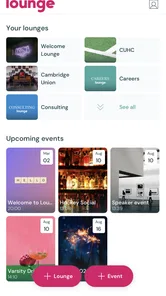
I approached Lounge as an events app rather than another social feed. Its promise is simple: keep groups and events together without surrounding them with constant distractions. That difference matters because many planning tools become noisy the moment they are used for more than one occasion. Lounge, developed by Lounge Technology, aims for a calmer space where a group can stay focused on what it is arranging.
After spending time with it, my first impression was that its value depends less on a dramatic feature and more on whether the people around you are willing to use it consistently. It can make recurring plans easier to keep visible, but it is not a magic solution for inactive groups or poorly defined events. I would recommend trying it when you want a dedicated place for shared plans, especially if ordinary chat threads are becoming difficult to follow.
From an appealing first week to a lasting habit
I find that an app’s first impression matters most when it helps me understand where to look and what a group is for. In this section, I consider whether Lounge’s focused setup can stay approachable as a group grows, and why clear conventions from the start matter more than adding extra spaces. That leads into the everyday question of who can comfortably take part.
Why the initial experience feels refreshing
The first-week appeal comes from the app’s narrow purpose. Lounge is not trying to compete with every entertainment, messaging, or news app on a phone. Its store summary describes “your groups and events, no distractions,” and that focus is easy to understand in practice: you open it with a specific social task in mind instead of entering a stream designed to keep you scrolling.
That makes the app particularly attractive when a group has a clear reason to exist. A group organizing a weekend outing, a club arranging regular meetings, or a circle of friends coordinating shared activities can benefit from having the context separated from unrelated conversations. I find this more useful than relying on a general-purpose social network, where an important event can disappear under posts that have nothing to do with the plan.
The clean concept also lowers the mental cost of checking in. If I am looking for an event, I want to find the event rather than reconstructing it from a long sequence of messages. If I am checking a group, I want to remember why that group exists. Lounge’s appeal is strongest when the app remains a destination for organized participation rather than becoming another place to browse passively.
There is a subtle trade-off here. A focused app can feel pleasantly quiet, but quiet also means it may not provide enough stimulation to pull people back automatically. The first week can be enjoyable because the purpose is fresh and the group is active. The real test begins when the event is no longer new and nobody is actively reminding everyone else to return.
More From Our News Desk

 Gmail
GmailGmail in a Busy Inbox: Who Benefits Most?
From first account to crowded workday, Gmail earns its place through dependable search and flexible sorting—but its best fit depends on how much inbox maintenance you can tolerate.

 Prime Video
Switching to Prime Video: What Changes in Your Viewing Routine
Prime Video can make a compelling second home for streaming, but switching means learning a different catalog, rental layer, and route from browsing to playback.

 Universal TV Remote Control
Universal TV Remote Control Works Best as a Reliable Backup
A phone remote earns its place through quick setup and reliable habits. Here is how to get more from Universal TV Remote Control—and where its limits show.

 Weather - By Xiaomi
Weather by Xiaomi Review: Clear at a Glance, Less Clear Up Close
Xiaomi’s weather app makes everyday forecasts quick to scan, but its calm surface can leave useful details and recovery paths harder to find than they should be.

 X
XX Under Pressure: Can It Recover When Posting Goes Wrong?
A resilience-focused review of X, examining setup, mistaken posts, interruptions, weak connections, and the gaps that matter when recovery needs to be dependable.

 Clash of Clans
Clash of Clans Is Won Between the Battles
Its raids are quick; its community is a long-term project of coordination, teaching, rivalry, and shared responsibility—with all the friction that entails.
Latest News



A realistic everyday scenario
Imagine a small group of friends planning a monthly dinner. In a normal chat, the first messages might cover possible dates, followed by unrelated jokes, photographs, and other conversations. A week later, someone asks which restaurant won, another person suggests changing the time, and a third person cannot remember who confirmed attendance. The problem is not that chat is bad; it is that chat treats planning as a stream rather than as an ongoing activity.
I would use Lounge for the planning layer in that situation. The group can remain connected to the dinner as a shared event instead of forcing every decision into one rapidly moving conversation. The practical benefit is not only finding information faster. It also gives the group a reason to return at the right moments: when the date is being chosen, when arrangements change, and when the event is approaching.
For this workflow, I have one important tip: create a group around a continuing purpose, not around a single vague idea. “People who may want to do something sometime” is likely to fade. “Monthly dinner planning” gives members a clear expectation and makes the space easier to maintain. The app’s focused design works best when the group’s boundaries are equally focused.
Who will appreciate the focused approach
Lounge is a good fit for people who feel overwhelmed by broad social platforms but still want shared digital spaces for real-world activities. It may suit volunteer circles, hobby groups, neighborhood plans, study-related gatherings, and friends who repeatedly arrange the same kind of event. The free price also makes experimentation straightforward, and its Teen content rating gives it a broad audience among younger users and adults.
It is less convincing for someone who only needs a one-time reminder or a private calendar. If your plans are mostly individual, a calendar app may be faster. If your group already lives in a messaging service and rarely loses information there, moving everyone to a separate app could create more work than it removes. Lounge needs a group-level reason to exist; without that, its focused nature can feel unnecessary.
What remains useful after the novelty fades
A group app has to work across more than one kind of moment: someone may be checking a plan in a quiet room, between errands, or while dealing with limited time and attention. I look at how Lounge’s event-centered purpose can reduce competing information, while also considering the trade-off when a person needs richer communication than a focused planning space provides. The next section turns to access in those real-life contexts.
Recurring value depends on the rhythm of the group
The month-to-month value is not measured by how often I open the app for entertainment. It is measured by whether it helps a group return to the same purpose without starting from zero each time. That is a healthier standard for an events app. A tool can be successful even if I use it briefly, provided those visits happen when decisions and updates matter.
For recurring groups, I would establish a simple routine: use the group space for the plan itself, keep event-related updates tied to the relevant activity, and avoid turning the space into a general conversation room. This is one of the more important non-obvious lessons from using a focused product. The fewer unrelated messages a group accumulates, the more valuable its history becomes later.
That history can help when the same members arrange another event. Instead of relying on memory, people can look back at how the group handled timing, attendance, or last-minute changes. I would not treat Lounge as a formal project-management system, but it can serve as a lightweight record for social coordination. The advantage is simplicity; the limitation is that it may not replace specialized tools for complex schedules, documents, or detailed task ownership.
How it compares with ordinary alternatives
Compared with a general social network, Lounge’s advantage is concentration. A social network is usually better when discovery, public reach, or broad interaction is the main objective. Lounge makes more sense when the participants are already known and the event itself is the center of attention. I would choose the former for finding an audience and the latter for keeping an existing group organized.
Compared with a messaging app, the choice is more nuanced. Messaging is usually quicker for urgent questions and has a lower barrier because people may already have it installed. Lounge can be better when a chat becomes a stream of mixed subjects and event details are repeatedly buried. The cost is adoption: every participant has to accept another place to check.
Compared with a calendar, the distinction is social context. A calendar is excellent for dates and personal reminders, but it does not necessarily give a group a shared home for the surrounding purpose. Lounge may be preferable when the event needs continuing participation rather than a single time entry. If the only requirement is “remember this appointment,” I would not add an events-focused group layer.
This comparison leads to a practical rule: use Lounge when the group is the product of the plan, not merely the audience for a notification. That is where its focused design earns its place. If the event is too complicated for a lightweight group space, or too simple to justify one, another tool will probably be more efficient.
Keeping the app useful from one event to the next
One of the strongest long-term workflows is to treat each event as part of a series rather than as an isolated burst of activity. A running club, recurring game night, or regular community gathering can give members a reason to return even when there is no immediate crisis to solve. The app then becomes a shared habit instead of a temporary installation.
I would also avoid creating multiple overlapping spaces for the same people unless their purposes are genuinely different. Duplicate groups create uncertainty: where should the next update go, and which space contains the current plan? A small amount of structure at the beginning can prevent that confusion later. In my experience, this kind of discipline matters more than adding more features.
Another useful approach is to make the next action clear after every event. If the group has just completed a gathering, the next event or planning step should be easy for members to recognize. That turns Lounge into a bridge between activities. Without a next step, even a well-organized group can become a digital room that nobody remembers to enter.
The maintenance burden and the points where fatigue appears
Keeping a group organized should not become another obligation that drains the people trying to bring everyone together. I consider where repeated checks, duplicated updates, or unclear ownership can make participation tiring, and how a lightweight routine can help without expecting every member to be equally active. From there, the final section weighs who is most likely to benefit from Lounge’s focused approach and when a simpler or more familiar tool is kinder to the group.
What the organizer has to keep doing
The main maintenance burden is social rather than technical. Someone has to give the group a purpose, keep event information understandable, and make sure important changes do not get lost. No focused app can remove the need for a person to make decisions. If nobody knows whether an event is still active, the app will feel abandoned regardless of how cleanly it presents the space.
I recommend assigning informal ownership before inviting a large group. That does not need to be a formal administrator role; it simply means one person agrees to keep the plan current and prompt the next step when necessary. This is a concrete way to reduce the common failure where everyone assumes someone else will update the event.
There is also a maintenance cost for members. They must remember to check Lounge rather than waiting for every update to arrive through their usual channels. If your friends or colleagues already struggle with multiple apps, this extra destination may create friction. The app’s distraction-free identity is useful only if the group sees that focus as a benefit rather than as an inconvenience.
Where users may become tired of it
The first source of fatigue is duplication. If the same announcement appears in Lounge, a chat, and a calendar, people may stop knowing which version is authoritative. I would decide early what belongs in Lounge and what belongs elsewhere. For example, the group can hold the event’s shared context while urgent personal messages remain in the communication tool everyone already uses.
The second source is over-organization. Not every casual plan needs a dedicated structure, and trying to formalize every spontaneous idea can make social activity feel like administration. Lounge is at its best when it reduces clutter, not when it turns a simple coffee invitation into a project.
The third is inactivity between events. A group that meets only occasionally may not generate enough natural activity to justify frequent checks. That does not make the app useless, but it changes how I would judge it. For an infrequent group, I would use it as a dependable home for the next confirmed plan rather than expecting members to open it daily.
A fourth issue is the boundary between focus and missing context. A dedicated events space can be clearer than a noisy feed, but it may not provide every communication function a large group expects. If your plans require long discussions, extensive file exchange, or complicated coordination, a more specialized collaboration service may be a better fit. Lounge should be judged as a focused group-and-event tool, not as a replacement for every digital service a community might need.
Practical habits that reduce friction
Give every group one plainly stated purpose so new members understand why they are there.
Use the event as the reference point for decisions that affect the event, instead of scattering them across unrelated conversations.
After a gathering ends, decide whether the group continues, pauses, or moves toward another event.
Keep urgent communication in the channel your members reliably monitor, while using Lounge for the shared event context.
These habits are not flashy, but they determine whether the app remains useful. The most valuable insight I took away is that Lounge rewards intentional boundaries. It does not need constant content; it needs a clear reason for each group and a predictable reason to return.
Device expectations and who should skip it
Lounge is free to use, and the current version is 33.6.0. It supports devices running Android 8.0 or later, which makes it accessible to people who are not using the newest phones. I would still check that every important member can install and comfortably use it before moving an established group there. Adoption is a group decision, and one missing participant can push the conversation back into the old channel.
The app is not the right choice for someone looking for a broad social discovery experience, a full calendar replacement, or a heavyweight planning suite. It also may disappoint users who expect a group app to create activity on its own. Lounge can gather the people and the event in one focused place, but the group still supplies the energy, decisions, and follow-through.
I would also skip it for a one-off plan that can be settled with a short message and a calendar entry. Installing a dedicated app for a single uncomplicated arrangement may be more friction than convenience. The stronger case is a repeated need: a group that keeps organizing activities and wants those activities to remain separate from the rest of its digital life.
My long-term verdict
After the novelty fades, Lounge earns lasting space when it becomes the agreed home for a recurring group or a continuing series of events. Its best quality is restraint. It does not need to compete for attention because its purpose is to help people find the plan, understand the plan, and return when the plan changes.
That restraint is also its central limitation. A quiet app can be easy to ignore, and a focused app can feel redundant if your existing tools already handle the group well. The decision should therefore be based on a specific problem, such as buried event details or a recurring group that lacks a stable shared space, rather than on curiosity alone.
For me, the strongest use case is a small or medium-sized group with a repeating reason to meet. I would introduce it gradually, start with one clearly defined event series, and watch whether members actually return without constant reminders. If they do, Lounge has proved its value. If they do not, adding another app will not solve the underlying lack of interest.
Lounge Technology has built an app with a clear identity in the events category, and I appreciate that it does not ask to become everything at once. With a free entry point, a focused purpose, and support for Android 8.0 or later, it is easy to test with a real group. My recommendation is positive but conditional: choose Lounge for recurring shared plans, not for plans that do not need a home. Used that way, it can remain useful long after the first-week appeal has worn off.
Lounge - Groups & Events Frequently Asked Questions
Is Lounge - Groups & Events free to download, and what should I know about its age rating?
Lounge - Groups & Events is a free app for discovering and participating in groups and events. Its Teen rating is worth considering when deciding whether it is suitable for younger users, particularly because the app connects people and supports community activity. As with any social app, families may want to review its features and discuss safe online communication before a young person creates an account.
Which devices can run Lounge - Groups & Events?
Lounge - Groups & Events is available for Android devices running version 8.0 or later. Before downloading, check your device’s operating-system version in its settings to make sure it meets that requirement. The app is developed by Lounge Technology, and its current version is 33.6.0. Keeping your device’s software and apps up to date can help you use the latest available release.
What is Lounge - Groups & Events, and what can I use it for?
Lounge - Groups & Events is a social networking app designed to help people discover, join, and participate in groups and events based on shared interests, locations, or communities. It can be useful for meeting like-minded users, following group conversations, finding activities, and keeping track of upcoming events. The available features may depend on your account, location, and the communities active in the app.
Do I need to create an account to use Lounge - Groups & Events?
Most of the app’s interactive features require an account. Registration typically allows you to create a profile, join groups, respond to events, communicate with other members, and receive notifications. Before signing up, review the information requested and check the privacy settings available. Some content may be visible without registration, but access to group participation and event tools can be limited until you log in.
Can I create my own groups or events in Lounge?
The app is built around group and event participation, and depending on the current version and your account permissions, you may be able to create or manage your own communities and activities. When publishing an event, check the date, location, description, visibility, and attendance settings carefully. Public posts may be seen by a wider audience, so avoid sharing sensitive personal information and use moderation tools when available.
Pros
- Easy way to discover and join local interest-based groups.
- Event tools help members coordinate meetups and activities.
- Useful for finding communities beyond mainstream social networks.
- Group discussions can make recurring activities easier to organize.
- Supports social connections around shared hobbies and interests.
Cons
- Activity levels may vary widely between groups and locations.
- Some events may require fees
- travel
- or advance planning.
- Public group posts may reveal personal interests to other members.
- Smaller communities can feel inactive outside scheduled events.
- Notifications may become distracting when joining several groups.











