

LotusLamp X
- 224.00
- 3.2
- Installs
- 1.00M
- Price
- Free

Screenshots



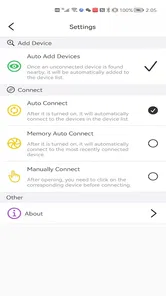
Analysis by Reviewed
I judge a lighting app less by how many effects it can show than by whether it makes an everyday adjustment feel effortless. LotusLamp X is aimed at people who want to shape a room’s atmosphere from their phone, especially when they already have compatible smart bulbs. It is a free personalization app from fstart, and its name suggests a more advanced take on the LotusLanternX app. I’d approach it as a way to manage mood and routine, not as a replacement for a dedicated smart-home system.
What to expect from speed and setup
The first useful test is a simple one: can you change the room’s lighting without turning setup into a project? In my experience, the appeal here is the straightforward path from opening the app to choosing a look. There is still a dependency that matters: the lights need to be compatible, and the phone has to communicate with them reliably. If either part is troublesome, no polished control screen can make the experience feel instant.
For a quick change before settling down for the evening, a direct color or effect choice is more practical than browsing through every option. I’d start with one basic setting, check how it looks in the room, and only then try more animated effects. That small habit makes it easier to tell whether a delay comes from the app, the bulbs, or simply the time it takes for a chosen effect to become noticeable.
Heavy use, routines, and trade-offs
The features described for LotusLamp X point toward more than occasional color changes: music-linked lighting, dynamic effects, scheduling, and voice control can each make the lights feel more involved in a room. They also create different expectations. A subtle fade is suited to winding down, while a more animated response makes sense for a gathering; neither needs to be the default for every moment. I’d keep a calm everyday setting easy to reach and reserve busier effects for when they add something rather than distract.
A realistic routine might be to set a softer look for the hour before bed, then choose a livelier effect when friends come over. Scheduling could help make a lighting change part of a regular day, but it is worth checking that the bulbs are connected and that the chosen timing still suits your routine. Music synchronization is a more occasional treat than a reason to use the app constantly, and voice control is most convenient when your assistant setup already works well.
Reliability and device fit
When lighting controls pause, the inconvenience is small but noticeable: you want the room to respond, not spend time repeating a command. I have found that a short wait during syncing can be a minor snag, so I would avoid rapidly tapping several settings if the lights have not caught up yet. Give the current change a moment, then try again. This is a sensible first step before changing your setup or assuming the app has stopped working.
There is a practical distinction between a focused bulb-control app and a broader smart-home alternative. If your priority is experimenting with room color, effects, and lighting routines, a purpose-built app can feel more direct. If you need one place to manage a wider collection of connected devices, your existing smart-home platform may be a better fit. LotusLamp X makes most sense when its lighting controls match the bulbs you own; it is not a useful reason by itself to buy hardware without first checking compatibility.
More From Our News Desk

 Gmail
GmailGmail in a Busy Inbox: Who Benefits Most?
From first account to crowded workday, Gmail earns its place through dependable search and flexible sorting—but its best fit depends on how much inbox maintenance you can tolerate.

 Prime Video
Switching to Prime Video: What Changes in Your Viewing Routine
Prime Video can make a compelling second home for streaming, but switching means learning a different catalog, rental layer, and route from browsing to playback.

 Universal TV Remote Control
Universal TV Remote Control Works Best as a Reliable Backup
A phone remote earns its place through quick setup and reliable habits. Here is how to get more from Universal TV Remote Control—and where its limits show.

 Weather - By Xiaomi
Weather by Xiaomi Review: Clear at a Glance, Less Clear Up Close
Xiaomi’s weather app makes everyday forecasts quick to scan, but its calm surface can leave useful details and recovery paths harder to find than they should be.

 X
XX Under Pressure: Can It Recover When Posting Goes Wrong?
A resilience-focused review of X, examining setup, mistaken posts, interruptions, weak connections, and the gaps that matter when recovery needs to be dependable.

 Clash of Clans
Clash of Clans Is Won Between the Battles
Its raids are quick; its community is a long-term project of coordination, teaching, rivalry, and shared responsibility—with all the friction that entails.
Latest News



Lighting Up Your World
From the moment I downloaded LotusLamp X, I was intrigued by its simple yet elegant interface. Setting it up was a breeze, and within minutes, my room was illuminated with a spectrum of colors. The app pairs easily with compatible smart light bulbs, allowing you to customize the lighting to suit your mood or occasion.
Features That Shine
One of the standout features of LotusLamp X is its ability to sync lights with your favorite tunes. Imagine having your room lights dance to the beat of your playlist! The app offers a range of dynamic settings and effects, from calming fades to energetic flashes. You can even schedule lighting changes, so your lights can gently nudge you awake in the morning or dim down as you wind down for the night.
Another feature that I absolutely love is the voice control capability. Thanks to its integration with popular virtual assistants, you can simply say, “Hey, turn on the party lights,” and watch your room transform instantly. It’s like having a personal lighting assistant at your beck and call.
User Experience
I appreciate how LotusLamp X keeps everything user-friendly. The navigation is intuitive, ensuring that even those who aren’t tech-savvy can navigate the app with ease. Plus, the developers are consistently updating the app with new features and improvements, which speaks volumes about their commitment to user satisfaction.
For a more deliberate setup, I’d make one change at a time: first choose a color, then adjust the effect, and finally decide whether it belongs in a schedule. This makes it easier to find a comfortable setting without turning a quick evening adjustment into a long round of experimentation. It is also a useful way to keep a reliable everyday choice separate from the more playful options.
Performance in everyday use
The app’s average rating is 3.2 from around 3,100 ratings, with about 165 written reviews, while its reach extends to over a million installs. I read that as a reason to set practical expectations rather than assume every setup will behave identically. It is free and rated for Everyone, so it is easy to try if you already have compatible bulbs, but the value still depends on how smoothly those lights work with your phone.
On Android, version 5.6.02 requires Android 8.0 or later. That gives older supported devices a chance to run it, though an older phone may feel less responsive than a newer one when switching among animated effects. I would judge performance with the lighting routine I actually plan to use, rather than expect a demanding effect to behave like a simple color change. If the phone is already struggling, keeping the setup focused and avoiding unnecessary switching is a sensible approach.
Who will get the most from it
This app is most appealing if you enjoy changing the feel of one room without wanting to learn a complex automation system. It can suit someone who likes choosing a color for reading, a softer setting for bedtime, or a livelier scene for company. If you rarely change your lights after choosing a single white setting, the extra effects may not justify adding another app to your routine.
I would also be cautious if you expect a lighting app to fix inconsistent bulbs or to control devices outside its intended setup. When dependable, broad household control matters more than color effects, the platform you already use for other connected devices may be the less frustrating option. For anyone unsure, the low-risk approach is to try the app with existing compatible lights first, then decide whether scheduling, music response, or voice commands are useful enough to keep.
Making the most of a lighting session
A useful way to evaluate this kind of control is to test it during an ordinary task, not only while exploring effects. I’d pick one moment when a lighting change would genuinely help—reading at a desk, getting ready to sleep, or welcoming people into a room—and see whether the app makes that moment easier. If the phone has to become the center of attention, the lighting is no longer doing its job. That simple test can tell you more than cycling quickly through a long set of looks.
There is also a small but worthwhile distinction between choosing a scene for yourself and setting one that other people in the home can understand. A bold color may look fun in the app but feel distracting when someone else is working nearby. I’d favor a clear, comfortable everyday choice for shared rooms, then keep more dramatic settings for occasions when everyone expects them. This helps prevent the app’s most eye-catching options from becoming a source of friction.
Choosing between effects and simplicity
Compared with using only a bulb’s basic controls, a dedicated personalization app is appealing when you want to explore more than on and off or a fixed brightness. The trade-off is another layer between you and the lights: you need to learn where your preferred controls are and keep the bulbs and phone communicating. If the built-in controls you already use handle your routine well, there may be little reason to switch simply for novelty. The stronger case is when you will regularly use the app’s color and effect choices.
I would treat music response as an occasional feature to test in the room where it will be used, rather than assume it suits every space. A lively effect may be entertaining during a gathering but visually tiring during a quiet evening. The practical tip is to decide on the mood first, then choose an effect that supports it. That keeps the lighting from competing with the music, conversation, or whatever else is happening.
Small checks that can prevent frustration
If a scheduled change does not fit the day you had in mind, I’d first review the timing and whether that routine is still useful, rather than adding more schedules to compensate. A setup that is easy to remember is more dependable in daily life than one with lots of exceptions. Likewise, if a command seems slow, make one adjustment and wait for the lights to respond before issuing another. These habits help separate a temporary communication delay from a genuine mismatch between the app and your setup.
For a first trial, I would avoid changing several bulbs, effects, and routines at once. Start with the room and the lights you care about most, confirm that a basic adjustment behaves as expected, then add one extra use case. This makes it much easier to decide whether the app is a good fit without turning troubleshooting into guesswork. It also gives you a practical answer to the question many people have: whether the app will be useful after the first burst of experimenting.
When another approach makes more sense
If you want centralized control for a mixed collection of connected devices, an established smart-home platform is likely the more sensible starting point. If your goal is specifically to give compatible bulbs a more expressive role in one room, a focused lighting app can be less cumbersome than navigating a larger system. Neither approach is automatically better; the deciding factor is whether you value specialized lighting choices or a single place for broader household control.
I would skip this app if you are not interested in changing lighting, do not already have compatible bulbs, or expect it to solve unreliable connectivity on its own. It is also a less obvious fit for someone who wants every household device to follow one shared routine. For a curious user with suitable lights, though, trying a simple setup first is a reasonable way to judge whether the extra control earns a place on the phone.
Final Thoughts
In a world where lighting can significantly affect our mood and environment, having an app like LotusLamp X is a game-changer. It’s more than just an app; it’s an experience that adds a splash of color and fun to everyday life. Whether you’re looking to jazz up your parties or create a soothing sanctuary, LotusLamp X is definitely worth a try. So, go ahead, give it a whirl, and let your lights do the talking!
LotusLamp X Frequently Asked Questions
Is LotusLamp X free to download, and what should I know before installing it?
LotusLamp X is free to download and is listed for Everyone. It is a personalization app from developer fstart, intended for people who want to adjust their lighting experience from a mobile device. Before installing, check that your device runs Android 8.0 or later. Its professional-version positioning may also be relevant if you are comparing it with the standard LotusLanternX app.
What is LotusLamp X and what can I do with it?
LotusLamp X is a versatile mobile application designed to enhance your lighting experience. It allows you to control smart lamps, create custom lighting scenes, and set schedules for your lights directly from your smartphone. With LotusLamp X, you can personalize your home’s ambiance, making it perfect for relaxation, work, or entertainment. LotusLamp X is described as the professional version of LotusLanternX App, so it is aimed at users looking for a more advanced lighting-control option.
Is LotusLamp X compatible with all smart lamps?
LotusLamp X is compatible with a wide range of smart lamps that support Bluetooth or Wi-Fi connectivity. However, it's recommended to check the compatibility list on the app's official website or within the app itself to ensure your specific lamp model is supported. This ensures optimal functionality and access to all features. Compatibility is worth checking before you install, especially if you already own a particular lamp and want to control it through the app.
How user-friendly is the LotusLamp X interface?
The interface of LotusLamp X is designed with user-friendliness in mind. It features an intuitive layout with easy-to-navigate menus and clear icons, making it accessible even for those who are not tech-savvy. The app includes a tutorial for first-time users to help them understand all functionalities quickly. This should make getting started more approachable for people who are new to controlling lighting from a phone.
What security measures does LotusLamp X have in place?
LotusLamp X prioritizes user security by implementing robust data encryption and secure login processes. The app regularly updates its security protocols to protect user data and prevent unauthorized access. Users are advised to keep their app updated to benefit from the latest security enhancements. Keeping the app current is a sensible step for anyone who uses it to manage connected lighting at home.
Pros
- User-friendly interface design
- Wide range of customization options
- Responsive customer support
- Supports multiple languages
- Frequent updates with new features
Cons
- Requires a stable internet connection
- Occasional in-app advertisement pop-ups
- Limited offline functionality
- High battery consumption
- Subscription required for premium features











