LooRead
- 391.00
- 3.8
- Installs
- 50.00K
- Price
- Free

Screenshots
Analysis by Reviewed
I approached LooRead as a reader looking for a simple way to discover digital stories, not as someone trying to replace every book app on my phone. That distinction matters. Its focus is the world of online fiction, so the experience is closer to browsing a constantly changing reading catalogue than opening a traditional ebook shelf. The app is free to install, carries a Teen content rating, and is published by HONG KONG LITERARY EXPLORATION TECHNOLOGY LIMITED.
After spending time with it, my impression is that LooRead works best when I want a quick reading session and enjoy exploring unfamiliar titles. It is less convincing for readers who already have a carefully organized library of purchased ebooks or who expect the clean, predictable structure of a dedicated ebook reader. The current version is 5.1.0, and the app has reached over 50 thousand installs with a 3.8 average from around 5 thousand ratings. That gives a useful picture: there is an active audience, but the experience is not universally smooth.
What reading on LooRead actually feels like
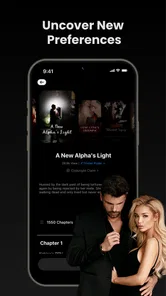
The first thing I noticed is that the app is built around discovery. Instead of beginning with a blank reading shelf, I found myself deciding what kind of story I wanted to try, scanning available choices, and judging a title from its presentation before committing to it. That makes the app appealing when I have only a few minutes and want something new, but it also means that browsing is part of the reading experience rather than a step I can completely avoid.
That approach suits serialized fiction particularly well. A long story can be tested in small portions, which lowers the risk of spending time on a title that does not match my taste. I recommend treating the first chapter or opening section as a trial rather than assuming every visible title will become a favorite. The most useful habit is to give a promising story enough time to establish its characters, then move on quickly if the writing or pacing does not work for you.
LooRead is categorized under Books & Reference, but I would describe it more specifically as a mobile fiction-reading service. It is not the same kind of tool as a dictionary, a research reference, or a conventional document reader. Readers who come for novels and episodic stories will understand its purpose quickly; readers looking for technical books, scanned documents, or a broad personal ebook archive should consider a different type of app.
The app’s free entry point is helpful because I can explore before deciding whether it belongs in my routine. However, in-app purchases range from $19.99 to $199.99 per item, so I would not begin by assuming that every part of the catalogue is included without cost. A sensible approach is to browse first, understand how access is presented for the particular story I want, and only then decide whether spending money makes sense.
Who will get the most from it
I think LooRead is a good match for readers who enjoy discovering fiction through recommendations, prefer reading on a phone, and do not mind sampling stories that may unfold over time. It can also suit someone who wants a lightweight evening habit: open the app, choose a title, read for a while, and stop without needing to plan an entire book.
More From Our News Desk

Weather by Xiaomi Review: Clear at a Glance, Less Clear Up Close

X Under Pressure: Can It Recover When Posting Goes Wrong?

Clash of Clans Is Won Between the Battles

Android Auto Makes the Case for Quieter Car Software

MobiOffice: Transforming Mobile Productivity with Seamless Integration

EA SPORTS FC™ Mobile Soccer: Redefining Mobile Sports Gaming
It is less suitable for a reader who wants to import an existing collection, control every aspect of typography, or read only books obtained from a personal library. It may also frustrate people who dislike browsing-based services or who want a clear one-time purchase model before they start reading. If you are mainly interested in public-domain classics, academic references, or audiobooks, a traditional ebook or audiobook platform will probably be a better first choice.
Starting without making the first session complicated
Because LooRead is free to install, I would begin with a low-commitment test. Install it on a compatible device, open the catalogue, and resist the temptation to judge the whole service from the first cover or recommendation. Look for a story that genuinely matches your preferred mood or genre, then read enough to decide whether the app’s presentation and pacing feel comfortable.
The minimum operating-system requirement is Android 7.0, which makes the app accessible on many older Android devices. That does not guarantee identical performance on every phone, so I would still keep the first session short if the device is older or has limited free storage. The practical goal is not to configure everything immediately; it is to find out whether reading inside this particular app feels natural on your screen.
When I try a new reading service, I pay attention to three things before becoming invested. First, can I return to a story without searching from the beginning? Second, is it obvious which part I have already read? Third, can I tell when continuing a title may involve a purchase? These checks are more valuable than simply counting how many stories appear on the home screen, because they determine whether the app remains convenient after the novelty fades.
My advice is to choose one story for a focused test instead of opening many titles at once. This creates a clearer first impression and makes it easier to notice how the app handles progress, chapter movement, and returning to the same work. If you immediately fill your attention with several recommendations, it becomes difficult to tell whether a problem comes from the app itself or from the way you are browsing.
Finding a first meaningful reading session
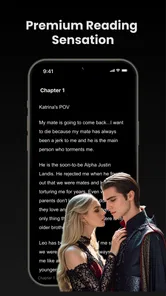
The first successful action should be simple: select a story that interests you and complete a genuine reading session rather than merely scrolling through recommendations. I would set aside enough time to get beyond the opening screen, read several sections, and then leave the app deliberately. Later, reopen it and see whether continuing feels obvious. That small test tells me far more than a quick glance at the catalogue.
A realistic example is an evening commute or a quiet break after lunch. I might open LooRead with no specific title in mind, choose a story based on its description, and read until I reach a natural pause. If I enjoy it, I note the title and return later. If I do not, I switch to another option without treating the first choice as a failure. This is where the app’s discovery-first design can be useful: the cost of trying a different story is mostly time and attention.
For a better result, I would avoid choosing solely from the most visually prominent recommendation. Instead, compare a few descriptions and look for the one that matches the kind of reading session you actually have available. A short break calls for an easy entry point, while a longer uninterrupted period may justify a more involved story. This sounds obvious, but it prevents the common mistake of blaming the app when the selected title simply does not fit the moment.
Another useful habit is to judge the reading flow separately from the story itself. A title can be interesting while the navigation feels awkward, or the interface can be comfortable while the writing is not for me. Keeping those judgments separate helps me decide whether to try another story in LooRead or leave the app altogether. One disappointing title should not automatically define the whole catalogue.
Where the free model needs attention
The word “free” describes the starting point, not necessarily the complete reading journey. Since the app includes in-app purchases, I would pay close attention to any screen that separates freely available material from paid access. The important question is not only whether I can open a story, but also how far I can continue before a purchase becomes relevant.
This is especially important for readers who prefer predictable entertainment spending. I would never add payment details or make a purchase in the middle of an emotionally intense chapter without first checking the amount and deciding whether the story has earned that commitment. The listed purchase range reaches from $19.99 to $199.99 per item, so a careful reader should treat the payment stage as a deliberate decision rather than an automatic continuation of reading.
My practical rule is to explore several titles before paying for one. If a story still holds my attention after the initial novelty has passed, I can make a more informed choice. If I am only curious about the ending, I would compare that desire with the cost and remember that another title may offer a better fit. This is one of the clearest trade-offs in LooRead: discovery is easy to start, while long-term value depends on how selectively I choose what to follow.
Confusion that can affect new readers
The biggest potential confusion is treating LooRead like a normal ebook reader. In a traditional reader, I usually bring a known book into a stable library and focus on reading. Here, the catalogue and discovery process play a larger role. If I expect to open the app and immediately see a personal collection of books I already own, the first session may feel less direct.
A second source of uncertainty is the difference between a title being visible and a title being fully available to read without payment. I recommend reading the access wording carefully before becoming attached to a story. This is not a reason to avoid the app, but it is a reason to make purchasing decisions while calm and informed.
Content rating also deserves attention. LooRead is rated Teen, so I would not hand it to a younger child simply because it is found in a books category. Parents should make their own judgment about whether the available fiction suits a particular reader. The rating is a useful starting signal, not a substitute for checking the kind of stories being selected.
Another point is device expectations. Android 7.0 is supported as the minimum operating-system level, but a supported device may still provide a different experience from a newer phone. If pages feel slow or the interface becomes uncomfortable, I would first close other demanding apps, check available space, and try a shorter reading session. Those are sensible troubleshooting steps before deciding that the service is unusable.
Three ways to use it more intelligently
My first tip is to create a personal shortlist rather than relying on one recommendation stream. When I find a title that looks promising, I remember it and compare it with another option before starting. This reduces impulsive choices and makes the catalogue work for me instead of keeping me in an endless browsing loop.
My second tip is to use the opening of a story as a compatibility test. I look for whether the tone, character introductions, and pacing suit the kind of reading I want that day. If they do not, I leave early. This saves more time than forcing myself through a title just because I already opened it, and it is particularly useful in a catalogue built around trying new fiction.
My third tip is to separate reading goals from spending goals. I can use the free entry point to discover what I like, but I should decide in advance what makes a paid continuation worthwhile. For me, that means enjoying the story consistently, understanding the purchase screen, and being comfortable with the amount. This simple separation prevents the emotional momentum of a cliffhanger from making the decision for me.
A fourth useful workflow is to test the app at the time and place where I will actually use it. Reading on a bright commute, in bed, or during a short break can produce very different impressions. If LooRead feels comfortable only during long browsing sessions but not during my normal reading window, it may not become a practical daily tool. The best app is the one that fits my routine, not merely the one with the most tempting catalogue.
How it compares with familiar alternatives
Compared with a conventional ebook reader, LooRead puts more emphasis on discovering fiction inside the service. A dedicated reader is usually better when I already know which books I want, need a dependable personal library, or prefer to manage files and reading materials myself. LooRead is more appealing when the search for a new story is part of the entertainment.
Compared with a physical book, the app is more convenient for carrying several possible stories on a phone, but it cannot offer the same screen-free feel or ownership experience. Compared with a general web browser, it may provide a more focused reading destination, yet the browser remains more flexible for accessing many unrelated sources. The right choice depends on whether I value curated discovery, personal control, or maximum openness.
Its purchase model is another point of comparison. Some readers prefer subscriptions because they can sample broadly for a recurring fee, while others prefer buying individual books and keeping a clear personal collection. LooRead’s listed in-app purchase range means I would evaluate each title and cost on its own rather than assuming it follows either of those familiar models. That can work for a reader who is selective, but it requires more attention.
When I would recommend skipping it
I would skip LooRead if my main goal were reading books I already own in a tightly organized library. I would also look elsewhere if I needed academic reference material, audiobooks, or a service designed around importing documents. The app’s identity is strongest when I want mobile fiction discovery, not when I need a universal reading utility.
I would be cautious if unexpected purchase prompts would make me uncomfortable, especially because the available purchase range can be substantial. In that situation, a platform with a payment structure I already understand may offer more peace of mind. I would also avoid recommending it to children without adult review, since its Teen rating indicates that it is not aimed at every age group.
Finally, I would not choose it solely because it is free to install. That is a useful invitation to try it, but the real question is whether its story selection and reading flow match my habits. If I enjoy browsing, sampling, and following mobile fiction, the app has a reasonable chance of becoming useful. If I want a quiet shelf of known books, another option will likely feel more natural.
My recommendation after the first week of use
My overall view is positive but measured. LooRead gives curious readers an accessible way to explore fiction on a phone, and its free starting point makes experimentation easy. I like the idea of treating it as a discovery tool rather than expecting it to behave like a traditional ebook cabinet. That mindset makes the experience clearer and helps me get to a meaningful reading session quickly.
At the same time, I would use it selectively. I would test several stories, watch the boundary between free reading and paid continuation, and decide whether a title deserves further spending before committing. The 3.8 average suggests a mixed experience, which matches my own judgment: the concept can work well, but convenience depends on finding the right story and understanding the access model.
My bottom line: LooRead is worth trying if you want to discover serialized or mobile fiction and are comfortable making careful choices about what you continue. It is not the best replacement for a personal ebook library, a research reference app, or a predictable all-you-can-read service. Start with one story, complete a real reading session, return to it once, and only then decide whether the app deserves a regular place on your phone.
For readers who enjoy that process, the app can turn a spare moment into a new reading habit. For everyone else, the test is still low risk at the beginning: explore patiently, keep your expectations specific, and let the quality of the actual reading experience—not the promise of endless discovery—make the final decision.
LooRead Frequently Asked Questions
Who develops LooRead, and what should I know before installing it?
LooRead is a Books & Reference app from HONG KONG LITERARY EXPLORATION TECHNOLOGY LIMITED. It is intended for readers interested in discovering and enjoying digital stories, so it may suit you if you want a mobile reading experience rather than a general-purpose library or document tool. The app is rated for Teen audiences, which is worth considering when choosing reading apps for younger users.
What is LooRead and what can I use it for?
LooRead is a reading-focused app designed to help users discover, organize, and enjoy written content in a convenient mobile format. Depending on the available catalog and features, you may use it to browse stories, save interesting titles, continue reading across sessions, and manage your personal reading experience. Its simple layout makes it suitable for casual readers as well as users who regularly follow digital content.
Is LooRead free to download and use?
LooRead is free to download, but some content or functions can depend on the app’s current business model. Certain books, stories, premium tools, subscriptions, or optional purchases may require payment; in-app purchases range from $19.99 to $199.99 per item. Before confirming any transaction, review the pricing information shown inside the app and check whether subscriptions renew automatically. Availability of free and paid features can also vary by country and platform.
Does LooRead require an internet connection?
An internet connection is generally needed to download the app, create or synchronize an account, browse the available library, and access newly loaded content. If LooRead supports offline reading, you may be able to download selected items in advance and read them without mobile data or Wi-Fi. Offline access can be limited by licensing, storage space, account status, or the specific title you choose.
Can I use LooRead on both Android and iPhone?
LooRead’s availability depends on whether the developer has released compatible versions for Android and iOS. Before downloading, check the official Google Play Store or Apple App Store listing for supported devices, operating-system requirements, and the latest update information. The Android version requires Android 7.0 or later. Older phones may not support every function, while tablets or different screen sizes may display the reading interface differently.
Pros
- Clean
- distraction-free interface for comfortable reading sessions.
- Useful reading tools make it easier to keep track of your progress.
- Content can be accessed conveniently from a mobile device.
- Simple navigation makes the app approachable for new users.
- Suitable for readers who prefer a focused alternative to social platforms.
Cons
- The available library may feel limited compared with larger reading services.
- Some features may require an account or additional setup before use.
- Offline access may not be available for every piece of content.
- Reading preferences and customization options could be more extensive.
- Performance may vary on older phones or with slower internet connections.













