

LogRide - Theme Park Database
- 47.00
- 4.2
- Installs
- 50.00K
- Price
- Free

Screenshots
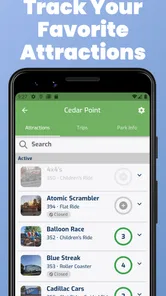
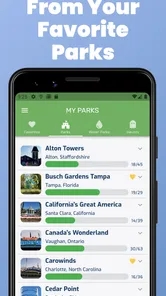
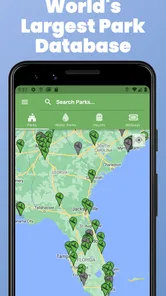
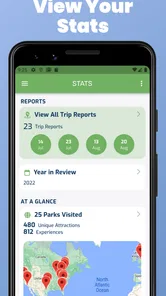
Analysis by Reviewed
I installed LogRide - Theme Park Database expecting a simple way to remember roller coasters, but I found something more useful for people who treat park visits as a hobby rather than a one-day outing. It is a travel and local app from PARKWIDE LLC that turns rides, parks, and personal memories into an organized record. The basic idea is easy to understand: instead of relying on scattered photographs, notes, or fading memories, I can use one dedicated place to keep track of my coaster experiences.
That focus makes it different from a normal theme-park map or a general travel planner. I would not open it primarily to find a restaurant or calculate the quickest route across a resort. I would open it before a visit to decide what I want to ride, during the day to keep my record current, and later when I want to remember which parks and attractions I have already experienced. The store presents it as a tool for theme-park fans, coaster enthusiasts, haunt fans, and thrill seekers, and that description fits its personality better than a broad “travel app” label.
The app is free to install, carries an Everyone age rating, and has reached over 50,000 installs. Its average rating is 4.2 from around 200 ratings, with several dozen written reviews. Those figures suggest a focused community rather than a mass-market travel service, which is important when deciding what to expect. This is a specialist logbook with a database-oriented purpose, not a replacement for every app you might use on a park trip.
Where I got stuck before the first useful visit
The first friction comes from the app’s specialist nature. A general travel application usually explains itself through familiar actions such as searching for a destination, saving a hotel, or following a map. LogRide asks me to think more like a collector: which park matters, which attraction belongs to it, and what do I want to record about my own history? That is not difficult, but it does require a moment of orientation.
I found it helpful to begin with one park I know well instead of trying to understand the entire database at once. Starting with a familiar visit gave me an immediate test: could I locate the park, recognize the rides, and record an experience without second-guessing every choice? This small approach is better than opening the app with an ambitious plan to reconstruct years of theme-park trips in one sitting.
Another possible stumbling block is expectation. The name “database” may lead some users to expect a live operational guide, while the more valuable use is keeping a personal relationship with the attractions. If I need current wait times, live closures, ticket purchasing, or detailed turn-by-turn navigation, I would still use the park’s official app or another travel tool. LogRide makes more sense beside those services, not necessarily instead of them.
There is also a difference between recording a ride and planning a day. A ride log can tell me what I have experienced and help me choose targets, but it does not automatically solve the practical problems of crowds, weather, opening hours, or family schedules. I would avoid judging it harshly for not behaving like a complete resort companion. Its strength is the enthusiast record, and the more clearly I use it for that purpose, the less confusing the first session becomes.
More From Our News Desk

 Weather - By Xiaomi
Weather by Xiaomi Review: Clear at a Glance, Less Clear Up Close
Xiaomi’s weather app makes everyday forecasts quick to scan, but its calm surface can leave useful details and recovery paths harder to find than they should be.

 X
XX Under Pressure: Can It Recover When Posting Goes Wrong?
A resilience-focused review of X, examining setup, mistaken posts, interruptions, weak connections, and the gaps that matter when recovery needs to be dependable.

 Clash of Clans
Clash of Clans Is Won Between the Battles
Its raids are quick; its community is a long-term project of coordination, teaching, rivalry, and shared responsibility—with all the friction that entails.

 Android Auto
Android Auto Makes the Case for Quieter Car Software
The car interface is no longer judged by how much it can do, but by how quietly it helps. Android Auto shows what drivers now expect—and what still gets in the way.

 MobiOffice: Word, Sheets, PDF
MobiOffice: Transforming Mobile Productivity with Seamless Integration
MobiOffice: Word, Sheets, PDF is redefining mobile productivity with a surprising blend of functionality and innovation.

 EA SPORTS FC Soccer Mobile 26
EA SPORTS FC™ Mobile Soccer: Redefining Mobile Sports Gaming
Dive into EA SPORTS FC™ Mobile Soccer, where immersive gameplay and strategic depth transform mobile sports gaming.
Latest News



Start with one known park
My preferred starting workflow is simple. I choose a park I have visited recently, find one or two attractions I clearly remember, and make sure the record reflects my own experience. Then I check whether the surrounding park structure feels intuitive. This gives me a low-risk way to learn the app while creating something useful immediately.
That method also reveals whether my own memory is organized enough for a large historical log. If I cannot remember the exact names of older rides, I do not force the issue. I record the visits I can verify from photographs, tickets, or messages, then return to older trips later. A careful partial history is more useful than a rushed list filled with guesses.
For a family, I would set expectations before handing the phone to children. The Everyone rating makes the app broadly suitable from an age-classification perspective, but the appeal is still strongest for people who enjoy tracking attractions. Younger visitors may prefer the excitement of choosing the next ride, while an adult can maintain the longer-term record. That division keeps the app from becoming another task during an already busy park day.
Setup checks that prevent avoidable frustration
Before a major trip, I would spend a few minutes checking the basics rather than waiting until I am standing in a crowded entrance area. I would update the app if an update is available, confirm that my phone has enough battery for the day, and open LogRide while I have a reliable connection. These are ordinary preparations, but they matter more when the app is being used as a live record during a busy outing.
The current version is 6.7.1 and the app requires at least OS 9. That makes compatibility an easy first check on an older Android or iOS device. If the installation itself fails, closes immediately, or behaves strangely before I can use any park content, I would first verify the operating system and the device’s available storage. Reinstalling repeatedly without checking those fundamentals rarely improves the situation.
I would also decide in advance how detailed my personal log should be. Some people want a clean list of completed attractions. Others want to preserve a richer history of parks, visits, and favorite experiences. Neither approach is automatically better. The useful choice is the one I can maintain consistently, because an elaborate system abandoned after one trip is less valuable than a modest record I continue using.
The app is free, but it includes optional in-app purchases ranging from $0.99 to $9.99 per item. I would explore the free experience first and only consider an optional purchase after understanding what part of my workflow it improves. That is especially sensible for occasional visitors. Frequent enthusiasts may find extra value in expanding their use, while a person visiting one park once may have no reason to spend beyond the initial installation.
One practical setup habit is to separate planning from logging. Before a trip, I can use the database to identify attractions that matter to me and make a short personal priority list elsewhere if needed. During the visit, I can focus on recording completed experiences rather than repeatedly browsing. Afterward, I can review the day with more patience. This three-stage approach reduces the temptation to turn every queue into an administrative session.
Use the first session as a test, not a full migration
I would not immediately enter every coaster I have ever ridden. Instead, I would test three situations: finding a familiar attraction, recording a recent ride, and returning to the same information later. Those checks answer the questions that matter most in practice: can I navigate comfortably, does the record make sense to me, and will I actually want to use it again?
If the app feels slow or incomplete during setup, I would distinguish between a content issue and a device issue. A single missing or unfamiliar attraction may simply require a different search term or a closer look at the park structure. A whole-app failure, on the other hand, points toward the phone, installation, connection, or operating-system environment. Making that distinction saves time and avoids blaming the wrong part of the setup.
I would also keep my first entries conservative. If I am unsure whether I rode a renamed attraction years ago, I would wait until I can check a photograph or personal note. The value of a personal database comes from trust. Once uncertain entries accumulate, future planning becomes less reliable because I no longer know which parts of the history are solid.
Recovering when a visit or record does not go smoothly
Real park days are messy. Phones lose battery, queues change plans, and I may forget to record a ride until much later. LogRide is most useful when I treat it as a recoverable journal rather than a stopwatch. If I miss an entry, I can reconstruct the day afterward from memory and supporting evidence such as photos or a calendar. That is one reason I prefer a post-visit review instead of insisting that every action happen immediately.
When an entry seems not to have saved, I would first pause and check whether I am looking at the correct park or attraction. Specialist databases can contain similarly named rides, and a mistaken location can look like a missing record. I would then close and reopen the relevant screen, verify the connection, and try again without rapidly tapping through several actions. These are safe, general recovery steps that address the most common sources of confusion without assuming a particular technical fault.
If the app stops responding, I would force-close it, reopen it, and check whether the problem affects one screen or the whole application. A single troublesome record suggests a navigation or content mismatch; a failure everywhere suggests a broader device or installation problem. I would avoid deleting the app as a first response, especially if I have not considered how my personal records are maintained. A restart and a careful retry are less disruptive.
For a planned trip, I would create a personal backup habit outside the app for anything I consider irreplaceable. That does not mean LogRide is unsuitable; it means a long history deserves the same caution as photographs or travel documents. I might keep a simple note of major parks and dates, especially before changing phones. The extra effort is small, and it gives me a reference if a device problem interrupts access.
A useful recovery workflow is to log the broad visit first and fill in details later. Suppose I spend a full day at a park and only remember the major coasters by the evening. I can record those while they are fresh, then revisit smaller attractions after checking my photos. This avoids turning the app into a burden and produces a more accurate history than trying to type everything while standing in a queue with limited attention.
When the record is more valuable than the live session
The app becomes particularly interesting after the trip. I can compare my memory with what I actually recorded, notice which parks have become familiar, and identify gaps in my coaster history. That retrospective use is easy to overlook because theme-park apps are often judged only by what they do on the day. Here, the long-term record is the reason to keep returning.
For a coaster enthusiast planning a future holiday, the database can serve as a filter for decisions. Instead of selecting a destination only because it is popular, I can think about which attractions would genuinely add something new to my personal history. This is a more meaningful planning method than collecting destinations for their own sake. It also helps prevent repeating a familiar trip when I would rather explore a different park.
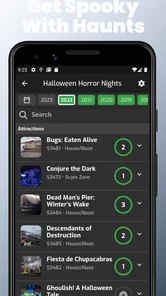
For haunt fans, the same principle applies to seasonal experiences. A visit can be remembered as more than a photograph or a social post. I can use the record to preserve which events and attractions shaped a particular season, then compare that personal history with future plans. The app’s appeal is not limited to people who rank every coaster; it also suits anyone who enjoys building a detailed memory of thrill-focused outings.
When the app is not the cause of the problem
Not every disappointing result comes from LogRide. A park may change an attraction’s name, remove a ride, reorganize an area, or present information differently from what I remember. If something looks unfamiliar, I would check the park’s own current information before assuming the database is wrong. Theme-park history is not static, and personal memories often preserve an older version of a place.
Connectivity can create another false diagnosis. If browsing works poorly in a crowded park, the issue may be the local network rather than the app itself. I would avoid repeated searches in a weak signal area and record the essential details later when the phone is working normally. Likewise, if the device is overheating, low on storage, or struggling with many open applications, other apps may show similar symptoms.
Battery management matters too. A full day of photographs, maps, messages, and camera use can leave little power for any logging tool. I would not blame LogRide if it disappears from my plan because the phone reaches a low-battery state. For a serious recording day, a charged power bank and a short list of priority entries are more practical than expecting one app to solve the limitations of the device.
There is also a human cause: over-recording. If I try to document every detail while traveling with friends, I may enjoy the day less and still end up with an incomplete record. The better compromise is to capture only the information I will value later. LogRide works best when it supports the visit rather than competing with it.
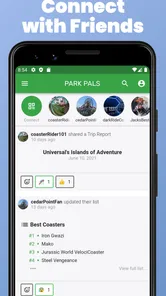
Compared with a park’s official application, this one is more appealing for personal history and enthusiast discovery, while the official option is usually the natural choice for immediate resort logistics. Compared with a spreadsheet or notes app, LogRide offers a purpose-built environment for theme-park memories, but a spreadsheet may be better for someone who wants complete control over custom columns, budgets, or group schedules. Compared with a social platform, it keeps the emphasis on my own record rather than public posting. The right choice depends on whether I want a specialist log, a live guide, a flexible database, or a social diary.
Who should use it, and who should skip it
I would recommend LogRide to a frequent park visitor who enjoys recognizing patterns in personal travel. It is also a good fit for someone planning a coaster-focused holiday, a collector who wants a structured history, or a family member who has become the unofficial keeper of everyone’s park memories. The app gives those users a reason to return after the excitement of a single day has passed.
I would be less likely to recommend it to someone who visits a theme park rarely and only wants current practical information. That person may get more immediate value from the official park app, a map, or a normal travel planner. I would also hesitate to suggest it to a user who dislikes maintaining personal records. A database cannot create enjoyment by itself; it rewards the habit of recording and reviewing.
The optional purchases deserve the same measured approach. Because the app is free to start, I can judge its fit without committing money immediately. If I only need a basic reminder of one trip, I would stay with that initial experience. If I become a regular user and find that the expanded functions support a real planning or cataloging habit, a small purchase may make sense. The key is to pay for a workflow I already use, not for the hope that spending will make the app interesting.
On mobile devices running OS 9 or newer, the technical entry point is straightforward enough for most users. Still, I would not install it minutes before a major trip and assume everything will be perfect. A short test at home reveals whether the navigation suits me, whether my phone handles it comfortably, and whether I understand how I want to record visits. That preparation is more valuable than trying to learn the system in a crowded park.
My practical verdict after using it as a real travel companion
What I like most is the change in perspective. LogRide makes a theme-park visit feel like part of a continuing hobby rather than an isolated day. I can plan around what I have already experienced, preserve memories that would otherwise blur together, and make future trips more personal. That long-term usefulness is the app’s clearest advantage over ordinary notes and general travel tools.
My reservations are mostly about fit and discipline. It is not the one app I would depend on for every live park need, and it can feel unnecessary if I do not care about keeping a ride history. The first session benefits from a deliberate approach, and a crowded outing can expose the limits of trying to log everything in real time. Those are not deal-breakers, but they should shape how I use it.
PARKWIDE LLC has positioned this as a focused Travel & Local app, and I think that focus is its strength. With a 4.2 average and more than 50,000 installs, it has found an audience among people who want more than a generic destination guide. The free entry point makes it easy to test, while the optional purchases give committed users room to decide whether deeper use is worthwhile.
My recommendation is to install it before the next park visit, choose one familiar attraction, and build from there. Do not treat it as a replacement for official park information, and do not let logging take over the day. Use it to prepare, capture the experiences that matter, and review the trip afterward. For me, LogRide - Theme Park Database is most rewarding when it becomes a trusted personal archive: practical enough to guide future plans, but relaxed enough to let the actual adventure come first.
LogRide - Theme Park Database Frequently Asked Questions
Is LogRide free to download, and are there in-app purchases?
LogRide is free to download, so you can try it without paying upfront. The app also offers optional in-app purchases, with individual items priced from $0.99 to $9.99. Whether those purchases are useful depends on how you want to use the app; the basic idea is to explore theme parks and attractions and keep a personal ride history.
Who makes LogRide, and what devices can run it?
LogRide is developed by PARKWIDE LLC and is available for mobile devices running Android or iOS. On Android, it requires version 9 or later. Its Everyone content rating makes it suitable for a general audience, including families and casual park visitors as well as dedicated coaster enthusiasts. Check your device’s software version and the relevant app store before downloading.
What is LogRide - Theme Park Database used for?
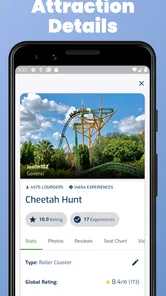
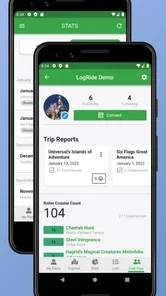
LogRide is designed for theme park enthusiasts who want to record, organize, and explore their roller coaster and attraction experiences. After setting up a profile, you can mark rides you have completed, view information about parks and attractions, track personal statistics, and keep a long-term history of your visits. It is especially useful for collectors, coaster fans, and travelers planning future park trips.
Does LogRide include theme parks and attractions from around the world?
The app focuses on a broad collection of theme parks, roller coasters, and other attractions, with coverage that extends beyond a single country. However, the amount and accuracy of information can vary depending on the park and attraction. Popular parks generally have more complete listings, while smaller or newer locations may require community updates or may not yet contain every detail you are looking for.
Can I use LogRide without creating an account or an internet connection?
Some browsing and basic exploration may be available without immediately creating an account, but the app’s main tracking features are intended for users who maintain a personal profile. An internet connection is normally helpful for loading park data, synchronizing changes, and accessing updated information. Offline availability should not be assumed for every feature, particularly when viewing newly updated databases or community content.
Pros
- Extensive database covering parks
- rides
- attractions
- and historical information.
- Useful for planning visits with ride lists
- park maps
- and personal tracking tools.
- Lets users record rides and build a detailed amusement park history.
- Community contributions help expand information for lesser-known parks and attractions.
- Helpful reference for enthusiasts comparing coasters
- parks
- and ride manufacturers.
Cons
- Some attraction details may be incomplete
- outdated
- or dependent on user submissions.
- The large amount of information can feel overwhelming for casual theme park visitors.
- Certain features or content may require an account or paid access.
- Park information may be less useful outside the regions with strong community coverage.
- Frequent database browsing can use mobile data
- especially without reliable offline support.











