Logo Master - Design & Maker
- 2.58K
- 4.5
- Installs
- 1.00M
- Price
- Free

Screenshots

Analysis by Reviewed
If you’ve ever toyed with the idea of creating your own logo, then you might want to check out Logo Master - Design & Maker. This app is like a magic wand for anyone who’s looking to whip up some impressive designs without needing a degree in graphic design. Trust me, after spending some time with it, I’m convinced it’s a game-changer for small businesses and creative minds alike.
Unleashing Your Inner Designer
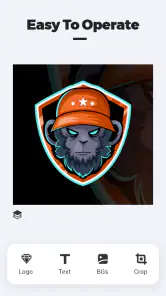
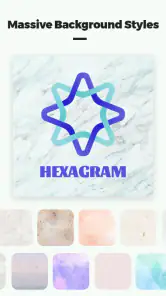
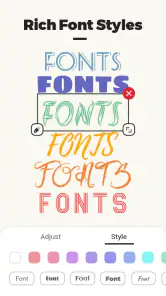
Let’s dive straight into what makes Logo Master - Design & Maker tick. First off, the user interface is sleek and intuitive. You open the app, and everything is laid out in a way that just makes sense. Even if you’re someone who breaks out in a cold sweat at the thought of design software, this app holds your hand every step of the way. It’s got an impressive array of templates and tools that let you customize to your heart’s content. Whether you want to tweak colors, adjust fonts, or add some unique icons, it’s all there.
Features That Spark Creativity
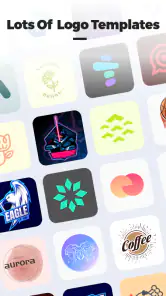
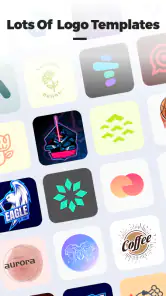
One of the things that really caught my eye was the variety of templates available. There’s literally something for every industry, from tech startups to fashion boutiques. And the best part? You don’t have to start from scratch unless you want to. Customize a template or dive into the deep end and create your masterpiece from a blank canvas. The level of flexibility is astonishing.
Now, let’s talk about the tools. Ever wanted to see how your logo would look on a business card or a t-shirt? The app’s mock-up feature lets you do just that. It’s a nifty little tool that gives you a realistic preview of your designs in real-world scenarios. Plus, the vector graphics ensure that your logo looks sharp and professional, no matter the size.
The Joy of Creating Without Limits
One of my favorite aspects of using Logo Master - Design & Maker is the freedom it offers. There’s no limit to the number of logos you can create. For a serial entrepreneur or someone with multiple projects on the go, this is a blessing. You can experiment, iterate, and refine your designs without any pressure.
And here’s a little nugget that I found particularly delightful: the app doesn’t bombard you with ads every five seconds. It’s a clean and focused environment where creativity can truly flourish. You can concentrate on what matters most – bringing your ideas to life.
Final Thoughts
In conclusion, Logo Master - Design & Maker is a must-have tool for anyone who needs a logo that stands out. It’s user-friendly enough for beginners yet powerful enough for seasoned designers. The plethora of templates and customization options means your creativity is the only limit. Whether you’re branding your new venture or just having fun designing, this app has got you covered. So, why not give it a whirl and see what amazing designs you can come up with?
More From Our News Desk

Clash of Clans Is Won Between the Battles

Android Auto Makes the Case for Quieter Car Software

MobiOffice: Transforming Mobile Productivity with Seamless Integration

EA SPORTS FC™ Mobile Soccer: Redefining Mobile Sports Gaming

How Microsoft OneDrive Became a Mobile Productivity Giant

How Google Translate Breaks Language Barriers Effortlessly
Logo Master - Design & Maker Frequently Asked Questions
What is Logo Master - Design & Maker?
Logo Master - Design & Maker is a versatile application designed for both Android and iOS platforms that enables users to create professional-looking logos and designs. With an extensive range of templates, fonts, and design tools, users can customize their logos to meet specific business or personal branding needs. This app is ideal for entrepreneurs, small businesses, and freelancers looking to establish a strong brand identity.
How easy is it to use Logo Master - Design & Maker for beginners?
Logo Master - Design & Maker is designed with user-friendliness in mind, making it accessible even for beginners. The app features an intuitive interface with drag-and-drop functionality, allowing users to effortlessly navigate through various design options. Additionally, the app offers tutorials and tips to help new users get started, ensuring a smooth design experience without requiring prior design skills.
What are the key features of Logo Master - Design & Maker?
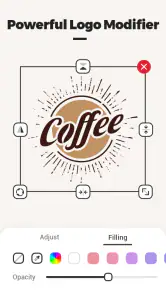
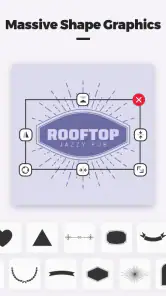
The app boasts a wide array of features including a vast library of customizable templates, an extensive choice of fonts and colors, and advanced editing tools such as layering, transparency adjustments, and shape manipulation. Users can also access high-quality vector files to ensure logos are scalable without losing quality. These features make it a powerful tool for creating unique and professional logos.
Is Logo Master - Design & Maker free to use?
Logo Master - Design & Maker offers a free version with basic features suitable for simple logo design tasks. However, for access to the full range of advanced features and a wider selection of templates and design tools, users can opt for a premium subscription. This subscription model allows users to make the most of the app's capabilities, catering to more complex design needs.
Can I use Logo Master - Design & Maker for commercial purposes?
Yes, Logo Master - Design & Maker allows users to create logos for commercial purposes. Whether you’re designing for your own business or for clients, the app provides the necessary tools and resources to produce high-quality logos that can be used in various professional settings. It's an excellent choice for entrepreneurs and freelancers aiming to develop strong brand visuals.
Pros
- User-friendly interface for easy design creation
- Wide variety of templates available
- Affordable premium features
- Cloud storage for designs
- Cross-platform accessibility
Cons
- Limited free version features
- Occasional in-app ads
- Requires internet for cloud access
- No offline mode
- Some advanced tools are complex
- Category
- Art & Design
- Version
- 3.0.6











