

Lockly Home
- 94.00
- 3.8
- Installs
- 50.00K
- Price
- Free

Screenshots
Analysis by Reviewed
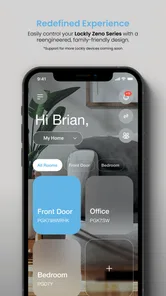
I spent time with Lockly Home as a house-and-home app for people who use Lockly devices and want more control than a traditional key can provide. Its purpose is focused: it brings device management and monitoring into one mobile interface rather than asking me to handle everything at the lock itself. That focus is useful, but it also means the app’s value depends heavily on already owning compatible Lockly hardware.
My overall impression is that this is a practical companion rather than a complete home-security platform. I found the idea most appealing for households where several people need access, where checking a lock remotely is reassuring, or where physical keys create avoidable problems. At the same time, anyone expecting the app to replace a lock, solve every access challenge, or work as a general smart-home controller should set more modest expectations.
How Lockly Home fits into everyday access
Lockly Home is developed by PIN Genie Inc. and sits in the House & Home category. It is free to install, carries an Everyone age rating, and was released on September 7, 2024. The current version is 1.5.7, with Android support starting at version 6.0. Optional purchases are listed from $1.99 to $139.99 per item, so I would treat the free download as an entry point rather than assuming every possible capability is included at no cost.
The central experience is easy to understand: connect the app to Lockly devices, manage the available settings and access arrangements, and monitor what is happening around the lock. That is a narrower job than the one performed by a broad smart-home app, and I think that is both its strength and its limitation. A focused app can be easier to approach when the only thing I need to do is deal with the front door, but it offers less reason to open it if I do not use Lockly hardware.
The app has attracted a 3.8 average from around 216 ratings, alongside roughly 94 written reviews and over 50 thousand installs. Those figures suggest a real but still relatively modest user base. I would not interpret the rating as a verdict on every Lockly device, because the day-to-day experience can depend on the particular lock, phone, connection, and household setup. Still, it is a useful reminder to test the workflow carefully before making the app central to a time-sensitive access routine.
Readability and navigation in a lock-focused app
What I like about the concept is that the app has a clear mental model. I am not searching through entertainment, shopping, or unrelated home controls to find the door. The important tasks should logically revolve around the Lockly device, its current state, and the people or situations connected to it. For a user who prefers a purpose-built tool, that is less mentally demanding than a crowded all-in-one dashboard.
There is an important distinction between a simple purpose and a simple experience, though. Managing a lock can involve several layers: identifying the right device, understanding who has access, checking whether a command has taken effect, and knowing whether the information on screen is current. I would take a few minutes to learn the terminology and screen flow before relying on the app while rushing out of the house. Familiarity matters more here than it does in a casual app because a misunderstood status can affect a real doorway.
More From Our News Desk

 Gmail
GmailGmail in a Busy Inbox: Who Benefits Most?
From first account to crowded workday, Gmail earns its place through dependable search and flexible sorting—but its best fit depends on how much inbox maintenance you can tolerate.

 Prime Video
Switching to Prime Video: What Changes in Your Viewing Routine
Prime Video can make a compelling second home for streaming, but switching means learning a different catalog, rental layer, and route from browsing to playback.

 Universal TV Remote Control
Universal TV Remote Control Works Best as a Reliable Backup
A phone remote earns its place through quick setup and reliable habits. Here is how to get more from Universal TV Remote Control—and where its limits show.

 Weather - By Xiaomi
Weather by Xiaomi Review: Clear at a Glance, Less Clear Up Close
Xiaomi’s weather app makes everyday forecasts quick to scan, but its calm surface can leave useful details and recovery paths harder to find than they should be.

 X
XX Under Pressure: Can It Recover When Posting Goes Wrong?
A resilience-focused review of X, examining setup, mistaken posts, interruptions, weak connections, and the gaps that matter when recovery needs to be dependable.

 Clash of Clans
Clash of Clans Is Won Between the Battles
Its raids are quick; its community is a long-term project of coordination, teaching, rivalry, and shared responsibility—with all the friction that entails.
Latest News



For people with reduced vision, readable text, strong contrast, predictable labels, and compatibility with the phone’s own display settings can make a major difference. I would not assume that every screen is equally comfortable simply because the app’s purpose is straightforward. Enlarged text can also change how much information fits on a screen, so I recommend checking the most important paths—opening the device view, checking status, and handling access—after adjusting the phone’s text size.
Navigation is also a question of cognitive load. A person managing a home for relatives, guests, or renters may not use the app every day. In that situation, a short written routine can help: open the app, select the correct lock, verify the displayed state, then perform the intended action. I find this more dependable than trusting memory, especially when more than one Lockly device is present.
Motor and sensory considerations at the door
The strongest accessibility benefit is the possibility of managing a compatible lock through a phone instead of depending entirely on a small physical key, a tight keyway, or a difficult turning motion. Someone with limited hand strength, arthritis, tremors, or an injury may find a familiar phone interaction easier than manipulating hardware. That benefit is real, but it should be viewed as an alternative route, not a guarantee that every access task becomes effortless.
Using a phone still requires several physical actions: holding the device, waking it, navigating to the correct control, and responding to whatever confirmation the app presents. A user with limited dexterity may prefer to keep the app in an easy-to-reach location and avoid burying it in a crowded folder. A protective case, gloves, wet hands, or a nearly empty battery can turn a normally convenient process into a frustrating one.
People with hearing loss may appreciate that an app-based workflow does not need to depend on hearing a mechanical sound at the door. However, visual confirmation becomes especially important. I would look for a clear change in the displayed state rather than assuming that tapping a control means the lock has completed the action. Likewise, users with low vision should consider whether the phone’s spoken feedback, magnification, or other system tools make the relevant controls understandable in practice.
For users with cognitive disabilities, the best setup is usually the one with the fewest decisions. Keeping device names distinct, limiting unnecessary changes, and agreeing on a household routine can reduce mistakes. If a family member is helping someone else manage access, it is worth practicing the process together in a calm moment rather than introducing it during an emergency or when somebody is waiting outside.
I also see a sensory advantage in separating the app from the physical keypad or other lock interaction. A person who finds bright displays, tactile buttons, or repeated physical steps uncomfortable may prefer whichever part of the system feels less demanding. The right choice will vary, so I would not call the app universally better than the lock’s built-in methods. It is more accurate to say that it adds another possible route.
Situational access beyond the front door
The everyday scenario where I see the clearest value is a household with changing access needs. Imagine a relative arriving while the resident is upstairs, a caregiver visiting at an agreed time, or a family member needing reassurance that the door is secure after everyone has left. In those moments, an app that can manage and monitor a Lockly device may reduce the need to exchange physical keys or interrupt another task.
It can also help when the person at the door is not the person who normally handles the lock. A household member with limited mobility may ask another trusted person to manage access, while someone who travels frequently may want a way to stay involved in the home’s routine from a distance. The useful insight is that the app is not only about convenience for the primary resident; it can support a shared access arrangement when responsibilities are clearly agreed.
That same flexibility calls for careful habits. I would avoid making the app the sole plan for a critical entry, particularly if the phone is shared, the battery is low, or the user is unfamiliar with the connection conditions. Keep a backup approach appropriate to the lock and household, and make sure everyone who may need to enter understands the normal process before they need it.
For older adults, the app may be attractive when a family member helps with home management. The helper can be involved without needing to handle the resident’s keys every time. Yet privacy and independence matter: access should be arranged deliberately, with only trusted people included, and the resident should understand what the arrangement allows. A technically convenient setup can still feel intrusive if it removes control from the person who lives there.
For short-term guests or service visits, the app’s usefulness depends on how clearly the household can define and manage access. I would not hand someone a phone with unrestricted control simply because they need to enter once. The safer practical approach is to decide what access is necessary, explain the timing and expectations, and remove or change it when the visit is over. The app may make administration easier, but it does not replace judgment.
Where the experience still has barriers
The first barrier is hardware dependence. Lockly Home is not a universal door-control app that can make an ordinary lock smart. If I do not own a compatible Lockly device, there is little reason for me to install it. That also means the total cost of adopting the system is not represented by the free app alone. The listed in-app purchase range reinforces the need to understand which functions or services may involve additional spending before building a household plan around them.
A second barrier is the difference between remote convenience and dependable access. Phone-based control introduces another layer between the person and the door. The user may need the phone to be charged, the app to be available, and the device connection to behave as expected. I would never describe a mobile control path as a substitute for thinking through what happens when the phone is lost, offline, damaged, or being used by someone who has not practiced the process.
There is also a learning barrier for people who are comfortable with physical keys but less comfortable with connected devices. A lock is a high-consequence object: a small misunderstanding can leave someone outside or create uncertainty about whether the home is secured. The best way to reduce this friction is hands-on rehearsal. Test the normal entry process, the monitoring view, and the household backup plan while everyone is available to help.
People with disabilities may encounter a mismatch between the app and the lock. An accessible phone interface does not automatically make the physical doorway accessible. The door may still be heavy, the handle may require twisting, or the person may be unable to position a phone comfortably while approaching it. Conversely, someone who can operate the hardware easily may find the app’s digital steps unnecessary. I would evaluate the complete journey from arriving at the door to getting inside, not just the app screen.
Another limitation is that a focused lock app can become awkward when a home contains several kinds of connected equipment. If I want lighting, cameras, alarms, and entry controls in one place, a broader ecosystem may be more convenient. The trade-off is that a general platform may be less direct for Lockly-specific tasks. I would choose based on the household’s priority: detailed lock management or a unified smart-home dashboard.
Practical ways to make the setup more inclusive
I recommend starting with one clearly identified Lockly device and one trusted user before expanding the arrangement. This makes it easier to notice confusing labels, unclear status information, or steps that require more dexterity than expected. Once the basic route feels comfortable, add other household members and ask each person to complete the process independently.
Use the phone’s accessibility tools as part of the test rather than treating them as an afterthought. Larger text, magnification, spoken assistance, display adjustments, and alternative touch settings can change the way an app feels. After enabling any of them, check that the lock’s name, status, and action controls remain understandable. A setting that helps one screen can make another screen harder to scan.
For users who struggle with memory or sequencing, write a short, plain-language instruction near a safe location—not exposed where a passerby could use it. Include the device name and the order of the essential steps, but do not record sensitive credentials in an obvious place. This small intervention can be more useful than asking someone to remember an unfamiliar interface during a stressful moment.
For caregivers and family helpers, agree on responsibility in advance. Decide who checks the lock, who assists when a phone is unavailable, and how access changes are communicated. The app can support coordination, but unclear household roles create confusion that no interface can solve. I particularly recommend a trial run at different times of day, since glare, darkness, gloves, and distractions can affect how easy the phone and door are to use.
If several people share a home, name devices according to location rather than personal preference. A label such as “main entrance” is easier to interpret than an inside joke or a nickname that only one user understands. This is a small detail, but it reduces the chance of selecting the wrong device when someone is tired, visually distracted, or helping remotely.
Who should use it, and who should look elsewhere?
I think Lockly Home is a sensible choice for existing Lockly owners who want mobile management and monitoring in one place. It is especially worth considering for households with multiple trusted users, changing access needs, or a resident who finds physical key handling difficult. The app’s focused purpose can be an advantage when the front door is the main concern and the household does not need a large smart-home control center.
I would be more cautious if dependable entry must work for someone who cannot comfortably use a phone. In that case, the physical lock, keypad, backup method, and door hardware deserve equal attention. The app may still help a caregiver, but it should not be presented as the only route. I would also look at other options if the household wants one application for many brands of home equipment or already has a trusted platform that handles its routines well.
People who dislike connected-device setup may find a conventional key or a simpler lock more comfortable. That is not a failure of this app; it is a question of fit. Lockly Home adds flexibility, but flexibility brings decisions about devices, users, phones, and backup plans. If those decisions feel like unwanted work, the familiar alternative may be the better everyday experience.
On Android, the minimum supported operating system is version 6.0, which gives the app a broad compatibility range for older devices. Even so, I would judge suitability on the actual phone being used, especially if the user depends on accessibility features or an older handset. A technically supported phone is not automatically a comfortable phone for reading, touch control, or reliable daily use.
My inclusive verdict
After looking at Lockly Home through the lens of different abilities and situations, I see a useful but conditional tool. Its best contribution is choice: a person may be able to manage a compatible Lockly lock from a phone instead of relying on a key or a single physical interaction. That can matter for mobility, strength, shared caregiving, and everyday reassurance.
My recommendation is to treat it as one part of an access plan, not the entire plan. Test the app with the actual people who will use it, check the complete path at the door, and keep a sensible backup for phone, connection, and hardware problems. Inclusive access comes from matching the app, the lock, the phone, and the household routine—not from any one feature alone.
For current Lockly users, the free app is worth trying because its purpose is directly connected to managing the devices they already own. For everyone else, I would first compare the total hardware and service commitment with a conventional lock or a broader smart-home system. Lockly Home earns my cautious recommendation when its focused approach matches the home’s needs, particularly for shared access and alternative ways of handling the door.
Lockly Home Frequently Asked Questions
Is Lockly Home free to download, and are there in-app purchases?
Lockly Home is free to download and is listed for everyone. Some in-app purchases are available, with listed prices ranging from $1.99 to $139.99 per item. The app is intended to work with compatible LOCKLY devices, so check that your lock supports the features you want before purchasing anything or setting up access.
What phones can run Lockly Home?
Lockly Home is available for Android and iOS, and the listed minimum Android requirement is version 6.0. Your phone also needs to support the connection and permissions required by your lock, such as Bluetooth during setup. Check that your operating system is current enough and that Bluetooth and other requested permissions are enabled when pairing a compatible LOCKLY device.
What is Lockly Home, and what can I use it for?
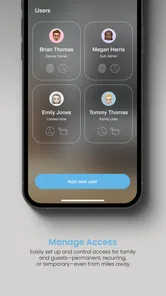
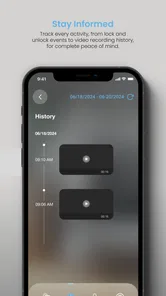
Lockly Home is the companion mobile app for compatible LOCKLY smart locks and access products. After pairing your lock, you can use the app to manage users, create or share digital access, check activity history, and control supported locking features remotely. The exact functions depend on your lock model, firmware, phone, and whether the device is connected through Bluetooth, Wi-Fi, or an optional hub.
Which devices and locks are compatible with Lockly Home?
Compatibility depends on the specific LOCKLY product rather than the app alone. Lockly Home is designed for supported LOCKLY smart locks and related access devices, but not every model offers the same features. Before downloading, check the product listing, packaging, or LOCKLY’s official compatibility information. Your phone should also meet the current Android or iOS requirements, and Bluetooth permissions may be necessary during setup.
Can I unlock or manage my door remotely with Lockly Home?
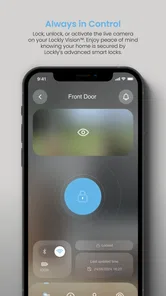
Remote access may be available, but it depends on your lock model and network setup. Bluetooth-enabled locks generally require you to be near the device, while remote control usually requires a supported Wi-Fi connection, bridge, or hub. Once configured, eligible users may be able to lock or unlock the door, issue access permissions, and review activity from outside the home, subject to internet availability.
Pros
- Remote locking and unlocking is convenient for trusted users.
- Supports temporary access codes for guests and service providers.
- Activity logs help monitor who accessed the lock and when.
- Useful notifications can alert you to lock activity remotely.
- Designed to work with compatible LOCKLY smart locks and accessories.
Cons
- Features depend heavily on owning a compatible LOCKLY lock.
- Remote access requires a stable internet connection.
- Some advanced functions may require additional hardware or subscriptions.
- Bluetooth and location permissions may be needed for full functionality.
- Battery or connectivity issues can limit access to smart features.







